
Choosing the right desktop DAC for studio monitors can make your monitoring chain cleaner, easier to use, and more consistent. The best options keep noise low, handle your inputs cleanly, and match well with powered monitors or a separate amp.
In this roundup, we focus on desktop-friendly DACs and DAC-amp hybrids that offer practical features for music production, critical listening, gaming, and home studio setups.
Best 10 Desktop Dac for Studio Monitors Picks for 2026
Flagship Balanced Desktop DAC

- Fully balanced DAC preamp with XLR/RCA outputs
- Multiple inputs include USB, optical, coax, Bluetooth, and HDMI ARC
- Supports DSD512 and PCM 32bit/768kHz with OLED display and remote
Best For: Flexible desktop or home stereo setups that need balanced connectivity
Portable DAC/Amp

- Portable USB DAC and headphone amplifier
- Compact design for on-the-go listening
- Black Stealth finish
Best For: Portable headphone use rather than monitor speaker setups
USB Audio Interface
Focusrite Scarlett Solo 3rd Gen

- 1 XLR mic preamp and 1 Hi-Z instrument input
- 24-bit/192kHz playback with 56dB gain range
- Works with macOS, Windows, and iPadOS
Best For: Solo recording setups that also need monitor playback
Desktop Headphone Amp

- Class A desktop headphone amplifier
- Drives 18-600Ω headphones with up to 1500mW output
- 3.5mm and 6.35mm headphone jacks
Best For: Desktop headphone amplification alongside a separate DAC
Clean USB DAC Pick

- PCM up to 384kHz and DSD256 support
- XMOS XU208 with customized driver
- Works with active speakers and other DACs
Best For: People who want a compact USB DAC for active speakers or simple desktop monitoring
Most Adjustable Desktop DAC

- Plug-and-play with USB, optical, and coaxial input
- RCA and 3.5mm outputs for speakers or headphones
- Bass and treble knobs for easy tone shaping
Best For: People who want a simple desktop DAC with built-in tone controls for active speakers
Compact USB-C Option
Kiwi Ears Allegro Mini USB-C DAC

- PCM up to 32-bit/384kHz and DSD128
- USB-C with 3.5mm and 4.4mm outputs
- Low THD+N for clean playback
Best For: People who want a tiny USB-C DAC for headphones or a minimal desktop setup
Gaming Desktop DAC
Fosi Audio K5 Pro for Active Speakers
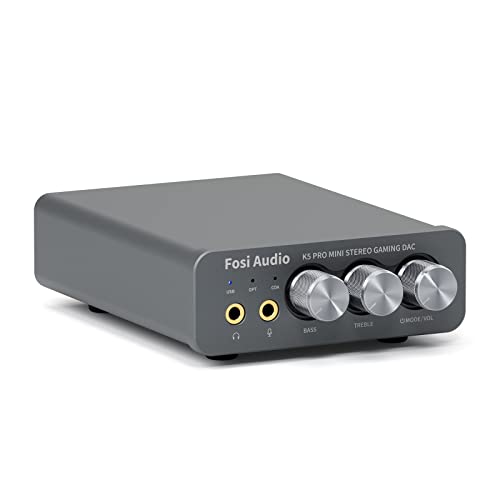
- USB-C, optical, and coaxial inputs
- RCA out for powered speakers
- Bass, treble, and mic support
Best For: Gaming and desktop listening with powered speakers
Portable Hi-Res Dongle DAC
Kiwi Ears Allegro Mini Titanium
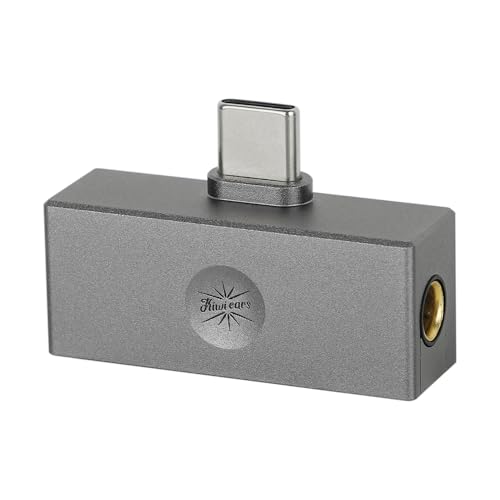
- PCM up to 32-bit/384 kHz
- 3.5mm and 4.4mm headphone outputs
- Compact aluminum USB-C design
Best For: Portable headphone or IEM listening from phone or PC
High-Resolution Desktop DAC
Fosi Audio Q6 for Studio Monitors

- RCA out plus sub-out for speakers
- USB-C, optical, and coaxial inputs
- Supports PCM 32-bit/768 kHz and DSD512
Best For: Powered studio monitors and compact desktop hi-fi systems
Flagship Balanced Desktop DAC – Fosi Audio ZD3
If you want a desktop dac for studio monitors with broad connectivity, the Fosi Audio ZD3 is built to slot into a flexible listening or desktop audio setup. Its balanced design, XLR/RCA outputs, and support for USB, optical, coax, Bluetooth, and HDMI ARC make it easy to integrate with a variety of sources.
Best For: Listeners who want a compact, fully balanced DAC preamp with many input options for desktop or home stereo use.
Pros:
- Fully balanced DAC preamp with XLR and RCA outputs
- Supports Bluetooth, USB, optical, coax, and HDMI ARC inputs
- High-resolution support up to DSD512 and PCM 32bit/768kHz
- Includes OLED display, remote, preamp bypass, and 12V trigger in/out
Cons:
- More feature-rich than a simple DAC-only solution
- Designed for system integration, so it may be more than some basic desktop setups need
The ZD3 stands out if you want one box that can handle multiple digital sources while giving you balanced outputs for a more serious desktop audio chain. It is a practical pick when flexibility and preamp functions matter as much as sound conversion.
Portable DAC/Amp – iFi Hip-dac 3
The iFi Hip-dac 3 is a portable USB DAC/headphone amplifier, so it makes more sense as a travel or personal listening device than as a desktop dac for studio monitors. If your main need is a compact unit for headphone playback from USB, this model fits that role well.
Best For: Portable headphone listeners who want a small USB DAC/amp instead of a desktop monitoring chain.
Pros:
- Compact portable design
- USB DAC and headphone amplifier in one unit
- Black Stealth finish
Cons:
- Built for headphones, not studio monitor outputs
- Not positioned as a desktop DAC for multi-input speaker setups
For buyers focused on monitor speakers, this is not the most direct fit, but it remains a useful compact USB audio device. It is best considered when portability and headphone amplification are the priority.
USB Audio Interface – Focusrite Scarlett Solo 3rd Gen
The Focusrite Scarlett Solo 3rd Gen is an audio interface built for recording and playback, so it can serve a desktop dac for studio monitors in simple desktop setups where you also need input and monitoring control. Its XLR mic preamp, Hi-Z instrument input, and 24-bit/192kHz playback make it a practical all-in-one choice for creators.
Best For: Solo creators who need an interface for recording plus monitor playback from a desktop.
Pros:
- 1 XLR mic preamp and 1 Hi-Z instrument input
- 24-bit/192kHz audio support
- 56dB gain range with Air Mode
- Compatible with macOS, Windows, and iPadOS
Cons:
- Primarily an interface, not a dedicated DAC-only unit
- Designed for recording workflows rather than pure monitor playback
If your studio monitors are part of a small home recording rig, the Scarlett Solo offers more than basic conversion. It is strongest when you need a straightforward interface that handles both input and playback.
Desktop Headphone Amp – Douk Audio U3 PRO
The Douk Audio U3 PRO is a mini Class A headphone amplifier, so it is not a desktop dac for studio monitors by itself. Still, it can be a strong companion piece in a desktop audio stack when you need a compact high-power amp for headphones alongside another source component.
Best For: Listeners who want a small desktop headphone amp for low- to high-impedance headphones.
Pros:
- Class A desktop headphone amplifier design
- Supports 18-600Ω headphones
- Up to 1500mW output
- Includes 3.5mm and 6.35mm jacks
Cons:
- Headphone amp only, not a DAC
- Does not provide studio monitor DAC connectivity on its own
For buyers building a desktop chain, the U3 PRO makes sense as the amplification side rather than the conversion side. It is best used when headphone power is the main need and the DAC is handled elsewhere.
Clean USB DAC Pick – Topping D10s USB DAC
If you want a desktop DAC for studio monitors with a simple USB setup, the Topping D10s is built for clean digital-to-analog conversion and broad format support. It works as a USB DAC, line-out source, or even a USB interface for another DAC, making it a flexible desktop piece for a compact monitoring chain.
Best For: Users who want a small, plug-in DAC to feed active speakers or build a simple desktop audio setup.
Pros:
- Supports PCM up to 384kHz and DSD256, including DoP and native DSD.
- XMOS XU208 USB interface with customized Thesycon driver for better high-resolution compatibility.
- Can connect to active speakers, an amplifier, or another DAC via coaxial/optical output.
- Automatic power on/off with the PC keeps desktop use simple.
Cons:
- Line-level design means it does not include speaker-specific volume control.
- Only one channel is listed in the supplied specs.
- Best suited to digital source conversion rather than all-in-one monitoring control.
Overall, the D10s is a straightforward choice if your priority is clean desktop conversion and flexible connectivity rather than extra controls. Its high-resolution support and multiple output options make it a practical fit for studio-monitor setups that already have separate volume management.
Most Adjustable Desktop DAC – AIYIMA DAC-A2 Desktop DAC/Amp
The AIYIMA DAC-A2 is a practical desktop DAC for studio monitors if you want a unit that adds both digital-to-analog conversion and easy tone shaping. With USB, optical, and coaxial inputs plus RCA and 3.5mm outputs, it fits neatly into a small desktop or home audio setup without needing software installation.
Best For: Listeners who want a plug-and-play desktop DAC with bass and treble controls for active speakers or headphones.
Pros:
- Plug-and-play design with no drivers or software required.
- Multiple inputs: USB, optical, and coaxial for flexible desktop use.
- RCA and 3.5mm outputs make it easy to connect to speakers or headphones.
- Front-panel bass and treble knobs let you fine-tune the sound.
Cons:
- Maxes out at 24-bit/192kHz via optical or coaxial input, below some higher-spec DACs.
- Uses 5V power and a compact design, so it is aimed at desktop convenience rather than heavy-duty output.
- Output protection is included, but it is still a simple DAC/amp rather than a full monitor controller.
If you want easy setup and hands-on tone adjustment, the DAC-A2 is the most adjustable option in this group. It is especially useful when your desktop monitors need a straightforward DAC with RCA output and a little extra control over bass and treble.
Compact USB-C Option – Kiwi Ears Allegro Mini USB-C DAC
The Kiwi Ears Allegro Mini is a compact USB-C DAC aimed more at portable listening, but it can still work in a desktop DAC for studio monitors setup when you only need a small stereo output source. Its aluminum body, high-resolution support, and low distortion spec make it a neat plug-and-play option for modern laptops and Android devices.
Best For: Users who want a tiny USB-C DAC for headphones or simple desktop audio playback.
Pros:
- Supports PCM up to 32-bit/384kHz and DSD up to DSD128.
- USB Type-C connection works with modern Android devices and laptops.
- Offers both 3.5mm single-ended and 4.4mm outputs for flexible headphone use.
- Low THD+N of 0.004% at 32 ohms for clean playback.
Cons:
- Designed primarily as a portable IEM DAC, not a monitor-controller style desktop unit.
- Output options are focused on headphones rather than dedicated speaker connections.
- Less suitable if you need multiple desktop inputs like optical or coaxial.
The Allegro Mini makes sense if you value small size and high-resolution playback more than full desktop connectivity. For a minimalist setup, it can serve as a clean digital source, but it is the least speaker-focused option here.
Gaming Desktop DAC – Fosi Audio K5 Pro for Active Speakers
If you want a desktop dac for studio monitors that also handles everyday listening and gaming, the Fosi Audio K5 Pro is a practical all-in-one option. It converts USB-C, optical, or coaxial input to RCA or 3.5mm output, and its RCA line out can feed powered speakers on a desk without much setup hassle.
Best For: PC, PS5, or Mac users who want a compact DAC/amp with speaker output and mic support.
Pros:
- USB-C, optical, and coaxial inputs for flexible desktop connections
- RCA output works well with powered speakers or an amplifier
- Includes bass, treble, and master volume control
- Built-in microphone function and headphone support up to 300 ohms
Cons:
- USB rate tops out at 24-bit/96 kHz
- Designed more as a DAC/headphone amp combo than a pure monitor interface
For a compact desktop setup, the K5 Pro gives you broad compatibility and straightforward control in one small unit. It is especially appealing if you want one box for monitors, headphones, and gaming sources.
Portable Hi-Res Dongle DAC – Kiwi Ears Allegro Mini Titanium
The Kiwi Ears Allegro Mini is a portable pick for buyers who need a desktop dac for studio monitors only in the sense of occasional desk use, not a full-size desktop controller. It is a USB-C dongle DAC with 3.5mm and 4.4mm outputs, built for clean playback from a phone or PC rather than speaker-focused routing.
Best For: Listeners who want a compact high-resolution USB-C DAC for headphones or IEMs.
Pros:
- Supports PCM up to 32-bit/384 kHz and DSD128
- Offers both 3.5mm single-ended and 4.4mm outputs
- All-aluminum body keeps it durable and compact
- Plug-and-play USB-C compatibility for modern Android devices and PCs
Cons:
- No RCA output for powered studio monitors
- More of a portable headphone/IEM DAC than a desktop monitor hub
This model makes sense if portability matters more than speaker connectivity. It delivers high-resolution specs in a small package, but studio-monitor users will need a separate way to feed balanced or RCA speakers.
High-Resolution Desktop DAC – Fosi Audio Q6 for Studio Monitors
The Fosi Audio Q6 is the most directly suited desktop dac for studio monitors in this group because it is built around desktop stereo use and includes RCA output plus a sub-out. With USB-C, optical, and coaxial inputs, it fits neatly into a PC, TV, or streamer-based setup where clean conversion and simple monitor connections matter.
Best For: Desktop stereo systems, powered monitors, and compact hi-fi setups that need RCA output.
Pros:
- RCA output and sub-out make it easy to connect desktop speakers
- AKM AK4493S, XMOS XU316, and OPA1612 for high-resolution playback
- Supports PCM up to 32-bit/768 kHz and DSD512
- Compact aluminum build keeps the desk clean and organized
Cons:
- No built-in headphone amplification listed as a main feature
- More focused on DAC output than on extra controls or mixing features
If your priority is a straightforward DAC for powered monitors, the Q6 is the strongest fit here. Its desktop-friendly size, wide input support, and RCA/sub-out combination make it easy to build around.
How We Picked the Best Desktop Dac for Studio Monitors
For this list, we prioritized sound quality, connection flexibility, desktop footprint, and real-world usefulness with studio monitors. We also looked for models with low-noise output, simple controls, and enough versatility to work in both casual and nearfield listening setups.
Because a Desktop Dac for Studio Monitors is often part of a larger signal chain, we also considered whether each unit makes level matching, source switching, and everyday use straightforward.
Quick Comparison
The best choice depends on how you plan to use it. Pure DACs are ideal if you already have monitor volume control or a separate preamp. DAC-amp combos are better if you want one compact box for both monitor output and headphones. Audio interfaces are the right pick when you need recording inputs as well as playback.
Key Buying Factors for Desktop Dac for Studio Monitors
Outputs and Connectivity
Look for the outputs your monitors actually need. USB is the most common source input, while optical and coaxial are useful if you want to connect a console, streamer, or TV. Balanced outputs can be helpful in more demanding desktop setups, especially when cable runs are longer or you want extra noise resistance.
Volume Control and Gain
If your monitors do not have convenient front-panel volume control, choose a DAC or DAC-amp with a usable knob or preamp mode. Gain settings matter too: too little gain can leave you short on output, while too much can make volume adjustment touchy.
Noise Floor and Channel Balance
A good Desktop Dac for Studio Monitors should stay quiet at low listening levels and maintain stable left-right balance. This matters most in nearfield listening, where small imperfections are easier to hear.
Use Case Fit
Pick a pure DAC if you already have a monitor controller or interface. Choose a DAC-amp if you also use headphones often. Choose an audio interface if you need microphones, instruments, or recording software integration.
Who Should Buy Which Desktop Dac for Studio Monitors?
Home studio users who want a simple playback chain should lean toward a clean, compact DAC with optical or USB input. Creators who switch between headphones and monitors may prefer a DAC-amp hybrid for convenience. Musicians and podcasters should consider an interface first, since it adds recording features beyond playback.
If you want the most flexible Desktop Dac for Studio Monitors, favor low noise, practical I/O, and volume control over flashy extras. The best match is the one that fits your monitoring workflow, not just the spec sheet.