
If you need clean digital routing, scalable I/O, and dependable networked audio, an audio interface with Dante can be the smartest upgrade you make. It connects gear over Ethernet, simplifies patching, and scales from small rigs to full production systems.
In this roundup, we focus on the models that offer the best mix of sound quality, connectivity, latency, and real-world workflow for studio, broadcast, install, and live use.
Best 10 Audio Interface with Dante Picks for 2026
Dante Recording Hub
Yamaha RUio16-D Dante/USB Audio Interface

- 16-in/16-out Dante and USB interface
- Includes 2 mic inputs and 2 line outputs
- Bundled with VST Rack Pro software
Best For: Mac or Windows users needing flexible Dante/USB routing
High-Channel Dante Bridge
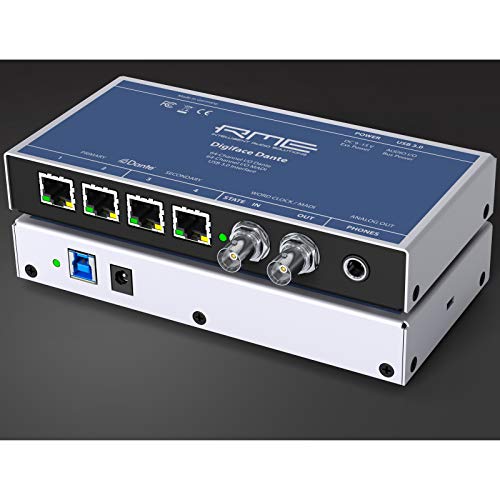
- 128-in/128-out Dante/MADI/USB 3.0 interface
- Up to 24-bit/192 kHz with bus power
- Includes headphone output and TotalMix FX
Best For: Engineers needing high-channel Dante connectivity
Compact Dante Workhorse
ESI planet 22x Professional Dante Interface

- 2-in/2-out Dante interface
- XLR/TRS combo inputs and major DAW support
- Compatible with Windows and macOS
Best For: Small studios needing simple 2-channel Dante
Dante Expansion Card

- 32-channel Audinate Dante expansion card
- Made for compatible X32 systems
- Ethernet-based Dante integration
Best For: Compatible Behringer owners adding Dante to X32 systems
Reference-Grade Network I/O
ESI planet 22c Dante Audio Interface

- 24-bit/96kHz converters
- 4-channel Dante IP audio network
- Works with Windows and macOS
Best For: Compact studio, live sound, or measurement workflows
Simple Computer Bridge
Audinate Dante AVIO USB Adapter I/O 2-CH

- 2x2 bidirectional audio
- No drivers or additional software needed
- Powered by PoE or USB
Best For: Computer users adding a basic Dante network link
Rack Stage Box Expansion
Yamaha Tio1608-D2 Dante Stage Box

- 16 inputs and 8 outputs
- 96kHz stage box with D-PRE preamps
- QUICK CONFIG for DM3 and TF mixers
Best For: Yamaha live sound setups needing expanded rack I/O
High-Channel Dante Interface
RedNet PCIeNX 128x128 Dante PCIe Interface

- 128 x 128 channels at 24-bit/192kHz
- Dual RJ-45 for switched or redundant mode
- AES67 and SMPTE ST 2110 support
Best For: large studio and broadcast Dante routing
Compact Dante Input
DT20-X 2-Channel Dante Input Interface

- 2-channel Dante input interface
- PoE-powered for easier installation
- XLR connectivity for compatible systems
Best For: adding simple Dante input to AHM or mixer setups
USB-to-Dante Bridge
ToVi DXA-USB-ED 2-Channel Dante Adapter

- USB bridge for Dante network audio
- 24-bit audio up to 96kHz
- AES67 compliant with analog I/O support
Best For: small USB-based Dante integration
Dante Recording Hub – Yamaha RUio16-D Dante/USB Audio Interface
If you want an audio interface with dante that also bridges USB recording, the Yamaha RUio16-D is built for a practical studio or live-rig workflow. It offers 16-in/16-out Dante and USB connectivity, plus 2 mic inputs and 2 line-level outputs, making it a versatile route for macOS and Windows setups.
Best For: Mac or Windows users who need a compact Dante/USB interface with enough I/O for flexible routing.
Pros:
- 16-in/16-out Dante and USB interface for networked audio workflows
- Includes 2 mic inputs and 2 line-level outputs
- Supports VST Rack Pro software with 30+ plug-ins
- Rated up to 96 kHz maximum sample rate
Cons:
- Only 2 mic inputs may be limiting for larger recording sessions
- Designed around a 16-channel Dante interface rather than high-channel-count expansion
This is a focused choice if you want Dante plus USB in one box and also value the included VST Rack Pro software bundle. It is less about maximum channel counts and more about straightforward, flexible integration for small to mid-size setups.
High-Channel Dante Bridge – RME Digiface Dante
The RME Digiface Dante is a powerful audio interface with dante for users who need a very large networked I/O count in a compact USB 3.0 device. Its 128-in/128-out Dante/MADI/USB design, headphone output, bus power, and 24-bit/192 kHz support make it a serious option for complex recording and playback routing.
Best For: Engineers and studios that need high-channel Dante connectivity with USB 3.0 and advanced routing.
Pros:
- 128-in/128-out Dante/MADI/USB 3.0 interface
- Supports up to 24-bit/192 kHz audio
- Includes a headphone output and bus power
- Works with TotalMix FX software
Cons:
- Listed with a 64-channel count in the supplied details, which may be less intuitive than the 128-in/128-out spec
- Windows operating system is specifically noted in the details
If you need serious Dante capacity and want a compact interface that can handle demanding system integration, this model stands out. It is best treated as a specialist tool for large workflows rather than a simple plug-and-play interface.
Compact Dante Workhorse – ESI planet 22x Professional Dante Interface
The ESI planet 22x is a compact audio interface with dante that keeps the focus on simple 2-in/2-out operation. With XLR/TRS combo inputs, support for major DAWs, and compatibility across Windows and macOS, it suits small setups that need reliable Dante connectivity without extra complexity.
Best For: Small studios, desktop rigs, or musicians who want a straightforward 2-channel Dante interface.
Pros:
- 2 inputs and 2 outputs for simple Dante workflows
- XLR/TRS combo input design for flexible connections
- Supports all major DAWs
- Works with Windows and macOS
Cons:
- Only 2 channels, so it is not meant for larger I/O needs
- Maximum sample rate is limited to 96 kHz
This is a practical pick if you want Dante in a small, easy-to-understand interface. The feature set is intentionally lean, which makes it appealing for focused recording or playback tasks.
Dante Expansion Card – BEHRINGER X-DANTE
If you need an audio interface with dante in the form of an expansion card, the BEHRINGER X-DANTE is designed to add Audinate Dante networking to compatible systems. Its 32-channel format, Ethernet-based connectivity, and 48 kHz operation make it a targeted solution for extending an X32-style setup.
Best For: Owners of compatible Behringer systems who want to add Dante networking through an expansion card.
Pros:
- 32-channel Audinate Dante expansion card
- Designed for compatible X32 systems
- Uses Ethernet connectivity for Dante integration
- Very small and lightweight at 5.6 ounces
Cons:
- It is an expansion card, not a standalone interface
- Operating frequency is listed at 48 kHz
This is the right kind of product if your goal is adding Dante to an existing Behringer workflow rather than buying a separate interface. The value depends heavily on system compatibility, so it is best viewed as an upgrade component.
Reference-Grade Network I/O – ESI planet 22c Dante Audio Interface
If you need an audio interface with dante for recording, live sound, or measurement work, the ESI planet 22c is built around a 24-bit/96kHz Dante IP network design with 4 channels of I/O. It’s a compact option that focuses on clean conversion, compatibility with major DAWs, and straightforward operation on Windows or macOS.
Best For: Engineers and creators who want a compact Dante interface for studio, live, or measurement use.
Pros:
- 24-bit/96kHz converters for high-resolution audio
- Works with all major DAWs on Windows and macOS
- Compact 0.5 kg design for easy placement
- Backed by a 2-year warranty and 24/7 support
Cons:
- Only 4 channels, so it is not ideal for larger I/O needs
- TRS input format may not fit every setup
- Product details are focused on core interface specs rather than extra features
This is a practical pick if your priority is a simple, reference-quality Dante interface rather than a feature-heavy control surface. The ESI planet 22c keeps the focus on network audio, resolution, and broad software compatibility.
Simple Computer Bridge – Audinate Dante AVIO USB Adapter I/O 2-CH
If you want an audio interface with dante that mainly bridges a computer into a Dante network, the Audinate Dante AVIO USB Adapter I/O 2-CH is a focused 2×2 bidirectional solution. It connects over USB or USB-C on the computer side and can be powered by PoE or USB, making it a straightforward way to add Dante audio without drivers or extra software.
Best For: Users who need a simple USB-to-Dante bridge for a computer-based setup.
Pros:
- 2×2 bidirectional audio for two-way computer/network routing
- No drivers or additional software needed
- Can be powered via PoE or USB
- Compact rugged ABS enclosure
Cons:
- Limited to 2-channel I/O
- Designed for Windows in the supplied details
- More of a network bridge than a full-featured interface
This adapter makes sense when you want a minimal, plug-in style Dante connection instead of a larger interface. Its simplicity is the main advantage: connect, power it, and move audio onto the Dante network.
Rack Stage Box Expansion – Yamaha Tio1608-D2 Dante Stage Box
For a more substantial audio interface with dante, the Yamaha Tio1608-D2 is a rackmount stage box designed for 16 inputs and 8 outputs at up to 96kHz. It pairs Yamaha’s D-PRE preamps with QUICK CONFIG support for DM3 and TF series mixers, so it fits naturally into Dante-based live and installed systems.
Best For: Yamaha mixer users who need a rack stage box with plenty of Dante I/O.
Pros:
- 16 inputs and 8 outputs in a 3U rack size
- 96kHz sample rate support
- Recallable D-PRE preamps
- QUICK CONFIG support for DM3 and TF series
Cons:
- Best suited to Yamaha Dante mixer ecosystems
- Heavier at 12.6 pounds than compact adapters
- May be more interface than needed for simple desktop use
This is the strongest choice here if you need real stage-box capacity rather than a small converter or adapter. The Yamaha Tio1608-D2 is built for users who want dependable rack I/O and integration with compatible Yamaha systems.
High-Channel Dante Interface – RedNet PCIeNX 128×128 Dante PCIe Interface
If you need an audio interface with dante for serious routing, the Focusrite RedNet PCIeNX is built for large channel counts and low-latency work. It offers 128 x 128 Dante channels at up to 24-bit/192kHz, dual RJ-45 networking, and support for AES67 and SMPTE ST 2110, making it a strong fit for advanced studio and networked audio setups.
Best For: Engineers and studios that need high-channel-count Dante I/O with flexible networking and ultra-low latency.
Pros:
- 128 x 128 Dante channels at 24-bit/192kHz
- Ultra-low round-trip latency, with optional paid upgrade to 256 x 256
- Dual Ethernet RJ-45 ports for switched or redundant mode
- Supports AES67 and SMPTE ST 2110 compliance
Cons:
- Optional upgrade to 256 x 256 requires an additional paid purchase
- Designed for PCIe or Thunderbolt workflows, so it is not a simple desktop USB device
Overall, this is a specialized Dante interface for users who care more about capacity, standards support, and network flexibility than simplicity. If your workflow demands a scalable backbone for pro audio or immersive formats, it stands out.
Compact Dante Input – DT20-X 2-Channel Dante Input Interface
The Allen & Heath DT20-X is a practical audio interface with dante for adding two channels of networked input to compatible systems. It uses PoE, connects through XLR, and is aimed at Dante, AHM, and mixer environments where a compact input interface is all you need.
Best For: Small-scale Dante input expansion in Allen & Heath or mixer-based installations.
Pros:
- 2-channel Dante input interface
- Powered by PoE for simpler installation
- XLR audio input connectivity
- Works with AHM systems, Dante systems, and mixers
Cons:
- Limited to 2 channels
- Maximum sample rate is 96kHz, which is lower than some higher-end interfaces
This is a straightforward choice when you want a dependable Dante input without extra complexity. It makes the most sense as part of an existing professional audio ecosystem rather than as a general-purpose interface.
USB-to-Dante Bridge – ToVi DXA-USB-ED 2-Channel Dante Adapter
If you want an audio interface with dante that connects directly to a computer, this ToVi USB adapter is a compact bridge between USB audio devices and Dante networks. It supports 24-bit audio at 44.1kHz, 48kHz, and 96kHz, is AES67 compliant, and includes analog input and output support for flexible AV and live-sound use.
Best For: Users who need a simple USB-to-Dante converter for studio, broadcast, or AV setups.
Pros:
- Bridges USB audio devices with Dante networks
- Supports 24-bit audio up to 96kHz
- AES67 compliant for interoperability
- Includes analog audio input and output support
Cons:
- Only 2 channels
- Uses USB rather than higher-channel network hardware
For basic computer integration, this is an accessible way to join a Dante environment without a full rack interface. It is best suited to smaller signal paths where USB convenience matters more than channel count.
How We Picked the Best Audio Interface with Dante
We prioritized Dante compatibility, audio quality, channel count, converter performance, latency behavior, and practical setup features. Because an Audio Interface with Dante can serve very different users, we also weighed whether each unit is better suited for desktop recording, rackmount installs, stage I/O, or high-channel-count production workflows.
Quick Comparison
Some options are built for simple two-channel USB or network bridging, while others are designed for large systems with multiple inputs and outputs. If you want a compact desktop solution, look at adapter-style units. If you need scalable routing or professional integration, rack units and PCIe solutions will usually be the better fit.
Key Buying Factors for an Audio Interface with Dante
I/O Count and Expansion
Start with the number of channels you actually need today, then allow room for growth. Two-channel devices are ideal for basic capture or playback, while stage boxes and PCIe interfaces are better for multi-source recording, live mixing, or post-production.
Connection Type
USB, PCIe, and dedicated Dante I/O each serve different workflows. USB is convenient for portable use, PCIe favors ultra-low-latency studio and broadcast setups, and rackmount units fit permanent networked installations.
Latency and Clocking
For monitoring, live sound, or time-sensitive production, low latency matters. Also confirm clocking options and network stability, especially if the interface will share a Dante network with other devices.
Sample Rate and Converter Quality
Higher sample rates can help in detailed recording workflows, but they are not always necessary for every user. Focus on converters, reliability, and how the device performs in the context of your entire signal chain.
Who Should Buy Which Audio Interface with Dante?
Choose a compact Dante adapter if you need a simple way to connect a computer or two-channel source to the network. Pick a stage box if your priority is dependable front-end I/O for live performance or installation. Go with a PCIe interface if you want maximum channel count and low-latency operation in a studio or broadcast control room. For users building a flexible, networked audio rig, the best Audio Interface with Dante is the one that matches your I/O needs, workflow, and long-term expansion plans.