
Multi-camera production is easier to manage when switching, monitoring, audio, and PTZ control are organized in one workspace. The right control panel can reduce operator workload while making live streams more consistent.
This roundup compares 10 options ranging from compact HDMI switchers to larger systems with SDI, NDI, 4K inputs, joystick control, multiview displays, and built-in recording features.
Best 10 Streaming Control Panels for Multi-Camera Production Picks for 2026
Most Versatile Streaming Hub

- Four HDMI inputs with MultiView and dual HDMI outputs
- Three-platform streaming, recording, playback, and audio effects
- Hardware panel with T-Bar, macros, keying, and portrait support
Best For: Multi-camera events needing integrated audio, graphics, recording, and streaming
Best Touchscreen Workflow
FEELWORLD L4 10.1-Inch Switcher

- 10.1-inch touchscreen plus buttons and T-bar control
- Four HDMI and one SDI input for five-camera switching
- Chroma key, logo overlays, and HDMI, SDI, and USB outputs
Best For: Mixed HDMI/SDI productions that value a large touchscreen preview
Best Compact Streaming Standard

- Four HDMI inputs with multiview and live streaming
- Transitions, keyers, recording, and six-input audio mixing
- Compact design with Ethernet and USB-C connectivity
Best For: Four-camera HDMI streams for education, business, esports, and events
Best PTZ Camera Control
Tenveo NDI PTZ Joystick Controller

- 7-inch quad-screen preview with 4D joystick operation
- Supports NDI, VISCA, ONVIF, Pelco-D, and Pelco-P
- Quick-select seven cameras and control up to 255 PTZ cameras
Best For: Networked PTZ camera operation at churches, conferences, and live events
Best All-Around Mixer

- Four SDI, four HDMI, USB-C, NDI HX, and playback inputs
- Multi-layer effects and MIX, DIP, WIPE, and T-Bar transitions
- Streams to up to three platforms; supports OBS and vMix
Best For: Flexible multi-camera switching and live streaming
Best for Everyday Use

- 4D joystick for movement, zoom, focus, and exposure control
- Five-inch touchscreen with RTSP, NDI, and ONVIF preview
- Supports up to 100 camera shortcuts and multiple protocols
Best For: Multi-camera PTZ operation and preset management
Best Portable Production Kit

- Includes switcher, 14-inch monitor, fan, plates, and cable
- Four HDMI/SDI inputs, two HDMI outputs, and two USB ports
- AC, DC, or USB power-bank operation for mobile setups
Best For: Portable multi-camera streaming and on-location production
Best All-in-One Control Panel
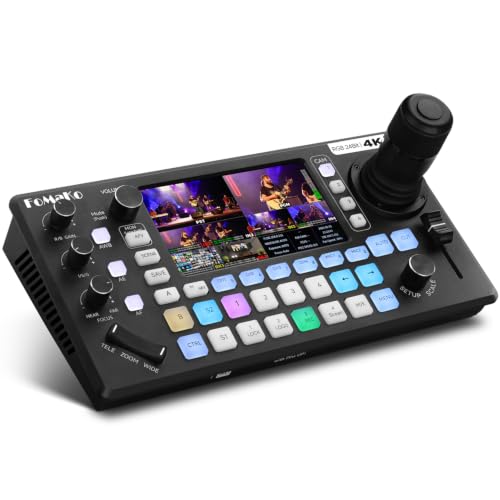
- Integrated 4D joystick controls up to four PTZ cameras
- Four 4K HDMI inputs with extensive audio and output connectivity
- Streams to three platforms and records directly to USB or SD
Best For: Solo operators, churches, and compact live-production setups
Best for Flexible Networked Workflows

- Combines HDMI, SDI, USB, NDI, RTMP, RTSP, and SRT support
- 10.1-inch flip screen with customizable output roles
- PTZ joystick control, dual-platform streaming, and recording
Best For: Networked event production and mixed HDMI/SDI setups
Best Hybrid HDMI/SDI Option
Tenveo PC500 Multi-Camera Switcher

- Accepts four HDMI and four SDI inputs for mixed-camera systems
- Supports NDI|HX3, SRT, RTMP, RTSP, and UVC streaming
- Controls four PTZ cameras and supports dual recording
Best For: Hybrid HDMI/SDI studios, venues, and broadcast-style productions
Most Versatile Streaming Hub – Osee GoStream Deck HDMI Pro
The Osee GoStream Deck is a flexible choice among streaming control panels for multi-camera production, combining four HDMI inputs with hardware switching, audio controls, recording, overlays, and direct streaming. Its Ethernet, USB-C, HDMI, audio, and SD card connections make it suitable for productions that need more than basic camera switching.
Best For: Multi-camera podcasts, conferences, worship services, weddings, and live events needing integrated streaming and graphics.
Pros:
- Four HDMI inputs, two HDMI outputs, and MultiView support.
- Built-in audio controls, effects, SD card or USB SSD recording, and playback.
- Streams to up to three platforms and supports landscape or portrait formats.
- Hardware panel includes PVW/PGM buses, T-Bar, macros, and keying tools.
Cons:
- Its broad feature set may require more setup than a basic switcher.
- Four-camera HDMI connectivity may not suit larger SDI-based systems.
Choose this model when you want a self-contained production surface with recording, audio, overlays, and streaming in one unit. Free PC control software and a companion control module provide additional flexibility.
Best Touchscreen Workflow – FEELWORLD L4 10.1-Inch Switcher
The FEELWORLD L4 brings a large touchscreen interface to streaming control panels for multi-camera production. With four HDMI inputs, one SDI input, real-time preview, a T-bar, chroma keying, logo overlays, and USB 3.0 output, it gives operators both touch and physical control options.
Best For: Five-camera productions that mix HDMI and SDI sources and need an easy-to-view control interface.
Pros:
- 10.1-inch touchscreen with intuitive menu controls and real-time preview.
- Supports four HDMI inputs plus one SDI input for up to five camera sources.
- Includes chroma keying and logo overlay functions.
- Provides HDMI, SDI, and USB 3.0 outputs for display and streaming workflows.
Cons:
- The supplied notes do not indicate built-in direct internet streaming.
- Input and output format compatibility should be checked before mixing cameras.
The L4 is a strong fit for operators who prioritize a generous preview screen and straightforward controls. Its combination of HDMI and SDI connectivity is particularly useful when a production is not built around one camera interface.
Best Compact Streaming Standard – Blackmagic ATEM Mini Pro
The Blackmagic Design ATEM Mini Pro is a compact option for streaming control panels for multi-camera production, offering four HDMI camera inputs, built-in streaming, recording, multiview, transitions, keying, and audio mixing. Its small footprint suits operators who need substantial live-production control without a larger console.
Best For: Education, business presentations, esports, and other four-camera HDMI streams.
Pros:
- Four HDMI inputs with a built-in four-camera multiview.
- Supports cut, mix, dip, wipe, and DVE transitions.
- Includes upstream and downstream keyers plus a six-input, two-channel audio mixer.
- Provides Ethernet streaming, USB-C webcam output, and external-drive recording.
Cons:
- It is limited to four HDMI camera inputs.
- The supplied connectivity does not include SDI inputs.
- Advanced production features may require learning the control workflow.
The ATEM Mini Pro is a practical choice when reliable core switching features matter more than a built-in touchscreen or a large number of inputs. Ethernet streaming, USB-C output, and recording cover several common live-production paths.
Best PTZ Camera Control – Tenveo NDI PTZ Joystick Controller
The Tenveo KB300PRO takes a different approach to streaming control panels for multi-camera production by focusing on PTZ camera movement rather than video-source mixing. Its 7-inch quad-screen preview, 4D joystick, broad protocol support, and network connectivity help operators frame and manage remote cameras during live productions.
Best For: Churches, conferences, sports, and event teams operating multiple NDI or networked PTZ cameras.
Pros:
- 7-inch LCD supports quad-screen preview, with a dedicated main view.
- 4D joystick controls pan, tilt, zoom, focus, iris, presets, and speed.
- Supports NDI, VISCA, ONVIF, Pelco-D, and Pelco-P protocols.
- Can quick-select seven cameras and control up to 255 PTZ cameras.
Cons:
- This is a PTZ camera controller, not a conventional HDMI/SDI video switcher.
- Quad-screen preview supports up to 720p30, while main view supports 1080p30.
- Some AI auto-tracking control requires firmware V5.4.6 or later.
Consider the KB300PRO as a camera-management companion for a broader production system. It is especially useful when precise, repeatable PTZ moves and direct visual feedback are more important than switching program video sources.
Best All-Around Mixer – GoStream Duet
Osee GoStream Duet Multiple Camera SDI and HDMI Live Stream Video Mixer Switcher
Check Price On AmazonFor creators comparing streaming control panels for multi-camera production, the Osee GoStream Duet is a flexible switcher with four SDI inputs, four HDMI inputs, USB-C, NDI HX sources, and media playback. It also supports computer control, portrait or landscape formats, multiple key effects, and streaming to up to three platforms.
Best For: Multi-camera productions that need broad input support, flexible switching, and direct or software-assisted streaming.
Pros:
- Supports 4 SDI, 4 HDMI, USB-C, NDI HX, and SD/SSD playback sources.
- Offers MIX, DIP, WIPE, and T-Bar transitions plus chroma, luma, pattern, PIP, and DSK effects.
- Can stream to up to three platforms and works with OBS and vMix.
- Provides built-in GUI, Mac and Windows software, and Bitfocus Companion control.
Cons:
- NDI HX requires downloading the latest firmware to unlock the included license.
- The broad feature set may require more setup than a basic switcher.
The GoStream Duet stands out when connection flexibility and production features matter more than a minimal control surface. Its compact 1 kg design and multiple control methods make it a practical centerpiece for varied live setups.
Best for Everyday Use – Pro PTZ Joystick Controller
Among streaming control panels for multi-camera production, this AVKANS controller focuses on hands-on PTZ operation rather than video mixing. Its 4D joystick, five-inch touch preview screen, broad protocol support, and PoE connectivity are designed for directing multiple networked cameras from one position.
Best For: Church, event, and studio teams controlling multiple PTZ or NDI cameras during live production.
Pros:
- Supports ONVIF, VISCA over IP, VISCA, Pelco-D, and Pelco-P protocols.
- Controls pan, tilt, zoom, focus, exposure settings, presets, tracking, and speed parameters.
- Five-inch touchscreen provides setup controls and RTSP, NDI, or ONVIF video preview.
- Supports up to 100 camera shortcuts across 10 groups and includes six custom keys.
Cons:
- It is a camera controller, not a standalone video mixer or streaming encoder.
- It requires wired connectivity and is intended for a corded setup.
This controller is a strong fit when camera movement and preset recall are the main production priorities. PoE can simplify installation, while RS232, RS422, RS485, and Ethernet connections support varied camera systems.
Best Portable Production Kit – GoStream Duet Kit
For mobile creators seeking streaming control panels for multi-camera production, the Osee GoStream Duet Kit combines the switcher with a 14-inch 1080×1920 monitor, mounting plates, and power accessories. Its four HDMI/SDI inputs, dual outputs, USB connectivity, and flexible power options make it suited to portable setups.
Best For: On-location multi-camera streaming where an integrated monitor, mounting options, and portable power are useful.
Pros:
- Includes the GoStream Duet, 14-inch monitor, silent fan, three cheese plates, and a DC-to-Type-C cable.
- Provides four HDMI/SDI inputs, two HDMI outputs, and two USB ports.
- Supports AC, DC, or USB power-bank operation, plus USB 5V output for additional devices.
- Compact kit design weighs about 5 kg and supports mounting to a light stand.
Cons:
- At about 5 kg, it is less lightweight than the standalone GoStream Duet.
- The integrated kit may be more equipment than fixed installations require.
The kit is most compelling when portability and monitoring are part of the brief. It keeps switching, display, mounting, and several power choices together, reducing the need to assemble a separate mobile production rig.
Best All-in-One Control Panel – FoMaKo KC800 4K PTZ Switcher
The FoMaKo KC800 is a practical choice for operators seeking streaming control panels for multi-camera production without adding a separate PTZ controller. It combines four 4K HDMI inputs, PTZ joystick control, AI tracking, audio mixing, streaming, and direct recording in one unit.
Best For: Churches, solo operators, weddings, corporate events, and productions that need integrated PTZ control and PC-free recording.
Pros:
- Controls up to four PTZ cameras with a 4D joystick, presets, and AI tracking.
- Offers four 4K HDMI inputs, multiple HDMI outputs, UVC connectivity, and broad audio I/O.
- Records to USB or SD card and can stream to up to three platforms plus one UVC feed.
- Includes a six-channel audio mixer with XLR inputs and 48V phantom power.
Cons:
- Outputs are specified at up to 1080p60 despite 4K input support.
- The extensive feature set may require setup time for new operators.
The KC800 stands out when convenience matters most. Its built-in PTZ control, audio mixing, streaming, and recording reduce the amount of equipment a small production team needs to manage.
Best for Flexible Networked Workflows – SPROLINK NeoLIVE N5
The SPROLINK NeoLIVE N5 is designed for streaming control panels for multi-camera production that need a mix of HDMI, network, PTZ, and recording capabilities. Its 10.1-inch flip screen, Super Source support, NDI connectivity, and web-based control suit productions that need flexible routing and monitoring.
Best For: Churches, studios, universities, conferences, podcasts, and event teams using HDMI, NDI, RTMP, or SRT workflows.
Pros:
- Accepts four HDMI inputs, including two supporting 4K60, plus USB and NDI sources.
- Provides HDMI and SDI PGM outputs, an HDMI AUX output, USB UVC output, and customizable display roles.
- Controls four PTZ cameras with joystick operation and up to 10 presets per camera.
- Supports simultaneous streaming to two platforms and records to USB or SD card.
Cons:
- Program output is specified at up to 1080p60, not 4K output.
- Only two microphone inputs and one headphone output are listed.
The NeoLIVE N5 is a strong fit when a production needs more than basic HDMI switching. Its network protocols, web control, SDI output, and instant playback features provide useful flexibility for live events and distributed workflows.
Best Hybrid HDMI/SDI Option – Tenveo PC500 Multi-Camera Switcher
The Tenveo PC500 is a useful option for streaming control panels for multi-camera production where both HDMI and SDI cameras are part of the system. It combines four HDMI inputs, four SDI inputs, PTZ and NDI control, web management, streaming, and direct recording in a production-oriented chassis.
Best For: Broadcast-style church, studio, conference, stage, sports, and event setups that need HDMI and SDI connectivity.
Pros:
- Supports four HDMI inputs and four SDI inputs, with two HDMI inputs accepting 4K60.
- Offers NDI|HX3 support, SRT, RTMP, RTSP, UVC streaming, and web-browser control.
- Manages four PTZ cameras with presets, camera adjustments, AI tracking triggers, and cruise tracks.
- Supports dual recording and can use recorded USB media as auxiliary production sources.
Cons:
- Program output is specified at up to 1080p60.
- The supplied specifications list USB recording rather than a dedicated SD recording output.
The PC500 is especially appealing for teams transitioning between consumer-friendly HDMI equipment and more installation-oriented SDI gear. Its network streaming and PTZ features add flexibility without requiring a separate control application.
How We Picked the Best Streaming Control Panels for Multi-Camera Production
We focused on the features that matter during real live productions: input flexibility, switching speed, monitoring, PTZ camera control, streaming and recording support, audio connectivity, and ease of setup. The selection includes HDMI-only units, hybrid HDMI/SDI systems, NDI-capable controllers, and models with integrated displays or joysticks.
Because production needs vary widely, we did not treat the most expensive or feature-heavy model as automatically best. A compact HDMI switcher may be ideal for a small studio, while a venue, church, school, or events team may benefit more from SDI, XLR audio, 4K support, or dedicated PTZ control.
Quick Comparison
- Best for compact HDMI workflows: Choose a small switcher with simple physical controls and direct USB streaming.
- Best for PTZ-heavy productions: Look for a 4D joystick, camera presets, NDI support, and an integrated preview screen.
- Best for longer cable runs: SDI inputs and outputs are generally more practical for installed venues and larger stages.
- Best for flexible layouts: Super Source, multiview, picture-in-picture, and multiple output formats help build more advanced scenes.
- Best for field portability: Favor built-in screens, recording, USB connectivity, and fewer external accessories.
Key Buying Factors for Streaming Control Panels for Multi-Camera Production
Inputs, Resolution, and Signal Type
Confirm how many cameras you need to connect now and later. HDMI is common for compact cameras and shorter cable runs, while SDI is better suited to professional installations. If your cameras record or output 4K, verify whether the switcher accepts 4K at the required frame rate; some devices accept 4K inputs but switch or stream at 1080p.
PTZ and Network Control
For remote cameras, check whether the panel supports the camera protocol and network standard you use. NDI support, a responsive joystick, speed controls, presets, and camera selection shortcuts can make a larger difference than resolution alone.
Monitoring and Operator Workflow
An integrated LCD or multiview output helps operators see program, preview, audio meters, and camera feeds without relying on several external monitors. Touchscreens can simplify menus, while dedicated buttons may be faster during a live show.
Streaming, Recording, and Audio
Check support for RTMP or other streaming platforms, USB webcam output, local recording, and the storage media required. For microphones and mixers, review the number and type of audio inputs, including whether balanced XLR connections are available.
Who Should Buy Which Streaming Control Panels for Multi-Camera Production?
Solo creators and small studios should prioritize straightforward HDMI switching, USB streaming, and a compact footprint. Churches, schools, and conference teams may prefer PTZ control, multiview monitoring, presets, and reliable SDI or NDI connectivity. Production companies and larger venues should compare input capacity, 4K handling, redundant outputs, audio integration, recording options, and long-term expansion.
Before buying, map your complete signal chain—from camera outputs and cable lengths to audio, streaming platform, recording destination, and display outputs. The best control panel is the one that supports that workflow without forcing unnecessary adapters or extra operators.