
The right boom arm can make long recording, streaming, gaming, and video-call sessions more comfortable by keeping your microphone positioned consistently without crowding your desk.
We selected 10 desk-mounted options with different strengths, from low-profile designs and pneumatic damping to heavy-duty construction, broad compatibility, and easy storage.
Best 10 Desk Boom Arms for Long Sessions Picks for 2026
Low-Profile Stability Pick

- All-metal, non-slip design
- Low-profile monitor clearance
- 29-inch reach with cable management
Best For: Gaming, streaming, and recording on larger desks
Pneumatic Heavy-Mic Pick

- Supports up to 5.5 pounds
- Adjustable pneumatic damping
- 30.2-inch horizontal extension
Best For: Heavy microphones and flexible desktop setups
Heavy-Duty Long-Reach Pick

- Supports up to 2 kilograms
- 34.25-inch maximum reach
- Quiet movement with covered cable channels
Best For: Heavy microphones and extended recording setups
Flexible Extended-Reach Pick

- 32.3-inch horizontal reach
- Includes a 6.3-inch riser
- Supports up to 3.5 pounds
Best For: Microphones needing extra height and monitor clearance
Heavy-Duty Stability Pick

- Supports up to 4.8 pounds
- 27.6-inch reach with five adjustment nodes
- Large padded clamp for desks up to 2.36 inches
Best For: Heavier microphones and extended recording sessions
Versatile Classic Pick

- 360-degree base rotation and multi-axis adjustment
- Supports microphones up to 3.3 pounds
- Folds away for compact storage
Best For: Flexible streaming, podcasting, and recording setups
Compact Lightweight Pick

- 27.1-inch reach with silent stepless adjustment
- Supports lightweight equipment up to 2.8 pounds
- Foldable design with cable management and multiple adapters
Best For: Compact desks and lightweight creator equipment
Low-Profile Pick
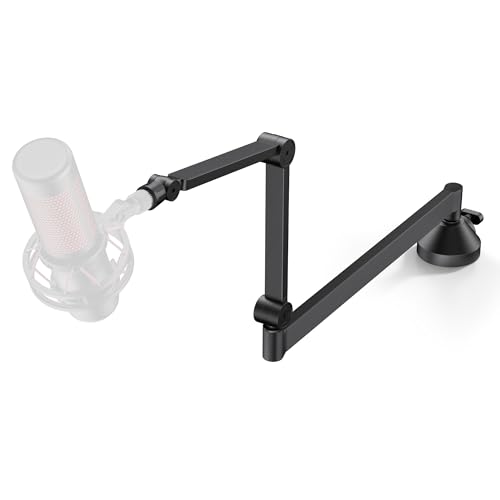
- Sits just 3.27 inches above the desk
- 26.1-inch reach with 360-degree rotation
- Supports microphones up to 3.3 pounds
Best For: Clean, monitor-friendly recording and streaming setups
Maximum Reach Pick

- Extends up to 29 inches long and 39.3 inches high
- Supports up to 3.3 pounds
- Includes 1/4-inch, 3/8-inch, and 5/8-inch adapters
Best For: Large desks and frequently repositioned recording setups
Space-Saving Pick

- 29-inch extension with a fold-away design
- 360-degree base hinge and cable channel
- Supports microphones up to 3 pounds
Best For: Light microphones and tidy, space-conscious desks
Low-Profile Stability Pick – FIFINE BM88 Boom Arm
For desk boom arms for long sessions, the FIFINE BM88 combines a low-profile design with an all-metal build that stays out of the way of your monitor. Its 29-inch reach, broad adjustment range, and hidden cable management suit gaming, streaming, podcasting, and recording setups.
Best For: Gamers and creators who want a stable, monitor-friendly boom arm for a larger desk.
Pros:
- All-metal construction and a non-slip C-clamp help reduce wobble.
- Low-profile arm extends beneath the monitor to preserve visibility.
- Offers 29-inch reach, 220-degree vertical adjustment, and 360-degree horizontal movement.
- Includes 1/4-inch, 3/8-inch, and 5/8-inch thread options.
Cons:
- The clamp fits desks from 0.8 to 2.4 inches thick.
- The section nearest the C-clamp cannot adjust vertically.
- Microphone is not included.
The BM88 is a practical choice when desk space and monitor clearance matter. Its low-profile layout and cable routing are particularly useful for maintaining a clean setup during extended sessions.
Pneumatic Heavy-Mic Pick – NEEWER MS002 Low-Profile Arm
The NEEWER MS002 is designed for desk boom arms for long sessions, using adjustable pneumatic damping to support microphones and other compatible gear up to 5.5 pounds. Its low-profile height, 30.2-inch horizontal extension, and concealed cable channels keep repositioning controlled and the workspace tidy.
Best For: Users with heavier microphones who want adjustable resistance and a low-profile desktop mount.
Pros:
- Pneumatic balancing system supports loads up to 5.5 pounds.
- Adjustable damping lets you tailor arm rebound and joint tension.
- Provides 360-degree pan, 360-degree microphone swivel, and 160-degree tilt.
- Clamp fits desks from 0.4 to 3.1 inches thick.
Cons:
- Joints cannot be fully locked.
- Pneumatic adjustment requires care because the arm can bounce during adjustment.
- Microphones, cameras, and other mounting accessories are not included.
With its higher weight capacity and adjustable pneumatic system, the MS002 stands out for demanding setups. It is a strong fit if smooth positioning and support for heavier equipment are more important than a fully locking arm.
Heavy-Duty Long-Reach Pick – FIFINE BM66 Boom Arm
For desk boom arms for long sessions, the FIFINE BM66 emphasizes smooth, quiet movement and a substantial all-metal build. It reaches up to 34.25 inches, supports up to 2 kilograms, and uses covered cable channels to help prevent tangles and friction noise during recording or streaming.
Best For: Podcasters, streamers, and vocal creators using heavier microphones or switching among microphone types.
Pros:
- Heavy-duty metal construction supports up to 2 kilograms.
- Quiet, one-handed movement requires no repeated knob tightening.
- Reaches up to 34.25 inches with 180-degree arm extension and a 360-degree base hinge.
- Supports 1/4-inch, 3/8-inch, and 5/8-inch threads.
Cons:
- Its longer, heavy-duty design may take more desk space than a low-profile arm.
- The microphone and shock mount are not included.
- The supplied details do not specify the supported desktop thickness range.
The BM66 is well suited to long recording or streaming sessions where quiet repositioning and load capacity matter. Its reach and broad thread compatibility also make it useful for multi-microphone setups.
Flexible Extended-Reach Pick – InnoGear MU-PSA28 Mic Arm
The InnoGear MU-PSA28 is a versatile option among desk boom arms for long sessions, with internal springs, a 32.3-inch horizontal reach, and a supplied extension riser. Its adjustable arm, 360-degree rotating base, and built-in cable channels make it easy to position a microphone while keeping the desk organized.
Best For: Blue Yeti, SM7B, and similar microphone users who need extra reach and flexible positioning.
Pros:
- Supports microphones up to 3.5 pounds.
- Includes a 6.3-inch extension riser for added height.
- Offers 32.3-inch horizontal and 37.4-inch vertical reach.
- Internal cable channels and rubber covers keep wiring organized.
Cons:
- The clamp fits desks up to 2 inches thick.
- Uses a 5/8-inch microphone connector, with compatibility depending on the microphone or adapter.
- Shock mount is not included.
The MU-PSA28 balances reach, adjustability, and cable organization without requiring a low-profile layout. It is a practical choice for users who need to position a microphone over a monitor or across a larger workspace.
Heavy-Duty Stability Pick – MAONO BA37
For desk boom arms for long sessions, the MAONO BA37 emphasizes stability, reach, and quiet adjustments. Its reinforced arm, large padded clamp, and 27.6-inch horizontal reach suit heavier microphones and flexible recording setups.
Best For: Podcasters, streamers, and gamers using heavier microphones or needing extensive positioning range.
Pros:
- Supports up to 4.8 pounds and uses a thicker metal arm for added stability.
- Offers 27.6 inches of horizontal reach, 29.6 inches of vertical reach, and five adjustable nodes.
- Large 4,200 mm² clamp supports desks up to 2.36 inches thick and includes a silicone protection pad.
- Internal springs are designed for smooth, quiet adjustments, with cable straps and a headset hook included.
Cons:
- The substantial 3-pound construction may be more than lightweight microphone users need.
- Its clamp requires a desk edge within the stated thickness range.
The BA37 is a strong long-session choice when microphone weight and arm stability matter most. Its broad reach and compatibility with 3/8-inch and 5/8-inch connections make it practical for varied creator desks.
Versatile Classic Pick – InnoGear MU01 Boom Arm
The InnoGear MU01 is a practical option among desk boom arms for long sessions, combining multi-directional adjustment with a compact fold-away design. Its steel construction and upgraded spring layout are intended to support steady, quiet positioning.
Best For: Streamers and podcasters who want broad positioning control and easy storage between sessions.
Pros:
- Provides 360-degree base rotation, 135-degree back-and-forth extension, and 180-degree vertical arm movement.
- Supports microphones up to 3.3 pounds with steel construction, strong springs, and an additional positioning hole.
- Folds away when not in use and is designed to avoid spring deformation from an obstructive arm knob.
- Includes a standard microphone clip and 5/8-inch to 3/8-inch adapter for broad microphone compatibility.
Cons:
- The clamp is intended for flat, squared desk edges up to 2 inches thick.
- Shock mounts are not included.
The MU01 balances adjustability and convenience for everyday recording. Check your desk edge shape and microphone mounting needs before buying, especially if your setup requires a separate shock mount.
Compact Lightweight Pick – Low Profile KR-LP01
For creators who prefer a tidy workspace, this low-profile arm is one of the more compact desk boom arms for long sessions. It offers silent, stepless positioning, a foldable design, and a padded clamp while remaining intended for lightweight equipment.
Best For: Lightweight microphones, webcams, lights, and compact gaming or streaming desks.
Pros:
- Extends up to 27.1 inches with stepless joints and 360-degree rotation.
- Carbon-steel clamp fits desks from 0.4 to 2.36 inches thick and uses silicone pads to protect surfaces.
- All-metal ball head supports lightweight equipment up to 2.8 pounds without drooping.
- Includes 1/4-inch, 3/8-inch, and 5/8-inch adapters, a mic clip, cable management, and a foldable design.
Cons:
- Not recommended for equipment exceeding 2.8 pounds.
- The low-profile format is less suited to users needing a heavier-duty arm.
The KR-LP01 is a sensible fit when desk space and clean cable routing are priorities. Its broad adapter selection adds flexibility, but heavier microphones should be paired with a higher-capacity arm.
Low-Profile Pick – InnoGear Foldable Boom Arm
For desk boom arms for long sessions, the InnoGear MS153 emphasizes a clean, unobstructed setup. Its low-profile lower arm sits just 3.27 inches above the desk, while the 26.1-inch reach and broad adjustment range make it practical for streaming, recording, and calls.
Best For: Users who want a compact, monitor-friendly arm for compatible microphones such as the Blue Yeti, HyperX QuadCast, SoloCast, Fifine models, or AT2020.
Pros:
- Low-profile design tucks beneath a monitor and helps preserve desk visibility.
- Offers 360-degree horizontal rotation plus extensive joint adjustment.
- Supports microphones up to 3.3 pounds and includes 3/8-inch to 5/8-inch hardware.
- Alloy C-clamp has rubber padding and includes a headphone hook.
Cons:
- The clamp fits desks up to 2.75 inches thick, so thicker surfaces may not work.
- The 26.1-inch reach may be limiting for especially deep desks.
The InnoGear is a strong long-session choice when keeping the microphone low and the monitor area clear matters most. Confirm your desk thickness and microphone weight before buying.
Maximum Reach Pick – BAISHUN Adjustable Mic Arm
Among desk boom arms for long sessions, this BAISHUN model stands out for its extended positioning range. The aluminum-alloy arm reaches up to 29 inches in length and 39.3 inches in height, with suspension springs designed to help prevent wobbling, tilting, or sinking.
Best For: Streamers, podcasters, and musicians who need substantial reach and broad mounting compatibility on a desk up to 2.16 inches thick.
Pros:
- Supports up to 3.3 pounds with a sturdy aluminum-alloy build and suspension springs.
- Provides up to 39.3 inches of height and 29 inches of length.
- Includes 1/4-inch, 3/8-inch, and 5/8-inch thread options.
- Foldable design, cable management, and non-slip clamp pads help organize the workspace.
Cons:
- The clamp is limited to desks up to 2.16 inches thick.
- Its larger adjustment range may be more than compact setups require.
This arm is a flexible choice for users who frequently reposition a microphone or work across larger desks. Its three thread sizes also make it useful for setups involving webcams, ring lights, or phone mounts.
Space-Saving Pick – TODI Lightweight Mic Arm
For desk boom arms for long sessions with lightweight microphones, the TODI TDMS02BKUS combines a slim profile with a 29-inch extension. Its fold-away design can reduce desk clutter, while the cable channel helps keep the microphone lead organized during gaming, podcasting, recording, or streaming.
Best For: Users with larger office desks who need a storable arm for light microphones and prefer low- or high-angle positioning.
Pros:
- Extends up to 29 inches and can sit behind a computer screen for an unobstructed view.
- Fold-away design saves space when the arm is not in use.
- 360-degree base hinge supports flexible positioning.
- Metal-alloy construction, cable management, and 3/8-inch and 5/8-inch threads are included.
Cons:
- Designed for lightweight microphones and not heavy-duty or studio microphones.
- Does not fit some 1/4-inch-thread microphones, including the Blue Yeti Orb, Yeti X, and Shure MV7i.
- The 3-pound maximum capacity is lower than some heavier-duty arms.
The TODI is best viewed as a compact everyday arm rather than a heavy studio mount. Check both your microphone’s weight and thread type before choosing it for extended sessions.
How We Picked the Best Desk Boom Arms for Long Sessions
For this roundup, we focused on the features that matter most when a microphone arm stays in use for hours: stable desk mounting, smooth repositioning, useful reach, dependable load support, and compatibility with common microphones. We also considered low-profile and foldable designs for smaller workspaces, along with cable-management features that help keep the setup tidy.
Because microphone weights and mounting hardware vary, confirm the arm’s stated capacity and included adapters before buying. A strong arm is only useful if its clamp fits your desk and its threads match your microphone or shock mount.
Quick Comparison
| Priority | Best type to consider | Why it matters |
|---|---|---|
| Small desk footprint | Low-profile or foldable arm | Leaves more room for monitors, keyboards, and other equipment. |
| Heavy microphones | Heavy-duty metal arm | Helps reduce sag and unwanted movement. |
| Frequent adjustments | Pneumatic or smoothly tensioned arm | Makes repositioning easier during long sessions. |
| Clean cable routing | Arm with cable management | Reduces dangling cables and desk clutter. |
| Multiple microphones or mounts | Arm with broad adapter support | Offers more flexibility as your setup changes. |
Key Buying Factors for Desk Boom Arms for Long Sessions
Stability and Clamp Quality
A wide, secure clamp is essential for preventing vibration and drift. Check the maximum desk thickness and make sure the mounting surface is solid rather than a fragile hollow panel. For especially heavy microphones, prioritize reinforced construction and a generous clamp contact area.
Reach, Rotation, and Positioning
Choose an arm that can place the microphone close enough for clear audio without blocking your screen. 360-degree rotation and multiple adjustment points are useful, but smooth movement matters more than a long list of joints. A low-profile arm can also keep the microphone below monitor height when it is not in use.
Weight Capacity and Thread Compatibility
Compare the arm’s supported weight with your microphone, shock mount, pop filter, and any other attached accessories. Included 1/4-inch, 3/8-inch, and 5/8-inch adapters can make an arm more versatile, but verify the actual connection required by your equipment.
Comfort and Cable Management
For long sessions, the best setup is one that stays out of your way. Internal or external cable channels help prevent snagging, while a quiet, controlled adjustment system avoids sudden microphone movement. A foldable arm is helpful if you regularly clear your desk after recording.
Who Should Buy Which Desk Boom Arms for Long Sessions?
Streamers and Gamers
Look for a stable arm with smooth repositioning, good reach, and cable management. Low-profile models are especially useful when desk space is limited or the microphone needs to move out of the way quickly.
Podcasters and Voice Creators
Prioritize rigid construction, reliable tension, and enough capacity for a microphone paired with a shock mount and pop filter. Heavy-duty models are generally the safer choice for a permanent recording position.
Remote Workers and Casual Users
A compact, adjustable arm with broad adapter support may provide the best balance of convenience and value. Choose foldability if you share the desk or store the microphone after calls.
Buyers Upgrading Later
If you expect to change microphones, select an arm with multiple thread adapters, a strong clamp, and adjustable tension. That flexibility can prevent a second purchase when your audio setup grows.