
A clean recording space is easier to work in, easier to film, and less vulnerable to accidental cable pulls. The right in-wall cable kit can route power and low-voltage connections neatly while reducing visible clutter around a podcast desk, wall-mounted display, or studio monitor setup.
These 10 options vary in outlet design, pass-through layout, included tools, cord length, and installation convenience. Use the guide below to match the kit to your wall construction, equipment, and comfort level with electrical work.
Best 10 In-Wall Cable Kits for Podcasters Picks for 2026
Best Long-Cord Recessed Option
Recessed Outlet Box Cable Hider
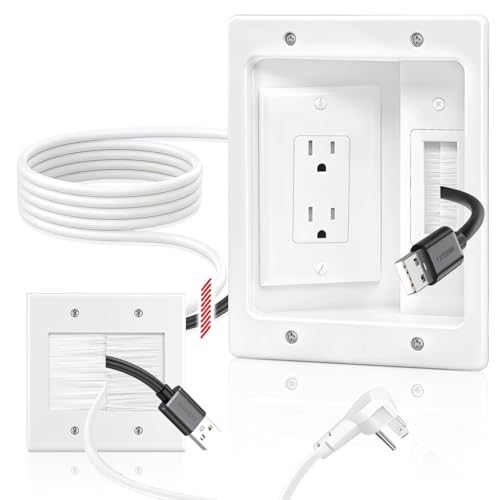
- Includes a 9-foot power cord
- Uses dual 15A/125V sockets
- Recessed design helps equipment sit flush
Best For: Studios needing extra cord reach and a recessed outlet
Best Dust-Controlled Installation
Perlegear In-Wall Cable Management Kit

- Includes dust bag, template, and hole saw
- Supports power, HDMI, Ethernet, and audio cables
- UL and SGS certified materials
Best For: Cleaner DIY installation in a home podcast studio
Simple Pass-Through Pick
Riozoo In-Wall Cable Management Kit
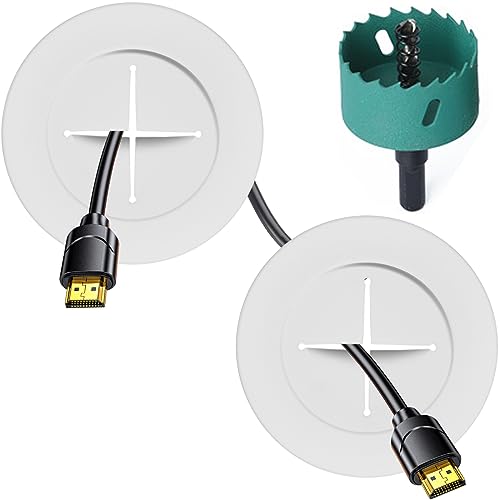
- Two pass-throughs for organized cable routing
- Includes hole-saw drill attachment
- Fits 12–18 mm plaster or wood plank walls
Best For: Podcasters routing low-voltage cables through compatible walls
Best Complete Setup
Mount-It! Recessed Power Cable Concealer
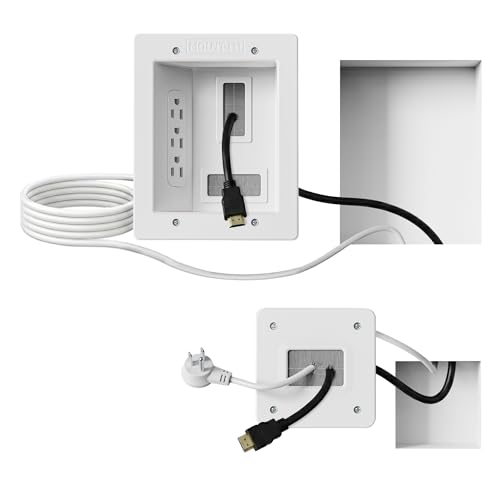
- Triple outlet with 9-foot extension cord
- Handles multiple HDMI, Ethernet, and A/V cables
- Includes saw, template, and instructions
Best For: Home studios needing concealed power and signal-cable routing
Best All-in-One Setup
Naerza In-Wall Cable Management Kit

- Routes power and multiple low-voltage cables inside the wall
- Includes hole saw, drill bit, cables, and extension cord
- Locking modules and fire-resistant materials support a clean setup
Best For: Podcasters creating a multi-cable wall-mounted display setup
Best for Supported DIY Installation

- Organizes four or more heavier cables
- Includes outlet modules, splitter, extension cord, and hole saw
- Offers fire-resistant construction and a 1-year warranty
Best For: Podcasters wanting a high-capacity kit with warranty support
Best DIY Power-and-Cable Kit – ECHOGEAR In-Wall Cable Management Kit
For podcasters building a clean recording space, the ECHOGEAR kit is a practical option among in-wall cable kits for podcasters. It is designed to route power, HDMI, Ethernet, and audio cables behind drywall while including the main tools needed for a straightforward installation.
Best For: Podcasters who want to conceal several power and low-voltage cables in a dedicated indoor studio or media setup.
Pros:
- Includes a 6-foot extension cord, drywall hole saw attachment, driver bit, and pre-wired modules.
- Accommodates up to four large HDMI cables along with Ethernet and audio cords.
- ETL certified and fitted with paintable grommets and locking wings.
- Designed for DIY installation in about 30 minutes.
Cons:
- The included extension cord is shorter than some competing options.
- Its modules are intended for indoor use and require cutting into drywall.
With its included hole saw and tested, pre-wired design, this is a well-rounded choice for creators prioritizing a polished studio installation without hiring an electrician.
Best Long-Cord Recessed Option – Recessed Outlet Box Cable Hider
This recessed outlet kit is worth considering when comparing in-wall cable kits for podcasters who need extra reach between equipment locations. Its 9-foot cord, dual sockets, and recessed design can help organize a wall-mounted display, studio monitor area, or other connected setup.
Best For: Podcasters who need a longer power cord and a recessed outlet box for a flush installation.
Pros:
- Provides a 9-foot power cord and dual 15A/125V sockets.
- Designed to hide power, HDMI, Ethernet, and audio/video cables inside the wall.
- Flame-retardant PC construction is described as resistant to bending and cracking.
- White, slim-profile housing suits residential, office, and conference-room installations.
Cons:
- Requires sufficient wall depth for the recessed outlet installation.
- A fish tape or wire snake may be needed to guide cables through the wall.
- Additional tools may be required beyond the basic installation supplies.
The long cord is the main advantage here, but buyers should confirm the wall cavity dimensions before installation, especially when planning a permanent podcasting workspace.
Best Dust-Controlled Installation – Perlegear In-Wall Cable Management Kit
The Perlegear kit stands out among in-wall cable kits for podcasters by including a dust bag and cutting template alongside its hole saw attachment. That combination is useful when installing cable routing in an active home studio where a tidier DIY process matters.
Best For: Podcasters who want a complete, safety-tested kit with accessories for a cleaner drywall installation.
Pros:
- Includes a hole saw attachment, cutting template, dust bag, two power modules, and a 5.9-foot extension cord.
- Supports multiple HDMI, Ethernet, and audio cables.
- UL and SGS certified, with fire-resistant materials noted in the product details.
- Locking wings help secure the modules in drywall.
Cons:
- Requires at least 2.8 inches of wall depth.
- The extension cord is shorter than the longest options in this roundup.
- Installation still requires a drill and cutting into the wall.
Its included dust bag and template make it particularly appealing for a controlled DIY project, while the cable capacity suits podcast studios with several connected devices.
Best Flush-Fit Recessed Box – 9.8-Foot Cord Cable Hider
For podcasters arranging a compact studio or office, this recessed cable hider offers long reach and a flush profile. It is one of the in-wall cable kits for podcasters designed to route power and low-voltage cables behind the wall while leaving less space between mounted equipment and the wall surface.
Best For: Podcasters who want a long cord and recessed outlet box for a wall-mounted, space-saving setup.
Pros:
- Includes a 9.8-foot power cord and dual 15A/125V sockets.
- Brush wall plate opening accommodates a power cord and several low-voltage cables.
- Recessed box helps equipment sit nearly flush against the wall.
- Flame-retardant PC construction is designed for long-term reliability.
Cons:
- Requires a wall cavity depth of at least 3.74 inches.
- A fish tape or wire snake may be needed for deeper cable runs.
- The listed warranty description is six months.
This model is a strong fit when cable reach and a low-profile finish matter most, though its relatively deep wall requirement should be checked before cutting.
Simple Pass-Through Pick – Riozoo In-Wall Cable Management Kit
For podcasters who need to route HDMI, Ethernet, or other low-voltage connections neatly through a compatible wall, this Riozoo kit offers a straightforward pass-through design. It includes two pass-throughs and a hole-saw drill attachment, making it a practical option among in-wall cable kits for podcasters who value a tidy studio or office setup.
Best For: Podcasters organizing cables through 12–18 mm plaster or wood plank walls.
Pros:
- Includes two pass-throughs for cleaner cable routing.
- Comes with a hole-saw drill attachment to help create a fitted opening.
- Designed for a neat, modern white finish in home or office spaces.
- Backed by a two-year warranty and stated defect-reissuance support.
Cons:
- Designed for walls 12–18 mm thick, so compatibility should be checked first.
- Does not include a recessed power outlet or extension cord.
This is a focused cable-pass-through solution rather than a full power-management system. Verify wall thickness and cable needs before buying, especially if your podcast workspace requires power routing as well as signal cables.
Best Complete Setup – Mount-It! Recessed Power Cable Concealer
Podcasters building a permanent recording station may prefer this Mount-It! kit because it combines recessed power access with room for multiple low-voltage cables. Among in-wall cable kits for podcasters, it stands out for its triple outlet, 9-foot extension cord, included drywall saw, and installation template.
Best For: Home studios and podcast desks that need concealed power plus HDMI, Ethernet, or A/V cable routing.
Pros:
- Includes a triple-outlet recessed power setup and 9-foot extension cord.
- Spacious opening accommodates multiple HDMI, Ethernet, and A/V cables.
- Includes a drywall saw, cutting template, screws, and instructions for DIY installation.
- ETL in-wall certified and backed by a lifetime warranty.
Cons:
- Requires a drywall cutout between studs and at least 2.4 inches of cavity depth.
- It is a plug-in system, not a hard-wired electrical installation.
- The larger plate has a substantial 6.3-by-7.9-inch footprint.
This is the most comprehensive option here for a cable-heavy podcast workspace, particularly when concealed power matters. Measure the wall cavity and planned cutout carefully before installation.
Fast DIY Option – ECHOGEAR 2-Pack Cable Pass-Throughs
The ECHOGEAR pass-through kit is a compact choice for podcasters who want a quick way to hide low-voltage connections behind a wall. It includes two pass-throughs, locking brackets, and a drill attachment, making it one of the more approachable in-wall cable kits for podcasters with a drill and a drywall installation.
Best For: DIY podcast rooms routing HDMI, AUX, and other low-voltage cables through drywall.
Pros:
- Designed for a quick installation using a drill and included attachment.
- Pass-throughs can fit up to four large HDMI cables.
- Locking brackets help secure the grommets behind drywall.
- Paintable grommets allow closer matching to the wall.
Cons:
- Does not include a recessed power outlet or extension cord.
- Installation requires a drill and drywall work.
This kit is a good fit when your primary goal is hiding signal cables rather than adding power access. Its capacity and paintable finish make it useful for a clean, flexible studio installation.
Best All-in-One Setup – Naerza In-Wall Cable Management Kit
For podcasters building a wall-mounted monitor, TV, or home-theater-style recording setup, this in-wall cable kit for podcasters provides power and low-voltage cable routing in one package. It includes a hole saw, drill bit, bendable cable, extension cord, and installation instructions for a relatively quick DIY installation.
Best For: Podcasters who need to route multiple power, HDMI, Ethernet, speaker, or audio cables behind a wall-mounted display.
Pros:
- Conceals power, HDMI, Ethernet, speaker, and audio cables inside the wall.
- Includes the main drilling accessories plus a 6-foot bendable cable and extension power cord.
- Spacious pass-through openings and flexible upper/lower module placement support multiple cables.
- Fire-resistant materials and locking wings are designed for a stable, flush installation.
Cons:
- Requires a wall cavity at least 3 inches deep.
- Requires two 3-inch holes and a TV plug no wider than 1.125 inches.
- No warranty is listed in the supplied product details.
This is a strong choice when you want a broad, all-in-one cable-routing package for a clean podcast studio display wall. Confirm the wall depth and plug dimensions before installation.
Best for Supported DIY Installation – Tensilearm In-Wall Cable Kit
This Tensilearm kit is a practical option among in-wall cable kits for podcasters who want to hide display, soundbar, Ethernet, HDMI, and power cables without hiring an electrician. The package combines outlet modules, a power splitter, an extension cord, and a hole saw attachment for a straightforward wall installation.
Best For: Podcasters who want a DIY cable-concealment kit with room for four or more heavier cables and a stated one-year warranty.
Pros:
- Spacious channel is designed to organize 4 or more power, HDMI, Ethernet, audio, or soundbar cables.
- Includes a power splitter, in-wall extension cord, two outlet modules, hole saw attachment, and drill bit.
- Designed for a fast installation using two drilled holes and a standard power drill.
- Fire-resistant construction and a 1-year hassle-free warranty are listed.
Cons:
- The supplied details do not specify a required wall-cavity depth or maximum plug width.
- Installation still requires drilling into the wall and following the included guide.
- It is an indoor-only kit.
Choose this model if cable capacity and warranty coverage matter in your recording space. Its included components make it convenient for a first-time DIY installation, provided the wall layout is suitable.
Best for Flexible Placement – PRLF In-Wall Cable Management Kit
PRLF’s kit suits podcasters who need flexibility when positioning a wall-mounted display or studio monitor. It supports up to a 5-foot separation between its upper and lower modules, includes a 6-foot extension cord, and supplies a 3-inch hole saw for routing cables through the wall.
Best For: Podcasters who need adjustable vertical cable routing and a secure fit for a compact wall-mounted setup.
Pros:
- Allows up to 5 feet between the upper and lower modules.
- Includes a 6-foot extension cord for reaching an existing outlet without exposed wiring.
- Comes with a 3-inch hole saw drill attachment and instructions for DIY installation.
- Locking wings help hold the modules securely behind the wall.
Cons:
- Requires at least 3 inches of wall-cavity depth.
- Requires two 3-inch holes and a TV plug no wider than 1.125 inches.
- The product details advise drilling at low speed to protect screw heads.
This is the most useful pick here when module spacing is a key consideration for your podcast studio. Check the wall cavity and plug measurements first, then use a low drilling speed during installation.
How We Picked These In-Wall Cable Kits for Podcasters
We focused on kits that can help organize a podcasting workspace, including setups with microphones, monitor speakers, displays, mixers, cameras, and accessories. Key considerations included recessed outlet design, separate paths for power and low-voltage cables, cord length, included templates or cutting tools, outlet capacity, and installation practicality.
Because wall construction and local electrical rules vary, these kits should not be treated as interchangeable. Verify that a product is suitable for your wall type and intended wiring method. Never run ordinary extension cords inside a wall unless the product is specifically designed and approved for that purpose.
Quick Comparison
| Feature | Why It Matters in a Podcast Studio |
|---|---|
| Recessed power outlet | Leaves more room behind wall-mounted equipment and reduces plug strain. |
| Low-voltage pass-throughs | Helps route HDMI, USB, speaker, network, and microphone-related cables cleanly. |
| Included hole saw or template | Can simplify accurate openings, especially for first-time installers. |
| Longer power cord | Provides more flexibility when the existing outlet is not directly below the installation point. |
| Multiple outlets or pass-throughs | Better for studios with displays, speakers, chargers, and other connected equipment. |
Key Buying Factors for In-Wall Cable Kits for Podcasters
Power Versus Low-Voltage Routing
Choose a kit with clearly separated power and signal paths. Audio, video, USB, and network cables should use the appropriate low-voltage opening, while power should follow the kit’s approved connection method. This separation helps keep the installation orderly and supports safer cable management.
Wall Type and Installation Depth
Check the required opening size and box depth before buying. Drywall installations are generally more straightforward than masonry, plaster, or built-in cabinetry. Measure stud locations and confirm that the box can fit without hitting framing, insulation, or existing wiring.
Studio Layout and Cable Length
Map the route from the equipment to the lower connection point before drilling. A kit with two pass-throughs may suit a wall-mounted monitor or display, while a multi-outlet design can be more useful near a workstation with several powered devices.
Tools and Finish
Included hole saws, hand saws, templates, and mounting hardware can reduce setup time, but inspect the supplied components before installation. Select a finish that blends with the wall and look for secure covers or locking brackets that keep plates stable during repeated cable changes.
Who Should Buy Which In-Wall Cable Kits for Podcasters?
Choose a basic two-pass-through kit for a simple desk or wall-mounted display with a few low-voltage cables. Choose a kit with recessed power and a longer cord when the nearest outlet is offset or difficult to reach. Choose a multi-outlet model for a larger podcast station using powered speakers, a display, chargers, and recording hardware. Choose a tool-inclusive kit if you want a more convenient DIY installation, but hire a qualified electrician when the project involves new mains wiring, uncertain existing circuits, or local code requirements.