
Insta360 Mic Pro Transmitter review 2026: this is a compact wireless mic aimed at creators who want direct phone or camera audio without a lot of setup friction.
It looks especially relevant if you value backup recording, flexible pairing, and a more polished on-camera workflow.
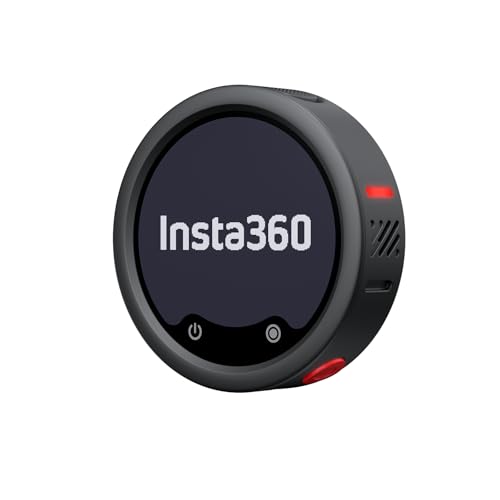
Insta360 Mic Pro Review Summary
The Insta360 Mic Pro Transmitter makes the most sense for creators who want a small, modern wireless mic that does more than just capture speech.
Its feature set is built around practical production advantages: customizable E-Ink display, three-mic pickup, AI noise canceling, 32-bit float internal recording, Bluetooth connectivity, and direct transmitter-to-camera audio with supported Insta360 devices.
Buy it if you want a streamlined creator mic with backup recording and easy connection options. It suits solo video makers, short-form content workflows, vloggers, and anyone who wants a transmitter that can double as a visible branding element on set.
It is less compelling if you only need the simplest possible lavalier and do not care about onboard recording or advanced pairing options.
Review Scorecard
| Category | Score | Why it scores this way |
|---|---|---|
| Audio flexibility | 9/10 | Three directional pickup modes and a 3-mic array make it adaptable across speaking setups. |
| Workflow convenience | 9/10 | Bluetooth connection, direct supported camera pairing, and Auto Gain Control reduce friction. |
| Backup reliability | 9/10 | 32-bit float internal recording lowers the risk of clipped audio. |
| Creator features | 8/10 | The customizable E-Ink display is genuinely useful for branding and identification. |
| Battery confidence | 8/10 | Up to 10 hours is strong for a compact transmitter. |
| Multi-camera use | 8/10 | One transmitter can pair with up to four receivers for synchronized capture. |
| Overall value fit | 8/10 | Feature-rich, but best for users who will actually use the advanced functions. |
Key Features and Specifications of Insta360 Mic Pro
The core appeal here is not a single headline spec.
It is the combination of creator-oriented tools that make recording easier and safer in real use.
The transmitter includes a customizable E-Ink display, and Insta360 says you can upload custom images, logos, or graphics through the app.
That is unusual for a mic and useful when you want your gear to be quickly identifiable on a busy set.
Audio capture is built around a 3-mic array with directional pickup modes.
The listing says you can choose from three modes, which should help you shape pickup to the scene instead of forcing a one-size-fits-all approach.
AI noise canceling is another major point.
Insta360 describes it as powered by an NPU chip and an algorithm designed to deliver cleaner, more natural sound.
For buyers, that matters because most wireless mics are judged less by raw feature count than by how gracefully they handle imperfect environments.
The transmitter also supports 32-bit float internal recording.
That is one of the most practical features in the product because it gives you a backup recording path if wireless audio has a problem or the input level is less than ideal.
Useful listed capabilities at a glance:
- Direct transmitter-to-camera audio with Insta360 X5, Insta360 Ace Pro 2, and GO Ultra
- Bluetooth connection to phones and Insta360 cameras without a receiver
- One transmitter can pair with up to four receivers
- Auto Gain Control with two gain modes
- Up to 10 hours of battery life
- Internal memory for onboard recording
These features position the Mic Pro Transmitter as a compact production tool rather than a basic consumer mic.
Pros and Cons of Insta360 Mic Pro
Pros
- Customizable E-Ink display adds a distinctive and practical branding touch.
- 3-mic array and directional pickup modes give it more flexibility than a single-purpose lav setup.
- 32-bit float internal recording is a meaningful safeguard for real-world shoots.
- Bluetooth and direct supported-device connection simplify the workflow.
- Up to 10-hour battery life should cover long creator sessions better than many compact options.
- 2 TX + 4 RX capability makes it more scalable than a single-device setup.
Cons
- Several strengths are tied to the Insta360 ecosystem, especially the direct transmitter-to-camera audio claim.
- The feature set may be more than some buyers need, especially if they only want a basic lavalier.
- Internal complexity can mean more setup decisions, such as pickup mode and gain behavior, rather than a dead-simple one-button experience.
Who Should Buy Insta360 Mic Pro?
This is a good fit for creators who record often enough to value workflow improvements.
If you shoot talking-head videos, product clips, travel content, or quick interviews, the combination of automatic gain, multiple pickup modes, and onboard recording can reduce the number of ways a take can go wrong.
It is also a sensible choice for anyone already using compatible Insta360 cameras.
The direct connection support for X5, Ace Pro 2, and GO Ultra is a real practical advantage, because it cuts down on extra hardware and keeps the setup cleaner.
You should probably skip it if you want the cheapest possible wireless mic, do not care about backup recording, or mainly record in very controlled conditions where the extra features will sit unused.
The price of convenience here is feature density, and not every buyer needs that much.
Audio Workflow and Recording Analysis of Insta360 Mic Pro
Pickup Modes Matter More Than Marketing
The 3-mic array and three directional pickup modes are the part of this product that should matter most day to day.
In creator audio, flexibility is often more valuable than a single fixed mode because speaking distance, background noise, and camera placement change constantly.
Internal Recording Is the Safety Net
32-bit float internal recording is a strong reason to consider this transmitter.
Even if you plan to monitor live audio, onboard recording gives you a recovery path when wireless conditions are less predictable or a clip needs a second pass in post.
The Display Is Not Just Cosmetic
The customizable E-Ink display sounds like a visual flourish, but it is more than that.
Being able to upload logos or images through the app makes the transmitter easier to identify, which helps on multi-person shoots and gives the gear a more polished, branded feel.
Battery and Pairing Fit Real Creator Work
Up to 10 hours of battery life and support for one transmitter to four receivers suggest a product designed for real production schedules.
That makes it more attractive to creators who need the same mic system to work across multiple cameras or quick turnarounds.
Alternatives to Insta360 Mic Pro
If you want a credible alternative, look at the broader creator wireless mic category rather than only generic lavs.
A few logical Amazon search targets are:
DJI Mic 2 is the closest comparison if you want a polished wireless creator kit with a strong all-around feature set.
Rode Wireless GO II remains a well-known option for buyers who want a proven compact system.
Hollyland Lark M2 is worth checking if you want a lighter, more minimal creator setup.
Shure MoveMic is the more brand-forward alternative if you prefer a microphone-focused ecosystem.
Is Insta360 Mic Pro Worth It?
Yes, if you will actually use the advanced features.
The Insta360 Mic Pro Transmitter is worth it for creators who want a compact wireless mic with reliable backup recording, flexible pickup options, Bluetooth convenience, and a display that adds real utility instead of decoration.
If your needs are basic, there are simpler alternatives.
But if you care about reducing recording risk and tightening the workflow around short-form video or mobile production, this is a smart, feature-rich buy.