
Choosing among the best 360-degree cameras for studio production depends on more than maximum resolution. Workflow, low-light performance, audio, mounting options, and software support can matter just as much.
This roundup compares 10 options for studio teams, livestreamers, educators, meeting spaces, and creators who need dependable immersive capture or all-around video coverage.
Best 10 360-Degree Cameras for Studio Production Picks for 2026
Best 8K Detail

- Dual 1/1.1-inch sensors capture 8K50fps video
- 10-bit color supports flexible finishing
- Includes battery, fast-charge case, and selfie stick
Best For: High-resolution studio capture and flexible reframing
Best Meeting Webcam
j5create 360 Degree Meeting Webcam
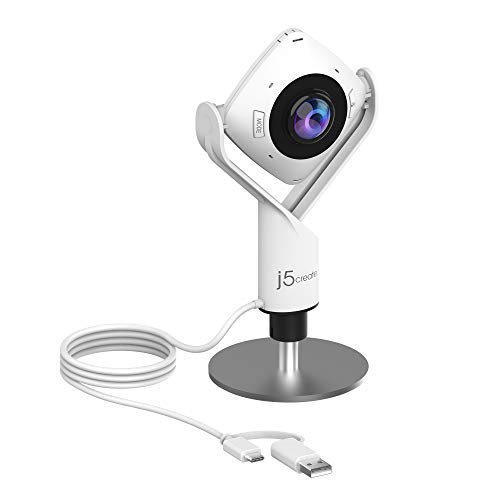
- Full HD 1080p video at 30 fps
- Six selectable viewing and participant modes
- Built-in omnidirectional microphone and USB plug-and-play
Best For: Studio meetings and remote collaboration
Best Low-Light Action Capture

- 8K30fps capture with dual 1/1.28-inch sensors
- AI processing targets challenging low-light scenes
- Stabilization, horizon lock, and replaceable lenses
Best For: Hybrid studio, location, and action production
Best All-in-One Room System
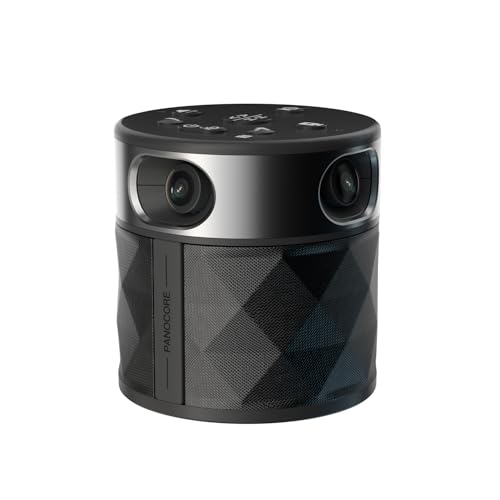
- Integrated 360 video, speaker, and three-mic array
- Auto-speaker focus plus dual 180-degree viewing
- Local MicroSD recording and driver-free USB operation
Best For: Small and medium studio meeting rooms
Studio Image Specialist

- Dual 1-inch sensors for detailed 23MP 360-degree stills
- Stabilized 4K video with HDR and four-channel audio
- 51GB internal storage plus RAW editing support
Best For: Virtual tours, real estate, and controlled studio production
Action-Ready 8K Choice

- 8K/30fps 360-degree video and up to 120MP photos
- Built-in 105GB storage with up to 190 minutes of recording
- Waterproof body with invisible selfie stick and 4K/120fps mode
Best For: Hybrid studio, travel, action, and live-event production
High-Resolution Production Tool

- 11K still capture with up to 60MP resolution
- 5.7K video, HDR-DNG RAW, and built-in GPS
- Touchscreen, interchangeable battery, and external memory
Best For: Detailed 360-degree photography, mapping, and long shoots
Compact 4K Capture

- 4K 360-degree video and 15MP stills
- Optical stabilization and IP53 water resistance
- Compact design with mobile and desktop support
Best For: Lightweight event capture and simple immersive content
Creator Combo

- 5.7K video with dual 48MP sensors
- Horizon leveling and AI subject tracking
- Includes charging case and invisible selfie stick
Best For: Flexible reframing and stabilized creator footage
Versatile 5.7K Action Camera

- 5.7K 360 HDR and 4K single-lens modes
- FlowState Stabilization with Horizon Lock
- Waterproof design and AI reframing
Best For: Hybrid 360-degree and conventional video production
Best 8K Detail – Insta360 X6 Essentials Bundle
For creators comparing 360-degree cameras for studio production, the Insta360 X6 stands out when high-resolution capture and flexible reframing matter most. Its dual 1/1.1-inch sensors record native 8K at up to 50 fps, while 10-bit color supports more flexible finishing and color work.
Best For: Studio teams, virtual production, and creators who need maximum 360 detail, smooth motion, and extensive post-production flexibility.
Pros:
- Native 8K50fps 360 video from dual 1/1.1-inch sensors
- 10-bit color with selectable profiles and filters
- AI Director and Auto Edit 2.0 simplify 360 editing
- Includes a 140-minute Xtreme Battery and 114cm invisible selfie stick
Cons:
- Its action-camera design may require additional studio mounting or audio accessories
- 8K capture and advanced editing can demand substantial storage and processing resources
The X6 is a strong choice when image resolution and color latitude take priority. It also offers 5K60 flat video, 170-degree ultra-wide capture, wind-protected microphones, and replaceable lenses for a versatile production kit.
Best Meeting Webcam – j5create 360 Degree Meeting Webcam
The j5create 360 Degree All Around Meeting Webcam is a practical option among 360-degree cameras for studio production when the goal is live collaboration rather than cinematic capture. It provides Full HD 1080p video, an omnidirectional microphone, and six display modes through a USB plug-and-play connection.
Best For: Production meetings, online classes, collaborative studio discussions, and conference rooms that need flexible participant views.
Pros:
- Six display modes include full-room, host, dual-host, single-view, and wide-angle options
- Built-in omnidirectional microphone supports room audio pickup
- USB UVC/UAC plug-and-play compatibility
- Works with Zoom, Teams, Google Meet, Webex, Slack, and other listed platforms
Cons:
- Limited to 1080p at 30 fps
- Fixed focus and no image stabilization
- Not water resistant and intended primarily for conferencing
This webcam is best treated as a room-communication tool rather than a high-end 360 production camera. Its straightforward USB workflow and selectable views make it useful for studio coordination and remote participation.
Best Low-Light Action Capture – Insta360 X5
For buyers seeking 360-degree cameras for studio production that can also handle challenging locations, the Insta360 X5 combines 8K capture with processing designed for improved low-light performance. Its stabilization, horizon lock, and replaceable lenses make it suitable for moving setups and repeated field use.
Best For: Hybrid studio-and-location production, immersive action footage, vlogging, and scenes where low light or camera movement is a concern.
Pros:
- Dual 1/1.28-inch sensors record 8K30fps 360 video
- Triple AI chip design supports noise reduction and low-light processing
- FlowState stabilization and 360-degree Horizon Lock smooth moving footage
- Replaceable lenses, waterproof construction, and up to three-hour battery life
Cons:
- Records 8K at up to 30 fps rather than 50 fps
- The standard bundle does not list an invisible selfie stick among included items
- MicroSD recording requires suitable V30 media for the listed specifications
The X5 is a capable all-around camera for productions that move beyond a controlled studio. Its InstaFrame mode can produce an immediately shareable flat video, while 360 capture preserves reframing options for later.
Best All-in-One Room System – PANOCORE360 Meeting Camera
The PANOCORE360 is designed for teams evaluating 360-degree cameras for studio production as part of a meeting or collaboration setup. It combines four cameras with a speaker and three-microphone array, delivering a stitched 4K 360 capture processed to a 1080p output stream over USB.
Best For: Small to medium studio meeting rooms with up to 12 participants, especially teams needing integrated video, voice pickup, playback, and local recording.
Pros:
- Combines 360-degree video, speaker, and three-microphone array in one unit
- Offers auto-speaker focus or dual 180-degree widescreen views
- AI voice processing provides up to a 10-foot pickup range
- Supports local recording to a MicroSD card and driver-free conferencing
Cons:
- 1080p is the stated output resolution despite 4K 360 capture and stitching
- Designed for conference rooms rather than cinematic image capture
- Requires USB power and may need the included adapter or splitter for full performance
The PANOCORE360 prioritizes simplicity and room communication over interchangeable production workflows. Its integrated audio, automatic speaker focus, local recording, and compatibility with Zoom, Teams, Webex, and Meet make it a convenient collaboration hub.
Studio Image Specialist – Ricoh Theta Z1 51GB
For creators seeking 360-degree cameras for studio production, the Ricoh Theta Z1 51GB emphasizes image quality, controlled exposure, and professional editing flexibility. Its dual 1-inch back-illuminated sensors produce 23MP stills and 4K video, while HDR processing and image stabilization support polished virtual tours, events, and immersive content.
Best For: High-quality virtual tours, real estate imagery, studio projects, and event coverage where low noise and dynamic range matter.
Pros:
- Dual 1-inch sensors and a refined lens design help reduce ghosting, flare, and fringing.
- Captures approximately 23MP 360-degree still images and stabilized 4K video.
- 51GB of internal storage holds approximately 6,350 JPEG stills or up to 110 minutes of 4K video.
- Supports RAW development, Lightroom Classic workflows, and dedicated Theta Stitcher software.
Cons:
- Not water resistant, so it is less suitable for wet or rugged outdoor production.
- Its 4K video resolution is lower than the higher-resolution options in this roundup.
- Internal storage is not described as expandable in the supplied specifications.
The Z1 is a strong production-oriented choice when still-image quality and editing control take priority over action-camera durability or maximum video resolution. Its magnesium-alloy body, HDR handling, and 360-degree livestreaming support add useful flexibility for professional workflows.
Action-Ready 8K Choice – DJI Osmo 360 Essential Combo
The DJI Osmo 360 Essential Combo is a versatile option among 360-degree cameras for studio production when a project also demands travel and action capability. It combines 8K/30fps 360-degree video, a 1-inch imaging system, built-in storage, stabilization, and a bundled invisible selfie stick for flexible shooting angles.
Best For: Hybrid studio-and-field production, action footage, travel content, live events, and creators who want high-resolution reframing options.
Pros:
- Records 8K/30fps 360-degree video and captures up to 120MP 360-degree photos.
- 1-inch imaging is designed to improve low-light detail and image quality.
- Built-in 105GB storage and up to 190 minutes of recording support extended shoots.
- Includes a 1.2m invisible selfie stick, with magnetic quick-release and 1/4-inch mounting compatibility.
Cons:
- The DJI Mimo app is not available through Google Play and requires downloading from DJI’s website.
- As an action-focused camera, its workflow may be less studio-specialized than the Ricoh models.
- Some listed features, including extended recording time, may depend on shooting conditions and setup.
The Osmo 360 stands out for productions that move between studio setups and demanding locations. Its 8K capture, large stated storage capacity, waterproof design, and included accessories make it particularly adaptable, while the app compatibility note is worth planning around.
High-Resolution Production Tool – Ricoh Theta X
The Ricoh Theta X is built for detail-focused 360-degree cameras for studio production, delivering up to 60MP still images and 5.7K video. Its large touchscreen, interchangeable battery, expandable memory, GPS, and RAW support make it practical for professional capture sessions that require on-camera control and extended shooting.
Best For: High-resolution photography, mapping and virtual tours, professional editing, and longer production days requiring replaceable media and batteries.
Pros:
- Captures 11K 360-degree still images at up to 60MP resolution.
- Records 5.7K video at 30fps and 4K video at up to 60fps.
- Supports 16-bit HDR-DNG RAW recording for more extensive editing workflows.
- Built-in GPS, a 2.25-inch color touchscreen, interchangeable battery, and external memory improve production flexibility.
Cons:
- Its 1/2-inch sensor is smaller than the Z1’s stated 1-inch sensors, which may matter in low-light work.
- Some higher-resolution or higher-bitrate modes have operating restrictions when wireless LAN or battery power is used.
- No compatible mounting specification is supplied, so accessory planning may require extra care.
The Theta X is a compelling choice when maximum still-image resolution, RAW capture, and self-contained operation are more important than a larger sensor. Its touchscreen and removable storage make it especially convenient for location-based production, mapping, and extended shoots.
Compact 4K Capture – Samsung Gear 360 (2017)
The Samsung Gear 360 (2017) is a compact entry point for studio teams exploring 360-degree cameras for studio production. Its dual 180-degree lenses capture 4K video and 15MP stills, while optical stabilization, a lightweight body, and a simple mobile workflow support quick capture and sharing.
Best For: Lightweight 360-degree capture, event documentation, and straightforward social or VR publishing.
Pros:
- Captures 360-degree video in 4K and still photos at 15MP.
- Optical image stabilization helps support steadier footage.
- Compact 4.6-ounce design with IP53 water resistance.
- Works with select Galaxy and iPhone devices, plus Windows and Mac software.
Cons:
- Compatibility is tied to the listed mobile devices and proprietary Samsung software.
- Its 4K capture is lower resolution than the newer 5.7K options in this roundup.
- The supplied details emphasize automatic shooting controls rather than advanced studio adjustment.
The Gear 360 makes sense when portability and ease of use matter more than maximum resolution or extensive production controls. It is a practical starter camera for simple immersive content.
Creator Combo – AKASO 360 Action Camera
The AKASO 360 is a feature-rich choice for creators comparing 360-degree cameras for studio production. It records 5.7K 360-degree video from dual 1/2-inch 48MP sensors and adds horizon leveling, subject tracking, RAW photography, and reframing tools for more flexible post-production.
Best For: Creators who want high-resolution reframing, stabilized motion footage, and a bundled invisible selfie stick.
Pros:
- Records 5.7K 360-degree video and captures 72MP 360-degree photos.
- 360 Supersmooth stabilization and Horizon Steady help level moving footage.
- AI subject tracking and shoot-first, frame-later workflows support flexible composition.
- Includes a charging case and invisible selfie stick in the Creator Combo.
Cons:
- The listed Creator Combo does not include a MicroSD card.
- Digital stabilization may require more post-production than optical stabilization.
- The supplied details do not specify a waterproof rating.
With strong resolution and creator-focused software features, the AKASO 360 is suited to productions that need to choose framing after recording. Its bundled accessories also make it ready for handheld and third-person shots.
Versatile 5.7K Action Camera – Insta360 X3
The Insta360 X3 combines 5.7K 360-degree capture with a dedicated 4K single-lens mode, making it a versatile option among 360-degree cameras for studio production. FlowState Stabilization, Horizon Lock, Active HDR, and AI-powered reframing give creators room to stabilize footage and select the final view later.
Best For: Hybrid productions that move between immersive 360-degree footage, conventional wide-angle video, and mobile editing.
Pros:
- Captures 5.7K 360 Active HDR video and 4K30 single-lens footage.
- FlowState Stabilization and Horizon Lock help keep footage smooth and level.
- Waterproof construction supports action, travel, and underwater use.
- AI reframing is available through the Insta360 app.
Cons:
- Storage relies on a separately supplied MicroSD card.
- The listed package includes basic camera accessories rather than a broader creator kit.
- Its 200-gram handheld body is less lightweight than the Samsung Gear 360.
The X3 is a strong all-purpose pick for teams that need both 360-degree and traditional wide-angle footage. Its stabilization and waterproof design broaden where it can be used, while app-based reframing keeps editing flexible.
How We Picked the Best 360-Degree Cameras for Studio Production
We evaluated these cameras against the needs of real studio workflows: image quality, lens and sensor design, stabilization, audio capability, recording formats, power and storage, mounting flexibility, and ease of reframing footage. We also considered whether each model is better suited to production capture, live conferencing, virtual tours, or portable creator work.
The selection includes flagship 8K and 11K cameras, compact action cameras, conference-focused systems with microphones, and older or budget-friendly models. Specifications can vary by firmware, accessory bundle, and recording mode, so confirm current manufacturer details before buying.
Quick Comparison
| Best For | What to Prioritize |
|---|---|
| Professional immersive video | Large sensors, high resolution, RAW or high-bitrate options, and reliable thermal performance |
| Studio livestreaming | Webcam compatibility, clean output, continuous power, and dependable software |
| Meetings and presentations | Speaker tracking, microphone arrays, auto framing, and simple USB setup |
| Portable production | Stabilization, waterproofing, replaceable lenses, battery life, and compact accessories |
| Budget experimentation | Usable resolution, straightforward editing, and low accessory costs |
Key Buying Factors for 360-Degree Cameras for Studio Production
Resolution and Sensor Size
Because a 360-degree image spreads pixels across a sphere, higher resolution is especially valuable when reframing a normal-looking shot. Large sensors can improve dynamic range and low-light quality, while 5.7K models may be sufficient for smaller displays, meetings, and social content.
Audio and Live Workflow
For conference or presentation studios, integrated microphone arrays, speaker tracking, USB connectivity, and compatibility with common video platforms may be more important than cinematic resolution. For narrative production, plan on using dedicated microphones and recording separately.
Heat, Power, and Storage
Long studio sessions demand continuous-power options, manageable heat, and adequate storage. Check recording limits at the desired resolution, battery behavior, memory-card requirements, and whether the camera can operate reliably while connected to a computer.
Editing and Mounting
Look for software that supports reframing, horizon leveling, stitching, and export to your intended platform. A standard tripod mount, invisible-stick support, interchangeable batteries, and available replacement lenses can significantly reduce production downtime.
Who Should Buy Which 360-Degree Cameras for Studio Production?
Choose a high-resolution Insta360, Ricoh Theta, or DJI model when immersive detail and reframing flexibility are central to the project. A Ricoh Theta Z1 is particularly appealing for image-focused work where larger sensors and still-photo quality matter, while the Theta X emphasizes high-resolution capture and an integrated touchscreen workflow.
For meetings, classrooms, and hybrid studios, the j5create and PANOCORE360 are the more practical choices because their conference-oriented features reduce setup complexity. Action-focused creators should consider the Insta360 X5, X6, X3, DJI Osmo 360, or AKASO option based on stabilization, durability, resolution, and budget. The Samsung Gear 360 remains most suitable for inexpensive experimentation or legacy workflows rather than demanding modern production.