
Choosing among digital mixing consoles for broadcast can be difficult when your setup spans microphones, computers, music playback, cameras, and live guests. The right mixer should simplify routing while giving you dependable control over gain, monitoring, effects, and output levels.
We selected 10 options ranging from compact video-oriented mixers to feature-rich audio consoles and affordable channel strips. Use the guide below to match each model’s connectivity and workflow to your broadcast, streaming, podcasting, or live-production needs.
Best 10 Digital Mixing Consoles for Broadcast Picks for 2026
Hands-On Live Mixing

- 16 channels with 10 digital mic preamps
- Tactile faders, onboard EQ, compression, and FX
- USB, Bluetooth, scene recall, and four aux sends
Best For: Small live productions, houses of worship, and mobile audio setups
All-in-One Streaming Production

- Six 1080p HDMI inputs with scaling
- Integrated 28-channel audio mixer and streaming encoders
- Touchscreen, macros, PTZ control, and remote software
Best For: Single-operator livestreams, corporate events, and worship production
Adaptive Creator Workflow

- Three control modes with a 7-inch touchscreen
- AutoMix for two microphones and custom headphone mixes
- USB-C, NDI, SD recording, Bluetooth, and trigger pads
Best For: Podcasts, interviews, and compact creator livestreams
Effects-Focused Stage Mixing
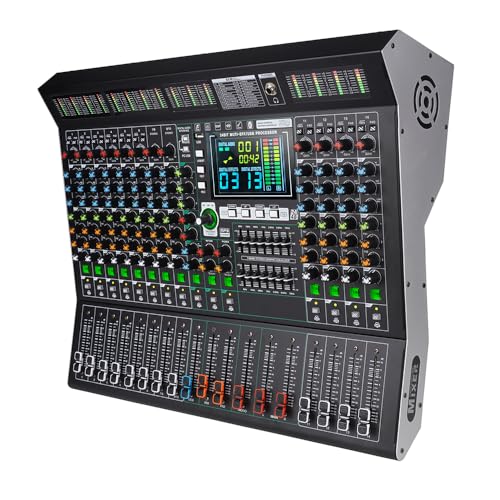
- 14 channels with LED parameter monitoring
- 99 DSP effects, 9-band EQ, and noise reduction
- Bluetooth, USB playback, and 48V phantom power
Best For: Stage, DJ, live sound, and effects-heavy audio setups
Flexible 8-Channel Pick

- 8 channels with XLR and balanced line inputs
- USB recording, MP3 playback, and Bluetooth streaming
- 3-band EQ, reverb, and +48V phantom power
Best For: Small productions, podcasts, karaoke, and live events
Compact Value Option

- Six channels in a compact steel chassis
- Bluetooth, USB, flash-drive, and MP3 support
- 3-band EQ, DSP effects, and phantom power
Best For: Small studios, karaoke, compact live rigs, and basic streaming
Hands-On Monitoring Pick

- Eight inputs with XLR and 1/4-inch support
- PFL headphone monitoring and individual channel controls
- USB recording, Bluetooth, reverb, and delay
Best For: Streaming, podcasting, small shows, and monitored recording
Versatile 16-Channel Pick
16-Channel Digital Mixer with 99 DSP Effects

- 16 channels with per-channel EQ, gain, and mute controls
- Bluetooth, USB playback, and 48V phantom power
- 99 DSP effects plus seven-band master EQ
Best For: Small broadcast and live setups needing more inputs and extensive effects
Broadcast Room Value Pick
Depusheng PA8 8-Channel Digital Mixer

- Eight channels with three-band EQ
- Bluetooth, USB, RCA, XLR, and 6.35mm connectivity
- 256 adjustable reverb effects and 48V phantom power
Best For: Broadcast rooms, conferences, live streams, and small productions
Compact Low-Profile Pick
FULUODE CT-80S 8-Channel Mixer

- Slim 1.57-inch design for space-limited desks
- Bluetooth 5.0, USB playback, and USB recording
- Eight inputs with three-band controls and 48V phantom power
Best For: Compact broadcast, conference, karaoke, and small live setups
Hands-On Live Mixing – Alto TMD16
The ALTO TMD16 is a practical option for smaller venues, houses of worship, rehearsal spaces, and mobile setups evaluating digital mixing consoles for broadcast or live production. Its 16 channels, tactile 100mm faders, 7-inch display, USB recording, Bluetooth, onboard processing, and scene recall provide a flexible all-in-one workflow without requiring a tablet.
Best For: Live sound operators and small production teams that value hands-on control, straightforward routing, and portable digital mixing.
Pros:
- 16-channel design with 10 digital mic preamps and four aux sends.
- Dedicated faders, encoders, and a 7-inch display support direct control.
- Built-in EQ, compression, 16-preset FX, USB, Bluetooth, and app control.
- Scene recall and a lightweight metal chassis suit repeat events and mobile use.
Cons:
- Its feature set is primarily aimed at live sound rather than integrated video production.
- Only a one-year manufacturer warranty is listed.
The TMD16 makes sense when physical controls and flexible audio routing matter more than a compact broadcast video workflow. It is a capable audio-focused console for smaller productions and event environments.
All-in-One Streaming Production – Roland VR-6HD
The Roland VR-6HD is designed for teams comparing digital mixing consoles for broadcast alongside video production equipment. It combines a 28-channel digital audio mixer, six HDMI inputs, video switching, effects, LAN/USB streaming encoders, and control connectivity in one portable unit for livestreams, meetings, worship, and professional capture.
Best For: Single-operator livestreams and productions that need coordinated audio mixing, HDMI video switching, and streaming in one system.
Pros:
- Integrates video switching, audio mixing, and LAN/USB streaming.
- Six 1080p HDMI inputs include frame-rate converters and real-time scalers.
- 28-channel digital audio mixer with effects and processing.
- Touchscreen, macros, PTZ control, and remote software support streamlined operation.
Cons:
- Its broad production feature set may be more than an audio-only setup requires.
- The supplied specifications list a 6-channel figure, while the product notes separately identify a 28-channel audio mixer, so buyers should confirm the intended channel terminology.
The VR-6HD is the strongest fit here for broadcast-style production because it handles video and audio together. Its automation and single-operator controls can reduce the complexity of a multi-device livestream rig.
Adaptive Creator Workflow – Mackie DLZ Creator XS
The Mackie DLZ Creator XS is a compact choice for podcast and streaming workflows considering digital mixing consoles for broadcast. Its 7-inch touchscreen, three control modes, AutoMix for two microphones, USB-C, Bluetooth, NDI, SD recording, and customizable trigger pads are geared toward creators who want guided operation and self-contained production tools.
Best For: Podcasts, interviews, YouTube programs, and small livestreams with one or two microphone presenters.
Pros:
- Easy, Enhanced, and Pro modes adapt controls to different experience levels.
- AutoMix manages levels for up to two microphones and supports separate headphone mixes.
- Records or streams multitrack audio via USB-C, NDI, or directly to an SD card.
- Trigger pads support samples, voice effects, censoring, ducking, fading, and other shortcuts.
Cons:
- Its two-channel design is less suited to larger broadcast crews or multi-source productions.
- Condenser microphones require 48V phantom power to be enabled in the setup menu.
The DLZ Creator XS prioritizes ease of use and creator-focused automation over large-scale routing. It is a practical fit when portability, quick setup, and podcast-specific controls are more important than extensive channel capacity.
Effects-Focused Stage Mixing – MD-14 14-Channel Mixer
The MD-14 is an audio-focused 14-channel mixer for buyers seeking digital mixing consoles for broadcast, stage, DJ, or studio use. It combines 99 DSP effects, a 9-band EQ, noise reduction, Bluetooth, USB playback, LED monitoring, and 48V phantom power in a larger console format.
Best For: Stage and DJ users who need abundant built-in effects, wireless playback, and conventional hands-on channel controls.
Pros:
- Offers 14 independent channels with a large LED display.
- Includes 99 DSP effects covering reverbs, delays, choruses, flangers, and pitch shifting.
- Provides Bluetooth, USB lossless playback, 9-band EQ, and 48V phantom power.
- Noise reduction and multiple effect chains support live sound and recording applications.
Cons:
- At 18 pounds, it is less portable than the compact consoles in this roundup.
- A 30-day return and exchange policy is the only warranty information supplied.
- The notes do not identify dedicated broadcast streaming or video-production features.
The MD-14 suits audio productions where effect variety and physical mixing controls take priority. For broadcast, verify that its audio-focused connectivity matches the rest of the production system before buying.
Flexible 8-Channel Pick – Bluetooth USB Mixer
For buyers comparing digital mixing consoles for broadcast, this 8-channel model offers a practical mix of microphone connectivity, USB playback and recording, Bluetooth streaming, and onboard control. Its 3-band EQ, reverb, and stereo capabilities suit small productions and live audio setups, though MacBook recording is specifically not supported.
Best For: Small broadcast-style productions, podcasts, karaoke, conferences, and live events needing flexible input and playback options.
Pros:
- Eight channels with XLR and balanced line connectivity.
- USB, MP3/WAV/WMA playback and recording features with LCD feedback.
- Bluetooth streaming, 3-band EQ, reverb, and +48V phantom power.
- Includes a stated two-year warranty.
Cons:
- Cannot connect to a MacBook for recording.
- Uses a 110V power system with a standard US plug.
This is a versatile entry-level choice when wireless playback and basic recording matter more than advanced broadcast automation or extensive channel capacity.
Compact Value Option – Pyle PMXU63BT
The Pyle PMXU63BT is a compact option for shoppers seeking digital mixing consoles for broadcast in smaller spaces. It combines six channels, Bluetooth, USB and flash-drive support, a built-in MP3 player, 3-band EQ, and 16-bit DSP effects in a steel chassis with sealed controls.
Best For: Compact live audio rigs, small studios, karaoke, band practice, and straightforward streaming or recording setups.
Pros:
- Six channels support XLR and unbalanced 1/4-inch inputs.
- USB, computer, flash-drive, and Bluetooth connectivity.
- +48V phantom power, LED peak indicators, 3-band EQ, and 16-bit DSP FX.
- 100V–240V power support is convenient for worldwide use.
Cons:
- Fewer channels than the two eight-channel alternatives here.
- One-year warranty is shorter than the warranty listed for the AX-80.
- The supplied notes do not identify dedicated broadcast-specific features.
Its compact footprint and broad device compatibility make it a sensible value pick for basic broadcast audio, provided six channels meet your input needs.
Hands-On Monitoring Pick – 8-Channel FX Mixer
This 8-channel console is worth considering among digital mixing consoles for broadcast when per-channel control and monitoring are priorities. It provides XLR and 1/4-inch inputs, PFL monitoring, channel faders, gain and FX controls, USB recording, Bluetooth playback, and built-in delay and reverb.
Best For: Streaming, podcasting, online meetings, small shows, music recording, and live setups requiring headphone monitoring.
Pros:
- Eight channels with XLR and unbalanced 1/4-inch inputs.
- PFL monitoring, headphone output, individual channel controls, and peak indicators.
- USB recording and playback plus Bluetooth connectivity.
- 3-band EQ, gain controls, reverb, and delay effects.
Cons:
- One-year warranty is the only warranty duration provided in the notes.
- The supplied specifications do not state a supported software-update date.
- Its feature set is aimed at smaller productions rather than large broadcast systems.
With dedicated monitoring controls and effects on every input channel, this model offers useful hands-on flexibility for creators who need more than simple volume mixing.
Versatile 16-Channel Pick – 16-Channel Digital Mixer with 99 DSP Effects
For buyers comparing digital mixing consoles for broadcast, this 16-channel model offers substantial input capacity plus flexible playback and sound-shaping tools. Its Bluetooth, USB, 48V phantom power, channel mutes, and broad connectivity make it adaptable for small broadcast setups, live productions, studios, and events.
Best For: Small broadcast, live performance, karaoke, DJ, and studio setups needing 16 channels and built-in effects.
Pros:
- Provides 16 channels with independent gain, three-band EQ, and mute controls.
- Includes Bluetooth, U-disk/USB playback, and a digital display player.
- Offers 99 DSP effects, a seven-band master graphic EQ, and 48V phantom power.
- Supports microphones, instruments, XLR, 1/4-inch, monitor, effects, and master outputs.
Cons:
- Its 18.9-inch width and 8.26 kg weight may be more than compact setups require.
- The supplied notes do not confirm software-update support.
This is the strongest option here when channel count and onboard processing matter most. It is a practical fit for more involved productions, though smaller systems may prefer a lighter eight-channel design.
Broadcast Room Value Pick – Depusheng PA8 8-Channel Digital Mixer
Among digital mixing consoles for broadcast, the Depusheng PA8 is a compact eight-channel choice with practical connectivity for speech, music, and event audio. Bluetooth, USB, RCA, XLR, and 6.35mm connections give it flexibility for broadcasting rooms, conferences, live broadcasts, recording, and stage use.
Best For: Broadcast rooms, live streams, conferences, KTV, and small recording or stage applications.
Pros:
- Combines eight channels with three-band EQ for straightforward scene control.
- Supports Bluetooth playback, USB storage, and an LCD color display.
- Provides 256 adjustable reverb effects for different production needs.
- Includes microphone and music inputs with 48V phantom power.
Cons:
- Eight channels provide less input capacity than the 16-channel alternative.
- The supplied notes do not confirm software-update support.
The PA8 emphasizes useful connectivity and a broad reverb selection in a smaller console. It is a sensible match for broadcast and conference environments that do not need a large channel count.
Compact Low-Profile Pick – FULUODE CT-80S 8-Channel Mixer
For space-conscious buyers evaluating digital mixing consoles for broadcast, the FULUODE CT-80S uses an ultra-thin 1.57-inch design while retaining core tools for voice, music, and live audio. Its Bluetooth 5.0, MP3/USB playback, LED song display, USB recording, and 48V phantom power suit compact broadcast, karaoke, conference, and performance setups.
Best For: Compact broadcast desks, home KTV, campus events, conferences, and small live performances.
Pros:
- Uses a slim 1.57-inch profile for installations where desk space is limited.
- Provides eight mono inputs with three-band channel controls and 48V phantom power.
- Includes Bluetooth 5.0, MP3/USB input, USB recording, and an LED display.
- Supports wired and wireless microphones, condenser microphones, and instruments.
Cons:
- Its eight-channel layout is less suited to larger broadcast productions.
- The supplied notes do not specify the number of built-in reverb settings.
This mixer stands out for its unusually slim enclosure and integrated playback features. Choose it when a compact footprint is more important than higher channel capacity or extensively specified effects.
How We Picked These Digital Mixing Consoles for Broadcast
We focused on practical broadcast requirements rather than channel count alone. The selection considers input capacity, microphone compatibility, 48V phantom power, USB connectivity, Bluetooth or media playback, onboard processing, monitoring options, and suitability for streaming or live production. We also included different form factors and price levels, since a solo creator, mobile operator, and multi-microphone production team have very different needs.
Because specifications vary across manufacturers and listings, verify the current inputs, outputs, software compatibility, and included accessories before purchasing. A mixer designed primarily for DJ or stage use may not provide the independent routing and computer integration required for a complex broadcast.
Quick Comparison
| Best For | What to Prioritize | Useful Features |
|---|---|---|
| Solo streaming or podcasting | Simple controls and USB connection | Bluetooth, USB audio, built-in processing |
| Small interview shows | Several microphone inputs and monitoring | Phantom power, headphone output, EQ |
| Live broadcasts | Flexible routing and reliable outputs | Multiple buses, effects, noise control |
| Video production | Audio/video integration | Dedicated video switching and embedded audio |
| Budget installations | Essential inputs at low cost | USB playback, Bluetooth, basic DSP |
Key Buying Factors for Digital Mixing Consoles for Broadcast
Inputs, Outputs, and Routing
Count every source you expect to connect, including host microphones, guest microphones, phone calls, computers, music players, and backup feeds. Leave spare inputs for growth. Check whether the console provides separate main, monitor, headphone, auxiliary, or subgroup outputs; these determine how easily you can send different mixes to talent, recording software, and a stream.
Computer and Device Connectivity
USB audio can reduce the need for a separate interface, but confirm whether the connection supports playback only or both recording and playback. Bluetooth is convenient for background music or phone guests, though it may introduce latency and is rarely ideal for critical live monitoring. If video is central to your workflow, an audio-only mixer may require additional hardware.
Processing and Ease of Control
EQ, compression, reverb, noise reduction, and feedback control can improve speech quality, but more effects do not automatically mean better sound. Look for clearly labeled controls, meters that are easy to read, and a workflow you can operate while monitoring the show. Digital displays and presets are helpful when multiple presenters or recurring productions share the system.
Microphone Compatibility and Reliability
Condenser microphones generally require 48V phantom power, while dynamic microphones do not. Confirm that phantom power is suitable for your microphone collection and that gain range is adequate for quieter sources. For broadcast use, stable power, clean preamps, low operating noise, and accessible mute or level controls matter more than flashy features.
Who Should Buy Which Digital Mixing Consoles for Broadcast?
Solo creators: Choose a compact model with USB audio, simple monitoring, and fast access to microphone and playback levels. Adaptive controls can be more valuable than a large channel count.
Podcasters and interview shows: Prioritize multiple mic inputs, phantom power, independent headphone monitoring, and straightforward talk-focused processing. Leave at least one or two inputs available for guests or remote-call hardware.
Live streamers and event teams: Look for flexible outputs, dependable meters, onboard effects, and enough channels for presenters, music, playback, and backup sources. A video-oriented mixer may be the better choice when switching cameras is part of the job.
Budget buyers: Basic eight- or 14-channel consoles can provide useful connectivity and effects at a lower price, but check build quality, driver support, routing limitations, and whether USB is a true audio interface before committing.