
Building a professional podcast studio requires more than a good microphone. The right workstation should organize your gear, simplify routing, support reliable monitoring, and leave enough room to grow as your production needs change.
This roundup covers 10 podcast workstations for professional studios, including studio furniture, digital mixers, USB interfaces, monitoring headphones, and all-in-one podcast bundles. Use the guide below to match the setup to your workflow, space, and budget.
Best 10 Podcast Workstations for Professional Studios Picks for 2026
Best for Organized Studios
Sound Town SDRK-WS69 Studio Rack Desk
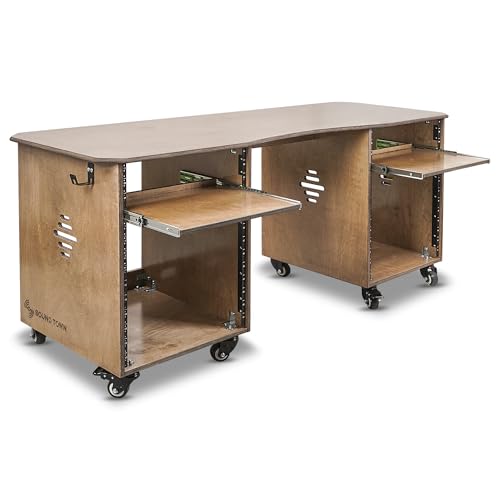
- Wide 68.9-inch desktop
- Dual 13U rack cabinets
- Casters, trays, and headphone hooks
Best For: Studios needing extensive rack storage and workspace
Best for Turnkey Podcast Control
TASCAM Mixcast 4 Podcast Mixer

- Four mic and headphone outputs
- 14-track SD recording
- Customizable sound-effect pads
Best For: Multi-person podcasts and live production
Best for Compact Premium Production

- Compact all-in-one production unit
- Two combo inputs with high gain
- Touchscreen, faders, and SMART pads
Best For: Solo creators and small podcast teams
Best for Large Multitrack Setups
PreSonus StudioLive 16.0.2 USB Bundle

- 16-channel digital mixer
- 18-in/16-out USB recording
- Folding stand supports up to 225 pounds
Best For: Studios handling complex multichannel sessions
Premium All-in-One Pick

- Two combo inputs with high-gain Revolution Preamps
- Four faders, touchscreen, and SMART pads
- APHEX effects plus dual USB-C and wireless connectivity
Best For: Professional podcasting, streaming, and content production
Starter Studio Bundle

- Includes interface, microphone, headphones, cables, and software
- Two mic preamps with +48V phantom power
- Zero-latency monitoring and MIDI connectivity
Best For: New podcasters and compact computer-based studios
Budget Live-Streaming Kit

- Complete kit with mixer, microphone, stand, and headphones
- Supports multiple microphone, instrument, USB-C, and mobile connections
- Built-in effects, voice changer, tone controls, and noise reduction
Best For: Beginner podcasters, streamers, and mobile content creators
Studio Monitoring Pick
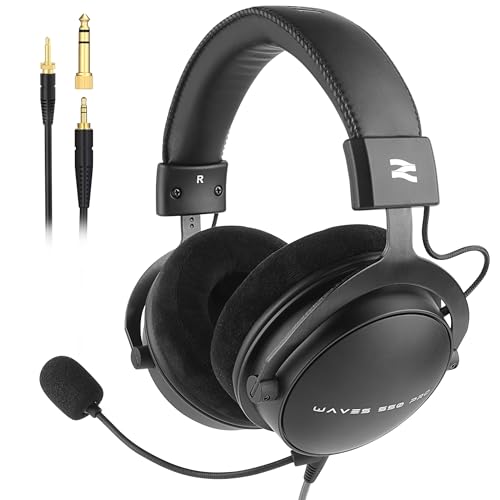
- Accurate 50mm-driver monitoring
- Detachable cardioid boom microphone
- Comfortable wired over-ear design
Best For: Long recording, editing, and podcast monitoring sessions
Beginner Bundle Pick
SK500 Podcast Equipment Bundle

- Includes mic, stand, earphones, and cables
- Mixer supports dual-device broadcasting
- Adds monitoring, effects, and noise reduction
Best For: Entry-level podcasting and live streaming setups
Multi-Platform Studio Pick

- Includes two condenser microphones and arms
- DSP noise reduction and voice effects
- USB-C and multi-platform compatibility
Best For: Podcasts, livestreams, broadcasts, and instrument-enabled setups
Best for Organized Studios – Sound Town SDRK-WS69 Studio Rack Desk
For podcast workstations for professional studios, the Sound Town SDRK-WS69 combines a wide desktop with substantial rack storage. Its dual 13U cabinets, slide-out trays, casters, and headphone hooks help keep microphones, interfaces, and accessories accessible while leaving room for editing or streaming equipment.
Best For: Recording rooms, podcast studios, and creators who need extensive rack storage and a spacious work surface.
Pros:
- 68.9-inch-wide desktop provides generous workspace.
- Dual 13U cabinets include 3U and 10U slide-out trays.
- Casters with lever brakes support mobility and secure placement.
- Baltic birch plywood construction and headphone hooks add practicality.
Cons:
- Assembly is required.
- Its large footprint may not suit compact rooms.
The SDRK-WS69 is a strong furniture-focused choice when organization and expandable rack capacity matter as much as the desktop itself. The weathered brown finish also gives a studio setup a polished appearance.
Best for Turnkey Podcast Control – TASCAM Mixcast 4 Podcast Mixer
The TASCAM Mixcast 4 is one of the more immediately usable podcast workstations for professional studios, pairing four mic inputs with headphone outputs, onboard recording, trigger pads, and touch-panel control. It can handle podcasts, live streams, voice-over work, and external audio sources without requiring a complicated setup.
Best For: Multi-person podcasts, live streaming, and studios that want integrated recording, monitoring, and sound-effect control.
Pros:
- Four mic inputs and four individual headphone outputs support group recording.
- Records up to 14 tracks directly to an SD card.
- Eight banks of customizable illuminated sound pads enable live effects and jingles.
- Bluetooth, aux, and USB connectivity support varied sources.
Cons:
- It is a corded device rather than a portable battery-powered unit.
- The extensive feature set may take time to learn.
With touch controls and TASCAM Podcast Editor support, the Mixcast 4 offers a focused production environment for creators who want recording and live-performance tools in one device.
Best for Compact Premium Production – RØDECaster Duo Audio Studio
The RØDECaster Duo is a compact option among podcast workstations for professional studios, offering two Neutrik combo inputs, broadcast-oriented preamps, physical faders, a touchscreen, and SMART pads. Its APHEX processing and USB connectivity make it suitable for podcasts, streaming, music, and general content production.
Best For: Solo creators or small podcast teams seeking a compact all-in-one production studio with hands-on controls.
Pros:
- Two combo inputs accept microphones or instruments.
- Revolution Preamps provide up to 76dB of gain.
- Touchscreen, four faders, and six SMART pads support direct control.
- APHEX processing adds studio-style voice enhancement tools.
Cons:
- Two primary combo inputs are fewer than some larger podcast mixers offer.
- It requires corded power.
The RØDECaster Duo is well suited to streamlined desks where space matters. It provides a broad set of production controls in a notably compact chassis without limiting its use to podcasting alone.
Best for Large Multitrack Setups – PreSonus StudioLive 16.0.2 USB Bundle
For larger podcast workstations for professional studios, the PreSonus StudioLive 16.0.2 USB bundle provides 16-channel digital mixing, multitrack USB recording, onboard processing, and a dedicated folding stand. It is built for podcasts and studio production as well as rehearsals, venues, schools, clubs, and other multi-source environments.
Best For: Professional rooms managing many microphones, instruments, remote sources, or live-production channels.
Pros:
- 16 channels and 12 Class A XMAX mic preamps support complex sessions.
- 18-in/16-out USB interface enables multitrack recording.
- Fat Channel processing is available on every channel and bus.
- Included RXS30 stand supports up to 225 pounds and folds for transport.
Cons:
- At 39.8 pounds, the bundle is considerably less portable than compact podcast mixers.
- Its extensive routing and processing may be more than a small podcast requires.
- The stand and mixer require a larger setup area.
This bundle makes the most sense when channel count, routing, and repeatable digital control take priority over simplicity. The included stand adds a stable, ergonomic platform for installation or mobile deployment.
Premium All-in-One Pick – RØDECaster Duo
For creators seeking podcast workstations for professional studios, the RØDECaster Duo combines dedicated controls, advanced processing, and flexible connectivity in a compact production console. Its two combo inputs, four faders, touchscreen, and wireless options make it well suited to polished podcast and streaming workflows.
Best For: Professional podcasters, streamers, and content creators who want an integrated production workstation.
Pros:
- Two Neutrik combo inputs with high-gain Revolution Preamps
- Four broadcast-quality faders, touchscreen, and six SMART pads
- Includes APHEX processing, dual USB-C, Bluetooth, Wi-Fi, Ethernet, and wireless microphone support
Cons:
- Provides four channels, which may limit larger productions
- Requires corded power
The RØDECaster Duo is the most studio-oriented option here, offering a strong balance of hands-on control, connectivity, and built-in effects. It is a particularly capable choice when streamlined operation matters as much as recording quality.
Starter Studio Bundle – AudioBox USB 96 Studio
The AudioBox USB 96 Studio is a practical entry point for podcast workstations for professional studios when you need the core recording hardware in one package. It includes a two-channel USB interface, condenser microphone, monitoring headphones, cables, and recording software for a straightforward computer-based setup.
Best For: Beginners and small recording setups needing microphones, headphones, interface hardware, and software together.
Pros:
- Includes an M7 condenser microphone, HD7 headphones, interface, cables, and software
- Two class-A mic preamps with +48V phantom power support simultaneous guitar and vocal recording
- Zero-latency monitoring, MIDI In/Out, and balanced main outputs
Cons:
- Only two channels for recording
- USB connectivity may be less flexible than larger standalone workstations
This bundle focuses on getting a complete recording chain running quickly rather than providing extensive live-production controls. It is a sensible choice for a compact studio that values included essentials and software compatibility.
Budget Live-Streaming Kit – G10 Podcast Bundle
For buyers comparing podcast workstations for professional studios on a budget, this bundle provides a mixer, microphone, stand, headphones, power cable, and OTG cable in one package. Its multiple input formats, mobile connectivity, voice effects, and tone controls target podcasting and live streaming rather than traditional multitrack studio production.
Best For: Beginners, mobile creators, gamers, and streamers who want an all-in-one live podcast setup.
Pros:
- Includes microphone, mixer, stand, headphones, power cable, and OTG cable
- Supports dual 3.5mm microphone inputs plus XLR/6.5mm microphone and instrument connections
- Offers noise reduction, tone controls, pitch adjustment, voice changing, and 16 sound effects
Cons:
- Battery-powered operation requires charging
- Feature set is geared toward live effects and streaming rather than advanced studio production
- Product notes advise charging the condenser microphone before use
This is the most accessible and effects-focused option in the group. It can help new creators assemble a flexible live setup quickly, though users seeking refined studio routing may prefer a more dedicated production console.
Studio Monitoring Pick – W550X Podcast Headphones
For podcast workstations for professional studios, accurate monitoring and comfortable long-session wear matter. The talomen W550X combines wired studio monitoring with a detachable boom microphone, making it useful for recording, editing, broadcasting, and streaming workflows.
Best For: Podcasters and creators who need monitoring headphones with an optional voice microphone.
Pros:
- 50mm dynamic drivers are tuned for clear mids, balanced bass, and detailed highs.
- Detachable cardioid boom microphone supports clearer voice communication.
- Lightweight over-ear design with memory foam cushions is suited to extended sessions.
- Includes 3.5mm and 6.35mm connectivity options, a coiled cable, splitter, and case.
Cons:
- Wired design does not provide wireless convenience.
- Passive noise isolation may be less effective than active noise cancellation.
- The microphone is detachable rather than integrated for all-use convenience.
The W550X is a practical monitoring-focused choice for a studio desk, especially when reliable wired audio and an optional boom mic are more important than wireless operation.
Beginner Bundle Pick – SK500 Podcast Equipment Bundle
For podcast workstations for professional studios, an all-in-one control setup can simplify getting started. The SK500 bundle includes a microphone, stand, earphones, cables, and a compact mixer with monitoring, noise reduction, ducking, voice effects, and dual-device broadcast support.
Best For: Beginners building a compact podcast, streaming, gaming, or live-broadcast station.
Pros:
- Includes a cardioid microphone, tripod stand, earphones, cables, adapters, and manual.
- Offers two microphone inputs and three device outputs for simultaneous broadcasting.
- Provides real-time monitoring, five volume faders, noise reduction, and voice enhancement.
- Includes voice changing, reverb modes, and 16 preset sound effects.
Cons:
- Supports 3.5mm microphone input and is not compatible with USB microphones or phantom power.
- Not compatible with Xbox for output, and PS4 and VR compatibility is limited or untested.
- Battery runtime is listed at approximately four to five hours per charge.
The SK500 favors accessible controls and included accessories over traditional studio expansion, making it a flexible starter station for creators using compatible phones, computers, tablets, or PS5 systems.
Multi-Platform Studio Pick – V8SS Recording Bundle
For podcast workstations for professional studios, the V8SS combines microphones, a mixer, USB-C connectivity, and live audio processing in one package. Its noise-reduction system, voice effects, cross-platform support, and instrument inputs make it suitable for podcasts, broadcasts, livestreams, and broader content production.
Best For: Creators who want a bundled mixer with two microphones, voice effects, and instrument connectivity.
Pros:
- Includes two condenser microphones with anti-vibration suspension arms.
- Uses DSP processing, noise reduction, and layered wind and plosive filtering for vocal capture.
- Offers four voice variations, 10 sound effects, and multiple live-production functions.
- Supports USB-C connections across Windows, Mac OS, Android, iOS, Chrome OS, smartphones, PC, PS5, and Xbox.
Cons:
- Requires battery charging before initial use or after prolonged storage.
- Driver installation may require contacting the manufacturer’s support team.
- The supplied notes do not specify supported software update dates.
The V8SS is the most feature-rich option here for creators who want a bundled two-mic setup with voice processing and the ability to connect instruments alongside podcast audio.
How We Picked These Podcast Workstations for Professional Studios
We focused on the practical needs of professional podcast production: microphone connectivity, monitoring, recording flexibility, desk or rack organization, portability, and ease of use. The selection includes dedicated production consoles such as the TASCAM Mixcast 4 and RØDE RØDECaster Duo, traditional recording interfaces, live mixers, studio furniture, headphones, and entry-level bundles.
Because “workstation” can describe both a physical studio desk and a complete audio setup, we considered how each product contributes to a usable production system. We also looked for features such as USB connectivity, multiple inputs, headphone monitoring, loopback or streaming support, expandable storage, and controls that reduce setup time during recording.
Quick Comparison
| Setup type | Best suited for | Primary advantage |
|---|---|---|
| Rack desk workstation | Permanent studio installations | Organized equipment storage and workspace |
| Podcast production console | Multi-person shows and live streaming | Integrated routing, mixing, and monitoring |
| Digital mixer | Large productions or hybrid studio work | More channels and flexible signal control |
| USB recording bundle | Solo creators and small studios | Simple path to computer-based recording |
| Basic podcast bundle | Beginners on a tight budget | Several core components in one package |
Key Buying Factors for Podcast Workstations for Professional Studios
Inputs and Expandability
Count how many hosts, guests, instruments, and playback sources you expect to use at once. Four XLR inputs may be enough for a small roundtable, while a larger mixer is better for complex productions. Check whether the system supports condenser microphones, phantom power, and future expansion.
Routing and Recording Workflow
Dedicated podcast consoles can combine preamps, sound pads, mix-minus routing, recording, and streaming controls. A basic interface may be more affordable, but it often depends more heavily on computer software. Choose the workflow that matches your comfort level and the amount of live control you need.
Monitoring and Room Setup
Closed-back headphones help prevent microphone bleed, while accurate studio monitors are useful when your room is acoustically controlled. Look for separate headphone outputs and independent volume controls when multiple people need to monitor a session.
Furniture, Ergonomics, and Cable Management
A rack desk can make a permanent studio cleaner and easier to operate, but it requires more floor space. Measure your room, equipment depth, chair clearance, and cable paths before buying. Casters may help with repositioning, while fixed furniture can provide greater stability.
Software and Computer Compatibility
Confirm operating-system support, USB requirements, included software, and whether the device records standalone or needs a computer. Bundled software is useful, but compatibility and long-term workflow fit matter more than the number of included programs.
Who Should Buy Which Podcast Workstations for Professional Studios?
Choose a rack desk workstation if you already own multiple processors, interfaces, or mixers and want a more organized permanent studio. Choose a dedicated podcast console if fast hands-on control, remote guests, live streaming, or multi-person recording is central to your work.
Choose a digital mixer for larger channel counts and hybrid live-recording applications. Choose a USB interface bundle for straightforward computer recording with a small number of microphones. Choose a complete beginner bundle only when convenience and low initial cost outweigh premium preamps, advanced routing, and long-term upgrade flexibility. Add dedicated monitoring headphones when accurate, private listening is essential.