
Accurate color can make the difference between content that looks consistent everywhere and images that shift noticeably from screen to screen. The right calibration tool helps creators build a more dependable editing workflow for photography, video, design, and print.
This roundup includes monitor colorimeters, advanced spectrophotometers, and related calibration tools. Use the guide below to narrow your options by display type, software, measurement range, and the level of color control your work requires.
Best 10 Monitor Calibration Tools for Content Creators Picks for 2026
Best Audio Calibration Alternative

- Provides 94, 104, and 114 dB reference levels
- Fits 1/2-inch microphones with an O-ring seal
- Meets IEC 60942:2018 Class 2 standards
Best For: Creators calibrating compatible sound level meters
Best Complete Color Workflow

- Profiles displays, projectors, printers, cameras, and scanners
- Uses adaptive iterative display profiling
- Includes ColorChecker Classic Mini for camera profiles
Best For: Photographers and studios managing capture-to-print color
Best Dual-Microphone Audio Pick

- Supports 1/2-inch and 1-inch microphones
- Offers 94 dB and 114 dB output levels
- Conforms to IEC942 Class 1 standards
Best For: Creators calibrating sound meters with different microphone sizes
Complete Capture-to-Edit Kit
Display Pro HL Photo Workflow Kit

- Combines monitor calibration with RAW camera profiling
- Supports mini LED, OLED, and Apple XDR displays
- Includes white-balance and exposure reference tools
Best For: Photographers building a consistent capture-to-edit workflow
Lens Accuracy Aid
Folding Lens Focus Calibration Cards
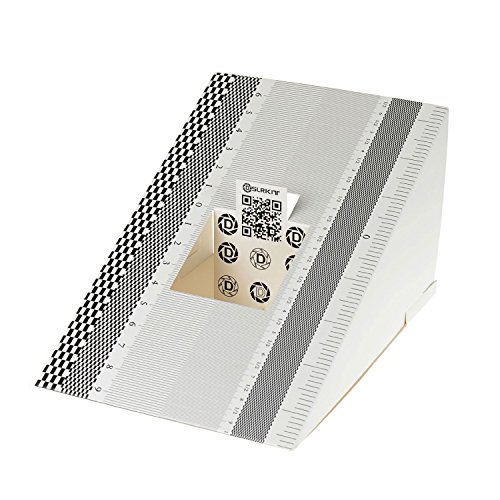
- Checks autofocus accuracy for camera-and-lens combinations
- Useful for shallow-depth-of-field photography
- Includes two compact physical calibration cards
Best For: Photographers troubleshooting autofocus precision
Simple Display Setup
Display 123 Monitor Colorimeter

- Guided Easy 1 2 3 calibration workflow
- Supports up to two displays
- Includes before-and-after accuracy checking
Best For: Creators wanting straightforward single- or dual-monitor calibration
Turntable Setup Pick
Acrylic Cartridge Alignment Protractor
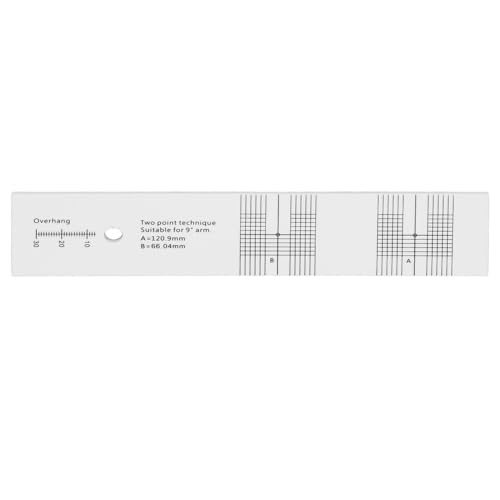
- Durable acrylic construction
- High-contrast alignment markings
- For 1/2-inch cartridges and S-shaped arms
Best For: Vinyl enthusiasts calibrating compatible turntables
First-Time Color Choice

- Lens-based color engine
- Guided, single-click calibration
- Supports multiple desktop and laptop monitors
Best For: Photographers and first-time display calibration users
Best High-Brightness Pick – Display Pro HL
For creators working with HDR, OLED, mini-LED, or bright Apple XDR displays, the Calibrite Display Pro HL is one of the more capable monitor calibration tools for content creators. Its high-luminance sensor, PROFILER software, and validation features are suited to photo, design, and video workflows where dependable tone and color consistency matter.
Best For: Content creators calibrating modern high-brightness displays or multiple monitors.
Pros:
- Measures displays up to 3000 nits, including LCD, mini-LED, OLED, and compatible projectors.
- PROFILER software supports custom white point, luminance, gamma, contrast, presets, and patch sets.
- Includes profile validation, uniformity checks, Quick Check, and flare correction tools.
- Supports Mac and Windows, USB-C connectivity, and USB-A compatibility through the included adapter.
Cons:
- Its advanced features may be more than needed for basic SDR monitor calibration.
- It is designed for display profiling rather than broader printer, scanner, or camera profiling.
The Display Pro HL is a strong choice when display brightness and HDR compatibility are priorities. Its multi-display workflow and verification tools also make it practical for studios or creators managing more than one screen.
Best Audio Calibration Alternative – Precision SPL Calibrator
Although it is designed for sound meters rather than screens, this precision SPL calibrator can be useful alongside monitor calibration tools for content creators who also produce or evaluate audio. It provides selectable reference levels and a sealed microphone fit for repeatable sound-level meter checks.
Best For: Audio-focused creators and labs calibrating compatible sound level meters.
Pros:
- Offers 94, 104, and 114 dB reference levels at 1000 Hz.
- Fits 1/2-inch microphones and uses an O-ring seal to help block ambient noise.
- Meets IEC 60942:2018 Class 2 standards.
- Rated for ±0.4 dB accuracy across 0–40°C and 25–90% relative humidity.
Cons:
- It does not calibrate monitors, displays, or color workflows.
- The 1/2-inch microphone fit may not suit creators using other microphone sizes.
This is not a substitute for a colorimeter or spectrophotometer, but it fills a different measurement need. Consider it only if your content workflow includes sound-level testing and you own a compatible meter.
Best Complete Color Workflow – ColorChecker Studio
The Calibrite ColorChecker Studio goes beyond screen calibration, making it one of the most versatile monitor calibration tools for content creators who manage color from camera capture through final output. Its spectrophotometer supports displays, projectors, printers, paper, scanners, and cameras through PROFILER software.
Best For: Photographers and studios that need monitor, camera, printer, and scanner profiling in one system.
Pros:
- Profiles monitors, laptops, projectors, printers, paper, cameras, and scanners.
- Adaptive iterative profiling optimizes results for each display.
- Ambient light measurement helps set display luminance for print comparison.
- Includes a ColorChecker Classic Mini for custom camera profiling.
Cons:
- Its broad feature set may be unnecessary for creators who only need monitor calibration.
- The supplied notes do not specify a high-luminance measurement limit for modern HDR displays.
Choose the ColorChecker Studio when color consistency must carry from RAW files to edited screens and printed work. It is especially compelling for photographers and production teams that want one device for several profiling tasks.
Best Dual-Microphone Audio Pick – SLM-111 Calibrator
The SLM-111 is another audio-focused option rather than a display calibrator, but it may complement monitor calibration tools for content creators building a complete measurement kit. It supports two reference levels and both common microphone sizes, making it practical for compatible noise-measurement equipment.
Best For: Creators and technicians calibrating sound meters with 1/2-inch or 1-inch microphones.
Pros:
- Provides selectable 94 dB and 114 dB output levels.
- Supports both 1/2-inch and 1-inch microphones with an included adapter.
- Conforms to IEC942 Class 1 standards.
- Offers approximately 100 hours of battery life.
Cons:
- It cannot calibrate monitors or measure display color.
- It requires a 9V battery.
- It has fewer selectable reference levels than the three-level alternative in this roundup.
The SLM-111 makes sense when audio measurement is part of your production process and microphone compatibility matters. For visual color work, however, you will need a dedicated colorimeter or spectrophotometer.
Complete Capture-to-Edit Kit – Display Pro HL Photo Workflow Kit
For content creators who need monitor calibration tools for content creators alongside more consistent camera color, this Calibrite kit combines Display Pro HL monitor profiling with a ColorChecker Passport Photo 2. It is designed to connect RAW capture, white balance, camera profiling, and display calibration in one workflow.
Best For: Photographers and creators editing RAW images on modern mini LED, OLED, or Apple XDR displays.
Pros:
- Combines monitor calibration and camera profiling for a more consistent capture-to-edit process.
- Supports modern high-luminance displays, including mini LED, OLED, and Apple XDR panels.
- ColorChecker Passport Photo 2 supports custom RAW camera profiles plus white-balance and exposure references.
- Calibrite PROFILER offers presets and adjustable targets such as white point and gamma.
Cons:
- Its camera-profiling features may be more than creators who only need monitor calibration require.
- The workflow is focused on photo and RAW still editing rather than general display setup alone.
This is the most comprehensive option here for creators who want to control color from capture through final edit. Choose it when camera consistency matters as much as monitor accuracy.
Lens Accuracy Aid – Folding Lens Focus Calibration Cards
These folding cards are a simple add-on for camera-focused creators comparing monitor calibration tools for content creators with broader production accuracy needs. They help identify front- or back-focus in a camera-and-lens combination, particularly when shooting with a shallow depth of field.
Best For: Photographers checking autofocus accuracy before shoots or fine-tuning supported Canon, Nikon, and Sony camera systems.
Pros:
- Provides a physical reference for checking whether autofocus is landing accurately.
- Useful for shallow-depth-of-field work where focus needs to be precise.
- Can help determine whether camera autofocus adjustments may be needed on supported bodies.
- Pack includes two compact 19 × 12.3 cm calibration cards.
Cons:
- It calibrates lens focus, not monitor color or display brightness.
- Results depend on whether the camera supports autofocus fine-tuning or micro-adjustment.
- It is a physical alignment aid rather than a software-guided calibration system.
This is not a substitute for a display colorimeter, but it can improve capture-side consistency. Consider it when focus accuracy is a recurring issue in your creator workflow.
Simple Display Setup – Display 123 Monitor Colorimeter
For creators seeking approachable monitor calibration tools for content creators, the Calibrite Display 123 uses a guided Easy 1 2 3 workflow. Its USB-C connection, brightness target choices, and support for two displays make it a practical fit for straightforward photo, video, and multi-monitor editing setups.
Best For: Creators who want an easy monitor-calibration process for one or two displays without extensive setup controls.
Pros:
- Guided Easy 1 2 3 software workflow keeps setup approachable.
- Supports calibration of up to two monitors for more consistent multi-screen viewing.
- USB-C connection and adjustable counterweight help with screen placement.
- Before-and-after comparison makes the calibration change easy to check.
Cons:
- It is focused on display calibration and does not include camera profiling tools.
- Its streamlined workflow may offer fewer advanced controls than a more comprehensive kit.
This is the clearest choice for creators who primarily need reliable display color with minimal complexity. It is especially useful when two monitors need to look more consistent during editing.
Turntable Setup Pick – Acrylic Cartridge Alignment Protractor
If your search for monitor calibration tools for content creators has led you into audio work, note that this compact tool is designed for turntable calibration rather than display color. Its acrylic construction and printed instructions help align a 1/2-inch-mounted cartridge, including setups with an S-shaped tonearm.
Best For: Vinyl enthusiasts and creators setting up compatible LP turntables.
Pros:
- Durable acrylic construction with a firm, lightweight design.
- High-contrast markings improve visibility during alignment.
- Printed instructions make the setup process straightforward.
- Helps correct tracking errors, overshoot, and related distortion.
Cons:
- Not a monitor or screen color calibration device.
- Compatibility is focused on 1/2-inch-mounted cartridges and can depend on tonearm setup.
This is a specialized audio alignment aid, not a fit for creators who need color-accurate displays. For compatible turntables, however, it offers a simple and durable way to support cleaner playback.
First-Time Color Choice – Datacolor Spyder X Pro
The Datacolor Spyder X Pro is the most directly relevant option here for creators comparing monitor calibration tools for content creators. Its lens-based color engine, guided workflow, and room-light monitoring are designed to help photographers and other visual professionals establish more consistent display color.
Best For: First-time users, photographers, and creators calibrating multiple laptop or desktop displays.
Pros:
- Single-click calibration and a wizard workflow simplify setup.
- Offers 12 predefined calibration targets for added control.
- Room-light monitoring and automatic profile changing support changing conditions.
- SpyderProof provides a before-and-after comparison using your own images.
Cons:
- Designed for desktops and laptops, not phones.
- The listed feature set may be more than casual users need.
With a guided process and support for multiple monitors, the Spyder X Pro is a practical choice for creators who want a straightforward route to more precise screen color without needing extensive calibration expertise.
Modern Display Pick – Datacolor Spyder Monitor Calibrator
For creators evaluating monitor calibration tools for content creators across newer display types, this Datacolor Spyder is built around current digital workflows. It supports a broad range of laptop and desktop displays, including OLED, mini-LED, and Apple Liquid Retina XDR, while its software combines preset simplicity with adjustable settings.
Best For: Content creators using modern displays who want fast, adaptable color calibration.
Pros:
- Calibration takes about 90 seconds according to the supplied product information.
- Supports OLED, mini-LED, and Apple Liquid Retina XDR displays.
- DevicePreview Beta simulates how photos may appear on other devices.
- Ambient-light sensing can prompt or automate recalibration with custom profiles.
Cons:
- DevicePreview is identified as a beta feature.
- Requires a nonstandard battery.
- Custom settings may be unnecessary for users who only want a basic preset.
This model stands out for creators working across newer screen technologies and variable room lighting. Its quick workflow suits routine checks, while customizable settings leave room for more controlled color work.
How We Picked These Monitor Calibration Tools for Content Creators
We focused on tools that support more reliable visual and measurement workflows, with priority given to display calibration capability, software usability, hardware compatibility, and the needs of photographers, video editors, designers, and other visual-content professionals. The selection includes dedicated monitor colorimeters, a spectrophotometer for broader profiling tasks, and adjacent calibration instruments for audio, lenses, and turntables.
Because these products serve different purposes, they should not be treated as interchangeable. A monitor colorimeter is generally the most direct choice for screen calibration, while a spectrophotometer can extend color-management work to printers, scanners, projectors, and more complex production environments.
Quick Comparison
| Tool type | Best suited to | What to check |
|---|---|---|
| Monitor colorimeter | Routine display calibration | Supported display technologies, brightness range, software, and connection |
| Spectrophotometer | Complete color-management workflows | Printer, scanner, projector, and display profiling support |
| Audio calibrator | Sound-level meter verification | Output levels, microphone size, and frequency |
| Lens calibration tool | Camera autofocus alignment | Scale accuracy, folding design, and camera compatibility |
| Turntable alignment tool | Phono cartridge setup | Protractor layout, durability, and cartridge geometry |
Key Buying Factors for Monitor Calibration Tools for Content Creators
Display Compatibility and Measurement Range
Check whether the device supports your panel type, such as LCD, mini-LED, OLED, or wide-gamut displays. HDR creators should pay particular attention to the tool’s maximum luminance range; a basic device may not measure high-brightness screens accurately enough for HDR work.
Software and Workflow
Good calibration software should guide you through setup, create a display profile, and make repeat calibration straightforward. Look for support for your operating system, USB connector, multiple displays, and the color spaces used in your work. Simple guided software can be ideal for beginners, while advanced users may value deeper profiling controls.
Color-Management Scope
If you only need consistent monitor viewing, a colorimeter is usually the practical option. If you also need to profile printers, scanners, or projectors, a spectrophotometer may justify its higher cost and broader capabilities.
Calibration Frequency and Environment
Plan to recalibrate periodically, especially if your display is used heavily or your room lighting changes. Keep ambient light consistent during critical work, and allow the monitor to warm up before measuring. Calibration cannot compensate for a poor viewing environment or an untrustworthy reference display.
Who Should Buy Which Monitor Calibration Tools for Content Creators?
- Most photographers and editors: Choose a dedicated monitor colorimeter with clear software and support for your display technology.
- HDR and professional display users: Prioritize a high-luminance measurement range and compatibility with modern OLED or mini-LED panels.
- Print studios and full color-management workflows: Consider a spectrophotometer that can profile displays as well as printers, scanners, and projectors.
- Beginners: Select a straightforward, guided solution rather than paying for advanced features you will not use.
- Audio, camera, or vinyl specialists: The related calibrators in this roundup address sound meters, lens alignment, or turntable setup—not monitor color accuracy.