
A rackmount audio interface can keep a busy studio organized, but the right choice depends on more than how many inputs appear on the spec sheet. Mic preamps, expansion ports, computer compatibility, and monitor routing all affect how smoothly a session runs.
These six listings span affordable multichannel recording, expandable studio setups, and premium DSP-based workflows. One is a cable bundle of another selected interface, so check what is included before treating every listing as a different model.
Best 6 Rackmount Audio Interface Picks for 2026
Best for Growing Studios
Focusrite Scarlett 18i20 4th Gen

- Eight mic preamps with 69 dB gain
- ADAT, S/PDIF, MIDI, and word clock
- Auto Gain and Clip Safe
Best For: Studios recording multiple sources and planning I/O expansion
Best for Eight-Mic Recording

- Eight MIDAS-designed mic preamps
- 18-in/20-out with ADAT I/O
- 24-bit/96 kHz USB 2.0 recording
Best For: Multi-microphone recording with ADAT connectivity
Best for UAD Workflows
Universal Audio Apollo x6 Gen 2

- Access to 200+ UAD plug-ins
- Auto-Gain across multiple inputs
- Bass management for a subwoofer
Best For: UAD-focused production and mixing setups
Best for Drum Tracking

- Eight mic preamps plus eight line inputs
- Two instrument-switchable inputs
- DSP monitoring with EQ and compression
Best For: Drum recording and multi-source sessions
Best for Vintage-Style Tracking
- Eight Vintage preamps and compressors
- 32-bit/192 kHz conversion
- Two cue mixes with talkback
Best For: Vintage-style tracking and expandable studio setups
Best Project-Studio Bundle
Focusrite Scarlett 18i20 4th Gen

- Four XLR cables and two MIDI cables included
- Auto Gain and Clip Safe modes
- Two headphone outputs and built-in talkback
Best For: Project studios that need an interface-and-cable bundle
Best for Growing Studios – Focusrite Scarlett 18i20 4th Gen
If your rackmount audio interface needs to handle a full band now and expanded I/O later, the Scarlett 18i20 4th Gen is a strong fit. It combines eight mic preamps with Hi-Z and line inputs, plus ADAT, S/PDIF, MIDI, and word clock connectivity.
Best For: Recording setups that need eight mic inputs, flexible expansion, and quick level-setting tools.
Pros:
- Eight mic preamps offer up to 69 dB of gain.
- 24-bit/192 kHz conversion and a stated 122 dB dynamic range.
- Auto Gain and Clip Safe help manage recording levels.
- Includes recording software and the Hitmaker Expansion bundle.
Cons:
- Its 17.37-inch stated depth deserves a rack-clearance check.
- Its many routing options may be more than a simple two-input setup needs.
The 18i20 makes the most sense when you will use its input count and digital connections; otherwise, much of its capability may go unused.
Best for Eight-Mic Recording – Behringer UMC1820
The Behringer UMC1820 is a rackmount audio interface to consider when eight microphone inputs matter more than high sample-rate specifications. Its 18-in/20-out USB 2.0 configuration includes ADAT I/O and eight MIDAS-designed mic preamps.
Best For: Recording several microphones or instruments at once with ADAT expansion available.
Pros:
- Eight MIDAS-designed mic preamps with 48 V phantom power.
- ADAT I/O expands its connection options.
- Supports 24-bit/96 kHz recording and MIDI connectivity.
Cons:
- Maximum stated sample rate is 96 kHz, below the 192 kHz offered by some alternatives.
- USB 2.0 connectivity may not suit buyers specifically seeking USB-C.
Choose the UMC1820 for its eight-preamp layout and digital I/O, while checking that its USB connection and 96 kHz ceiling meet your workflow.
Best for UAD Workflows – Universal Audio Apollo x6 Gen 2
Universal Audio Apollo x6 Gen 2 with UAD Analog Classics Thunderbolt 3 Audio Interface
Check Price On AmazonFor buyers comparing a rackmount audio interface around plug-in workflow and monitoring, the Apollo x6 Gen 2 stands out for access to UAD DSP and native plug-ins. Its listed features also include Auto-Gain and bass management for adding a subwoofer to a monitor setup.
Best For: Producers and mix engineers who want UAD plug-in access and subwoofer-ready monitoring features.
Pros:
- Access to a library of more than 200 UAD DSP and native plug-ins.
- Auto-Gain sets levels across multiple inputs.
- Bass management supports adding a subwoofer.
Cons:
- The notes do not specify its mic preamp count or full physical I/O layout; verify these before buying.
- Check the included plug-in edition against the UAD titles you want to use.
The Apollo x6 Gen 2 is most compelling if its UAD ecosystem and monitoring tools fit your setup. Confirm connection and I/O requirements against the exact configuration before committing.
Best for Drum Tracking – Tascam US-16×08
The Tascam US-16×08 is a rackmount audio interface for sessions that need to capture several microphones and line sources at once. Its eight mic preamps and eight additional line inputs make it a practical fit for recording a drum kit alongside other instruments.
Best For: Drum recording and larger sessions that need multiple simultaneous inputs.
Pros:
- Eight Ultra-HDDA mic preamps offer up to 56 dB of gain.
- Eight additional line inputs include two switchable to instrument level.
- DSP mixer provides low-latency monitoring with four-band EQ and compression per channel.
Cons:
- Maximum sample rate is 96 kHz.
- Only two of the eight line inputs switch to instrument level.
Choose this interface when input count and flexible monitor mixes matter more than a sample rate above 96 kHz.
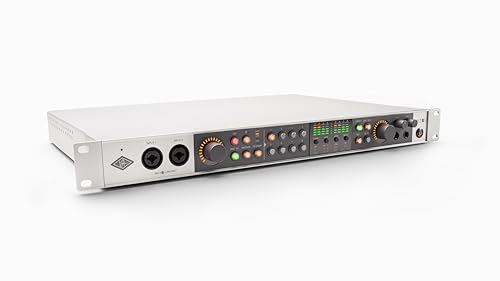
Best for Vintage-Style Tracking – Universal Audio Volt 876
The Universal Audio Volt 876 is a rackmount audio interface for producers who want onboard vintage-inspired processing as they record. It pairs eight Vintage preamps with compressors inspired by UA’s 1176 limiter and supports 32-bit/192 kHz conversion.
Best For: Producers seeking vintage-style input tone, cue mixing, and room to expand a recording setup.
Pros:
- Eight onboard Vintage preamps and classic-inspired compressors shape sound while tracking.
- UAD Console supports Assistive Auto-Gain, front-panel setting recall, and two low-latency cue mixes with talkback.
- Can be combined with up to three Volt 876 interfaces or integrated with Apollo and ADAT-equipped gear.
Cons:
- Its 13.9-pound weight is worth considering for a mobile setup.
- Uses a USB 2.0 port with a USB Type-C connector.
The Volt 876 stands out if its recording workflow and built-in tonal options are more useful to you than a bare-bones interface.
Best Project-Studio Bundle – Focusrite Scarlett 18i20 4th Gen
This Focusrite Scarlett 18i20 bundle gives project studios a rackmount audio interface alongside four XLR cables and two 10-foot MIDI cables. The interface includes Auto Gain and Clip Safe modes, plus monitoring features suited to a shared recording space.
Best For: Project studios that want a Scarlett 18i20 with recording cables included.
Pros:
- Bundle includes four XLR-to-XLR cables and two MIDI cables.
- Auto Gain and Clip Safe modes help manage recording levels.
- Two headphone outputs, speaker switching, and built-in talkback support studio monitoring.
Cons:
- Requires external power.
- Included cables may be unnecessary if your studio is already stocked.
This bundle makes the most sense when you need both the interface’s monitoring controls and the supplied cables; otherwise, consider whether the extras fit your setup.
How We Picked These Rackmount Audio Interfaces
We focused on practical differences a buyer can check before ordering: available mic and line inputs, digital expansion, computer connection, monitoring features, and the value of any included accessories. The six selected listings do not represent six distinct interface designs: the Focusrite Scarlett 18i20 4th Gen also appears as a bundle with cables. Compare its bundle price with the standalone unit rather than assuming it offers different recording hardware.
Quick Comparison
For a straightforward multichannel USB setup, start with the Focusrite Scarlett 18i20 4th Gen or Behringer UMC1820. The Tascam US-16×08 is worth a look when connecting many microphones and line sources at once is the priority. Consider the Universal Audio Volt 876 if its USB-based workflow and rack-style format suit your setup. The Apollo x6 Gen 2 is the premium Thunderbolt option for buyers who specifically want the Apollo and UAD workflow. Choose the Scarlett bundle only if its included XLR and MIDI cables are useful and the total price makes sense.
Key Buying Factors for a Rackmount Audio Interface
Count the Inputs You Can Use at Once
Separate built-in mic preamps from line inputs and channels available only through digital expansion. If you record a full drum kit or a live band, map each microphone and instrument to a physical input before you buy. Likewise, check whether the advertised output count includes headphone, digital, or other channels rather than only analog line outputs.
Check Expansion and Synchronization
ADAT can add channels with a compatible external preamp or converter, but the number of available channels can change at higher sample rates. If you plan to connect other digital gear, confirm the ports and clocking options on the exact model. Do not buy based on a maximum channel count unless you know what additional equipment it requires.
Match the Connection to Your Computer
USB and Thunderbolt are different buying decisions, not interchangeable cable choices. Verify your computer’s ports, operating-system support, current driver requirements, and any adapter limitations before ordering—especially for a Thunderbolt interface. Also check rack fit, ventilation guidance, and access to frequently used controls.
Plan Your Monitoring Workflow
Think about how many separate headphone mixes, monitor feeds, and outboard connections you need. Onboard routing software, direct monitoring, and DSP features may matter more than an extra input if performers need comfortable, low-latency cue mixes.
Who Should Buy Which Rackmount Audio Interface?
Choose the Scarlett 18i20 4th Gen as a starting point for an expandable USB studio; choose its bundle if you also need the listed cables. Consider the UMC1820 when budget and ADAT connectivity lead your checklist. Look at the US-16×08 for input-heavy recording, particularly when you need to connect multiple mics and line sources. The Volt 876 suits buyers interested in its specific USB feature set, while the Apollo x6 Gen 2 makes the most sense if Thunderbolt compatibility, its routing, and the UAD ecosystem justify the higher spend. Before checkout, verify each listing’s exact contents, since a useful cable bundle and a required external converter can change the real cost of your setup.