Recording on an iPhone can be simple, but the right interface depends on what you’re plugging in. A guitar, an XLR microphone, and a stereo mixer feed each call for different inputs.
These 10 options cover portable guitar adapters, microphone-friendly interfaces, and streaming tools. Start with your iPhone’s connector, then match the inputs and monitoring features to how you record.
Best 10 Audio Interface for Iphone Picks for 2026
Best for Hybrid Workflows
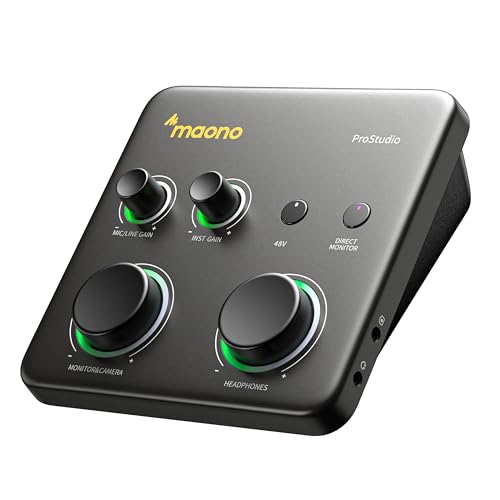
- Connect a computer and mobile device simultaneously
- Up to 70 dB microphone gain
- Auto-Gain, loopback, and direct monitoring
Best For: Desktop recording with phone-based streaming or sharing
Best for Stereo Sources

- Stereo RCA inputs for mixers and playback gear
- Lightning, USB-C, and USB connection options
- Direct monitoring and loopback
Best For: Mobile streams fed by a stereo mixer or audio player
Best for Lightning Mics

- Accepts 3.5 mm TRS and TRRS microphones
- Headphone output for real-time monitoring
- Plug-and-play on Lightning iPhones and iPads
Best For: Using an existing 3.5 mm mic with a Lightning device
Best for Portable Live Mixing

- Two combo inputs with 48 V phantom power
- Dual phone ports for streaming workflows
- Rechargeable battery rated up to 4–5 hours
Best For: On-location music streams with multiple audio sources
Best for Digital Guitar Recording
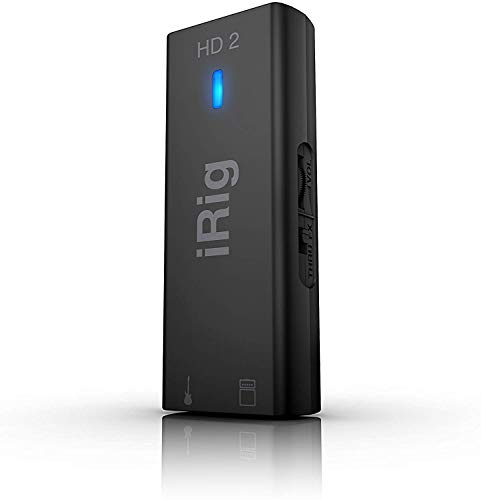
- Up to 24-bit/96 kHz recording
- Switchable FX/Thru amp output
- Headphone output with level control
Best For: Guitarists recording on iPhone and connecting to an amp
Best for Analog Amp Rigs
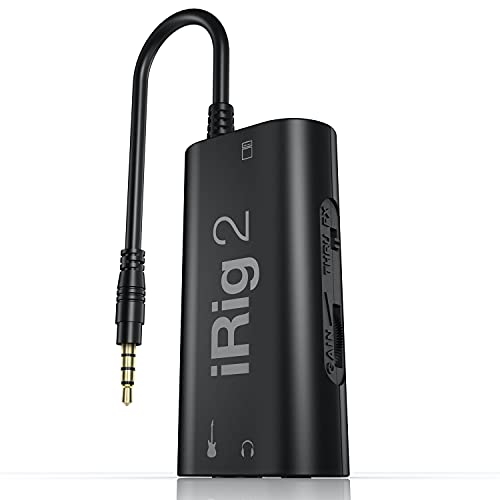
- Adjustable instrument gain
- Headphone and 1/4-inch amp outputs
- FX/Thru switch for signal choice
Best For: Guitarists pairing iPhone apps with an amplifier
Best for Pocket Live Streaming

- Up to 24-bit/48 kHz recording
- USB-C with Lightning adapter
- Headphone monitoring and back clip
Best For: Portable guitar or bass recording and live streaming
Best for Mic and Instrument Recording
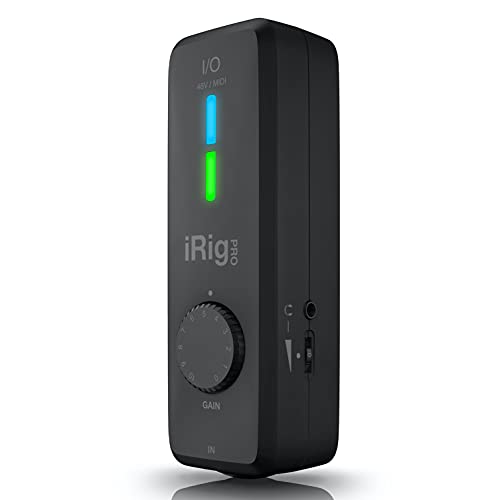
- Combo XLR/Hi-Z input with 48V phantom power
- MIDI In/Out and direct headphone monitoring
- Lightning, USB-C, and USB-A cables included
Best For: iPhone musicians recording a mic or instrument who need MIDI connectivity
Best for Guitar Practice and Amp Rigs

- 24-bit/96 kHz single-channel instrument recording
- Headphone monitoring and processed/direct amp output
- AmpliTube and TONEX apps included
Best For: Guitarists practicing, recording, or connecting to an amp rig
Best for Charging During Streams

- USB-C charging port for live-stream setups
- Separate input and output level controls
- Two channels and up to 24-bit/192 kHz sampling
Best For: Phone-based creators who need charging while recording or streaming
Best for Hybrid Workflows – MAONO P1 USB Audio Interface
If you want an audio interface for iPhone that can also stay connected to your computer, the MAONO P1 is built around that workflow. Its dual USB ports support simultaneous computer and phone or iPad connections, making it useful for recording on a desktop and sharing from a mobile device.
Best For: Creators who record vocals or guitar on a computer and stream or upload from a phone or iPad.
Pros:
- Up to 70 dB of gain supports demanding dynamic microphones.
- Auto-Gain, loopback, and direct monitoring simplify recording and streaming.
- Independent mute and listening controls add flexibility during live sessions.
Cons:
- Its desk-oriented controls may be more than you need for a simple mobile microphone hookup.
The P1 makes the most sense when mobile connectivity is part of a larger recording setup, rather than the only feature you need.
Best for Stereo Sources – IK Multimedia iRig Stream
The iRig Stream is an audio interface for iPhone users who need to bring a stereo mixer, keyboard, or audio player into a mobile recording or livestream. Its RCA inputs and included Lightning, USB-C, and USB connection options make it particularly suited to existing line-level gear.
Best For: Streaming or recording a stereo feed from a mixer, keyboard, or audio player.
Pros:
- Stereo RCA inputs accommodate common mixer and playback outputs.
- A headphone output provides real-time direct monitoring.
- Loopback and a level-indicator LED help with mobile streaming.
Cons:
- RCA inputs are a less direct fit for connecting a microphone or guitar on its own.
- The supplied specifications disagree on maximum sample rate, listing both 48 kHz and 96 kHz.
Choose this one for a straightforward stereo feed into your phone; check the sample-rate specification if that detail affects your workflow.
Best for Lightning Mics – Saramonic SR-EA2D
If you already own a 3.5 mm lavalier, mini shotgun, or wireless receiver, the Saramonic SR-EA2D is a compact audio interface for iPhone models with a Lightning port. It plugs directly into the device and supports both TRS and TRRS microphone connections.
Best For: Adding a 3.5 mm microphone and headphone monitoring to a Lightning-equipped iPhone or iPad.
Pros:
- Accepts compatible TRS and TRRS microphones with plug-in power.
- Provides a 3.5 mm headphone output for real-time monitoring and playback.
- Device-mounted, plug-and-play design needs no drivers or additional software.
Cons:
- Designed for Lightning devices, not iPhones with USB-C ports.
- Its 3.5 mm input is not a direct XLR microphone connection.
This is the simplest pick here for putting an existing 3.5 mm mic to work on a compatible Lightning device without carrying a larger mixer.
Best for Portable Live Mixing – JOYO MOMIX PRO
The rechargeable JOYO MOMIX PRO is an audio interface for iPhone creators who want hands-on mixing away from a desk. Two combo microphone/instrument inputs, a separate stereo instrument input, and two phone connection ports suit compact music and livestream setups.
Best For: Mobile singers, instrumentalists, and streamers mixing multiple sources on location.
Pros:
- Two combo XLR/6.35 mm inputs include 48 V phantom power for compatible condenser microphones.
- Dual OTG ports support two-phone streaming and backing-track workflows.
- Rechargeable battery is rated for up to 4–5 hours; direct monitoring and two headphone outputs support live use.
Cons:
- Reverb applies to the two combo-input channels, not the dedicated stereo instrument input.
- The stated battery runtime may require recharging during longer sessions.
Pick the MOMIX PRO when portable source mixing matters more than a minimal, single-mic phone adapter; check the connection requirements for your particular iPhone before heading out.
Best for Digital Guitar Recording – IK Multimedia iRig HD 2
If you want an audio interface for iPhone that also fits a Mac or PC recording setup, the iRig HD 2 offers a digital 1/4-inch instrument input and recording at up to 24-bit/96 kHz. The supplied Lightning, USB-C, and USB cables give you connection options across those devices.
Best For: Guitarists who want to record on an iPhone and connect to an amp for practice or performance.
Pros:
- Adjustable input gain and up to 24-bit/96 kHz recording.
- Dedicated headphone output with level control for private practice.
- 1/4-inch amp output switches between processed FX and Thru signals.
Cons:
- One input channel limits simultaneous recording.
- Its instrument-focused input is less versatile than a multi-input interface.
The amp output makes this more flexible for guitarists than a recording-only adapter, while the single-channel design keeps it focused on one source at a time.
Best for Analog Amp Rigs – IK Multimedia iRig 2
The iRig 2 is an audio interface for iPhone built around a straightforward guitar-to-phone setup. Its 3.5 mm TRRS connector works with a compatible headset jack, while newer iPhones need a suitable Lightning-to-3.5 mm or USB-C-to-3.5 mm adapter.
Best For: Guitarists who want to use an iPhone app alongside an existing amplifier.
Pros:
- Adjustable gain dial helps set the instrument input level.
- Separate headphone and 1/4-inch amplifier outputs offer two listening options.
- FX/Thru switch lets you choose a processed signal or a clean analog path.
Cons:
- Modern iPhones without a headset jack require an appropriate adapter.
- The supplied notes do not specify a digital recording resolution.
Choose this for its simple amp integration and analog Thru option, but account for the adapter your particular iPhone needs before buying.
Best for Pocket Live Streaming – Pocket Guitar Audio Interface
This compact audio interface for iPhone is aimed at getting guitar or bass audio into a recording or live-streaming app without a larger desktop setup. It connects by USB-C and includes a Lightning-to-USB-C adapter for compatible iPhones and iPads.
Best For: Beginners who want a portable way to record or stream guitar or bass from a phone.
Pros:
- Supports up to 24-bit/48 kHz recording.
- 1/4-inch instrument input and 3.5 mm headphone output support playing and monitoring.
- Monitor-volume buttons, a level indicator, and a back clip suit mobile use.
Cons:
- Recording only; no onboard editing or mixing functions are listed.
- No amplifier output is specified.
It is a practical pick when portability and a direct instrument connection matter more than onboard production controls or amp integration.
Best for Mic and Instrument Recording – IK Multimedia iRig Pro I/O
If you need an audio interface for iPhone that handles both an instrument and an XLR microphone, the iRig Pro I/O is a versatile portable option. It records at up to 24-bit/96 kHz and includes Lightning, USB-C, and USB-A cables for use across supported devices.
Best For: Musicians recording guitar, bass, or vocals on an iPhone who also want MIDI connectivity.
Pros:
- Combo XLR/Hi-Z input accepts a mic or instrument, with 48V phantom power for condenser mics.
- MIDI In/Out accommodates controllers and keyboards.
- Headphone jack supports direct, real-time monitoring.
- Included Lightning, USB-C, and USB-A cables offer flexible connections.
Cons:
- Its single combo input is limiting if you need to connect a mic and instrument simultaneously.
- The supplied warranty lists one year for parts but only 90 days for labor.
Choose this model for its mix of mic, instrument, and MIDI features; check your input needs before planning a multi-source session.
Best for Guitar Practice and Amp Rigs – IK Multimedia iRig HD X
For guitarists shopping for an audio interface for iPhone, the iRig HD X focuses on playing, recording, and practicing rather than general-purpose mic input. Its single instrument channel captures up to 24-bit/96 kHz audio, and Lightning and USB cables are included.
Best For: Guitarists who want headphone practice, app-based tones, and a connection to an amp or pedal rig.
Pros:
- Includes AmpliTube and TONEX apps for a range of guitar tones.
- Headphone output supports direct monitoring for silent practice.
- Dedicated amp output offers processed FX or direct THRU settings.
- Onboard tuner and multi-LED gain indicator simplify setup.
Cons:
- Single instrument input is not suited to plugging in an XLR microphone.
- One channel limits simultaneous recording of separate sources.
The amp output and guitar-focused controls make this a stronger fit for a player’s rig than for a mixed vocal-and-instrument setup.
Best for Charging During Streams – Portable G42 Stereo Interface
If keeping your phone powered during a stream is a priority, this portable audio interface for iPhone offers a USB-C charging port alongside instrument-recording features. The G42 lists two channels, up to 24-bit/192 kHz sampling, and separate input and output level controls.
Best For: Creators who want a compact interface for instrument recording or broadcasting while charging their phone.
Pros:
- USB-C charging port is designed for use during live streams.
- Independent input and output controls help set recording and monitoring levels.
- Compact 2.2-by-2.2-inch footprint is easy to carry.
- Listed compatibility includes phones, tablets, and computers across multiple operating systems.
Cons:
- The supplied details list line input, not an XLR microphone input or phantom power.
- Check your iPhone’s connector and required cables before buying; the supplied notes do not specify included cables.
This is the most charging-focused choice of the three, but its listed connections warrant a closer look if your setup depends on a particular iPhone port or microphone.
How We Picked the Best Audio Interface for Iphone
We focused on the practical differences across the selected products: what they accept, how they connect to an iPhone, and whether they suit guitar practice, microphone recording, or stereo streaming. We also considered headphone monitoring, power needs, portability, and stated recording capabilities. A higher sample-rate specification alone does not make an interface the best choice; the right inputs and a reliable connection matter more.
Quick Comparison: Match the Interface to the Source
For electric guitar, start with a dedicated instrument-input model such as the iRig 2, HD 2, or HD X. For an XLR microphone or a more flexible mobile setup, look at the iRig Pro I/O or an interface with the inputs and gain controls your mic requires. The iRig Stream is aimed at bringing a stereo feed from a mixer or other line-level source into a phone. Compact adapters such as the Saramonic SR-EA2D serve a different purpose: connecting a compatible 3.5 mm microphone while retaining a headphone output.
Other USB-style and portable options in this roundup may fit mixed phone-and-computer use. Compare their exact inputs, included cables, and iPhone compatibility before choosing one over a purpose-built guitar or streaming interface.
Key Buying Factors for an Audio Interface for Iphone
Connector and App Compatibility
Check whether your iPhone has Lightning or USB-C, then confirm that the interface supports that connector and your iOS version. Do not assume a product advertised for “phones” includes the cable or adapter you need. Also verify support in the recording, video, or livestreaming app you plan to use.
Inputs, Power, and Monitoring
Choose an instrument input for guitar or bass, a suitable mic input for your microphone, or stereo line inputs for a mixer. If you use a condenser microphone, check for 48V phantom power. High-gain claims are worth noting for quieter microphones, but available power and noise performance matter too. A headphone output with direct or low-latency monitoring helps you record without a distracting delay; check whether it can monitor the source you intend to capture.
Mobile Practicality
Some interfaces draw power from the phone; others use batteries, an internal rechargeable battery, or external power. Think about recording time, cable clutter, and whether you need to charge the iPhone during a session. If you need two separate microphones or instruments recorded at once, confirm the number of independent input channels rather than relying on a “stereo” label.
Who Should Buy Which Audio Interface for Iphone?
Guitarists should prioritize an instrument input and convenient headphone monitoring. Singers and podcasters should prioritize the right microphone connection, sufficient gain, and phantom power when needed. Streamers routing audio from a mixer should look for stereo line-level capture. For a pocket-size phone-mic setup, a compatible 3.5 mm adapter may be enough. The best Audio Interface for Iphone is the one that connects directly to your device and handles your actual source without unnecessary adapters or features.