
The best audio-over-IP interfaces for live streaming make it easier to combine microphones, instruments, calls, game audio, and music without complicated software workarounds.
We compare 10 popular USB-C interfaces, podcast mixers, and streaming-focused control surfaces to help you choose the right balance of inputs, routing, monitoring, portability, and ease of use.
Best 10 Audio-Over-IP Interfaces for Live Streaming Picks for 2026
Premium All-in-One Pick
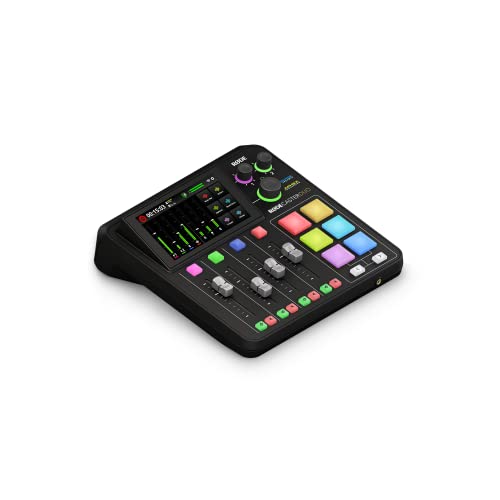
- Two Neutrik combo inputs with high-gain Revolution Preamps
- Touchscreen, faders, and six SMART pads
- APHEX processing plus USB and headset connectivity
Best For: Creators seeking a complete hands-on streaming studio
Best for Collaborative Streams
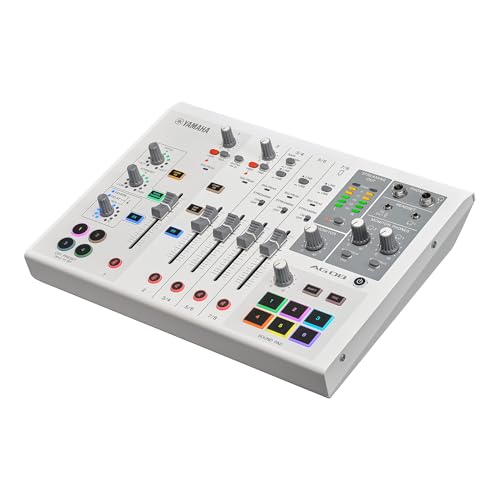
- Eight-channel USB-C streaming mixer
- Dual phantom-powered mic inputs and headphone outputs
- Assignable faders, DSP effects, and sound pads
Best For: Two-person streams and complex multi-source audio setups
Best Budget Gaming Mixer

- XLR input with built-in 48V phantom power
- Independent controls for four audio channels
- Mute, monitor, sound effects, and two-PC support
Best For: Beginner single-mic gaming and livestream setups
Versatile Podcast Hub

- Two XLR inputs with 60dB preamps
- Eight customizable sound-effect buttons
- Loopback and up to 8-hour battery
Best For: Portable podcasting and co-hosted live streams
Mobile Stereo Streamer

- Stereo RCA input for mixers and studio gear
- 24-bit audio with up to 96kHz sampling
- Direct monitoring and broad app compatibility
Best For: Mobile stereo streaming from external audio equipment
DSP-Controlled Mic Interface

- Up to 80dB gain for XLR microphones
- Onboard EQ, compression, and voice effects
- Wave Link routing with touch mute control
Best For: Desktop streamers using one XLR microphone
Two-Channel Creator Pick

- Two mic preamps and two Hi-Z inputs
- Auto Gain and Clip Safe level control
- 24-bit/192kHz audio with 120dB dynamic range
Best For: Two-input streaming and recording setups
Compact Budget Choice

- One XLR mic and one Hi-Z instrument input
- 24-bit/192kHz recording support
- Low-noise balanced outputs and Air mode
Best For: Solo creators with a simple input setup
Modern Solo Streaming Pick

- One XLR mic and one Hi-Z instrument input
- 120dB dynamic range with 24-bit/192kHz support
- Improved Air mode for vocals and guitars
Best For: Solo streaming with current-generation features
Premium All-in-One Pick – RØDECaster Duo
The RØDECaster Duo is a polished all-in-one option for creators who want audio-over-IP interfaces for live streaming without assembling a separate mixer, effects unit, and monitoring setup. It combines two Neutrik combo inputs, USB connectivity, physical faders, SMART pads, and built-in APHEX processing in a compact desktop studio.
Best For: Podcasters, musicians, and streamers who want hands-on control and integrated audio processing.
Pros:
- Two combo inputs include high-gain, low-noise Revolution Preamps and 48? phantom power is not specified in the supplied notes.
- Physical faders, touchscreen controls, and six SMART pads support practical live operation.
- Built-in APHEX effects, USB audio, and headset connectivity support recording and streaming workflows.
Cons:
- Only two microphone/instrument combo inputs are listed.
- At 2 kg, it is less travel-friendly than smaller interfaces.
The RØDECaster Duo is a strong choice when tactile control and integrated production features matter more than having a large number of inputs.
Best for Collaborative Streams – Yamaha AG08
The Yamaha AG08 is an eight-channel USB-C audio interface and live streaming mixer suited to audio-over-IP interfaces for live streaming setups with several sound sources. Its dual microphone inputs, assignable faders, DSP effects, sound pads, and independent headphone outputs make it especially useful for interviews, gaming, and collaborative broadcasts.
Best For: Two-person podcasts, livestreamers, and creators balancing microphones, game audio, music, and voice chat.
Pros:
- Two +48V phantom-powered XLR inputs support condenser microphones.
- Dual headphone outputs allow two people to monitor independently.
- Assignable faders, four FX buttons, six sound pads, and five DSP effects provide extensive live control.
- Dedicated Hi-Z input on channel 2 supports direct guitar or bass connection.
Cons:
- The 4.9-pound chassis is relatively substantial for a desktop streaming mixer.
- Its one-year warranty is limited to purchases from authorized Yamaha retailers in the specified U.S. coverage area.
Choose the AG08 if flexible routing and collaborative monitoring are central to your stream; it offers more dedicated live controls than a basic two-input interface.
Best Budget Gaming Mixer – FIFINE Ampligame SC3
The FIFINE Ampligame SC3 is a straightforward choice among audio-over-IP interfaces for live streaming, particularly for single-microphone gaming and content setups. It provides individual controls for microphone, line input, headphones, and line output, along with mute, monitoring, sound effects, and two-PC mixing support.
Best For: Beginner streamers who need simple physical controls for a microphone, game audio, and monitoring.
Pros:
- XLR input with built-in 48V phantom power supports compatible condenser microphones.
- Independent channel controls make it easy to balance mic, line, headphone, and line-out levels.
- Front mute and monitor buttons are convenient during live broadcasts.
- Four customizable sound-effect buttons, voice-changing modes, and RGB lighting add streamer-focused features.
Cons:
- It has one XLR microphone input and is designed around one-mic recording.
- USB microphones are not supported through the listed XLR input.
- An XLR cable is not included.
The SC3 is a practical entry-level mixer for gaming and streaming, but creators planning multi-microphone productions should consider an interface with more dedicated inputs.
Best for Hybrid Mobile Workflows – MAONO P2
The MAONO P2 is a flexible pick for creators comparing audio-over-IP interfaces for live streaming across computers and mobile devices. Its dual USB ports support simultaneous computer and phone or iPad connectivity, while dual XLR inputs, loopback, direct monitoring, and Stream Mode help combine vocals, instruments, and desktop audio.
Best For: Mobile creators, musicians, podcasters, and streamers who move between PC, phone, tablet, and camera workflows.
Pros:
- Dual USB ports support simultaneous computer and phone or iPad connections.
- Dual XLR inputs offer 24-bit/192kHz recording and support dynamic and condenser microphones.
- Loopback can combine voice, instrument, backing tracks, and desktop audio.
- Independent mute and headphone/monitor controls support flexible streaming and recording.
Cons:
- The supplied notes do not specify a built-in battery, so mobile use may still require external power.
- Advanced routing and VST features depend on the included ProStudio 2 software workflow.
The P2 stands out for connection flexibility: it is a sensible option when your live-streaming setup needs to bridge a computer and mobile device rather than remain PC-only.
Versatile Podcast Hub – MAONO E2 Gen2
The MAONO E2 Gen2 is a flexible choice for creators comparing audio-over-IP interfaces for live streaming. Its two XLR combo inputs, 60dB preamps, USB-C connectivity, loopback, and built-in battery make it suitable for portable podcasting, co-hosted shows, and computer-based streams.
Best For: Podcasters and streamers who want multiple inputs, customizable sound effects, and portable operation.
Pros:
- Two XLR combo inputs with up to 60dB of gain.
- Eight customizable sound-effect buttons, plus pitch and reverb options.
- USB-C, phone, AUX, Bluetooth, and loopback connectivity.
- Built-in 1500mA battery provides up to eight hours of use.
Cons:
- Its many podcast-focused controls may be more than a simple streaming setup requires.
- The supplied notes do not specify the full package contents beyond the listed interface and USB cable entry.
The E2 Gen2 stands out when hands-on control and portable features matter. It is especially appealing for two-person podcasts and creators who use effects or stream from more than one device.
Mobile Stereo Streamer – IK Multimedia iRig Stream
The IK Multimedia iRig Stream is a compact option for audio-over-IP interfaces for live streaming when your source is a mixer, keyboard, or other stereo device. Its RCA inputs, device compatibility, direct monitoring, and level indicator support straightforward recording and streaming from mobile or desktop hardware.
Best For: Mobile streamers and podcasters routing stereo audio from mixers or studio equipment into phones, tablets, or computers.
Pros:
- Stereo RCA inputs connect mixers, keyboards, and audio players.
- Supports 24-bit recording and sample rates up to 96kHz.
- Direct headphone monitoring helps avoid latency and echo.
- Works with iPhone, iPad, Android, Mac, PC, and apps such as Zoom and Instagram.
Cons:
- RCA connectivity is less suitable for directly connecting XLR microphones.
- It has two channels and fewer onboard controls than a podcast mixer.
Choose the iRig Stream for a small, focused stereo interface rather than an all-in-one vocal mixer. Its broad device and app compatibility makes it practical for mobile-first workflows.
DSP-Controlled Mic Interface – Elgato Wave XLR MK.2
The Elgato Wave XLR MK.2 is aimed at creators who want audio-over-IP interfaces for live streaming with strong microphone gain and software-based routing. Its 80dB gain, low-latency monitoring, onboard processing, touch controls, and Wave Link integration provide a streamlined single-mic streaming setup.
Best For: Desktop streamers using an XLR microphone who want software mixing and integrated voice processing.
Pros:
- Up to 80dB of gain for a wide range of XLR microphones.
- Built-in voice enhancer, compressor, EQ, and other DSP effects.
- Ultra-low-latency monitoring at 24-bit, 48kHz resolution.
- Wave Link provides routing, effects, and monitoring control.
Cons:
- It uses an XLR input and is less suited to stereo line-source routing.
- Wave Link requires Windows 11 or Apple Silicon Mac with the listed operating-system versions.
The Wave XLR MK.2 is a strong fit for a computer-centered streaming desk. Its single-microphone design and Wave Link dependence favor creators who value polished vocal processing over portable or multi-source operation.
Two-Channel Creator Pick – Scarlett 2i2 4th Gen
The Focusrite Scarlett 2i2 4th Gen is a practical choice for audio-over-IP interfaces for live streaming when you need two simultaneous inputs for a microphone, guitar, or other instrument. Its 24-bit/192kHz conversion, 120dB dynamic range, Auto Gain, and Clip Safe features support clean, controlled capture for streams, podcasts, and music production.
Best For: Creators who need two inputs and flexible mic-and-instrument recording.
Pros:
- Two mic preamps and two Hi-Z instrument inputs support varied recording setups.
- Auto Gain and Clip Safe help manage recording levels and reduce clipping concerns.
- Includes Air modes, 24-bit/192kHz operation, and a 120dB dynamic range.
- Comes with Pro Tools Intro+, Ableton Live Lite, Cubase LE, and Hitmaker Expansion.
Cons:
- USB connectivity requires a computer, tablet, or compatible host setup.
- Its two-input design may be limiting for larger multi-microphone streams.
For streamers who alternate between vocals, instruments, and two-person setups, the 2i2 offers more input flexibility than a single-channel interface while remaining compact. It is the strongest fit here when level control and expansion room matter.
Compact Budget Choice – Scarlett Solo 3rd Gen
The Focusrite Scarlett Solo 3rd Gen is a compact option for audio-over-IP interfaces for live streaming, especially when your setup centers on one microphone and one instrument. It records up to 24-bit/192kHz and provides low-noise balanced outputs for monitoring through headphones or studio monitors.
Best For: Solo streamers, musicians, and podcasters working with a simple mic-and-instrument setup.
Pros:
- Provides one XLR mic preamp and one Hi-Z instrument input.
- Supports recording and mixing up to 24-bit/192kHz.
- Switchable Air mode adds clarity to acoustic instruments.
- Includes recording software and a three-year warranty.
Cons:
- One mic preamp limits simultaneous microphone use.
- It is an older third-generation model compared with the supplied fourth-generation options.
The Solo 3rd Gen keeps a streaming desk straightforward and portable. Choose it when one vocal mic and one guitar or bass input cover your needs; users planning interviews or multiple microphones should consider a two-input model instead.
Modern Solo Streaming Pick – Scarlett Solo 4th Gen
The Focusrite Scarlett Solo 4th Gen suits audio-over-IP interfaces for live streaming when you want a compact, current-generation interface for one microphone and one instrument. Its 120dB dynamic range, 24-bit/192kHz support, and improved Air mode help provide detailed capture for vocals, guitars, and spoken content.
Best For: Solo creators who want current-generation audio performance in a small USB interface.
Pros:
- Combines one XLR mic preamp with one Hi-Z instrument input.
- Offers 120dB dynamic range and recording up to 24-bit/192kHz.
- Improved Air mode adds presence and harmonic drive to vocals and guitars.
- Includes Pro Tools Intro+, Ableton Live Lite, Cubase LE, and Hitmaker Expansion.
Cons:
- One XLR input is not intended for multi-microphone streaming.
- USB operation requires a compatible computer, tablet, or other host.
The Solo 4th Gen is a focused upgrade for streamers who value current-generation conversion and a compact footprint. Its single mic input keeps the workflow simple, while the dedicated instrument input accommodates a guitar or bass without adding another interface.
How We Picked the Best Audio-Over-IP Interfaces for Live Streaming
We focused on practical features that matter during real broadcasts: dependable USB connectivity, microphone preamp quality, input and output flexibility, headphone monitoring, physical controls, loopback or mix-minus options, and compatibility with computers, phones, and tablets. We also considered how easily each device can handle common setups such as a solo microphone, two-person podcast, gaming stream, musical performance, or hybrid call.
The selection includes dedicated audio interfaces, compact streaming mixers, and podcast-oriented production consoles. These products are not identical, so the best choice depends on whether you prioritize simple recording, hands-on live control, multiple XLR microphones, mobile streaming, or integrated effects.
Quick Comparison
| Best For | What to Look For |
|---|---|
| Solo streamers | One strong preamp, easy monitoring, compact controls |
| Two-person shows | Two XLR inputs, independent gain control, headphone outputs |
| Gaming and desktop streaming | Fast mute controls, loopback, chat and game-audio mixing |
| Mobile creators | Phone or tablet compatibility, adaptable power, low-latency monitoring |
| Advanced live production | Multiple channels, routing flexibility, effects, and scene or preset support |
Key Buying Factors for Audio-Over-IP Interfaces for Live Streaming
Inputs and Microphone Power
Count the microphones, instruments, and playback sources you expect to use at once. XLR inputs are important for dynamic and condenser microphones, while combo inputs add flexibility for line-level gear and instruments. If you use condenser microphones, confirm that the interface provides reliable 48V phantom power.
Routing, Loopback, and Mix-Minus
Live streaming often requires sending a blended signal to broadcasting software while monitoring audio privately. Loopback can bring computer audio into the stream, and mix-minus helps prevent callers from hearing their own delayed audio. These features can be more valuable than a higher recording sample rate.
Monitoring and Control
Look for a dedicated headphone output, direct or low-latency monitoring, clear meters, and physical mute or volume controls. Streamers who adjust levels during a broadcast may benefit from faders and onboard processing, while simple setups can stay cleaner with a few large knobs.
Compatibility and Connection Type
USB-C is convenient, but check whether the device works with your operating system, phone, tablet, and preferred streaming application. Mobile users should verify cable requirements and power behavior before buying. Driver support and software updates also matter for long-term reliability.
Who Should Buy Which Audio-Over-IP Interfaces for Live Streaming?
Choose a compact solo interface if you mainly need one microphone, clean monitoring, and straightforward computer streaming. A two-input model is the better fit for interviews, co-hosted shows, or occasional instrument recording. Podcast mixers and production consoles suit creators who want multiple sources, tactile faders, onboard effects, and faster adjustments without relying entirely on software.
Gaming streamers should prioritize loopback, chat mixing, quick mute controls, and convenient desktop access. Mobile creators should favor interfaces with explicit iPhone, iPad, or Android support and flexible power options. Before purchasing, map your complete signal path—from microphone and music source to headphones, computer, guests, and broadcast software—then select the simplest model that provides those connections and controls.