
If you’re looking to enhance your audio setup, the right network streamer can make a significant difference. In 2026, four standout models cater specifically to hi-fi enthusiasts. They offer exceptional sound quality and versatile features that can elevate your listening experience. But which one should you choose? Let’s explore what makes each of these streamers unique and how they can fit into your audio lifestyle.
Sonos Port – The Versatile Streaming Component for Your Stereo Or Receiver

If you’re looking to elevate your traditional stereo or receiver setup, the Sonos Port is the perfect streaming component for you. This versatile device connects through RCA to your existing audio equipment, allowing you to enjoy music, podcasts, and internet radio effortlessly. With support for both Ethernet and Wi-Fi, you can stream vinyl, CDs, and stored files to Sonos speakers in other rooms. Plus, you can control everything via the Sonos app or Apple AirPlay 2. Compact and lightweight, it fits neatly into your setup while delivering impressive sound quality. Experience audio like never before with the Sonos Port!
Best For: Audiophiles and music enthusiasts looking to integrate streaming capabilities into their traditional stereo or receiver setups.
Pros:
- Versatile Connectivity: Connects easily to existing audio equipment via RCA and supports both Ethernet and Wi-Fi.
- Multi-Room Streaming: Allows you to stream music and audio files to Sonos speakers in different rooms for a seamless listening experience.
- User-Friendly Control: Easily controlled through the Sonos app or Apple AirPlay 2, making it convenient to manage your audio preferences.
Cons:
- Limited Video Support: While it supports EARC and 1080p video output, its primary focus is on audio streaming rather than video capabilities.
- Compact Size: May not fit larger setups or may require additional accessories for optimal use with certain equipment.
- Price Point: Compared to other streaming devices, it may be considered more expensive for those on a budget.
Denon HEOS Link Wireless Pre-Amplifier for Multi-Room Audio
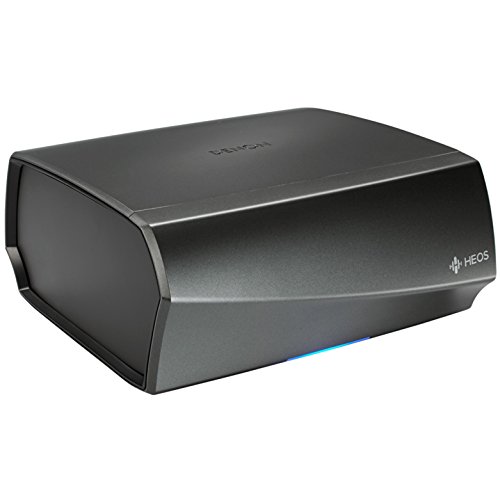
The Denon HEOS Link Wireless Pre-Amplifier is an ideal choice for multi-room audio enthusiasts looking to elevate their home sound experience. With built-in WiFi and Bluetooth, you can easily turn any stereo system into a HEOS wireless zone, allowing music playback from anywhere in your home. Enjoy seamless audio synchronization across multiple rooms using HEOS technology, ensuring no delays. The extensive back panel connections provide versatility, supporting various inputs and a USB port for high-resolution music files. Plus, with the HEOS app, you can stream from popular services like Spotify and Tidal, making your listening experience truly limitless.
Best For: Music enthusiasts looking to create a seamless multi-room audio experience with high-quality sound and streaming capabilities.
Pros:
- Versatile Connectivity: Offers a wide range of input options including analog, digital, USB, and optical for various audio sources.
- Seamless Streaming: Compatible with popular streaming services and easily controlled via the HEOS app on mobile devices.
- Audio Synchronization: HEOS technology ensures precise audio synchronization, allowing for simultaneous playback in multiple rooms without delays.
Cons:
- Requires Existing Stereo System: This device is a pre-amplifier, meaning users must already have a stereo system to utilize its features.
- Limited Color Options: Available only in black with silver, which may not match all home decor styles.
- No Built-in Speakers: As a pre-amplifier, it does not include built-in speakers, necessitating additional equipment for a complete audio setup.
YAMAHA WXC-50 MusicCast Wireless Streaming Preamplifier (Dark Silver)

For audiophiles seeking a seamless integration of wireless streaming capabilities into their existing hi-fi setups, the YAMAHA WXC-50 MusicCast Wireless Streaming Preamplifier stands out with its versatile connectivity options. You’ll appreciate its Wi-Fi, Bluetooth, and AirPlay compatibility, allowing for easy streaming from services like Spotify and Tidal. Weighing just 3.2 pounds and featuring a sleek dark silver design, it fits effortlessly into any setup. With a low total harmonic distortion of 0.003%, you can expect pristine audio quality. Plus, its voice control compatibility with Alexa adds a modern touch to your listening experience.
Best For: Audiophiles looking to enhance their hi-fi setups with wireless streaming capabilities and modern voice control features.
Pros:
- Versatile connectivity options including Wi-Fi, Bluetooth, and AirPlay for easy streaming from various services.
- Low total harmonic distortion of 0.003% ensures high-quality audio performance.
- Voice control compatibility with Alexa adds convenience and modern functionality to your listening experience.
Cons:
- No built-in speaker; requires external speakers or a compatible audio system for playback.
- Best Sellers Rank indicates it may not be as popular as other preamplifiers in the market.
- Limited output power of 1.92 Watts may not suit larger audio setups requiring more power.
YAMAHA WXA-50 MusicCast Wireless Streaming Amplifier

When you want to elevate your audio experience without compromising on space, the Yamaha WXA-50 MusicCast Wireless Streaming Amplifier stands out as an ideal choice. This compact device connects to your speakers, delivering powerful audio through Wi-Fi, AirPlay, Bluetooth, and Spotify Connect. With a solid metal body and sleek design, it fits perfectly in any setup. You can easily control your music library and adjust EQ settings via the MusicCast app. Plus, it’s compatible with smart home devices and voice control. With an average rating of 4.2 stars, it’s a reliable option for any hi-fi enthusiast.
Best For: Those seeking a compact, high-quality audio amplifier that integrates seamlessly with smart home devices and offers versatile streaming options.
Pros:
- Versatile Connectivity: Supports Wi-Fi, AirPlay, Bluetooth, and Spotify Connect for diverse streaming options.
- Compact Design: Slim and stylish, making it suitable for various spaces and placements.
- Easy Control: User-friendly MusicCast app allows for convenient music library access and EQ adjustments.
Cons:
- Limited Power Output: May not be suitable for very large rooms or demanding speaker setups.
- Requires Additional Devices for Voice Control: Smart home compatibility requires a separate Alexa device for voice operation.
- Average Customer Ratings: While decent, the average rating of 4.2 stars may not meet the expectations of audiophiles seeking top-tier products.
Factors to Consider When Choosing an Audiolab Network Streamer for Hi Fi
When picking an Audiolab network streamer for your Hi-Fi setup, consider several key factors. You’ll want to focus on audio quality performance, connectivity options, and compatibility with your existing devices. Plus, think about the streaming services you plan to use and how easy the controls are to navigate.
Audio Quality Performance
Choosing the right Audiolab network streamer can greatly impact your listening experience, especially for Hi-Fi enthusiasts. First, look for a low total harmonic distortion (THD) rating; values below 0.01% typically mean cleaner audio output with less noise. Next, consider the signal-to-noise ratio (SNR); higher values, like 110 dB or more, indicate better audio clarity and reduced background noise. Verify your streamer supports high-resolution audio formats, such as 24-bit/192kHz, to make the most of your high-quality files. Advanced audio encoding support, like FLAC or DSD, can further enhance playback quality. Finally, evaluate the multi-room audio technology, as precise synchronization prevents delays and guarantees consistent sound across different spaces, enriching your overall listening experience.
Connectivity Options Available
Connectivity options play an essential role in maximizing your Audiolab network streamer’s potential. Look for streamers that support multiple options like Wi-Fi, Ethernet, and Bluetooth, ensuring seamless integration with your audio setup. It’s vital to choose devices with both analog (RCA) and digital (optical, coaxial) inputs, accommodating various audio sources while enhancing compatibility with different equipment. Make sure the streamer supports popular streaming protocols like AirPlay and Chromecast for easy streaming from your smartphone or tablet. Additionally, check for USB ports that handle high-resolution music files directly from external drives. Finally, consider multi-room audio capabilities, allowing you to synchronize and control multiple speakers throughout your home for an immersive listening experience.
Compatibility With Devices
While evaluating an Audiolab network streamer, it’s crucial to guarantee compatibility with a range of audio sources to enhance your Hi-Fi setup. Look for a device that seamlessly integrates with vinyl, CDs, and stored audio files, maximizing its usability. Check for various connectivity options like Wi-Fi, Ethernet, Bluetooth, and AirPlay, confirming it fits into your existing network smoothly. Voice control compatibility with smart assistants like Amazon Alexa or Google Assistant is a great feature for hands-free operation. Additionally, consider the supported audio formats and resolutions; aim for high-resolution audio files up to 24-bit/192kHz for ideal sound quality. By focusing on these factors, you’ll make sure your network streamer elevates your listening experience.
Streaming Service Support
Selecting the right streaming service support is vital for maximizing your Audiolab network streamer’s potential in a Hi-Fi setup. Make certain it supports popular services like Spotify, Tidal, Pandora, and Apple Music to enjoy versatile listening options. Additionally, check for access to internet radio and podcasts, which can enhance your audio experience beyond just music. It’s essential to guarantee compatibility with high-resolution audio streaming, allowing you to play lossless formats for superior sound quality. Look for multi-room audio capabilities so you can synchronize playback across different rooms effortlessly. Finally, evaluate whether a dedicated app exists for controlling the streaming services, as this can markedly improve your navigation and playback management experience.
Control and Usability
When choosing an Audiolab network streamer, control and usability are just as important as streaming service support. Look for streamers that offer dedicated apps for both iOS and Android; this guarantees you can manage music playback and access your library easily. Consider devices that support voice control compatibility, allowing for hands-free operation within your smart home setup. Multiple connectivity options like Wi-Fi, Ethernet, and Bluetooth enhance flexibility in connecting to various audio sources. Built-in support for popular streaming services simplifies access without needing additional devices. Finally, a user-friendly interface with intuitive navigation can greatly improve your overall experience, making it effortless to adjust settings and enjoy your music.
Design and Build Quality
Design and build quality play a significant role in your choice of an Audiolab network streamer. Look for solid construction featuring durable materials like metal and aluminum, which not only enhance aesthetics but also guarantee longevity. Compact dimensions are critical for seamless integration into your audio setup, allowing for flexible placement without taking up too much space. A high signal-to-noise ratio is essential for delivering superior audio performance, minimizing interference and assuring clarity. User-friendly controls and ample connectivity options enhance your experience, making it easier to navigate audio sources. Finally, consider energy efficiency; a streamer with low standby power consumption is beneficial for your wallet and the environment, offering long-term savings.
Warranty and Support
Warranty and support are essential factors in ensuring your investment in an Audiolab network streamer is protected and worthwhile. Start by reviewing the warranty period; a longer warranty often reflects the manufacturer’s confidence in the product’s durability and performance. Check the availability of customer support—make sure you can easily reach them via phone, email, or chat. Pay attention to what the warranty covers, including parts and labor, and note any exclusions or conditions. A generous return policy can offer peace of mind, letting you test the product before fully committing. Finally, look for easily accessible warranty information, like downloadable PDFs or online resources, to better understand the terms and conditions that apply to your purchase.
Price and Value Analysis
While evaluating the price and value of an Audiolab network streamer, you should focus on how the features align with your audio needs. Compare connectivity options like Wi-Fi, Bluetooth, and Ethernet to guarantee compatibility with your existing equipment; this can save you costs on adapters or new devices. Don’t overlook the importance of warranty and support; a longer warranty often indicates the manufacturer’s confidence in durability. Customer reviews and ratings offer valuable insights into real-world performance, helping you assess whether the price reflects true value. Additionally, consider extra features such as multi-room audio capability and streaming service support, as these can enhance functionality and overall value without considerably increasing the price.