
Need to route multiple HDMI sources to multiple displays without constant cable swapping? A matrix switch gives you flexible control, cleaner installs, and fewer headaches.
This roundup focuses on practical options for home theaters, conference rooms, and AV racks, with attention to 4K support, audio features, and control methods.
Best 10 Av Access Hdmi Matrix Switch Picks for 2026
Best for 4K Signal Flexibility
AV Access 4x2 4K60 HDMI Matrix
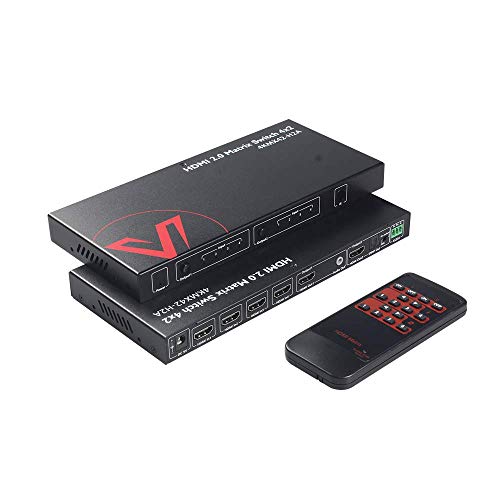
- Routes 4 inputs to 2 outputs independently
- 4K@60Hz 4:4:4 with HDR10, HLG, and Dolby Vision
- ARC, SPDIF, 3.5mm audio, and per-output downscaling
Best For: Home theater and AV setups that need flexible 4K source routing with strong audio options.
Best for Large-Scale Matrix Switching
ICUIXIAN 16x32 HDMI Matrix Switch

- 16 inputs and 32 outputs for large AV routing
- Web GUI, LAN, RS-232, IR, and button control
- EDID scenes and rack-mount design for installs
Best For: Commercial AV installations that need flexible multi-source, multi-display switching.
Best for Simple AV Over IP Control
AV Access 4K HDMI Extender & Decoder

- Plug-and-play AV over IP operation
- 4K transmission up to 395 ft (120 m)
- Supports matrix-style routing and video walls
Best For: Installers and users needing easy long-distance HDMI distribution with AV over IP control.
Best for 4K Audio Extraction

- 4-in-2-out matrix switching for two displays
- 4K@60Hz, HDMI 2.0, and HDCP 2.2 support
- Optical and 3.5mm audio outputs built in
Best For: Users who want flexible HDMI routing with easy audio extraction in a home or office setup.
Best for Rack-Mounted Control
8x8 HDMI Matrix Switch 4K@30Hz

- 8x8 routing for multi-source, multi-display setups
- EDID, RS-232, WebGUI, and IR control options
- 4K-to-1080p downscaling for mixed displays
Best For: Installers and AV buyers who want a rack-friendly matrix with flexible control.
Best for Pro Routing
AV Access 4x4 HDMI Matrix Switch

- 4x4 routing for four sources and four displays
- 4K@60Hz 4:4:4 with HDR and Dolby Vision
- Web UI, RS232, IR, and API control options
Best For: Installers and advanced AV setups needing flexible multi-display switching.
Best for 8K Gaming
OREI 4x2 HDMI Matrix Switch 8K
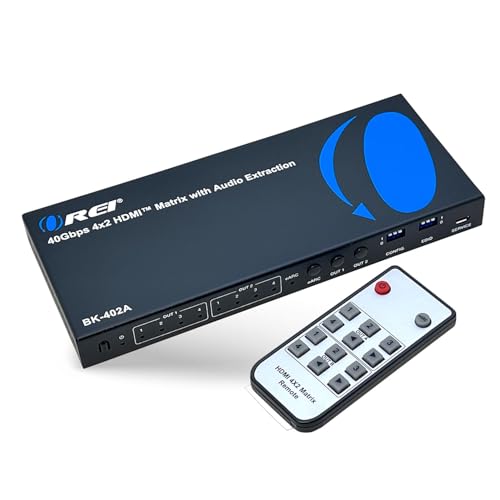
- 4-in/2-out matrix routing for dual-display setups
- HDMI 2.1 with 8K@60 and 4K@120 support
- eARC, optical, and 3.5mm audio extraction
Best For: Gamers and home theater users who need a high-bandwidth 4x2 HDMI matrix with advanced audio features.
Best for 4K Digital Signage
Tripp Lite 4x4 HDMI Matrix Switch

- Routes 4 sources to 4 displays
- 4K 60Hz HDR with 4:4:4 color
- Multiple control options plus scene memory
Best For: Teams and homeowners who need flexible 4K source-to-display routing across multiple screens.
Best for Mixed-Resolution AV

- 4x4 routing with independent or mirrored outputs
- Downscales 4K to 1080p for mixed displays
- Supports 4K@60Hz, HDR, HDCP 2.2, and 7.1 audio
Best For: Installations that need flexible 4-in/4-out switching across both 4K and 1080p displays.
Best for 4K Signal Flexibility – AV Access 4×2 4K60 HDMI Matrix
If you need an av access hdmi matrix switch that can route multiple 4K sources to two displays without compromising on format support, this 4×2 model is built for the job. It handles 4K@60Hz 4:4:4 HDR, supports independent output scaling, and adds useful audio options for home theaters, conference rooms, and mixed-display setups.
Best For: Users who want a flexible 4-source, 2-display HDMI matrix with 4K60 pass-through, downscaling, and ARC/audio extraction.
Pros:
- Routes any of 4 inputs to either or both outputs with different or matching signals
- Supports 4K@60Hz 4:4:4, HDR10, HLG, Dolby Vision, and 18Gbps bandwidth
- Includes ARC, SPDIF, 3.5mm audio extraction, plus downscaling on each output
- Offers IR, button, RS-232, and documented API control options
Cons:
- ARC and some audio features depend on compatible TV and receiver hardware
- More advanced than basic splitters, so casual users may not need the extra controls
Overall, this av access hdmi matrix switch stands out for buyers who need both serious video compatibility and practical audio management in a single rack-friendly unit. It is especially useful when one display needs 4K while the other needs 1080p, or when you want clean integration with a soundbar or AVR.
Best for Large-Scale Matrix Switching – ICUIXIAN 16×32 HDMI Matrix Switch
If you need an av access hdmi matrix switch for routing many sources to many displays, this ICUIXIAN 16×32 model is built for high-channel installations. It supports 16 HDMI inputs and 32 outputs, plus web, LAN, RS-232, IR, and front-panel control for flexible day-to-day operation.
Best For: Commercial AV setups, conference rooms, control spaces, and other projects that need lots of source-to-screen combinations.
Pros:
- Massive 16-in/32-out matrix capacity for complex routing jobs
- Multiple control options including Web GUI, LAN, RS-232, IR, and buttons
- EDID management and scene recall help simplify setup and switching
- Rack-mount design fits installed AV systems well
Cons:
- 4K is limited to 30Hz, which may not suit fast-motion or gaming use
- Overkill for simple home theater or a small number of displays
- Setup is more involved than a basic switcher
This is a strong choice if you need a high-capacity av access hdmi matrix switch with broad control and management features. It’s better suited to installed AV environments than casual plug-and-play use.
Best for Simple AV Over IP Control – AV Access 4K HDMI Extender & Decoder
If you want an av access hdmi matrix switch style setup without a lot of configuration work, this AV Access unit is built for straightforward HDMI distribution over IP. It supports 4K transmission up to 395 ft (120 m), visual control, PoE, RS-232, and video wall use up to 8×8, making it a practical fit for multi-screen AV routing.
Best For: Installers and users who need a plug-and-play AV over IP decoder for simple matrix-style HDMI distribution, video walls, or long-distance signal runs.
Pros:
- Plug-and-play design reduces setup time
- Supports 4K video transmission over long distances
- Useful features for matrix switching, visual control, and video walls
- PoE and RS-232 add flexibility for installations
Cons:
- Requires AV over IP infrastructure for full use
- Not a traditional standalone HDMI matrix switch
- Feature set may be more than casual home users need
For buyers comparing an av access hdmi matrix switch alternative, this model stands out when you need long-range distribution and easy control rather than a basic direct-connect switch. It is especially appealing for commercial or custom AV setups where flexibility matters more than simplicity alone.
Best for 4K Audio Extraction – 4×2 HDMI Matrix Switch
If you need an av access hdmi matrix switch that can route four HDMI sources to two displays while also pulling audio out separately, this 4×2 matrix is built for that job. It supports 4K@60Hz, HDMI 2.0, HDCP 2.2, IR remote control, and both optical and 3.5mm audio output, making it a practical fit for mixed display and audio setups.
Best For: Home theater, classrooms, conference rooms, or any setup that needs flexible 4-in-2-out switching plus audio extraction.
Pros:
- Routes 4 HDMI sources to 2 displays with matrix-style switching.
- Supports 4K@60Hz, HDMI 2.0, and HDCP 2.2 for modern devices.
- Includes optical and 3.5mm outputs for separate audio extraction.
- IR remote and manual buttons make source switching straightforward.
Cons:
- Mirror-only output; it does not support extended desktop mode.
- Auto downscaling is limited to 4K-to-1080p scenarios.
- Batteries for the remote are not included.
For buyers comparing an av access hdmi matrix switch against simpler splitters, this model stands out for its useful audio output options and broad compatibility. It’s a solid choice when you want one box to handle source switching and audio management without overcomplicating the setup.
Best for Rack-Mounted Control – 8×8 HDMI Matrix Switch 4K@30Hz
If you need a practical av access hdmi matrix switch for routing multiple sources to multiple displays, this 8×8 model covers the core pro AV basics: 4K@30Hz support, EDID handling, HDCP 2.2, and flexible control options. It is a solid fit when you want simple source-to-screen switching with the ability to manage mixed display setups.
Best For: Installers, conference rooms, and home theater setups that need dependable 8×8 routing with rack-friendly control.
Pros:
- 8×8 matrix layout supports multiple sources and displays at the same time
- EDID, RS-232, WebGUI, and IR give you several control and setup options
- Downscaling to 1080p helps mixed-resolution displays work together
- Dolby Atmos and DTS:X passthrough adds value for AV-focused installs
Cons:
- 4K tops out at 30Hz, so it is not ideal for fast-motion gaming
- 8×8 capability may be more than casual users need
- Best results depend on proper EDID and system configuration
This av access hdmi matrix switch is strongest in structured AV environments where reliability, control flexibility, and compatibility matter more than flashy extras. If you want a rack-mountable matrix with broad signal-management features, it is an easy one to shortlist.
Best for Pro Routing – AV Access 4×4 HDMI Matrix Switch
If you need to send multiple source devices to multiple displays with solid 4K support, the av access hdmi matrix switch is built for more advanced home theater and AV setups. It combines 4×4 routing, 4K@60Hz 4:4:4, HDR, Dolby Vision, and control options like web UI, RS232, IR, and API access for flexible installation.
Best For: Installers, AV enthusiasts, and multi-display setups that need reliable matrix switching with audio extraction and downscaling.
Pros:
- 4×4 matrix routing lets you connect four sources to four displays with flexible switching.
- Supports 4K@60Hz 4:4:4, HDR, and Dolby Vision for high-quality video output.
- Includes audio extraction, downscaling, and multiple control methods for custom setups.
- Power-off memory helps preserve your last-used configuration after shutdown.
Cons:
- More features than casual users typically need.
- Setup may be overkill for simple one-source, one-display use cases.
This av access hdmi matrix switch stands out when you need serious routing flexibility and installer-friendly control, not just basic HDMI switching. If your setup involves multiple rooms, mixed display types, or remote management, it offers a capable feature set for the price.
Best for 8K Gaming – OREI 4×2 HDMI Matrix Switch 8K
If you need an av access hdmi matrix switch that can route multiple 8K sources to two displays without giving up HDMI 2.1 features, this OREI 4×2 model is a strong fit. It combines high bandwidth, VRR/ALLM support, and flexible audio extraction, making it practical for both home theater and gaming setups.
Best For: Users who want a feature-rich 4×2 HDMI matrix for 8K gaming, dual-display routing, and integrated audio management.
Pros:
- 4-in/2-out matrix routing for independent source-to-display control
- HDMI 2.1 with up to 8K@60 and 4K@120 support plus VRR, ALLM, and FVA
- eARC, optical, and 3.5mm audio extraction for flexible sound system integration
- EDID and downscale support help improve compatibility across mixed displays
Cons:
- eARC only works when both the TV and soundbar support eARC
- More advanced than basic splitters, so setup may take extra time
- Overkill for simple single-source, single-TV installations
For buyers comparing an av access hdmi matrix switch, this OREI stands out when you need modern gaming specs, audio flexibility, and true matrix routing in one box.
Best for 4K Digital Signage – Tripp Lite 4×4 HDMI Matrix Switch
Tripp Lite 4x4 HDMI Matrix Switch/Splitter w Audio Extractor 4K 60Hz HDR (B302-4HX4H-4K)
Check Price On AmazonIf you need an av access hdmi matrix switch for routing multiple sources to multiple screens, this Tripp Lite 4×4 model is built for the job. It gives you four HDMI inputs and four outputs, plus flexible control options for switching the same signal everywhere or different sources to each display.
Best For: Home theaters, showrooms, classrooms, restaurants, and other setups that need dependable 4K routing across several displays.
Pros:
- 4×4 matrix design handles up to four sources and four displays
- Supports 4K 60Hz, HDR, HDCP 2.2, and 4:4:4 color
- Multiple control methods, including front panel, IR, RS-232, GUI, and network access
- Audio extractor and scene memory add flexibility for custom installs
Cons:
- More features than a simple plug-and-play splitter
- RS-232 cable is sold separately
- Best suited to fixed installations rather than portable use
Overall, this is a strong choice if you want an av access hdmi matrix switch alternative with serious installation flexibility and true 4K performance. It makes the most sense when you need to manage several screens from several sources without sacrificing picture quality or control.
Best for 4K Signal Splitting – OREI 2×2 HDMI Matrix Switch 4K/60Hz
If you need a flexible av access hdmi matrix switch for routing two HDMI sources to two displays, the OREI 2×2 is a practical pick. It supports 4K at 60Hz, HDR, HDCP 2.2, and audio extraction, making it a solid fit for home theaters or small AV setups where you want source sharing plus separate audio output.
Best For: Users who need a compact 2×2 matrix with 4K/60Hz pass-through, IR control, and both optical and analog audio extraction.
Pros:
- 4K@60Hz, 18Gbps, HDR, and HDCP 2.2 support for modern AV gear
- Audio extraction with optical and analog PCM 2.0 output
- IR remote and smart EDID management make switching easier
- Dual-voltage power supply adds convenience for international use
Cons:
- Not intended to extend PC monitors
- Limited to a 2-in, 2-out layout
- Audio output support is more limited than full multichannel pass-through on some outputs
As an av access hdmi matrix switch alternative, this OREI model stands out for straightforward routing, solid 4K compatibility, and useful de-embedded audio without adding much setup complexity.
Best for Mixed-Resolution AV – OREI 4×4 HDMI Matrix Switch
If you need an av access hdmi matrix switch for multiple sources and mixed-resolution displays, the OREI 4×4 is built for flexible routing. It lets you send four HDMI inputs to four outputs, mirror or split content independently, and downscale 4K to 1080p for displays that can’t handle full Ultra HD.
Best For: Home theaters, conference rooms, and AV setups that need one matrix to feed both 4K and 1080p screens.
Pros:
- 4×4 matrix routing with independent or mirrored output control
- Downscaling support makes mixed-display installations easier
- 4K@60Hz, HDR, HDCP 2.2, and HDMI 2.0a support
- Up to 7.1-channel audio with Dolby Digital and DTS-HD Master Audio
Cons:
- More capability than casual single-screen users typically need
- Setup can be overkill if you only want simple source switching
This is a strong pick if you want an av access hdmi matrix switch that can handle a real-world mix of displays without forcing every screen to match the same resolution. The downscale feature and broad format support make it especially practical for AV environments where compatibility matters more than basic switching.
How We Picked the Best Av Access Hdmi Matrix Switch
We selected models based on real-world usefulness: input/output count, video resolution, HDR support, audio extraction, downscaling, control options, and compatibility with modern sources and displays. For an Av Access Hdmi Matrix Switch, stability and clean switching matter as much as raw specs, so we prioritized units that support dependable operation with current 4K gear.
Quick Comparison
Smaller 2×2 and 4×2 units are best for simple source-sharing setups, while 4×4 and 8×8 models fit more advanced AV systems. If you need a large commercial installation, higher-port rackmount options make more sense. For mixed-display environments, look for scaling and downconversion so older screens can still work alongside 4K panels.
Key Buying Factors for an Av Access Hdmi Matrix Switch
Input and Output Count
Match the matrix size to your current needs plus some headroom. A 4×2 or 4×4 setup is usually enough for a living room, office, or small meeting space. Larger systems benefit from 8×8 or higher.
Resolution and HDR Support
Check whether the switch supports 4K at 60Hz, 4:4:4 chroma, HDR, and HDCP 2.2 if you use game consoles, streaming devices, or UHD players. These details affect both picture quality and compatibility.
Audio Features
Many buyers need more than video routing. Look for ARC, eARC, optical, SPDIF, or analog audio extraction if you plan to send sound to a soundbar, AVR, or separate zone.
Control and Integration
IR remotes are fine for simple use, but RS-232, LAN, and Web GUI control are better for rack systems, custom installs, and remote management. If you are building a more advanced Av Access Hdmi Matrix Switch setup, integration support can save time later.
Scaling and EDID Handling
Downscaling helps when displays have different capabilities. EDID management reduces handshake issues and black screens, especially in mixed-brand systems.
Who Should Buy Which Av Access Hdmi Matrix Switch?
If you want a simple home setup, choose a compact 2×2 or 4×2 model. For family rooms or content-sharing between several displays, a 4×4 gives more flexibility. Small businesses and conference rooms should lean toward matrixes with LAN, RS-232, and Web GUI control. Larger AV installations or multi-zone deployments are better served by 8×8 and rackmount options.
In short, choose the smallest matrix that meets your needs, then prioritize 4K compatibility, audio extraction, and the control options you will actually use.