
Choosing among beginner-friendly digital mixing consoles can be challenging when channel counts, wireless features, effects, and recording connections vary widely. The right console should make everyday setup easier without limiting future projects.
This roundup compares 10 selected mixers across compact home setups, streaming rigs, rehearsal spaces, and small live performances, with practical buying advice to help you narrow the field.
Best 10 Beginner-Friendly Digital Mixing Consoles Picks for 2026
Best Balanced Pick

- 10 channels with USB and SPX effects
- One-knob compression is beginner-friendly
- Rugged chassis with EQ and high-pass filters
Best For: Small recording, rehearsal, and live setups
Best Hands-On Digital Upgrade

- Seven-inch display with touch faders
- Built-in EQ, compression, and 16 FX presets
- Bluetooth, USB, app control, and scene recall
Best For: Live sound, rehearsals, and small venues
Best Assistive Feature Set
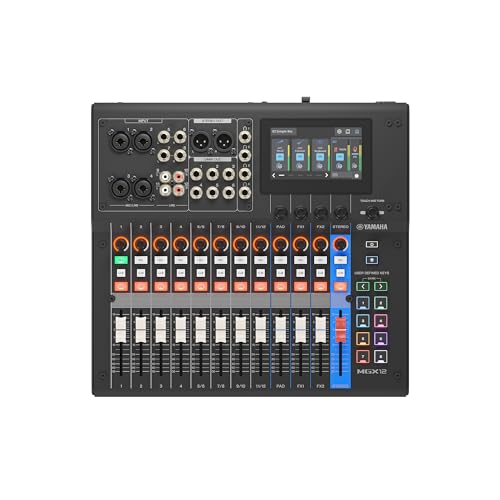
- Touchscreen, tactile faders, and Simple mode
- Auto Gain, Clip Safe, and scene recall
- Dual USB-C, Bluetooth, and bundled software
Best For: Guided digital mixing and computer-based production
Best Compact Budget-Style Option

- Six channels with 16 DSP effects
- 48V phantom power for condenser microphones
- Lightweight design with RCA stereo input
Best For: Home parties, karaoke, and small DJ events
Best Overall for Guided Mixing

- Touchscreen, tactile faders, and assistive mixing modes
- 18 channels with Bluetooth, microSD, and dual USB-C
- DSP, latency-free monitoring, and 4K USB-HDMI interface
Best For: Beginners seeking a capable console for recording, live sound, and growth
Best for Karaoke and Events
FULUODE CT-80S 8-Channel Mixer

- Eight channels with 48V phantom power
- Bluetooth, MP3/USB playback, and USB recording
- Reverb, LED display, and slim 1.57-inch design
Best For: Home KTV, small performances, campus activities, and conferences
Best Compact Starter

- USB-B recording and USB-A playback support
- Three XLR inputs with switchable 48V phantom power
- Headphone monitoring, Bluetooth, EQ, echo, and delay
Best For: Compact podcast, livestream, recording, and small-band setups
Feature-Rich Pick

- 16 channels with independent gain, EQ, faders, and mute controls
- Bluetooth, USB, and U-disk playback options
- 99 DSP effects and switchable 48V phantom power
Best For: Beginners planning larger or expandable live, karaoke, or studio setups
Beginner Streaming Pick

- Eight channels with XLR and 1/4-inch input support
- USB, Bluetooth, and flash-drive playback or recording
- Per-channel EQ, gain, effects, faders, and headphone monitoring
Best For: Streaming, podcasting, karaoke, meetings, and small live shows
Portable Playback Pick

- 3-band EQ for independent tonal adjustments
- Bluetooth, USB, MP3 playback, and onboard recording
- 48V phantom power with balanced line inputs
Best For: Karaoke, parties, podcasts, and small performances using wireless playback
Best Balanced Pick – Yamaha MG10XU
The Yamaha MG10XU is a practical choice for shoppers seeking beginner-friendly digital mixing consoles with familiar hands-on controls. Its 10-channel layout, USB connectivity, one-knob compressors, three-band EQ, high-pass filters, and built-in SPX effects provide useful control without requiring a large setup.
Best For: Beginners recording, rehearsing, or running small live setups who want straightforward controls and built-in effects.
Pros:
- USB connectivity and onboard SPX digital effects
- One-knob compressors simplify control of vocals and instruments
- Three-band EQ and high-pass filters help clean up mixes
- Rugged powder-coated metal chassis
Cons:
- Limited to 10 channels
- Uses a corded-electric power source
- No Bluetooth connectivity is listed
The MG10XU is a sensible starting point when you value clear physical controls, durable construction, and simple USB recording over advanced touchscreen operation.
Best Hands-On Digital Upgrade – Alto TMD16
The Alto TMD16 is designed for users who want beginner-friendly digital mixing consoles with substantial hands-on control. Its 100mm touch faders, dedicated encoders, seven-inch color display, onboard processing, Bluetooth, USB, and scene recall make it approachable for live sound without requiring a tablet.
Best For: Small venues, rehearsal spaces, houses of worship, and mobile live-sound setups needing flexible digital control.
Pros:
- Seven-inch display and tactile touch faders reduce menu diving
- Built-in parametric EQ, compression, and 16-preset FX engine
- USB recording, Bluetooth connectivity, and app control
- Four aux sends and four subgroups support flexible routing
Cons:
- More features may take longer for absolute beginners to learn
- Its 16-channel format is larger than needed for very small setups
- Requires corded-electric power
With a display and physical faders working together, the TMD16 offers a helpful bridge from analog mixers to digital workflows while leaving room to expand.
Best Assistive Feature Set – Yamaha MGX12
The Yamaha MGX12 combines physical faders with a 4.3-inch touchscreen and assistive tools aimed at simplifying digital mixing. Auto Gain, Clip Safe, Simple and Standard modes, scene recall, Bluetooth, dual USB-C audio interfacing, and included software make it a capable option for beginners building a more advanced audio setup.
Best For: Beginners who want guided mixing features, computer connectivity, and room to grow into streaming or production workflows.
Pros:
- Simple and Standard modes support different experience levels
- Auto Gain and Clip Safe can help manage input levels
- Dual USB-C audio interface and Bluetooth audio input
- Includes Cubase AI, WaveLab Cast LE, and other software
Cons:
- Its feature set may be more than a basic mixer setup requires
- Heavier than the other compact options listed at 14.7 pounds
- The supplied details do not specify the included software’s update status
The MGX12 is a strong choice if ease-of-use aids matter as much as channel capacity, particularly for users who also want USB-C production and streaming-related connectivity.
Best Compact Budget-Style Option – 6-Channel Stereo Mixer
This six-channel stereo mixer is a straightforward entry point for shoppers comparing beginner-friendly digital mixing consoles for home use, karaoke, DJ events, or small gatherings. It offers four mic/line inputs, stereo RCA connectivity, 16 DSP effects, three-band EQ, and 48V phantom power in a compact three-pound design.
Best For: Home parties, karaoke, small DJ events, and users who want simple analog-style controls with digital effects.
Pros:
- Compact and lightweight at three pounds
- Sixteen DSP effects add flexible sound-shaping options
- 48V phantom power supports condenser microphones
- RCA stereo input works with audio players, iPads, and TVs
Cons:
- No USB connectivity
- Only six channels are available
- Its feature set is more limited for computer-based recording
This mixer keeps the learning curve manageable and the footprint small, making it suitable when physical controls, basic effects, and stereo consumer-device inputs are more important than advanced digital routing.
Best Overall for Guided Mixing – Yamaha MGX12
For beginners who want room to grow, the Yamaha MGX12 is a strong choice among beginner-friendly digital mixing consoles. Its touchscreen, tactile faders, assistive modes, and broad connectivity make common setup and mixing tasks easier to manage.
Best For: Beginners seeking a capable console for recording, live sound, and more advanced workflows.
Pros:
- 4.3-inch touchscreen and five control knobs provide hands-on control.
- Simple/Standard Mode, Auto Gain, Clip Safe, and Scene Recall can simplify operation.
- Offers 18 channels, Bluetooth, microSD, dual USB-C, and versatile I/O.
- Built-in DSP supports professional sound and latency-free monitoring.
Cons:
- Its larger feature set may take longer for a complete beginner to learn.
- The corded design is less convenient for highly mobile setups.
The MGX12 stands out when you want beginner assistance without quickly outgrowing the console. Its software bundle and USB-HDMI interface with 4K capture and pass-through add value for computer-based and video-related work.
Best for Karaoke and Events – FULUODE CT-80S 8-Channel Mixer
The FULUODE CT-80S is a straightforward option among beginner-friendly digital mixing consoles for karaoke, small performances, and community events. Bluetooth, USB playback, reverb, and phantom power cover many everyday audio needs without a complicated feature list.
Best For: Home KTV, karaoke, small bands, campus activities, and conferences.
Pros:
- Eight channels support microphones and instruments for small setups.
- Built-in Bluetooth and MP3/USB input support wireless playback and music files.
- Includes reverb, a large LED display, and 48V phantom power.
- Ultra-thin 1.57-inch design is relatively easy to place or transport.
Cons:
- Its listed 110-volt American plug limits convenience outside compatible power systems.
- The supplied notes do not identify software updates or advanced digital control features.
This mixer focuses on accessible playback and vocal effects rather than deep production control. It is a practical starting point if your priority is getting microphones, music, and basic effects working for casual events.
Best Compact Starter – BOMGE BM-05 5-Channel Mixer
The BOMGE BM-05 is a compact pick among beginner-friendly digital mixing consoles for podcasting, livestreaming, recording, and small performances. Its USB interfaces, headphone monitoring, Bluetooth playback, and simple EQ and effects provide useful controls in a small footprint.
Best For: Beginners building compact podcast, livestream, recording, or small-band setups.
Pros:
- USB-B supports computer, phone, or tablet mixing and recording with the appropriate adapter.
- USB-A handles MP3 playback and recording to a USB stick.
- Three XLR inputs include switchable 48V phantom power for condenser microphones.
- Headphone monitoring, two-band EQ, echo, delay, and Bluetooth add flexibility.
Cons:
- Bluetooth, USB, and 4/5-channel functions cannot be used simultaneously.
- Bluetooth operates within a stated 1.5-foot range.
- Phone connections require a USB OTG adapter for data transfer.
The BM-05 makes sense when desk space and portability matter more than channel count. Its limitations are important for more complex sessions, but its focused recording and monitoring features suit a beginner’s compact setup.
Feature-Rich Pick – 16-Channel DSP Mixer
For beginners who want room to grow, this 16-channel board combines broad connectivity with straightforward channel controls. It is a practical choice among beginner-friendly digital mixing consoles for live performances, karaoke, small venues, and home studios, especially if built-in effects and wireless playback are priorities.
Best For: Beginners who need many inputs, Bluetooth or USB playback, and a large selection of built-in effects.
Pros:
- Offers 16 channels with independent gain, 3-band EQ, faders, and mute controls.
- Includes Bluetooth, U-disk playback, USB input, and a digital display player.
- Provides 99 DSP effects plus a 7-band graphic EQ in the master section.
- Supports condenser microphones through switchable 48V phantom power.
Cons:
- Its 16-channel layout may feel more complex than necessary for very small setups.
- At 8.26 kg, it is less convenient to move than a compact mixer.
- The supplied notes do not identify software-update support.
This mixer is a strong fit when flexibility matters more than minimal controls. Its channel count and extensive DSP give beginners useful room to experiment, though a smaller board may be easier for simple two- or three-source setups.
Beginner Streaming Pick – 8-Channel USB Mixer
This 8-channel mixer keeps the core controls visible and approachable while adding USB, Bluetooth, and recording functions. It suits shoppers comparing beginner-friendly digital mixing consoles for streaming, podcasting, meetings, karaoke, and small performances.
Best For: New users who want flexible computer, phone, flash-drive, and microphone connections without moving to a larger console.
Pros:
- Provides eight channels with XLR and unbalanced 1/4-inch input support.
- Includes USB audio connectivity, Bluetooth playback, and USB flash-drive recording.
- Offers 3-band EQ, gain, reverb, delay, channel faders, and peak indicators.
- Features headphone monitoring through PFL/AFL controls and a 6.5mm jack.
Cons:
- Eight channels provide less expansion room than a 16-channel mixer.
- The supplied notes do not specify software-update support.
With its familiar per-channel controls and useful monitoring options, this is a balanced starting point for home recording and live streaming. Its thinner chassis may also appeal to users who need a compact board for occasional events.
Portable Playback Pick – 8-Channel Bluetooth Mixer
Designed around accessible playback and recording features, this 8-channel board is an appealing option for shoppers seeking beginner-friendly digital mixing consoles for karaoke, podcasting, parties, and small performances. Its Bluetooth, MP3 player, and USB functions make it easy to combine music with microphones or instruments.
Best For: Beginners who want simple wireless playback, onboard media support, and basic tone shaping for events or recording.
Pros:
- Provides independent 3-band EQ controls for shaping high, mid, and low frequencies.
- Supports Bluetooth streaming, MP3/WAV/WMA playback, USB input, and onboard recording.
- Includes 48V phantom power for condenser microphones and other compatible setups.
- Uses gold-plated XLRs and balanced line inputs designed for low-noise performance.
Cons:
- The supplied notes state that it cannot connect to a MacBook for recording.
- Its eight-channel design offers less input capacity than larger consoles.
- The listed dimensions may make it less compact than some similarly sized boards.
This model emphasizes convenient playback and media handling over a high channel count. It is a sensible choice for straightforward event audio, provided MacBook recording compatibility is not essential.
How We Picked These Beginner-Friendly Digital Mixing Consoles
We focused on consoles that offer approachable controls, useful connectivity, and features suited to first-time users. The selection includes compact mixers, larger channel-count models, and digital boards with Bluetooth, USB audio, built-in effects, phantom power, or streaming-friendly connections.
We also considered how easily each type of mixer can support common uses such as microphones, instruments, podcasts, DJ playback, rehearsal monitoring, and basic multitrack or stereo recording. Because specifications and included software can vary by seller or revision, confirm the current listing before buying.
Quick Comparison
| Best For | Look For |
|---|---|
| Small home setups | Compact size, simple channel controls, and USB connectivity |
| Streaming and podcasting | USB audio, Bluetooth playback, monitoring, and easy level control |
| Rehearsals and small events | More channels, phantom power, effects, and flexible outputs |
| Recording projects | Low-noise preamps, dependable USB interfacing, and software support |
| DJ or backing-track use | Bluetooth or USB media playback, stereo inputs, and onboard effects |
Key Buying Factors for Beginner-Friendly Digital Mixing Consoles
Channel Count and Input Types
Count the microphones, instruments, playback devices, and other sources you expect to connect at once. Leave some spare capacity for growth. Check whether the listed channels are mono, stereo, or shared inputs, since a headline channel count may not equal the number of independent microphone preamps.
USB, Bluetooth, and Recording Features
USB is useful for sending audio to a computer or receiving playback, but the exact routing matters. Bluetooth is convenient for backing tracks and casual playback; it is not always a substitute for a proper wired recording connection. If recording is important, verify whether the mixer supports stereo recording or separate multitrack channels.
Effects, Phantom Power, and Monitoring
Built-in reverb, delay, or DSP effects can simplify vocals and live presentations. Phantom power is essential for many condenser microphones, but it should be used carefully with compatible equipment. Look for a headphone output, main and monitor outputs, mute controls, and clear level meters so troubleshooting remains straightforward.
Controls and Learning Curve
Beginners often benefit from clearly labeled physical knobs and switches. Digital features are valuable when menus are intuitive and presets are easy to understand. Also check dimensions, power requirements, construction, and whether the console will be easy to operate in the lighting and space where it will be used.
Who Should Buy Which Beginner-Friendly Digital Mixing Consoles?
Choose a compact four- to eight-channel mixer if you need a straightforward setup for one or two microphones, music playback, streaming, or home recording. These models reduce clutter and are usually easier to learn.
Choose a 10- to 16-channel console if you are assembling a band rehearsal rig, small event system, or flexible studio setup. The additional inputs and outputs provide room for multiple microphones, instruments, monitors, and playback sources.
Prioritize USB audio when computer recording or streaming is central to your workflow. Prioritize Bluetooth or onboard media playback when convenience matters most for presentations, DJ-style playback, or rehearsals. If your needs may expand, spending more on extra inputs, phantom power, better monitoring, and reliable effects can be more practical than replacing a basic mixer later.