
When it comes to selecting the best broadcast reference monitors, you’ve got plenty of options that cater to professional quality and precision. From high brightness displays to versatile connectivity, each model brings unique features to the table. You might find that some monitors excel in color accuracy while others shine with multi-feed management. Let’s explore the top contenders and see which ones can elevate your workflow and enhance your production experience.
FEELWORLD FVM215 21.5 Inch High Bright Production Broadcast Studio Monitor

The FEELWORLD FVM215 21.5 Inch High Bright Production Broadcast Studio Monitor is an ideal choice for video creators who need a reliable display in bright environments. With a brightness of 1000 nits and a 4K resolution at 60Hz, you’ll enjoy sharp, vibrant visuals. The 1000:1 contrast ratio guarantees accurate colors, while CALMAN software calibration enhances color precision. You’ll find various connectivity options, including HDMI and 3G-SDI, making it easy to connect multiple devices. Plus, the built-in focus and exposure tools—like false color and waveform monitor—help you achieve superior shooting parameters swiftly, boosting your production efficiency.
Best For: Video creators and professionals who require a high-brightness monitor for accurate color representation in well-lit environments.
Pros:
- High brightness of 1000 nits ensures visibility in bright settings.
- 4K resolution at 60Hz provides sharp and vibrant visuals.
- Includes advanced focus and exposure tools to enhance shooting efficiency.
Cons:
- Limited color depth of 8 bits may not satisfy high-end color grading needs.
- The size may be cumbersome for portable setups.
- Higher price point compared to standard monitors without specialized features.
SEETEC ATEM156 15.6 Inch Live Streaming Broadcast Director Monitor

For live streaming professionals seeking reliable monitoring solutions, the SEETEC ATEM156 stands out with its impressive 15.6-inch IPS LCD panel that delivers sharp 1920 x 1080 resolution. With 4 HDMI input/output capabilities, it seamlessly integrates with video switchers like the ATEM Mini Pro, allowing you to monitor multiple feeds effortlessly. The monitor features essential tools like Peaking Focus and False Color, enhancing your shooting efficiency. Plus, its user-friendly control panel lets you customize shortcuts for quick access. Power it via a 12V DC input or a V-mount battery plate, making it versatile for any production environment.
Best For: Live streaming professionals and video directors seeking a high-quality monitoring solution for live broadcasts.
Pros:
- High-resolution 1920 x 1080 display provides sharp and clear visuals.
- Versatile with 4 HDMI input/output capabilities for multi-feed monitoring.
- User-friendly control panel allows for customized shortcuts for efficiency.
Cons:
- Requires an additional HDMI splitter for HDCP signals.
- Battery not included, necessitating separate purchase for V-mount power solutions.
- Brightness level of 250cd/m² may be insufficient in very bright outdoor environments.
SEETEC ATEM156-CO Live Streaming Director Monitor

Designed for dynamic live productions, the SEETEC ATEM156-CO Live Streaming Director Monitor is perfect for content creators needing a portable yet powerful solution. With its 15.6-inch IPS LCD panel, you’ll enjoy stunning 1920 x 1080 resolution and a contrast ratio of 800:1. It features four HDMI input and output ports, allowing seamless connections to multiple cameras or devices. Essential monitoring tools like Peaking Focus and False Color help you achieve sharp images. Plus, the user-friendly control panel lets you customize shortcuts for quick operation. Its compact design and included V-mount battery plate make it ideal for on-the-go production.
Best For: Content creators and live production teams seeking a portable and feature-rich monitor for multi-camera setups.
Pros:
- High-resolution display with 1920 x 1080 resolution and 800:1 contrast ratio for clear and vibrant images.
- Multiple HDMI ports allow for easy connection to up to 4 different devices, enhancing versatility during productions.
- User-friendly control panel with customizable shortcuts for efficient operation during live events.
Cons:
- Battery not included, requiring an additional purchase to fully utilize the portable capabilities.
- HDCP signals require an HDMI splitter, which may add extra complexity to setup if using protected content.
- Brightness level of 250 cd/m² may not be sufficient for bright outdoor conditions.
Samsung 34″ ViewFinity S50GC Series Ultra-WQHD Monitor

Experience stunning visuals with the Samsung 34″ ViewFinity S50GC Series Ultra-WQHD Monitor, perfect for professionals in broadcast and video editing. Its 34-inch screen and 21:9 aspect ratio deliver breathtaking detail, while HDR10 technology showcases over 1 billion colors for vibrant imagery. With a 100Hz refresh rate and 5ms response time, you’ll enjoy smooth, clear visuals even during fast-moving scenes. Eye care features, like the Ambient light sensor and Flicker Free technology, guarantee comfort during long hours. Plus, multiple connectivity options and a borderless design enhance your workspace, making multitasking seamless and distraction-free.
Best For: Professionals in broadcast and video editing who require high-quality visuals and multitasking capabilities.
Pros:
- Exceptional Color Accuracy: HDR10 technology displays over 1 billion colors for vibrant and lifelike imagery.
- Comfortable for Extended Use: Eye care features, such as Flicker Free technology and Eye Saver Mode, reduce eye strain during long hours of work.
- Seamless Multitasking: Picture-by-Picture (PBP) and Picture-in-Picture (PIP) functionalities allow for efficient use of multiple sources simultaneously.
Cons:
- Limited Connectivity Options: Only two HDMI inputs may be insufficient for users with multiple devices.
- Higher Price Point: Premium features may come with a higher price compared to standard monitors.
- Large Footprint: The 34-inch size may require significant desk space, which could be a limitation in smaller work environments.
FEELWORLD ATEM156 Quad-Split Monitor 4K 15.6

With its impressive quad-split capability, the FEELWORLD ATEM156 Quad-Split Monitor 4K 15.6 is perfect for live streamers, broadcasters, and studio professionals who need to monitor multiple video feeds simultaneously. This 15.6″ IPS display supports 4K resolution, providing crystal-clear visuals with a 170° viewing angle. It features four HDMI inputs, allowing seamless integration with ATEM switchers and OBS. The monitor includes essential tools like Picture-in-Picture and image analysis software, ensuring you stay on top of your content. Its durable aluminum housing and lightweight design make it a reliable choice for any professional setup.
Best For: Live streamers, broadcasters, and studio professionals seeking to monitor multiple video feeds with high-quality visuals.
Pros:
- Quad-split capability allows monitoring of four 4K signals simultaneously.
- Durable aluminum housing ensures a lightweight yet sturdy design, suitable for professional environments.
- Integrated image analysis tools such as Picture-in-Picture and false color enhance content management.
Cons:
- Brightness level of 250 cd/m² may be insufficient for very bright environments.
- Requires HDMI splitter to strip HDCP signal, which may add to setup complexity.
- V-mount battery plate is included, but the battery itself is not provided, necessitating additional purchase.
SEETEC P173-9HSD-CO 17.3 Inch Broadcast Monitor

The SEETEC P173-9HSD-CO 17.3 Inch Broadcast Monitor stands out as an excellent choice for professionals who demand high image quality and versatility in their production workflow. With its Full HD resolution of 1920×1080 and a brightness of 300cd/m², you’ll experience crystal clear images. The monitor’s focus assist and image freeze features enhance your shooting precision. Plus, the front and rear TALLY lights provide essential recording cues. You’ll appreciate its multiple input options, including 3G HD-SDI and HDMI, ensuring compatibility with various video signals. The included accessories make setup straightforward, allowing you to focus on your creative work.
Best For: Professionals in the film and video production industry who require high-quality visual monitoring and versatile connectivity options.
Pros:
- High Image Quality: Full HD resolution of 1920×1080 with 300cd/m² brightness ensures clear visuals.
- Versatile Connectivity: Supports multiple input formats including 3G HD-SDI, HDMI, Composite, and Component.
- User-Friendly Features: Includes tools like focus assist, image freeze, and tally lights for efficient shooting.
Cons:
- Size and Portability: The 17.3-inch size may be less portable compared to smaller monitors.
- Price Point: May be more expensive than basic monitors, which could be a concern for budget-conscious users.
- Limited Battery Life: Depending on usage, battery life with V battery plate may require frequent recharging.
AILE Blood Pressure Monitor for Home Use
For those seeking a reliable and user-friendly option for monitoring blood pressure at home, the AILE Blood Pressure Monitor stands out with its voice broadcast functionality. This automatic device is clinically accurate and recommended by doctors, making it ideal for everyday use. It accommodates arm sizes from 8.7 to 16.5 inches and stores up to 99 readings for two users, allowing you to track your health easily. With voice announcements of systolic, diastolic, and heart rate values, you can stay informed without straining your eyesight. Plus, it includes a 5-year warranty and 24/7 customer support for peace of mind.
Best For: Individuals seeking a clinically accurate and user-friendly blood pressure monitor for home use, especially those with visual or physical challenges.
Pros:
- Clinically accurate and recommended by doctors, ensuring reliable readings.
- Voice broadcast functionality makes it accessible for individuals with visual impairments.
- Stores up to 99 readings for two users, facilitating easy tracking and sharing with healthcare providers.
Cons:
- Batteries are not included, requiring additional purchase.
- Limited to the included cuff size of 8.7-16.5 inches, which may not fit all users.
- Some users may prefer a device with more advanced features or connectivity options.
JBL Professional 705P Bi-Amplified Studio Monitor Speaker
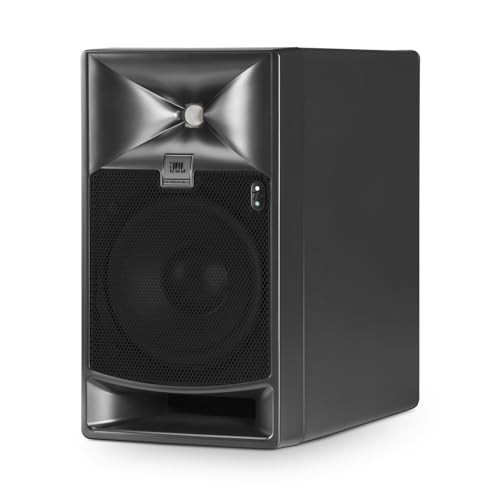
Engineered for precise audio production, the JBL Professional 705P Bi-Amplified Studio Monitor Speaker excels in delivering accurate sound reproduction, making it an ideal choice for sound engineers and music producers. With its 5-inch bi-amplified design, this monitor features advanced JBL driver technology, ensuring low distortion and high SPL. Dual Class-D amplifiers provide 250W for both low and high frequencies. The patent-pending JBL Image Control Waveguide enhances sound imaging, while extensive room EQ options let you tailor your sound. Its compact design and robust construction make it easy to place, ensuring you achieve professional audio quality in any setting.
Best For: The JBL Professional 705P Bi-Amplified Studio Monitor Speaker is best for sound engineers and music producers seeking accurate audio reproduction for professional audio production.
Pros:
- Exceptional sound accuracy with low distortion and high SPL thanks to advanced JBL driver technology.
- Extensive room EQ and delay controls allow for customized sound tailoring to fit any environment.
- Compact and robust design makes it easy to place in various studio settings without sacrificing durability.
Cons:
- Sold individually, which may require purchasing multiple units for a complete stereo setup.
- Relatively higher price point compared to basic studio monitors on the market.
- Requires proper setup and calibration to fully utilize its extensive features and capabilities.
Tannoy Gold 7 6.5-inch Powered Studio Monitor

If you’re looking for a studio monitor that excels in tight spaces, the Tannoy Gold 7 6.5-inch Powered Studio Monitor could be your ideal solution. Its front-firing bass port design allows for near-wall placement, ensuring peak low-frequency performance. You’ll appreciate the legendary Tannoy Dual Concentric driver technology, which provides class-leading phase coherence and point-source imaging. With an ultra-precise and neutral soundstage, this monitor delivers a non-fatiguing listening experience, perfect for those extended sessions. Whether you’re mixing or monitoring, the Gold 7’s performance will elevate your sound quality and precision, making it a valuable addition to your studio setup.
Best For: The Tannoy Gold 7 6.5-inch Powered Studio Monitor is best for audio professionals and enthusiasts looking for high-quality sound reproduction in compact studio spaces.
Pros:
- Front-firing bass port design allows for optimal near-wall placement.
- Legendary Dual Concentric driver technology ensures excellent phase coherence and imaging.
- Ultra-precise and neutral soundstage offers a non-fatiguing listening experience for long sessions.
Cons:
- May not produce as much low-end impact as larger monitors in open spaces.
- Limited connectivity options compared to some competitors.
- Higher price point may not fit all budgets.
SEETEC P215 PRO 21.5″ Broadcast Director Production Monitor
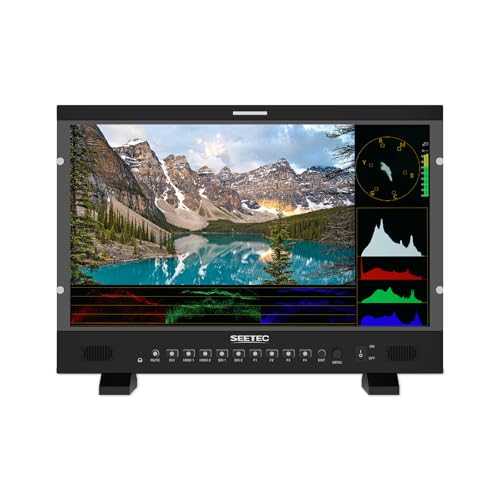
The SEETEC P215 PRO 21.5″ Broadcast Director Production Monitor stands out as an exceptional choice for professionals seeking precision in color accuracy and monitoring. With its 1920×1080 resolution and 8-bit color depth, you’ll enjoy vibrant visuals. The high brightness of 1000 nits guarantees great visibility, even in daylight. You can rely on HDR monitoring and CalMAN software for superior calibration. Plus, with multiple SDI and HDMI inputs and outputs, connecting your gear is a breeze. The built-in TALLY light enhances team collaboration, making it ideal for both indoor and outdoor broadcast environments. Experience professional quality with the SEETEC P215 PRO.
Best For: Professionals in broadcasting and production who require accurate color monitoring and high visibility in various lighting conditions.
Pros:
- High brightness of 1000 nits ensures excellent visibility even in daylight.
- Supports HDR monitoring and CalMAN software for enhanced color accuracy and calibration.
- Multiple input and output options (SDI and HDMI) provide flexibility for diverse equipment connections.
Cons:
- Limited to 8-bit color depth, which may not meet the needs of those requiring higher color fidelity.
- Size may be cumbersome for portable setups or smaller production spaces.
- Potentially higher price point compared to basic monitors, which might not be justifiable for casual use.
Factors to Consider When Choosing a Broadcast Reference Monitor
When choosing a broadcast reference monitor, you’ll want to take into account several key factors. Display size and resolution matter for clarity, while brightness and contrast ratio can impact your viewing experience. Don’t forget about connectivity options, monitoring features, and portability to guarantee the monitor fits your workflow.
Display Size and Resolution
Choosing the right display size and resolution for your broadcast reference monitor is essential for accurately evaluating image quality. A larger screen enhances your ability to assess image details, providing a more immersive experience. Opt for a monitor with a higher resolution, like 4K, to capture greater detail and clarity, which is vital during content production. For professional use, monitors with at least a 1920×1080 (Full HD) resolution are recommended, ensuring sharpness and precision in color grading and editing. Additionally, consider the monitor’s 16:9 aspect ratio, which aligns with standard video formats. Combining a larger screen with high resolution can markedly improve your workflow efficiency, allowing you to view multiple applications without losing detail.
Brightness and Contrast Ratio
Evaluating image quality doesn’t stop at display size and resolution; brightness and contrast ratio play a significant role in how your broadcast reference monitor performs. Brightness, measured in nits, is essential for visibility, especially in bright environments. A monitor with over 1000 nits guarantees you can work effectively outdoors or in well-lit studios. Contrast ratio, expressed as a ratio (like 1000:1), indicates the difference between dark and bright parts of an image, impacting color depth and richness. For HDR content, you’ll need a monitor that not only meets high brightness standards but also boasts excellent contrast to showcase the full range of colors. Remember, poor brightness and contrast can distort colors and detail from different viewing angles.
Connectivity Options Available
As you consider your options for a broadcast reference monitor, connectivity plays a crucial role in guaranteeing seamless integration with your production setup. Look for monitors that offer HDMI, SDI, and sometimes DisplayPort inputs and outputs. Many models feature multiple input ports—like 2 SDI and 2 HDMI—allowing you to connect various devices simultaneously, such as cameras and switchers. Loop-through capabilities can be a game changer, letting you send the input signal to additional devices without extra cables. Advanced features like Picture-in-Picture (PiP) and dual view can enhance your multitasking during live production. Finally, verify compatibility with industry-standard equipment, such as HDMI splitters for HDCP signals, to maintain a smooth workflow.
Monitoring Features and Tools
When selecting a broadcast reference monitor, monitoring features and tools can greatly impact your production quality. Look for monitors with professional functions like focus assist, false color, and waveform monitoring to enhance shooting efficiency and guarantee image accuracy. Color calibration capabilities are essential for maintaining consistent and precise color representation during your shoots. Advanced features like peaking focus and RGB parade help you improve exposure and perform thorough color analysis. Custom LUT loading options allow you to preview specific color grades, giving you creative freedom. Finally, prioritize user-friendly interfaces that let you customize shortcut keys for quick access to your most-used monitoring tools, streamlining your workflow and enhancing your overall shooting experience.
Portability and Design Quality
Choosing a broadcast reference monitor involves careful consideration of portability and design quality, especially for field production and live events. You’ll want a lightweight and compact monitor that’s easy to transport and set up. A durable design is essential, as your monitor needs to withstand challenging conditions while on the go. Look for integrated features like V-mount battery plates, allowing you to operate without relying solely on AC power. Consider the weight and dimensions to guarantee compatibility with your existing gear for hassle-free mounting on tripods or rigs. Finally, ergonomic design elements, such as user-friendly controls and adjustable stands, enhance usability, making it easier to manage settings and view content comfortably during long sessions.