
The best budget mini PCs for streaming deliver smooth video playback without taking up the space or power of a traditional desktop. The right model can also handle browsing, office work, light multitasking, and multiple displays.
This roundup compares 10 compact Windows PCs across processor performance, memory, storage, upgrade potential, connectivity, and overall value, so you can choose a system that fits your streaming setup and budget.
Best 10 Budget Mini PCs for Streaming Picks for 2026
Best Balanced Pick
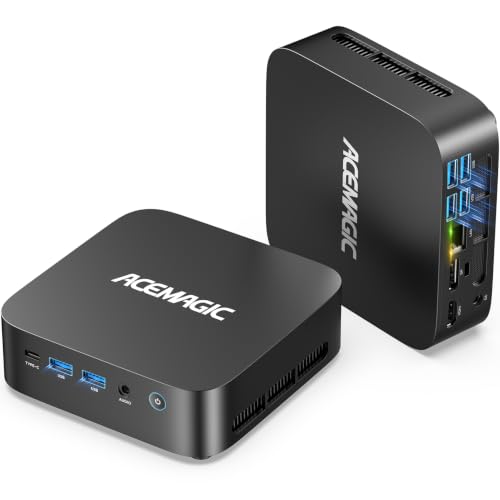
- Ryzen 5 7530U with 16GB RAM
- 512GB SSD and dual M.2 expansion
- Triple 4K display support
Best For: Streaming, home offices, and multitasking
Best Performance Pick
GMKtec M5 Ultra Ryzen 7 Mini PC

- 8-core Ryzen 7 7730U processor
- RAM expands to 64GB
- Wi-Fi 6E and dual 2.5GbE LAN
Best For: Streaming, multitasking, and light gaming
Best Ultra-Budget Option

- Compact Windows 11 Pro desktop
- Dual 4K HDMI display support
- Storage expansion up to 4TB
Best For: Basic streaming and everyday home use
Best Expandable Office Pick

- Ryzen 3 5300U for everyday workloads
- RAM expands up to 64GB
- Triple 4K display and dual 2.5GbE LAN
Best For: Expandable home-office and multi-monitor setups
Efficient 4K Multitasker
ACEMAGIC Ryzen PRO 7330U Mini PC

- Ryzen PRO 7330U with 4 cores and 8 threads
- Triple 4K display support
- Expandable RAM and dual M.2 storage
Best For: Home streaming and compact multi-monitor workstations
Streaming Value Pick

- 16GB RAM and 512GB NVMe SSD included
- Dual 4K HDMI outputs
- Wi-Fi 6 and Bluetooth 5.3
Best For: Everyday streaming and browser-heavy multitasking
Upgrade-Friendly Network Hub

- Triple 4K display outputs
- RAM expandable up to 64GB
- Dual 2.5GbE LAN ports
Best For: Multi-monitor streaming and upgrade-focused users
Best Budget Streaming Starter

- 16GB RAM and a 256GB SSD
- Dual 4K display support
- Storage expandable up to 4TB
Best For: Everyday streaming and compact home-office setups
Best Value Ryzen Pick
- Four cores and eight threads
- Expandable RAM up to 32GB
- Wi-Fi 6 and dual 4K HDMI
Best For: Streaming and upgrade-friendly everyday computing
Best Balanced Pick – ACEMAGIC K1 Ryzen 5 Mini PC
For shoppers comparing budget mini PCs for streaming, the ACEMAGIC K1 offers a strong balance of everyday speed, memory, connectivity, and quiet operation. Its Ryzen 5 7530U, 16GB of RAM, and 512GB SSD are well suited to 4K streaming, office work, video calls, and multitasking.
Best For: Home offices, streaming, online learning, and users who want a compact Windows 11 Pro desktop with room to expand.
Pros:
- Ryzen 5 7530U with 6 cores and 12 threads
- 16GB RAM and 512GB SSD, with two M.2 storage slots
- Supports up to three 4K displays at 60Hz
- Quiet operation rated below 30dB, plus Wi-Fi 6
Cons:
- Integrated graphics are aimed at everyday use rather than demanding gaming
- Memory is LPDDR4X rather than user-upgradeable desktop RAM
The K1 is a practical all-rounder for streaming-focused setups. It adds useful display support and expansion options without taking much space, making it a versatile choice when you need more than a basic media box.
Best Performance Pick – GMKtec M5 Ultra Ryzen 7 Mini PC
The GMKtec M5 Ultra is one of the stronger options among budget mini PCs for streaming when you also want extra processing headroom. Its Ryzen 7 7730U, dual-channel memory, fast networking, and triple-display support suit streaming, productivity, multimedia, and light gaming.
Best For: Users who want a higher-performance mini PC for streaming, multitasking, office work, and compact gaming setups.
Pros:
- Ryzen 7 7730U with 8 cores and 16 threads
- 16GB dual-channel RAM expandable to 64GB
- Supports three 4K displays at 60Hz
- Wi-Fi 6E and dual 2.5GbE LAN ports
Cons:
- Storage is a PCIe 3.0 SSD in the listed configuration
- Performance settings may require BIOS adjustment
This model makes sense for buyers who want more CPU and networking capability than entry-level mini PCs provide. Its upgradeable RAM and dual storage expansion also give it more long-term flexibility.
Best Ultra-Budget Option – Bmax B3 Pro N4500 Mini PC
The Bmax B3 Pro is a compact, entry-level choice for shoppers seeking budget mini PCs for streaming and basic home use. Its Intel N4500 processor, 8GB of RAM, and 256GB SSD are designed for routine computing, web browsing, office tasks, and 4K media playback.
Best For: Basic streaming, everyday browsing, education, and simple home-office setups where low cost and small size matter most.
Pros:
- Very compact design with Windows 11 Pro
- Dual HDMI outputs support two 4K displays at 60Hz
- Storage can expand up to 4TB through its dual M.2 design
- Includes Wi-Fi 5, Bluetooth 5.0, and Gigabit Ethernet
Cons:
- Two-core processor and 8GB RAM limit heavier multitasking
- Less suitable for demanding editing or gaming
The B3 Pro is best treated as a straightforward streaming and productivity machine rather than a performance system. It is a sensible fit for basic displays, media playback, and light workloads on a tight budget.
Best Expandable Office Pick – BOSGAME E5 Ryzen 3 Mini PC
The BOSGAME E5 is a practical option for budget mini PCs for streaming when expansion and multi-monitor productivity are priorities. Its Ryzen 3 5300U, dual-channel 8GB RAM, and 256GB SSD cover everyday streaming and office work, while the internal upgrade paths add flexibility.
Best For: Business users, home offices, multi-monitor workspaces, and buyers who may upgrade memory or storage later.
Pros:
- Ryzen 3 5300U with 4 cores and 8 threads
- RAM is expandable up to 64GB
- Extra M.2 slot supports additional storage
- Triple 4K display output and dual 2.5GbE LAN
Cons:
- Listed configuration includes only 8GB RAM and a 256GB SSD
- Less CPU headroom than the Ryzen 5 and Ryzen 7 models here
The E5 stands out for buyers who value upgradeability and connectivity over maximum out-of-box performance. Its quiet design, VESA mount, and three-display support make it especially useful in a compact office or streaming workspace.
Efficient 4K Multitasker – ACEMAGIC Ryzen PRO 7330U Mini PC
For shoppers comparing budget mini PCs for streaming, the ACEMAGIC Ryzen PRO 7330U model offers a compact Windows 11 Pro setup with integrated Radeon graphics, 8GB of RAM, and 256GB of SSD storage. Its 4K-capable display outputs and 28W cooling design suit everyday streaming, office work, and home entertainment.
Best For: Home streaming, compact office setups, and users who want upgradeable memory and storage.
Pros:
- Ryzen PRO 7330U provides four cores, eight threads, and boost speeds up to 4.3GHz.
- Supports up to three 4K displays through HDMI, DisplayPort, and USB-C.
- Dual memory slots and M.2 SATA/NVMe storage bays allow future expansion.
- Includes Windows 11 Pro, a wall mount, HDMI cable, and a 12-month assurance.
Cons:
- The included 8GB RAM and 256GB SSD may feel limited for large media libraries or heavier multitasking.
- Wi-Fi 5 and Bluetooth 4.2 are older than the wireless standards on some competing mini PCs.
This ACEMAGIC is a practical choice when a small streaming PC also needs multi-monitor support and upgrade headroom. Buyers who need more memory or storage should plan to use its expansion options.
Streaming Value Pick – Getorli Ryzen 5 3500U Mini PC
The Getorli GT101 is a strong value option among budget mini PCs for streaming, pairing a Ryzen 5 3500U processor with 16GB of RAM and a 512GB NVMe SSD. It is configured for everyday computing, media playback, and home-office multitasking without taking much desk space.
Best For: Everyday streaming, browser-heavy work, and users who want generous memory and storage out of the box.
Pros:
- Includes 16GB DDR4 RAM and a spacious 512GB NVMe SSD.
- Ryzen 5 3500U offers four cores and eight threads for daily workloads and media streaming.
- Dual HDMI ports support two 4K displays.
- Wi-Fi 6, Bluetooth 5.3, multiple USB ports, and a VESA mounting bracket improve flexibility.
Cons:
- The Ryzen 5 3500U is an older processor generation.
- Maximum RAM expansion is listed as 32GB, which may limit heavier future workloads.
With more RAM and storage than the other configurations here, the Getorli is an appealing ready-to-use choice for streaming and multitasking. Its dual-4K output also makes it useful as a small workstation.
Upgrade-Friendly Network Hub – BOSGAME E5 Plus Ryzen Mini PC
The BOSGAME E5 Plus stands out among budget mini PCs for streaming with flexible expansion and connectivity. Its Ryzen 5400U processor, triple 4K display support, dual 2.5GbE ports, and Windows 11 Pro make it suitable for streaming, home-office productivity, and wired networking projects.
Best For: Upgrade-minded users, multi-monitor streaming workstations, and homes or offices needing fast wired networking.
Pros:
- Ryzen 5400U provides four cores, eight threads, and boost speeds up to 4.0GHz.
- Supports three 4K displays through HDMI, DisplayPort, and full-function USB-C.
- Two SODIMM slots support up to 64GB RAM, while dual M.2 slots support storage expansion.
- Dual 2.5GbE LAN ports offer fast wired connectivity for file transfers and dual-LAN applications.
Cons:
- The base configuration includes only 8GB RAM and a 256GB SATA SSD.
- Wi-Fi 5 and Bluetooth 5.0 are less current than the wireless standards on some alternatives.
The E5 Plus is best viewed as a flexible platform rather than the most complete out-of-box configuration. Its substantial RAM and storage expansion potential make it a compelling long-term option for streaming and productivity.
Best Budget Streaming Starter – KAMRUI AK1PLUS N5095 Mini PC
For shoppers comparing budget mini PCs for streaming, the KAMRUI AK1PLUS is a compact, low-power option built for everyday media use. Its Intel Celeron N5095 processor, 16GB of RAM, and 256GB SSD provide responsive performance for streaming, browsing, video calls, and general multitasking.
Best For: Everyday streaming, home-office tasks, online classes, and compact dual-monitor setups.
Pros:
- 16GB RAM helps with everyday multitasking and multiple browser tabs.
- Dual HDMI 2.0 outputs support two 4K displays at up to 60Hz.
- Storage can expand with an additional M.2 drive and 2.5-inch SATA drive, up to 4TB total.
- Compact design, quiet cooling, Gigabit Ethernet, Wi-Fi, and Bluetooth connectivity.
Cons:
- The Celeron processor is intended for everyday computing rather than demanding workloads.
- The included 256GB SSD may be limiting for large local media libraries.
The AK1PLUS makes the most sense when you want ample memory, easy storage expansion, and dual-screen support in a very small desktop. It is a practical budget streaming pick for straightforward home and office use.
Best Value Ryzen Pick – Getorli Ryzen 5 3500U Mini PC
The Getorli Ryzen 5 3500U is a strong value candidate among budget mini PCs for streaming. Its four-core, eight-thread processor is paired with a 256GB NVMe SSD and supports smooth media streaming, daily computing, and multitasking in a quiet, space-saving system.
Best For: Streaming, web browsing, home-office work, and users who want upgradeable memory.
Pros:
- Ryzen 5 3500U processor reaches up to 3.7GHz and has four cores and eight threads.
- 256GB NVMe SSD supports quick boot-ups, app launches, and file transfers.
- RAM is expandable from 8GB up to 32GB.
- Wi-Fi 6, Bluetooth 5.3, dual HDMI outputs, and multiple USB ports offer flexible connectivity.
Cons:
- It includes 8GB of RAM, less than the other systems in this roundup.
- The included storage is limited to 256GB before adding external or replacement storage.
Choose this model if processor capability and future memory upgrades matter more than having maximum RAM out of the box. Its modern wireless connections and dual-4K HDMI support add useful flexibility for streaming and productivity.
Best Performance Upgrade – KAMRUI Pinova P2 Ryzen 5425U
For buyers willing to spend toward the higher end of the budget category, the KAMRUI Pinova P2 offers notably stronger hardware for streaming and multitasking. Its Ryzen 5 5425U processor, 16GB of RAM, fast 256GB SSD, and integrated Radeon graphics are housed in a compact system with triple-4K display support.
Best For: Multitasking, multi-display streaming setups, home entertainment, and demanding everyday use.
Pros:
- Ryzen 5 5425U provides four cores, eight threads, and boost speeds up to 4.1GHz.
- 16GB RAM and a 256GB SSD support responsive application switching and quick startup.
- HDMI, DisplayPort, and USB-C support up to three 4K displays at 60Hz.
- Two storage slots allow expansion up to 4TB, while the compact case supports VESA mounting.
Cons:
- The included 256GB SSD may require expansion for extensive media storage.
- Its integrated Radeon graphics are suited to 4K playback and light casual gaming, not dedicated-GPU workloads.
The Pinova P2 is the most capable choice here for users who stream while multitasking or need several high-resolution displays. Its expansion options and quiet cooling also make it a flexible long-term compact desktop.
How We Picked the Best Budget Mini PCs for Streaming
We evaluated these mini PCs around the tasks buyers typically care about: reliable HD and 4K video playback, responsive app switching, web browsing, streaming-service compatibility, and everyday productivity. Processor generation and core count helped distinguish entry-level systems from models better suited to multitasking.
We also considered included RAM and storage, upgrade options, Windows availability, display support, physical size, and value. A compact computer is only a good streaming choice if it has the ports, wireless connectivity, and practical performance needed for your TV, monitor, or desk setup.
Quick Comparison
- Best overall balance: Look for a Ryzen 5 or Ryzen 7 processor with 16GB of RAM and an NVMe SSD.
- Best for basic streaming: Intel Celeron and lower-end Ryzen models can handle common streaming and office tasks at a lower price.
- Best for multitasking: Ryzen 7 systems or Ryzen 5 models with upgradeable memory are better for streaming while browsing or working.
- Best for storage flexibility: Choose a model with an accessible second drive bay or expandable SSD support.
Key Buying Factors for Budget Mini PCs for Streaming
Processor and Video Playback
For standard streaming, a modern entry-level processor is usually sufficient. Ryzen 5 and Ryzen 7 chips offer more headroom for multiple browser tabs, light editing, and simultaneous applications. Integrated graphics are generally appropriate for video playback, but these systems are not intended to replace a gaming desktop or dedicated workstation.
RAM and Storage
Eight gigabytes of RAM works for straightforward streaming, while 16GB is a more comfortable choice for multitasking and longer-term use. An SSD makes Windows and apps feel substantially faster than a hard drive. A 256GB drive is adequate for streaming-focused setups, but 512GB provides more room for downloads and local media.
Ports, Displays, and Wireless Connectivity
Check the exact port layout before buying. HDMI output, USB ports, Ethernet, and headphone connectivity may matter more than a small difference in processor speed. If you plan to use two monitors or a television plus monitor, confirm the advertised display support and required resolutions. Wired Ethernet can also provide steadier playback than Wi-Fi in crowded networks.
Cooling, Size, and Upgrades
Small computers can become warm under sustained workloads, so ventilation and placement matter. Avoid blocking the air vents inside a cabinet or behind a television. Upgradeable RAM or storage can extend the useful life of a budget system and make a lower initial specification more acceptable.
Who Should Buy Which Budget Mini PCs for Streaming?
Choose an entry-level Intel model if you mainly stream from one display, browse the web, and want the lowest-cost compact computer. A Ryzen 5 model with 16GB RAM is the safer all-around choice for families, office work, frequent multitasking, and several open browser tabs. Step up to a Ryzen 7 system if you regularly stream while running demanding applications or want additional performance headroom.
For a living-room setup, prioritize quiet placement, dual-display support, dependable wireless connectivity, and enough USB ports for accessories. For a home-office setup, favor upgradeable memory, a larger SSD, and stronger multi-core performance. Regardless of model, verify current specifications, included power accessories, operating-system licensing, and return coverage before purchase.