
Choosing the right camera support or streaming camera can make live production noticeably smoother. The options in this roundup range from compact desk mounts and flexible arms to full-size mini jibs, PTZ cameras, and AI-tracking systems.
Use the guide below to match your setup with the reach, stability, image quality, control options, and portability your streams require.
Best 10 Camera Cranes for Live Streaming Picks for 2026
Premium Mini Jib
IFOOTAGE M1 III Carbon Fiber Crane

- Supports cameras up to 33 pounds
- 85-inch reach with pan and tilt movement
- Includes quick-release and accessory-mount options
Best For: Cinematic live streams needing physical jib movement
AI Tracking Webcam

- 4K video from a 1/1.3-inch sensor
- Physically pans and tilts for AI tracking
- Works with major streaming and meeting platforms
Best For: Hands-free presenter tracking and desk streaming
Desk Mount Jib Alternative
SMALLRIG Triangle Camera Desk Mount

- Stable triangular support for overhead shots
- Holds up to 6.6 pounds
- Clamps to desks up to 7 centimeters thick
Best For: Desktop streams, product shots, and overhead content
Best Flexible Mount
22-inch SMALLRIG Magic Arm Clamp

- 22-inch articulating arm for adjustable overhead angles
- Clamp fits desks and round tubes
- Supports lightweight phones, webcams, lights, and cameras
Best For: Desk-based streaming and overhead content
AI Tracking Streaming Camera
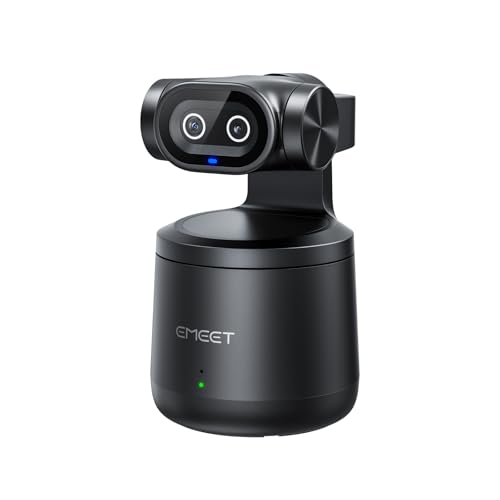
- 4K dual-lens video
- AI tracking with gesture control
- Up to eight hours of streaming
Best For: Hands-free solo streams and active subjects
Overhead Mounting Kit
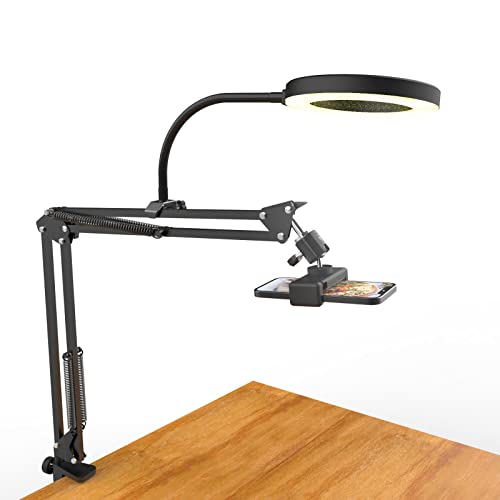
- Flexible overhead positioning
- Dimmable six-inch ring light
- Supports up to three pounds
Best For: Desk-based overhead cooking, craft, and webcam streams
Premium Mini Jib – IFOOTAGE M1 III Carbon Fiber Crane
For creators comparing camera cranes for live streaming, the IFOOTAGE M1 III is a compact jib designed for smooth, elevated, low-angle, and inverted camera moves. Its carbon-fiber construction supports cameras and accessories up to 33 pounds, while the included water bag helps with setup stability.
Best For: Live-streaming productions that need cinematic camera movement from a compact jib.
Pros:
- Supports up to 33 pounds and reaches 85 inches.
- Carbon-fiber square tube construction is designed for rigidity and stability.
- Supports tilt adjustments, pan movement, low-angle shots, and upside-down mounting.
- Multiple quick-release plates and 1/4-inch and 3/8-inch threads expand accessory compatibility.
Cons:
- Its extended reach and heavy-duty capacity may be more than needed for simple desk streaming.
- The product is listed as mint with a creased box, so packaging condition may vary.
The M1 III is the strongest choice here for operators who specifically want physical jib movement rather than automated camera tracking. It is especially useful when a live production calls for repeatable vertical, horizontal, or dramatic low-angle shots.
AI Tracking Webcam – Insta360 Link 2 Pro 4K PTZ
The Insta360 Link 2 Pro takes a different approach to camera cranes for live streaming: instead of using a mechanical jib, its PTZ body physically pans and tilts to follow the presenter. It combines 4K capture, AI tracking, low-light performance, and USB connectivity for computer-based broadcasts.
Best For: Streamers, presenters, and meeting hosts who want automated framing without operating a crane.
Pros:
- Captures 4K video with a large 1/1.3-inch sensor and HDR support.
- AI tracking physically pans and tilts to keep people in frame.
- Directional dual microphones help isolate voices from background noise.
- Supports Stream Deck integration, mobile control, gestures, and specialized modes.
Cons:
- It is a webcam rather than a long-reach jib, so it cannot create elevated crane-style shots.
- It is not currently compatible with ARM-based Windows systems or Windows Hello Face Recognition.
- Its built-in zoom is digital rather than optical.
Choose the Link 2 Pro when hands-free presenter tracking matters more than sweeping jib movement. Its software features and broad streaming-platform compatibility make it convenient for solo creators and desk-based productions.
Desk Mount Jib Alternative – SMALLRIG Triangle Camera Desk Mount
For tabletop camera cranes for live streaming, the SMALLRIG Triangle Camera Desk Mount offers a compact overhead setup without the footprint of a full-size jib. Its reinforced triangular structure clamps to desks up to 7 centimeters thick and supports cameras, phones, webcams, and lights.
Best For: Desktop live streams, product demonstrations, unboxings, beauty content, and overhead shots.
Pros:
- Triangular support structure improves stability for overhead desktop shooting.
- Supports up to 3 kilograms, or 6.6 pounds.
- Adjustable horizontal arm extends from 42 to 68.5 centimeters.
- Includes a 1/4-inch ball head and phone holder for multiple device types.
Cons:
- Its desk-clamp design is limited to surfaces up to 7 centimeters thick.
- Shorter reach and lower capacity make it unsuitable for large cinema cameras or wide venue shots.
- It is intended for indoor desktop use and is not water resistant.
The SMALLRIG is a practical choice when your live stream happens at a desk and the goal is a stable overhead or angled view. It offers more flexibility than a basic stand while remaining much smaller than a full camera jib.
Long-Range PTZ System – KATOVJJTS 4K 20X PTZ Camera
The KATOVJJTS PTZ camera suits live productions that need remote framing across a church, conference room, or other large venue. While it is not a physical jib, its 340-degree pan, 120-degree tilt, and 20X optical zoom provide the remote camera movement often sought from camera cranes for live streaming.
Best For: Church services, worship events, conferences, and networked multi-camera streaming.
Pros:
- Records 4K UHD video at 30 frames per second.
- 20X optical zoom captures distant subjects with detail.
- 340-degree pan and 120-degree tilt cover broad shooting areas.
- Supports HDMI, USB 3.0, Ethernet, PoE, RTSP, and RTMP connections.
Cons:
- At 2.89 kilograms, it is substantially heavier than a typical webcam.
- It provides remote PTZ movement rather than the rising or sweeping motion of a jib arm.
- Setup may be more involved than a simple USB webcam when using IP, PoE, or HDMI workflows.
This camera is a strong alternative to a crane when the production needs repeatable remote shots from a fixed position. Its optical zoom and flexible outputs are particularly useful for venues where the camera must remain far from the stage or presenter.
Best Flexible Mount – 22-inch SMALLRIG Magic Arm Clamp
For creators comparing camera cranes for live streaming, the SMALLRIG 22-inch Magic Arm Clamp is a compact overhead mounting alternative for phones, webcams, lights, and lightweight cameras. Its articulating joints and desktop-friendly clamp make it useful when you need adjustable framing without a full floor stand.
Best For: Overhead shots, desk-based streaming, vlogs, video calls, and lightweight camera or phone setups.
Pros:
- Long 22-inch arm with independently adjustable double-ball joints.
- Clamp opens to 63.5mm and can attach to desks or round tubes.
- Silicone pads and rubber rings help improve grip and protect equipment.
- Includes a phone holder, two 1/4-inch-20 screws, and a 1/4-inch-to-3/8-inch adapter.
Cons:
- Recommended load capacity is limited to 600g, so it is not suited to heavy camera rigs.
- Longer arm positions may require careful adjustment to prevent ball-head slippage.
This is better suited to lightweight, close-range streaming accessories than to traditional camera-crane work. Choose it when desk space, portability, and flexible overhead positioning matter more than carrying capacity.
Best Long-Range Streaming Camera – NearStream VM20 4K PTZ Streaming Camera
For camera cranes for live streaming setups that need to cover a stage, classroom, or conference room, the NearStream VM20 provides a more production-oriented camera option. It combines 4K USB video with HDMI, Ethernet, remote PTZ control, and up to 40x hybrid zoom for flexible distance shooting.
Best For: Live events, classrooms, webinars, conference rooms, and multi-camera software-based productions.
Pros:
- Records up to 4K at 30fps or 1080p at 60fps.
- Offers USB, HDMI, and RJ45 connectivity, plus RTSP support through NearStream software.
- 40x hybrid zoom combines 8x optical and 5x digital zoom for distant subjects.
- Remote pan, tilt, zoom, multi-camera control, and an 8-MEMS noise-canceling microphone array support live production.
Cons:
- Not intended for direct NDI pipelines or SDI broadcast systems.
- Its software-oriented workflow may be more involved than a basic plug-and-play webcam setup.
The VM20 is the strongest fit here when your streaming position is far from the subject and you need connection flexibility. It is a camera rather than a physical crane, so pair it with a suitable mount or support when elevated positioning is required.
Best AI Tracking Camera – EMEET PIXY Dual-Camera PTZ 4K Kit
For creators searching camera cranes for live streaming who want automated framing rather than manual repositioning, the EMEET PIXY Kit combines a 4K camera, AI tracking, PTZ movement, and an adjustable tripod. It is designed to keep presenters, demonstrators, and moving subjects in frame during live content.
Best For: Fitness streams, product demonstrations, teaching, podcasts, meetings, and other presenter-led broadcasts.
Pros:
- 4K main camera with a 1/2.55-inch Sony sensor and PDAF autofocus.
- Dual-camera AI system supports tracking, autofocus, and exposure assistance.
- 310-degree pan and 180-degree tilt provide broad movement coverage.
- Included tripod adjusts from 6.7 to 18.5 inches and has a 360-degree swivel head.
Cons:
- FOV adjustment is locked in 4K 30fps and 1080p 60fps modes.
- Some remote functionality requires purchasing the separately sold remote.
- The included tripod is compact rather than a tall camera-crane support.
PIXY is a practical choice when automatic subject tracking and quick angle changes are more valuable than a long boom reach. Its tripod makes it easy to start, while the PTZ system helps maintain framing as the presenter moves.
Portable Streaming Camera – Mevo Start
The Mevo Start is a compact, wireless option for creators comparing camera cranes for live streaming and flexible multi-angle setups. It records and streams in 1080p, supports Wi-Fi, Ethernet, and smartphone LTE connections, and can be controlled from a phone.
Best For: Mobile streamers, creators building simple multicamera broadcasts, and users who value wireless control.
Pros:
- Streams and records in 1080p HD.
- Supports Wi-Fi, Ethernet, and smartphone LTE streaming.
- Allows control through smartphone features such as Auto-Director.
- Can connect up to three Mevo Start cameras for multiple angles.
Cons:
- Does not provide 4K video.
- Fixed-focus lens limits manual focusing control.
- Not water resistant.
With a compact 8.2-ounce design and up to six hours of battery life, the Mevo Start is convenient for portable live production. Its RTMP, NDI|HX, and Webcam Mode support also gives it room to fit into more advanced streaming workflows.
AI Tracking Streaming Camera – EMEET PIXY Wireless
The EMEET PIXY Wireless stands out for creators evaluating camera cranes for live streaming who need automatic subject tracking. Its dual-lens design pairs a 4K video lens with a dedicated AI tracking lens, while wireless connectivity and gesture control simplify hands-free broadcasts.
Best For: Solo presenters, sports and training streams, and users who want 4K video with automated tracking.
Pros:
- Captures 4K video with HDR support.
- Uses AI tracking and gesture control for hands-free operation.
- Supports wireless multicamera control through a phone.
- Its 5200mAh battery supports up to eight hours of streaming.
Cons:
- Fixed-focus design offers less manual lens control.
- Not water resistant.
- External microphones require the 3.5mm input rather than a built-in advanced audio interface.
The PIXY Wireless combines a wide 97-degree field of view, dual-lens tracking, and one-stream multi-platform support through EMEET STUDIO. It is a strong fit when movement and wireless operation matter more than a traditional crane-mounted camera workflow.
Overhead Mounting Kit – Ring Light Camera Arm Stand
This Pozliv overhead mount is a practical accessory for camera cranes for live streaming, especially when you need top-down views for cooking, crafts, drawing, or product demonstrations. Its articulating arm, universal 1/4-inch threads, and included ring light support flexible desk-based positioning.
Best For: Overhead phone, webcam, and lightweight-camera streams at a desk or table.
Pros:
- Flexible arm and ball joints allow overhead and angled shooting.
- Includes a dimmable six-inch ring light with three modes and ten brightness levels.
- Supports phones, Logitech webcams, compact cameras, and action cameras.
- Extra flexible clip arm enables multiple-device combinations.
Cons:
- Maximum load is three pounds and is not intended for heavy-duty cameras.
- Desk clamp fits surfaces up to 5.2 cm (2 inches) thick.
- Ring light requires USB power.
Rather than being a camera, this kit provides the positioning hardware and lighting needed for overhead live content. Its three-pound capacity makes it best suited to lightweight gear, while the 1/4-inch mounts offer useful compatibility for common webcams and compact cameras.
How We Picked These Camera Cranes for Live Streaming
We selected these products to cover the main ways creators build a live-streaming camera setup: overhead mounting, compact desk support, remote-controlled PTZ coverage, AI subject tracking, and cinematic camera movement. The list includes dedicated camera cranes and mini jibs, but also practical alternatives for streamers who need a stable angle rather than sweeping motion.
Our comparisons focus on payload capacity, mounting flexibility, camera compatibility, image quality, connectivity, remote control, portability, and the type of production each product suits best. A true jib is not interchangeable with a webcam or PTZ camera, so the right choice depends on whether your priority is movement, framing, automation, or speed of setup.
Quick Comparison
- Mini jib: Best for controlled rising, lowering, and sweeping camera movements.
- Desk clamp or magic arm: Best for overhead demonstrations, product videos, and small workspaces.
- PTZ camera: Best for repeatable wide-room coverage and remote operation.
- AI-tracking camera: Best for presenters who move without a dedicated camera operator.
- Wireless streaming camera: Best for fast setup and mobile broadcasts.
Key Buying Factors for Camera Cranes for Live Streaming
Payload and Balance
Check the arm’s maximum load, then account for the camera, lens, battery, monitor, microphone, and any mounting hardware. Stay comfortably below the stated limit for safer movement and better stability. A heavier camera may also require counterweights or a stronger tripod base.
Reach and Movement
Longer arms create more dramatic angles but place greater leverage on the support base. Confirm the crane’s usable reach, adjustment points, locking mechanisms, and whether you need vertical movement, horizontal sweeps, or only a fixed overhead position.
Mounting Compatibility
Verify the thread size, clamp opening, desk thickness range, tripod connection, and camera plate style. Small desk mounts are convenient, but they are generally intended for phones, webcams, or lightweight cameras rather than cinema bodies.
Video Quality and Connectivity
For live production, consider resolution, low-light performance, autofocus, optical zoom, HDR, and frame-rate support. USB is convenient for computers, while HDMI, SDI, IP, and PoE can integrate more effectively with switchers and permanent studio systems.
Control and Tracking
Remote pan, tilt, zoom, presets, AI tracking, and app control can reduce the need for an operator. Tracking is useful for presenters, but manual control may be preferable when framing must remain consistent during demonstrations or performances.
Who Should Buy Which Camera Cranes for Live Streaming?
Choose a mini jib if you want genuine camera movement and have a sturdy tripod or production base. Choose a clamp or articulating arm for overhead crafting, unboxing, cooking, and desk-based streams where compactness matters most. Choose a PTZ model for churches, classrooms, conferences, and multi-angle rooms that benefit from remote presets and optical zoom. Choose an AI-tracking camera if you present alone and move around the frame. Choose a wireless streaming camera when portability and rapid deployment matter more than a traditional multi-camera workflow.