
The right clamp can turn a desk, shelf, or studio stand into a dependable camera-mounting point without taking up valuable floor space. For live streaming, that means steadier framing, cleaner cable management, and easier adjustments between sessions.
This roundup compares 10 camera super clamps for live streaming, including compact desk mounts, heavy-duty dual-ball clamps, articulating arms, and overhead rigs. Use the guide below to match load capacity, reach, thread compatibility, and workspace needs to your setup.
Best 10 Camera Super Clamps for Live Streaming Picks for 2026
Compact Rig Pick

- 60mm maximum clamp opening
- Supports up to 1.5kg
- 360° ballhead with 1/4-inch and 3/8-inch threads
Best For: Compact camera and accessory rigs
Heavy-Duty Choice

- 33.1-pound stated load capacity
- Clamps tubes from 10–60mm
- Includes two clamps and mounting studs
Best For: Heavy multi-device studio rigs
Desk-Mount Stand

- Extends from 17 to 40 inches
- Supports up to 6.6 pounds
- 360° ballhead with desk C-clamp
Best For: Desk-based streaming and webcam setups
Multi-Unit Value

- Four clamps in one pack
- 12–54mm adjustable jaw range
- 1/4-inch and 3/8-inch threaded holes
Best For: Lightweight accessories and multi-point rigs
Best All-Around Pick
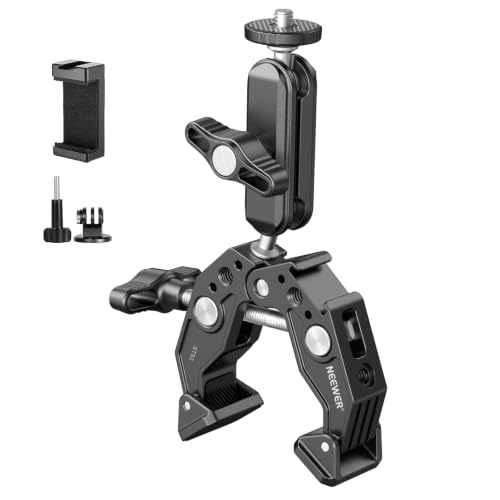
- Fits 0.6- to 2.4-inch poles and flat surfaces
- Dual ball heads offer 360-degree positioning
- Supports up to 6.6 pounds
Best For: Versatile camera, phone, light, and microphone mounting
Best Desktop Stand

- Adjusts from 19 to 39 inches high
- 360-degree rotation with -90/+45-degree tilt
- Fits desks up to 1.85 inches thick
Best For: Desk-based streaming and interview setups
Best for Extended Reach
NEEWER ST16C Articulating Clamp

- 11-inch arm reaches around streaming equipment
- Dual ball heads support 360-degree adjustment
- Rated for loads up to 4.4 pounds
Best For: Positioning monitors, lights, cameras, and microphones at a distance
Best All-Around Clamp

- Supports up to 7.7 lb
- Fits rods and surfaces up to 2.56 in
- Multiple threaded mounting holes
Best For: Flexible multi-surface streaming setups
Best Overhead Rig

- Supports up to 26.5 lb overall
- Adjustable height and width
- Includes dual ball heads and phone holder
Best For: Overhead tabletop streaming and unboxing
Best Two-Pack
SMALLRIG Dual Ball Head Clamps

- Includes two mini clamp kits
- Supports up to 1.5 kg per clamp
- Dual ball heads and GoPro adapter
Best For: Multi-device desktop or vehicle setups
Compact Rig Pick – ULANZI R094 Super Clamp Kit
For creators comparing camera super clamps for live streaming, the ULANZI R094 is a compact option for mounting a camera, monitor, light, microphone, or action camera to compatible rods and handles. Its 60mm maximum opening and adjustable ballhead make it useful when you need flexible positioning in a small rig.
Best For: Small camera, monitor, and accessory setups using rods, shoulder rigs, bike handles, or stabilizer systems.
Pros:
- 360° ballhead allows flexible positioning during shooting.
- Supports up to 3.3 pounds (1.5kg).
- Fits round rods and other surfaces up to 60mm wide.
- Includes 1/4-inch and 3/8-inch female threads plus an action-camera adapter.
Cons:
- Lower load capacity than heavy-duty clamp kits.
- Not water resistant.
The aluminum-alloy body, CNC finish, and protective rubber pad provide a sturdy, scratch-conscious mounting solution. Choose it when compact adjustability matters more than maximum payload.
Heavy-Duty Choice – SMALLRIG SC5318 Two-Pack
Among camera super clamps for live streaming, the SMALLRIG SC5318 stands out for setups that need substantial holding strength. This two-pack supports up to 33.1 pounds per clamp and includes threaded studs for mounting cameras, microphones, monitors, video lights, and related equipment.
Best For: Heavy studio, C-stand, tripod-leg, tabletop, and stabilizer-handle mounting.
Pros:
- High stated load capacity of 33.1 pounds (15kg).
- Clamps round tubes from 10 to 60mm and flat objects up to 30mm thick.
- Includes two clamps, two 5/8-inch studs, and M5 screws.
- Removable wedge improves grip on flat surfaces.
Cons:
- Heavier and less compact than lighter-duty single clamps.
- Not water resistant.
Integrated protective pads help safeguard clamped surfaces while improving stability. With two clamps and multiple connection options, this is a practical choice for more demanding multi-device streaming rigs.
Desk-Mount Stand – NEEWER TL283 Extendable Mount
The NEEWER TL283 takes a different approach to camera super clamps for live streaming by combining a desk C-clamp with an extendable stand. It raises gear from 17 to 40 inches and provides a 360° ballhead for positioning a camera, webcam, ring light, or LED panel.
Best For: Desk-based live streaming, video conferencing, online teaching, vlogging, and overhead camera work.
Pros:
- Height adjusts from 17 to 40 inches.
- Supports up to 6.6 pounds (3kg).
- 360° swivel and -45° to +90° tilt support varied camera angles.
- Desk C-clamp fits surfaces up to 2 inches thick and uses rubber pads.
Cons:
- Designed for desk mounting rather than general-purpose rod clamping.
- Phone holder is not included.
Its telescoping aluminum-alloy construction offers useful height flexibility while keeping the setup relatively portable at 24.3 ounces. Select it when a clean, elevated desk mount is more useful than a small clamp-only rig.
Multi-Unit Value – QYXINC Four-Pack Super Clamps
For streamers building several simple mounting points, this four-pack offers a practical entry into camera super clamps for live streaming. Each clamp has 1/4-inch and 3/8-inch threaded holes and an adjustable jaw for attaching compatible accessories to rods, shelves, cross bars, and other surfaces.
Best For: Budget-conscious creators who need multiple clamps for lights, hooks, shelves, or lightweight camera accessories.
Pros:
- Includes four super clamps for multi-point setups.
- Adjustable jaw accommodates objects from 12 to 54mm.
- 1/4-inch and 3/8-inch threaded holes support varied accessories.
- Rubber pads improve grip and help prevent scratches.
Cons:
- Maximum stated weight recommendation is only 120g.
- No ballhead or mounting arm is included.
- Not water resistant.
The aluminum-alloy and stainless-steel construction is suited to lightweight accessories, but the modest weight recommendation limits use with larger cameras or heavier lights. It is best viewed as a versatile multi-clamp accessory pack rather than a heavy-duty camera support.
Best All-Around Pick – NEEWER ST83 Super Clamp
For creators comparing camera super clamps for live streaming, the NEEWER ST83 is a flexible choice for desks, poles, stands, and handlebars. Its 3-inch dual-ballhead arm supports multiple accessories while offering a rated payload of up to 6.6 pounds.
Best For: Live streamers who need a versatile clamp for cameras, phones, webcams, lights, or microphones.
Pros:
- Clamps onto flat surfaces and round poles from 0.6 to 2.4 inches.
- Dual 360-degree ball heads provide broad angle adjustment.
- Includes 1/4-inch threads, ARRI locating points, and a built-in cold shoe.
- Aluminum alloy and stainless-steel construction includes nonslip protective pads.
Cons:
- Not suitable for on-camera speedlite flashes.
- Its compact 3-inch arm provides less reach than longer articulating arms.
The ST83 stands out when one clamp needs to handle several streaming accessories and mounting locations. It is a practical pick for flexible setups, provided your equipment stays within the 6.6-pound capacity.
Best Desktop Stand – SMALLRIG Adjustable C Stand
The SMALLRIG C Stand is a space-saving option for camera super clamps for live streaming, especially when your setup is centered on a desk. Its adjustable column raises equipment from 19 to 39 inches and combines a desktop clamp with a 1/4-inch ball head.
Best For: Desk-based live broadcasts, interviews, beauty content, ring lights, webcams, and DSLR cameras.
Pros:
- Height adjusts from 19 to 39 inches for flexible camera or light placement.
- Ball head rotates 360 degrees and tilts from -90 to +45 degrees.
- Desk clamp adjusts for tables up to 1.85 inches thick.
- Lightweight 15-ounce aluminum-alloy design is easy to carry.
Cons:
- Designed for desktop mounting rather than poles, handlebars, or general-purpose clamp locations.
- Its 6.6-pound capacity should be considered when mounting larger equipment.
Choose this model when stable height adjustment matters more than maximum portability or mounting versatility. It offers a tidy alternative to a floor tripod for a compatible desk-based streaming station.
Best for Extended Reach – NEEWER ST16C Articulating Clamp
The NEEWER ST16C adds an 11-inch articulating arm to a super clamp, making it useful for positioning monitors, lights, microphones, and cameras around a streaming rig. Its dual ball heads and friction gear joint provide adjustable placement, with a maximum load of 4.4 pounds.
Best For: Streamers who need extended reach and precise positioning for monitors, lights, cameras, or microphones.
Pros:
- 11-inch two-arm design offers more reach than compact magic arms.
- Ball heads rotate 360 degrees and tilt up to 90 degrees.
- ARRI locating pins, 1/4-inch and 3/8-inch holes, and silicone pads help limit movement.
- Large locking lever enables quick, tool-free arm adjustment.
Cons:
- Lower 4.4-pound capacity than the ST83 and SMALLRIG stand.
- Longer articulated arms can require careful tightening to prevent movement with heavier gear.
The ST16C is the stronger fit for rigs where an accessory must sit away from the clamp or around other equipment. Its lower payload makes it best for appropriately sized streaming accessories rather than heavy camera packages.
Best All-Around Clamp – SMALLRIG Camera Super Clamp
For camera super clamps for live streaming, this SMALLRIG model is a versatile choice for mounting cameras, monitors, LED lights, and action cameras to rods, tables, handlebars, tripods, and stabilizer rings. Its multiple threaded holes and adjustable jaw make it suitable for a range of streaming setups.
Best For: Streamers who need a compact, adjustable clamp for varied mounting surfaces and accessories.
Pros:
- Supports up to 7.7 pounds (3.5 kg).
- Fits rods from 0.55 to 2.36 inches and surfaces up to 2.56 inches thick.
- Offers 1/4-inch and 3/8-inch threaded mounting options.
- Aircraft-grade aluminum, stainless steel, and anti-slip cushions improve stability.
Cons:
- It is not water resistant.
- The clamp is sold as a single unit.
Choose this model when you want one durable clamp that can adapt to several live-streaming and camera-mounting positions without drilling.
Best Overhead Rig – NEEWER NK002 Camera Mount
For camera super clamps for live streaming with an overhead viewpoint, the NEEWER NK002 combines a desktop C-clamp rig, crossbar, dual ball-head super clamp, and phone holder. It is designed for tabletop streaming, unboxing, online meetings, lighting, and top-down shooting.
Best For: Creators building a dedicated overhead or tabletop live-streaming station.
Pros:
- Heavy-duty stand supports up to 26.5 pounds (12 kg).
- Height adjusts from 27.2 to 48 inches and width from 25.2 to 47.2 inches.
- Dual 360-degree ball heads allow flexible camera angles.
- Includes a phone holder, mini ball head, crossbar, and desktop stands.
Cons:
- The dual ball-head super clamp itself has a 3.3-pound (1.5 kg) maximum load.
- Optional crossarms are not included.
- Its larger rig format requires more desk space than a standalone clamp.
This is the most capable option here for structured overhead content, especially when you need adjustable height, width, and multiple mounting points.
Best Two-Pack – SMALLRIG Dual Ball Head Clamps
For camera super clamps for live streaming, this two-pack offers a practical way to position more than one device or keep a spare ready. Each mini clamp includes a dual ball head and 1/4-inch-20 screw for cameras, webcams, monitors, lights, microphones, and action cameras.
Best For: Creators who need two compact mounts for desktop, vehicle, or multi-device setups.
Pros:
- Two mini clamp kits provide flexible mounting options.
- Non-slip threads and an anti-twist structure support up to 1.5 kg.
- Dual ball heads enable angle adjustment.
- Includes an adapter mount for GoPro-style cameras.
Cons:
- Each clamp has a 1.5 kg maximum capacity.
- A safety rope is recommended for dynamic scenarios but is not listed as included.
- It is not water resistant.
Pick this set when quantity and compact positioning matter more than the heavier load capacity of a full-size super clamp.
How We Picked These Camera Super Clamps for Live Streaming
We focused on clamp systems suited to real streaming workstations rather than basic utility clamps. The selection covers desk and table mounts, C-stand-style designs, dual-ball magic arms, overhead camera rigs, and multipacks for mounting more than one accessory. We considered listed load capacity, adjustment range, mounting threads, clamp versatility, and compatibility with cameras, webcams, microphones, lights, and monitors.
Because clamp performance depends on the surface and setup, published weight ratings should be treated as a ceiling—not a recommendation to load a fully extended arm to its maximum. A short, well-supported arm is generally more stable than a long arm carrying the same equipment.
Quick Comparison
| Best For | Look For | Notable Options |
|---|---|---|
| Compact desk streaming | Small footprint and ball-head adjustment | ULANZI, NEEWER ST83 |
| Heavy cameras or monitors | High load rating and rigid clamp body | SMALLRIG 2-Pack, NEEWER ST16C |
| Overhead views | Long reach and secure two-point adjustment | NEEWER NK002, TL283 |
| Multiple accessories | Extra threads, cold shoes, or multiple clamps | 4-Pack, SMALLRIG multipacks |
Key Buying Factors for Camera Super Clamps for Live Streaming
Clamp Fit and Surface Protection
Check the stated opening range against your desk, shelf, crossbar, or C-stand tubing. A padded jaw helps protect finished furniture and improves grip, but avoid clamping to hollow, flexible, or damaged surfaces. Tighten firmly by hand without crushing the surface.
Load Capacity and Arm Length
Compare the combined weight of the camera, cage, monitor, light, microphone, and accessories with the clamp’s rating. Longer arms create more leverage and can introduce sag or vibration, especially when a camera is mounted far from the clamp.
Threads and Attachment Hardware
Most camera accessories use 1/4-inch-20 or 3/8-inch-16 threads. Dual-thread designs provide more flexibility, while cold shoes are useful for compact lights or microphones. Confirm whether the package includes adapters, ball heads, or a camera plate before buying.
Adjustment and Stability
Ball heads are fast to reposition; articulating arms offer more control over reach and angle. For a fixed stream, prioritize rigidity. For changing between portrait, landscape, overhead, and face-camera positions, prioritize locking joints and broad adjustment range.
Who Should Buy Which Camera Super Clamps for Live Streaming?
Choose a compact ball-head clamp if you stream from a small desk and use a lightweight camera or webcam. Pick a heavy-duty SMALLRIG-style clamp when stability and higher load capacity matter more than portability. An articulating NEEWER arm is a practical choice when you need reach and frequent repositioning.
For cooking, crafts, unboxing, or tabletop demonstrations, an overhead rig with two ball heads can make top-down framing easier. If you mount several lights, monitors, microphones, or cameras, a multipack offers better value and more flexible placement. Before going live, tighten every joint, verify the clamp is fully seated, and test the framing for vibration while recording.