
Heavy microphones need more than a basic boom arm. A weak mount can sag, drift, or make positioning frustrating, especially when paired with broadcast-style microphones, shock mounts, and accessories.
We selected 10 desk boom arms for heavy equipment that emphasize load support, stability, reach, adjustability, and useful adapter options. The guide below explains how to choose the right arm for your desk and setup.
Best 10 Desk Boom Arms for Heavy Equipment Picks for 2026
Heavy-Duty Gear-Lock Pick

- 6.6-lb capacity with gear-lock support
- 780 mm reach and broad adjustment range
- Cable channels and multiple adapters included
Best For: Heavy studio microphones and low-profile desk setups
Flexible Workspace Choice

- 360-degree rotation with angle stabilization
- Includes a 6-inch riser for overhead placement
- 1,000 g capacity with multiple adapters
Best For: Flexible setups using moderately heavy microphones
Premium Low-Profile Option

- All-metal anti-torsion construction
- 740 mm reach with low-profile positioning
- Magnetic cable covers hide and organize cables
Best For: Clean, unobstructed creator and streaming setups
Best Value Compact Arm

- Supports microphones up to 1.4 kg
- Dual springs and reinforced adjustment knobs
- Clamp fits desks up to 1.89 inches thick
Best For: Compact setups using Blue Yeti, HyperX QuadCast, or similar microphones
Best Low-Profile Design

- Supports up to 3.3 pounds
- Extends to 25.6 inches with 360-degree rotation
- Clamp fits desks up to 2.75 inches thick
Best For: Clean monitor-area setups needing flexible microphone positioning
Best Overhead Reach
Heavy-Duty Extension Riser Mic Arm

- 31.5-inch riser clears monitors
- Steel construction supports up to 2.6 pounds
- Clamp fits desks up to 4.2 inches thick
Best For: Overhead recording setups needing extra height and monitor clearance
Low-Profile Heavy-Duty Pick
InnoGear MS153 Low-Profile Mic Arm
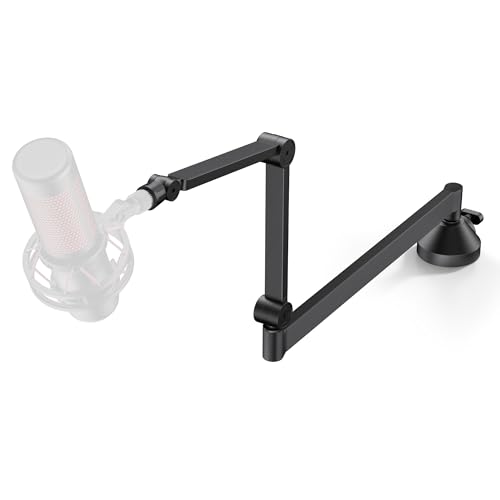
- Supports microphones up to 3.3 pounds
- 26.1-inch reach with 360-degree rotation
- Low-profile design and headphone hook
Best For: Clean, monitor-friendly streaming and recording setups
Proven Heavy-Load Classic
InnoGear MU01 Heavy-Duty Mic Arm

- 3.3-pound load capacity with steel construction
- 360-degree base rotation and fold-away design
- Broad compatibility with included adapter
Best For: Flexible gaming, podcasting, and recording desks
Highest-Capacity Extension Arm
M05 Pro Extended Heavy-Duty Mic Arm

- 4-pound maximum load capacity
- Includes a 9.8-inch extension rod
- 360-degree adjustment with cable accessories
Best For: Wide desks and heavier microphones needing extra reach
Heavy-Duty Gear-Lock Pick – Low-Profile 6.6-lb Mic Arm
For shoppers comparing desk boom arms for heavy equipment, this low-profile model stands out for its 6.6-pound capacity and gear-lock support. Its reinforced aluminum-and-glass-fiber construction, 780 mm reach, and built-in cable channels suit heavier studio microphones without relying on conventional springs.
Best For: Podcasters, streamers, and creators using heavier microphones such as the Shure SM7B, RODE PodMic, Blue Yeti, or comparable studio models.
Pros:
- Supports up to 6.6 pounds with a gear-lock design intended to resist sagging.
- Offers 360-degree horizontal and 120-degree vertical adjustment.
- Includes cable channels, adapters, an extension rod, and an extra-long 780 mm reach.
Cons:
- Its 1.63 kg construction is heavier than a basic microphone arm.
- The low-profile design may not provide as much vertical lift as a taller stand.
This is a strong choice when dependable support for a heavy microphone matters more than minimizing desk hardware. The one-year warranty and broad adapter compatibility add practical value for studio setups.
Flexible Workspace Choice – Sensic SA-30 Boom Arm
The Sensic SA-30 is a versatile option among desk boom arms for heavy equipment, with a clamp-and-grommet mounting system, 360-degree rotation, and a supplied 6-inch riser. Its 1,000-gram load recommendation makes it better suited to moderately heavy microphones rather than the largest broadcast models.
Best For: Users who want flexible positioning for microphones such as the Blue Yeti, Blue Snowball, or RODE models and need an overhead placement option.
Pros:
- Includes a 15 cm riser for positioning the microphone over or behind a monitor.
- Supports 360-degree rotation and maintains the microphone’s angle during adjustment.
- Includes 1/4-inch, 3/8-inch, and 5/8-inch adapters plus clamp and grommet mounts.
Cons:
- The 1,000-gram maximum recommendation is lower than the capacity of the other heavy-duty arms here.
- Its mixed aluminum, stainless steel, and plastic construction may be less substantial than an all-metal arm.
The SA-30 is a practical pick for flexible desktop positioning and easy transport. However, buyers with particularly heavy microphones should verify the microphone and accessory weight against its 1,000-gram recommendation.
Extended-Reach Heavy-Duty Pick – 950 mm Gear-Lock Arm
For larger desks and demanding studio workflows, this 950 mm arm is one of the more capable desk boom arms for heavy equipment. It combines a 6.6-pound load rating with a rigid gear-lock system, 15-degree locking adjustments, and a long reach designed for consistent microphone placement.
Best For: Podcasters, streamers, and studio creators who need to position a heavy microphone across a large desk and keep it securely in place.
Pros:
- Supports microphones up to 6.6 pounds with mechanical gear-lock positioning.
- Provides a 950 mm reach and 360-degree rotation for broad placement flexibility.
- Includes built-in cable channels and six snap-in clips for cable organization.
Cons:
- The rigid system requires fully tightening the gear knob for best stability.
- Its 15-degree adjustment steps may offer less fine positioning than a freely moving joint.
This model is especially appealing when reach and long-term holding strength are priorities. Its heavy-duty construction and cable-management features make it well suited to permanent or semi-permanent studio work.
Premium Low-Profile Option – Elgato Wave Mic Arm
The Elgato Wave Mic Arm offers a clean, low-profile approach to desk boom arms for heavy equipment. Its all-metal anti-torsion construction, 740 mm horizontal reach, and magnetic cable-channel covers are designed to keep the microphone setup stable and visually unobtrusive.
Best For: Creators who want a premium-looking, low-profile arm with concealed cable routing and broad desktop coverage.
Pros:
- Uses an all-metal, anti-torsion construction.
- Stays below the shoulder line for a less obstructed view.
- Offers magnetic cable covers, 360-degree horizontal rotation, and 90-degree upper vertical rotation.
Cons:
- The supplied notes do not specify a maximum load capacity.
- Its 740 mm reach is shorter than the 950 mm option in this roundup.
The Wave Mic Arm is a compelling choice for users who prioritize appearance, cable access, and a clear line of sight. Since no load rating is provided here, confirm that your heavy microphone is within the manufacturer’s supported range before buying.
Best Value Compact Arm – SUNMON QuadCast Boom Arm
If you need desk boom arms for heavy equipment without taking up much space, this SUNMON suspension arm offers a straightforward setup for popular microphones. Its dual springs and reinforced knobs help support microphones weighing up to 1.4 kg, while the clamp fits desks up to 1.89 inches thick.
Best For: Blue Yeti, HyperX QuadCast, SoloCast, Shure MV7, and similar microphones on compact desks.
Pros:
- Supports up to 1.4 kg and uses dual suspension springs for added stability.
- Includes a pre-installed 3/8-inch to 5/8-inch adapter for broad microphone compatibility.
- Padded clamp fits desktops up to 1.89 inches thick and helps prevent scratches.
Cons:
- The clamp accommodates thinner desks than the other arms in this roundup.
- The compact design may offer less reach and positioning flexibility than overhead models.
This is a practical pick for heavier microphones when you want a simple, compact arm and already have a compatible desk edge. Check your desk thickness and microphone weight before buying.
Best Low-Profile Design – InnoGear MU-LP26 Mic Arm
The InnoGear MU-LP26 is a strong option among desk boom arms for heavy equipment when you want a clean setup beneath your monitor. Its alloy-steel construction supports up to 3.3 pounds, extends to 25.6 inches, and combines 360-degree horizontal rotation with a 250-degree vertical adjustment range.
Best For: Streamers and creators who want a low-profile arm with broad positioning range and a larger desk clamp.
Pros:
- Supports up to 3.3 pounds with solid alloy-steel construction.
- Low-profile design can tuck beneath a monitor while offering up to 25.6 inches of reach.
- C-style clamp fits desks up to 2.75 inches thick and doubles as a headphone hook.
- Includes 3/8-to-5/8-inch and 3/8-to-1/4-inch adapters plus a universal mic clip.
Cons:
- Its 3.3-pound capacity may not suit microphones or accessories exceeding that limit.
- The low-profile layout may be less suitable if you specifically need an elevated overhead position.
With its larger clamp, long reach, and multiple adapters, the MU-LP26 balances heavy-equipment support with a tidy desktop footprint. It is especially useful when monitor clearance and flexible positioning matter.
Best Overhead Reach – Heavy-Duty Extension Riser Mic Arm
For desk boom arms for heavy equipment that must clear monitors, this overhead stand uses a 31.5-inch extension riser and thickened steel construction. Its clamp fits desktops up to 4.2 inches thick, while the adjustable riser and extension arm support sitting or standing recording positions.
Best For: Overhead podcasting, broadcasting, gaming, and recording setups that need extra height and monitor clearance.
Pros:
- 31.5-inch riser helps position the microphone above or across monitors.
- Heavy-duty steel construction supports microphones up to 2.6 pounds.
- Upgraded clamp fits desks up to 4.2 inches thick.
- Tool-less joint adjustments and included adapters support flexible positioning.
Cons:
- Its 2.6-pound capacity is lower than the InnoGear arm in this roundup.
- The tall overhead design has a larger footprint than compact or low-profile arms.
- Assembly includes multiple components, including risers, screws, and hex keys.
This stand is the most specialized choice here: its height and wide clamp range are designed for monitor clearance and overhead placement. Confirm that your microphone weighs no more than 2.6 pounds and that your desk can accommodate the larger structure.
Low-Profile Heavy-Duty Pick – InnoGear MS153 Low-Profile Mic Arm
For shoppers comparing desk boom arms for heavy equipment, the InnoGear MS153 combines a compact low-profile design with a 3.3-pound capacity. Its 26.1-inch reach and broad adjustment range make it practical for keeping a microphone positioned without blocking your monitor.
Best For: Streamers, podcasters, and creators who want a low-profile arm for microphones such as the Blue Yeti, HyperX QuadCast, or Fifine models.
Pros:
- Supports microphones up to 3.3 pounds.
- Extends 26.1 inches and offers 360-degree horizontal rotation.
- Low-profile design tucks beneath a monitor.
- Includes a 3/8-inch to 5/8-inch adapter, universal mic clip, and headphone hook.
Cons:
- The clamp fits desks up to 2.75 inches thick.
- Its low-profile layout may provide less clearance for unusually tall setups.
The MS153 is a strong choice when stability, reach, and a clean desk footprint matter. Its alloy-steel construction and 1.5 kg capacity suit heavier microphones, while the supplied adapters broaden compatibility.
Proven Heavy-Load Classic – InnoGear MU01 Heavy-Duty Mic Arm
The InnoGear MU01 is a practical option for buyers seeking desk boom arms for heavy equipment without giving up fold-away storage. Its steel construction, reinforced spring design, and 3.3-pound load rating support a wide range of dynamic and USB microphones.
Best For: Recording, gaming, streaming, and podcasting setups using microphones such as the Shure SM7B, MV7, Blue Yeti, or HyperX QuadCast.
Pros:
- Handles up to 3.3 pounds, exceeding the stated 2.2-pound capacity of lighter alternatives.
- Offers 360-degree base rotation and multiple arm adjustments.
- Folds away when not in use.
- Includes a standard mic clip and 5/8-inch to 3/8-inch adapter.
Cons:
- The clamp is designed for flat, squared desk edges up to 2 inches thick.
- A shock mount is not included.
Choose the MU01 if you value a conventional scissor-arm design with strong load support and easy repositioning. The foldable construction is particularly useful when desk space is shared or the arm must be stored between sessions.
Highest-Capacity Extension Arm – M05 Pro Extended Heavy-Duty Mic Arm
Among desk boom arms for heavy equipment, the M05 Pro stands out with a stated 4-pound capacity and an included 9.8-inch extension rod. That combination helps it span wider desks or monitors while supporting heavier microphones such as the Blue Yeti.
Best For: Users who need extra reach and a higher stated load rating for streaming, podcasting, radio, or studio work.
Pros:
- Supports up to 4 pounds, the highest capacity among these options.
- Includes a 9.8-inch extension rod for wider desks and monitor clearance.
- Provides 360-degree adjustment and 3/8-inch and 5/8-inch compatibility.
- Includes cable bands, a mic clip, conversion screw, and one-year service.
Cons:
- The clamp fits desks up to 2 inches thick.
- HyperX QuadCast microphones require an adapter that is not included.
- Installation guidance should be followed closely for proper stability.
The M05 Pro is the most suitable pick here when load capacity and reach are the priorities. Its reinforced clamp, aluminum-alloy arm, and extension rod provide useful flexibility, though buyers should confirm desk thickness and any microphone-specific adapter needs.
How We Picked the Best Desk Boom Arms for Heavy Equipment
We focused on arms designed to support heavier microphones and complete recording setups, not just lightweight USB mics. Our comparison considered stated load capacity, construction, joint stability, desk-mount design, reach, rotation, folding convenience, and compatibility with common microphone threads.
Because manufacturer specifications and real-world desk conditions can vary, treat maximum load ratings as a limit rather than a target. A microphone, shock mount, pop filter, cable, and extension can quickly add weight.
Quick Comparison
- Best for maximum support: Look for models with a stated 6.6-pound capacity and reinforced joints.
- Best for low-profile setups: Choose a compact arm that keeps the microphone below or near monitor level.
- Best for flexible positioning: Prioritize 360-degree rotation, multiple adjustment points, and a useful riser.
- Best for varied microphones: Select an arm with 3/8-inch and 5/8-inch adapters, plus any required 1/4-inch compatibility.
- Best for limited desk space: A foldable arm or compact clamp can make storage and cable management easier.
Key Buying Factors for Desk Boom Arms for Heavy Equipment
Load Capacity and Sag Resistance
Check the published capacity and compare it with the fully assembled weight of your microphone and accessories. Strong springs, locking joints, and rigid metal sections help the arm hold position, but proper tightening and balanced positioning still matter.
Clamp Strength and Desk Compatibility
Measure your desk thickness before buying. Confirm that the clamp opens wide enough and has padded contact surfaces. A secure clamp is essential because even a strong arm can wobble if the mounting point flexes or grips poorly.
Reach, Height, and Movement
Choose enough horizontal reach to place the microphone near your mouth without blocking a monitor. Low-profile arms work well for gaming and streaming desks, while risers and heightened extensions help clear displays or accommodate standing positions.
Thread Adapters and Cable Management
Most microphones use 3/8-inch or 5/8-inch connections, but included adapters vary. Verify compatibility with your microphone, shock mount, and any extension. Integrated channels or clips can also keep heavy cables from pulling the arm out of position.
Who Should Buy Which Desk Boom Arms for Heavy Equipment?
Choose a high-capacity, reinforced arm if you use a Shure SM7B-style microphone, a substantial shock mount, or multiple accessories. Choose a low-profile arm for a clean desk and unobstructed monitor view. Choose a riser-equipped model if your microphone must clear a large display or sit above a keyboard. Choose a foldable arm if you regularly reclaim desk space. For lighter microphones, a simpler 360-degree arm may provide the best value without unnecessary bulk.