
A well-chosen monitor riser can improve viewing height, reclaim desk space, and make a gaming setup feel more organized. The best option depends on your monitor count, desk width, preferred materials, and whether you need storage or built-in accessories.
We selected 10 desktop monitor risers for gaming that range from compact single-monitor platforms to wide dual-monitor shelves, with options for adjustable layouts, drawers, USB connectivity, RGB lighting, and laptop support.
Best 10 Desktop Monitor Risers for Gaming Picks for 2026
Flexible Dual-Screen Organizer
BONTEC White Dual Monitor Riser

- Adjusts from 31.5 to 42.5 inches
- Swivel shelves support straight, angled, or corner layouts
- Three compartments plus phone and cable organization
Best For: Dual-monitor desks needing flexible layouts and storage
Sturdy Compact Classic
VIVO 24-Inch Monitor and Laptop Riser
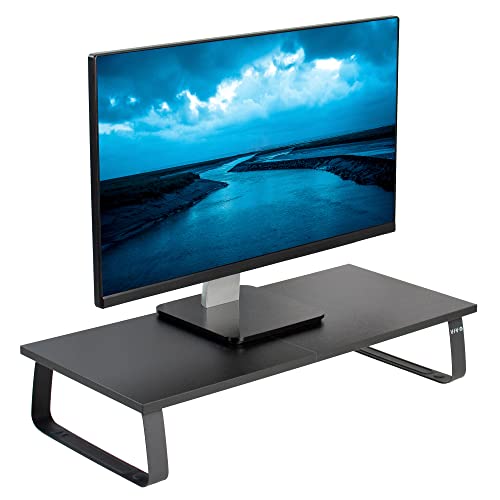
- 24-inch wooden desktop platform
- Solid steel footing with 44-pound capacity
- Anti-slip padding and three-year warranty
Best For: Compact single-monitor or laptop setups
Colorful Dual-Display Setup
BONTEC Pink Dual Monitor Riser

- Expands from 31.5 to 42.5 inches
- Swivel shelves fit straight, angled, or corner layouts
- Three compartments with phone and cable organization
Best For: Color-focused dual-monitor gaming and study desks
Heavy-Duty Gaming Setup
Simple Trending Dual Monitor Riser

- 100-pound metal-and-steel load capacity
- Two-tier design for keyboards and consoles
- Includes a 32-inch mouse pad
Best For: Large dual-monitor gaming desks needing strong under-shelf storage
Connected RGB Desk Upgrade
Petify Monitor Riser with USB Hub

- Four front-facing USB ports
- 10 RGB lighting modes
- Adjustable width with drawer storage
Best For: Gaming desks that need USB access, lighting, and compact organization
Expandable Dual-Screen Shelf
Across-Star Adjustable Dual Monitor Riser

- Adjusts from 32 to 40 inches
- Holds about 70 pounds
- Under-shelf space fits a full-size keyboard
Best For: Flexible single- or dual-monitor gaming and workstations
Dual-Monitor Rustic Riser
WESTREE Wood and Steel Dual Monitor Stand

- Supports two monitors with a 68 kg load capacity
- Steel legs and anti-slip pads promote stability
- Under-shelf storage helps clear desktop space
Best For: Stable dual-monitor gaming and workstations
Adjustable Desk Organizer
Klearlook Foldable Adjustable Monitor Riser

- Three width settings accommodate changing desk layouts
- Built-in drawer and tablet/phone holder organize accessories
- No assembly required and supports up to 55 pounds
Best For: Flexible gaming desks and compact workspaces
Storage-Focused Gaming Shelf
OPNICE Dual Monitor Riser with Drawer

- Extends up to 39 inches for two-monitor setups
- Adds a drawer and two hanging pen holders
- Raises screens 3.78 inches with no installation required
Best For: Organized dual-monitor gaming desks
Flexible Dual-Screen Organizer – BONTEC White Dual Monitor Riser
For shoppers comparing desktop monitor risers for gaming, the white BONTEC Dual Monitor Stand Riser is designed for two-screen setups that need both flexibility and storage. Its length adjusts from 31.5 to 42.5 inches, while the side shelves can swivel for straight, angled, or corner layouts.
Best For: Dual-monitor gaming or home-office desks that need adjustable positioning, open storage, and a phone holder.
Pros:
- Adjustable width and swivel shelves support multiple desk layouts.
- Three open compartments store keyboards, mice, notebooks, and gaming devices.
- Includes a phone-holder slot, cable-management opening, and non-slip pads.
- Supports up to 44 pounds and assembles in about two minutes.
Cons:
- Its 31.5-inch minimum width is relatively large for compact desks.
- The wooden design provides one fixed height rather than adjustable height levels.
This is a practical choice when a dual-monitor setup and desk organization matter as much as monitor elevation. Confirm your available desk width before buying.
Sturdy Compact Classic – VIVO 24-Inch Monitor and Laptop Riser
The VIVO STAND-V000D is a straightforward option among desktop monitor risers for gaming, with a 24-inch wooden platform supported by solid steel footing. It raises a monitor while leaving room underneath for a keyboard or other desk items.
Best For: Single-monitor, laptop, keyboard, or small-TV setups that need a compact riser with a 44-pound capacity.
Pros:
- Solid steel footing provides strong support.
- Supports up to 44 pounds.
- Anti-slip silicone padding helps protect the tabletop and prevent movement.
- Quick assembly and a three-year warranty are included.
Cons:
- The 24-inch platform is less suitable for wide dual-monitor arrangements.
- It has a single fixed level with no adjustable height or angle.
Choose this model for a simple, stable desktop lift rather than an expandable organizer. Its compact rectangular platform can also accommodate laptops, keyboards, and small TVs.
Colorful Dual-Display Setup – BONTEC Pink Dual Monitor Riser
The pink BONTEC Dual Monitor Stand Riser combines a colorful finish with practical flexibility for desktop monitor risers for gaming. It expands from 31.5 to 42.5 inches, and its swivel side shelves can be arranged straight, at an angle, or in a corner configuration.
Best For: Dual-screen gaming or study setups that want a pink desktop organizer with flexible shelf positioning.
Pros:
- Adjustable length accommodates smaller and larger desks.
- Swivel shelves support straight, angled, and corner arrangements.
- Three open compartments provide storage for peripherals and gaming devices.
- Includes a phone slot, cable-management opening, non-slip base, and quick assembly.
Cons:
- Its large adjustable footprint may not suit compact desks.
- The fixed single-level design does not offer height adjustment.
This model is especially appealing if you want dual-monitor organization without a plain black or white finish. Measure the desk first, particularly if you plan to use the side shelves at an angle.
High-Capacity Minimal Shelf – TEAMIX 20-Inch White Monitor Riser
The TEAMIX 20-inch riser is a compact, simple choice among desktop monitor risers for gaming. Its white engineered-wood shelf raises a screen while leaving an underside area for a full keyboard, notebook, or other accessories.
Best For: Single-monitor, laptop, printer, or compact gaming desks that need a minimal shelf with substantial stated load capacity.
Pros:
- Supports up to 80 pounds according to the supplied specifications.
- Provides full keyboard storage underneath the shelf.
- Its 20-inch width fits laptops under 20 inches and many smaller screens.
- Simple assembly and a minimalist white design suit varied desk décor.
Cons:
- The 20-inch width is not intended for wide dual-monitor arrangements.
- It has one fixed level and no cable-management or phone-holder features listed.
- The supplied finish is unfinished, which may be less polished than lacquered alternatives.
This is a good basic shelf when capacity and under-shelf keyboard storage are priorities. It offers less built-in organization than the BONTEC models, but its narrower footprint can be easier to place on a smaller desk.
Heavy-Duty Gaming Setup – Simple Trending Dual Monitor Riser
For gamers comparing desktop monitor risers for gaming, this Simple Trending model combines a sturdy metal frame with a spacious two-tier design. Its 7-inch lift can improve screen positioning, while the lower shelf accommodates a keyboard, Xbox console, printer, or other desk equipment.
Best For: Dual-monitor gaming setups that need substantial under-shelf storage and high load capacity.
Pros:
- Supports up to 100 pounds with steel support legs.
- 30.5-inch-wide lower tier holds keyboards, consoles, printers, and cable boxes.
- Mesh platform improves airflow around the device.
- Includes a large 32-by-10-inch mouse pad and non-slip suction cups.
Cons:
- The 32-inch overall width requires a relatively spacious desk.
- Its fixed 7-inch height offers less adjustment flexibility.
This is a practical choice when stability, capacity, and desk organization matter more than a compact footprint or adjustable height.
Connected RGB Desk Upgrade – Petify Monitor Riser with USB Hub
This Petify riser is a versatile option among desktop monitor risers for gaming, adding a front-facing USB hub and RGB lighting to a compact organizer. Its width adjusts from 16.1 to 21.7 inches, making it suitable for one wide monitor or a laptop beside a display.
Best For: Gamers who want built-in USB access, RGB effects, and small-item storage in one monitor stand.
Pros:
- Four-port hub includes three USB 2.0 ports and one USB 3.0 port.
- Offers 10 RGB lighting modes, including music rhythm effects.
- Pull-out drawer, device slot, and open keyboard space help organize the desk.
- Adjustable width and a stated 72-pound capacity support varied setups.
Cons:
- The 20.5-inch listed length is smaller than extended dual-monitor risers.
- USB ports are intended for peripherals and accessories rather than display connectivity.
Choose this model if convenience features are a priority. It adds useful connectivity and visual customization without requiring a separate RGB accessory or desk organizer.
Expandable Dual-Screen Shelf – Across-Star Adjustable Dual Monitor Riser
The Across-Star is designed for flexible dual-screen setups and stands out among desktop monitor risers for gaming with its retractable 32-to-40-inch length. The adjustable shelf can fit different desk spaces while creating room underneath for a full-size keyboard and other accessories.
Best For: Gamers and multitaskers who need an adjustable-length riser for one or two monitors.
Pros:
- Retracts from 32 to 40 inches to suit changing screen configurations.
- Raises two screens for a more comfortable viewing position.
- Supports about 70 pounds with four wood legs and an adjustable metal plate.
- Can also serve as a printer, laptop, PC, or TV stand.
Cons:
- Its extended 40-inch length can require considerable desk space.
- The wood-and-metal assembly requires screwing on the four legs.
- No mouse pad, USB hub, or lighting features are listed.
This riser makes sense for users who value width flexibility and a clean desktop. It is especially useful when a setup may switch between a single display and two screens.
Dual-Monitor Rustic Riser – WESTREE Wood and Steel Dual Monitor Stand
For shoppers comparing desktop monitor risers for gaming, the WESTREE Dual Monitor Stand is a sturdy option for raising two screens while adding useful storage beneath. Its rustic-brown wood surface and steel legs can also support a laptop, printer, or TV.
Best For: Dual-monitor gaming or workstations that need a stable, spacious riser with an under-shelf storage area.
Pros:
- Designed to hold two monitors and rated for up to 68 kg.
- Thick steel legs and optional anti-slip pads help keep the stand stable.
- Raises screens for a more comfortable viewing level while creating storage space underneath.
- Includes pre-drilled parts, tools, and instructions for assembly.
Cons:
- The fixed, single-level design does not offer adjustable width or height.
- Its rustic-brown finish may not suit minimalist or modern gaming setups.
- Assembly is required, even though the supplied instructions are designed to simplify it.
Choose this WESTREE model when load capacity and dual-monitor support matter more than adjustability. It is especially practical for a larger desktop where the space below the screens can hold accessories.
Adjustable Desk Organizer – Klearlook Foldable Adjustable Monitor Riser
The Klearlook is a flexible choice among desktop monitor risers for gaming, particularly when desk width and accessory storage change from one setup to another. Its foldable design offers three width settings, while the built-in drawer and device holder help organize a compact workstation.
Best For: Gamers and home-office users who want adjustable width, keyboard clearance, and integrated storage without assembly.
Pros:
- Adjusts to three widths: 16.5, 18.5, or 20.5 inches.
- Foldable construction makes it adaptable to different workstations.
- Includes a hidden tablet/phone holder and storage drawer.
- Rubberized legs and an internal metal plate support up to 55 pounds.
Cons:
- The 55-pound capacity is lower than the WESTREE stand’s listed capacity.
- Its plastic-and-metal construction may feel less substantial than an all-metal riser.
- The compact adjustable format may provide less surface area for larger dual-monitor arrangements.
The Klearlook stands out for adaptability and organization rather than maximum load capacity. Its no-assembly setup and adjustable footprint make it a convenient fit for changing gaming desks or smaller spaces.
Storage-Focused Gaming Shelf – OPNICE Dual Monitor Riser with Drawer
For a clutter-conscious gaming setup, the OPNICE dual monitor riser combines a wide desktop shelf with a drawer and two hanging pen holders. It raises two monitors or a laptop by 3.78 inches and leaves room underneath for a keyboard, mouse, files, or gaming accessories.
Best For: Dual-monitor users who prioritize built-in organization, extra desk storage, and a ready-to-use design.
Pros:
- Designed for raising two monitors and can extend up to 39 inches wide.
- Provides a drawer plus two pen holders for small accessories.
- Creates storage space underneath for keyboards, mice, files, printers, or gaming items.
- Metal construction and powder-coated finish support a stable, durable setup.
Cons:
- The supplied details do not specify a maximum load capacity.
- Its 3.78-inch rise is fixed rather than height-adjustable.
- The drawer and pen holders may be unnecessary for users who prefer a minimal shelf.
Consider OPNICE if desktop organization is a primary concern. Its wide, extendable format and multiple storage features make it more than a simple riser, though shoppers seeking adjustable height or a stated weight limit may prefer a different design.
How We Picked the Best Desktop Monitor Risers for Gaming
We focused on practical features that matter at a gaming desk: usable width, monitor capacity, stability, adjustability, storage, cable-management potential, and compatibility with common monitor and laptop setups. We also included different styles and price-oriented designs so you can prioritize ergonomics, appearance, or organization.
Before buying, check each riser’s stated dimensions and weight capacity against your monitors, stands, and accessories. A riser should sit flat without wobbling, and its legs or supports should leave enough clearance for your keyboard, speakers, and other desk equipment.
Quick Comparison
| Best For | Look For |
|---|---|
| Two-monitor gaming setups | Wide platforms, adjustable length, and sturdy supports |
| Small desks | Compact dimensions and space beneath the shelf |
| Storage and organization | Drawers, pen holders, tablet slots, or accessory compartments |
| RGB-focused setups | Integrated lighting and convenient power or USB access |
| Mixed monitor and laptop use | Extra width, adjustable sections, and strong load support |
Key Buying Factors for Desktop Monitor Risers for Gaming
Size and Monitor Capacity
Measure the total footprint of your monitors, including their stands. Dual-monitor risers need enough length for both displays without forcing the bases too close together. A larger shelf can also accommodate a laptop, speakers, or a console, but it requires more desk depth and width.
Height and Ergonomics
The goal is to bring the top of the display closer to eye level while leaving comfortable room underneath for your keyboard or storage. Fixed-height risers are simple and stable; adjustable models are more flexible when users or screens vary in height.
Stability and Construction
Wood, steel, and reinforced composite designs can all work well, but construction details matter more than the material label alone. Look for broad supports, non-slip feet, and a clearly stated load rating. Avoid placing a heavy ultrawide or multiple monitors on a riser that is intended for light office equipment.
Storage, Ports, and Extras
Drawers and shelves help reduce desk clutter, while tablet slots and pen holders are useful for hybrid work and study. USB hubs and RGB lighting add convenience or visual appeal, but they should not outweigh stability, dimensions, and cable access.
Who Should Buy Which Desktop Monitor Risers for Gaming?
Choose an adjustable dual-monitor riser if you use two displays or expect your setup to change. A compact single-platform model is better for a smaller desk or one monitor with a keyboard stored underneath. Pick a storage-drawer design if organization is your main concern, especially for controllers, cables, and small accessories. RGB and USB-equipped models suit gamers who want integrated setup features, while wood-and-steel shelves are a strong choice for buyers who prefer a more furniture-like appearance and multipurpose storage.