
If you want better stereo imaging and less desk reflection, the right stand can make a big difference. Desktop speaker stands with tilt adjustment help aim your speakers toward ear level for a cleaner, more focused sound.
Below, we cover the best options for different desk setups, from clamp-on designs to free-standing trays, so you can choose the right fit for your monitors, space, and weight needs.
Best 9 Desktop Speaker Stands with Tilt Adjustment Picks for 2026
Best for Adjustable Positioning
suptek Clamp-on Speaker Stands, Tilt & Swivel

- Height adjustment with tilt and swivel
- Clamp-on design saves desk space
- Large trays suit many stereo speaker setups
Best For: Desktop listeners who want flexible speaker aiming and a cleaner workspace.
Best for Tilt Control
Vondynote 12° Adjustable Speaker Stands

- 0° to 12° tilt with free rotation
- 11" to 16" height range with locking support
- Steel frame and EVA-padded 9" x 9" top plates
Best For: Desk setups that need flexible aiming, stable support, and a cleaner workspace.
Best for Heavy Monitors
Vondynote Adjustable Tilt Desk Clamp Stands

- 0-12° tilt for aiming speakers toward your listening position
- Clamp-mounted design saves desk space and adds stability
- Supports up to 60 lbs with adjustable height from 10.4 to 15.4 inches
Best For: People setting up heavier studio monitors on a desk and wanting tilt plus height adjustment.
Best for Angled Listening
Kanto S2 Tilted Desktop Speaker Stands
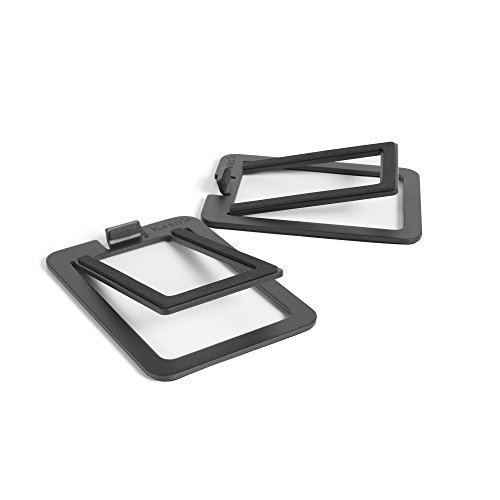
- 16° tilt improves direct sound to ear level
- Foam padding helps reduce resonance and slipping
- Compact metal design suits small desks and monitors
Best For: Small speakers and compact studio monitors that benefit from a fixed angled listening position.
Best for Heavy-Duty Clamp Mounting
Liquid Stands Adjustable Clamp-On Monitor Stands

- Clamp-on steel design supports up to 65 lbs.
- 0° to 20° tilt plus horizontal/vertical positioning.
- Low-profile mount saves desk space and reduces clutter.
Best For: Home studio users who want a sturdy clamp-on desktop monitor stand with tilt control.
Best for Precise Tilt Control
Tlingt Clamp-on Speaker Stands

- -10° to +10° tilt plus 4 height positions
- Clamp-on metal design saves desk space
- Padded trays and 33-lb capacity per stand
Best For: People who want adjustable, clamp-mounted stands for compact desktop speakers.
Best Heavy-Duty Pick
Clamp-On Monitor Stands with Tilt

- Clamp-on design preserves desk space
- 13.4"–18.2" height with 0–15° tilt
- 66 lb capacity with anti-slip EVA pads
Best For: Small studios and busy desks that need adjustable speaker placement without taking up surface area.
Best for Adjustable Positioning – suptek Clamp-on Speaker Stands, Tilt & Swivel
If you want desktop speaker stands with tilt adjustment that can also swivel and raise your monitors off the desk, this suptek clamp-on set is a practical pick. The 9.6 x 8.8 inch trays give you room for many computer and bookshelf speakers, while the clamp-on design helps free up surface space and keep your setup cleaner.
Best For: Desktop users who want flexible speaker positioning, elevated sound, and a space-saving clamp mount.
Pros:
- Height adjustment plus tilt and swivel for easier aiming
- Clamp-on mount keeps the desk surface clear
- Large trays fit a wide range of computer and bookshelf speakers
- 2-pack format works well for stereo setups
Cons:
- Clamp mounting may not suit every desk edge or thickness
- Tray size is generous, but very large speakers may still be a squeeze
Overall, this is a strong choice if you need desktop speaker stands with tilt adjustment and want more control over speaker angle without cluttering your workspace. The combination of clamp mounting, height changes, and swivel makes it especially useful for dialing in nearfield listening.
Best for Tilt Control – Vondynote 12° Adjustable Speaker Stands
If you want desktop speaker stands with tilt adjustment that make it easier to aim your monitors without giving up desk space, the Vondynote pair is a practical pick. The 11″ to 16″ height range, 0° to 12° tilt, and rotating top plate give you plenty of placement flexibility for monitors, laptops, or even a projector.
Best For: Users who want a sturdy, space-saving stand pair with easy angle tuning for a cleaner desktop setup.
Pros:
- 0° to 12° tilt plus free rotation for precise speaker positioning
- Height adjusts from 11″ to 16″ with locking support for stable setup
- Steel build with 60 lb capacity per stand feels secure for heavier gear
- Large 9″ x 9″ top plates with EVA padding help reduce resonance and slipping
Cons:
- Fixed height steps may not suit buyers who want infinitely fine adjustment
- More suitable for desk setups than tall room-wide monitor positioning
- Bulkier base can take up some space on very small desks
Overall, these desktop speaker stands with tilt adjustment are a strong fit if you value stable placement, straightforward angle control, and a tidy desktop layout. They lean more toward practical function than fancy extras, which makes them easy to recommend for everyday studio or home office use.
Best for Adjustable Projection – Suptek Desktop Speaker Stand Set
If you want desktop speaker stands with tilt adjustment that can fine-tune both listening height and angle, this Suptek 2-pack is a practical pick. The large 9.6 x 8.8 inch trays, 4-step height range, and ±12° tilt make it easy to position bookshelf or studio monitor speakers for better desk setup and clearer sound.
Best For: Users who want a sturdy, free-standing speaker stand set with adjustable height and projection angle for computer desks, home offices, or compact studio setups.
Pros:
- 4-level height adjustment plus ±12° tilt for more precise speaker aiming
- Large trays fit many computer and bookshelf speakers up to 33 lb each
- Free-standing steel base helps keep placement flexible on busy desks
- Can also lift laptops, projectors, or other gear to free up workspace
Cons:
- Two-piece stands take more desk space than clamp-on designs
- May be overkill for very small speakers or ultra-minimal setups
- Tilt and height adjustments are useful, but not as refined as higher-end studio stands
Overall, this set offers a useful mix of size, stability, and adjustability for buyers comparing desktop speaker stands with tilt adjustment. It’s a strong option when you want a simple way to raise speakers, angle them toward your ears, and reclaim some desk space.
Best for Heavy Monitors – Vondynote Adjustable Tilt Desk Clamp Stands
If you need desktop speaker stands with tilt adjustment that can also support larger gear, the Vondynote Studio Monitor Stands are built for a stable, space-saving setup. The 0-12° tilting tray, height adjustability, and clamp mount make them a practical choice for desk-based monitor speakers in home studios or editing workstations.
Best For: Users who want heavy-duty clamp-on stands for studio monitors, laptops, or small AV devices with flexible angle and height positioning.
Pros:
- Tilting top plate adjusts from 0-12° for better speaker aiming.
- Heavy-duty clamp design saves desk space while improving stability.
- Fits speakers up to 60 lbs and includes EVA padding for grip.
- Height adjusts from 10.4 to 15.4 inches for flexible placement.
Cons:
- Clamp setup may not work with every desk edge thickness or shape.
- Best suited for users who want a fixed desktop mount rather than portable stands.
For buyers comparing desktop speaker stands with tilt adjustment, this model stands out for its combination of clamp-mounted stability, adjustable height, and a speaker-friendly angled tray. It is a strong fit when you want to free up desk space without giving up precise monitor positioning.
Best for Angled Listening – Kanto S2 Tilted Desktop Speaker Stands
If you want desktop speaker stands with tilt adjustment that actually improve monitor positioning, the Kanto S2 is a simple, effective choice. The 16° upward angle helps aim small speakers toward ear level, while foam padding and a solid metal build keep vibrations in check on a desk or compact studio setup.
Best For: Small speakers, compact 2″-3″ studio monitors, and listeners who want better direct sound without adding bulk to the desk.
Pros:
- 16° tilt helps direct sound toward your ears for clearer highs
- Foam padding adds grip and reduces unwanted resonance
- Low-profile metal design keeps desktop clutter to a minimum
- Supports up to 6 lb per stand for small speaker setups
Cons:
- Only suitable for smaller speakers and compact monitors
- No height adjustment beyond the fixed tilt angle
For buyers comparing desktop speaker stands with tilt adjustment, the S2 stands out as a straightforward way to improve listening angle without sacrificing desk space. They’re especially appealing if you want stable, no-fuss support for small nearfield speakers.
Best for Heavy-Duty Clamp Mounting – Liquid Stands Adjustable Clamp-On Monitor Stands
If you want desktop speaker stands with tilt adjustment that feel more secure than typical desktop risers, this Liquid Stands 2-pack is built for stability first. The heavy-duty steel construction, clamp-on design, and 0° to 20° tilt range make it a practical choice for aligning studio monitors on crowded desks or music booths.
Best For: Home studios, desk-based music setups, and buyers who need a strong clamp-on mount with flexible angle control.
Pros:
- Heavy-duty steel build supports speakers up to 65 lbs.
- Adjustable tilt and switchable horizontal/vertical plate positioning add setup flexibility.
- Clamp-on design works with desks 0.5 to 2 inches thick and keeps the footprint small.
- Anti-slip isolation padding helps reduce movement and vibration.
Cons:
- Clamp mount may not suit every desk style or edge shape.
- Height range is useful but not as tall as full floor stands.
- Assembly and positioning take a bit more effort than simple fixed stands.
Overall, these are a strong pick if you want desktop speaker stands with tilt adjustment that prioritize security, desk space savings, and monitor positioning flexibility. They’re especially compelling for users who want a sturdier, more permanent studio-style mounting solution.
Best for Precise Tilt Control – Tlingt Clamp-on Speaker Stands
If you want desktop speaker stands with tilt adjustment that do more than just lift your monitors, this clamp-on pair is a smart, space-saving pick. The heavy-duty metal trays, lockable height settings, and -10° to +10° tilt make it easier to aim sound toward ear level and fine-tune your listening angle on a cluttered desk.
Best For: Small to medium bookshelf or monitor speakers, especially if you want adjustable height and angle control without using floor stands.
Pros:
- 4 lockable height positions and -10° to +10° tilt for flexible placement
- Clamp-on design helps free up desktop space while staying stable
- Padded, anti-skid trays help protect speakers and reduce vibration
- Heavy-duty build supports up to 33 lbs per stand
Cons:
- Best suited for 3″ to 4″ speakers, so larger models may not fit well
- Requires a desk edge up to 2.5″ thick for proper clamping
For buyers comparing desktop speaker stands with tilt adjustment, this model stands out for its combination of clamp security, angle control, and desk-friendly footprint. It is a practical choice if you want cleaner placement and better listening alignment without adding bulk to your workspace.
Best for Clamped Desk Setups – Clamp-On Speaker Stands, 9"-14" Adjustable
If you want desktop speaker stands with tilt adjustment that free up surface space, this clamp-on pair is built for simple positioning and steady support. The 4 locking height settings make it easy to raise monitors to a more comfortable listening level, while the wide metal top plate and nonslip pad help keep gear stable.
Best For: Home studios, streamers, and office desks that need sturdy monitor stands without giving up valuable desktop space.
Pros:
- 4 locking height settings from 9″ to 14″ for better monitor alignment
- Heavy-duty C-clamp design supports up to 50 lbs per stand
- Compact footprint helps clear clutter from smaller desks
- Fits a wide range of gear, including studio monitors and laptops
Cons:
- Clamp requires enough desk clearance near the wall
- Height adjusts in fixed steps, not continuous increments
- No true tilt mechanism beyond height-based positioning
These are a strong choice if your priority is stable, space-saving placement over more advanced adjustability. For buyers comparing desktop speaker stands with tilt adjustment, the main appeal here is the clamp-mounted flexibility and secure elevation rather than a full articulation system.
Best Heavy-Duty Pick – Clamp-On Monitor Stands with Tilt
If you want desktop speaker stands with tilt adjustment that free up workspace without sacrificing positioning, this clamp-on pair is a strong fit. The adjustable height, 0–15° tilt, and 360° rotation make it easier to aim speakers toward ear level, while the sturdy metal build and vibration-damping pads help keep your setup stable.
Best For: Small studios, gaming desks, and multipurpose workstations that need elevated speakers with a compact footprint.
Pros:
- Clamps to the desk to save surface space
- Height adjusts from 13.4″ to 18.2″ with 0–15° tilt
- 66 lb capacity suits many monitors, bookshelves, and accessories
- EVA pads help reduce slipping and desk vibration
Cons:
- Clamp design may not suit all desk edges or thicknesses
- Bulkier than simple tabletop risers
For buyers comparing desktop speaker stands with tilt adjustment, this model stands out for its space-saving clamp mount and flexible aiming options. It’s less about minimalist looks and more about getting solid, adjustable monitor placement on a crowded desk.
How We Picked These Desktop Speaker Stands with Tilt Adjustment
We focused on practical features that matter on a real desk: stable construction, reliable tilt range, height flexibility, tray size, clamp security, and compatibility with compact studio monitors or small powered speakers. We also looked for options that reduce wobble and help angle speakers more accurately toward the listening position.
Quick Comparison: Which Style Fits Your Desk?
Clamp-on stands are best if you want to save surface space and keep the setup locked in place. Free-standing trays are easier to move and usually work better if your desk edge is not suitable for clamps. If you need a minimal footprint for small speakers, low-profile tilted designs can be ideal. For heavier monitors, prioritize reinforced trays, strong hardware, and clear weight support.
Key Buying Factors for Desktop Speaker Stands with Tilt Adjustment
Height and Tilt Range
The main purpose of tilt is to aim the tweeters toward your ears, so check how far the tray can angle and whether the height range fits your seating position. Small changes can improve clarity more than adding extra volume.
Tray Size and Speaker Footprint
Make sure the tray can comfortably support the speaker base without overhang. Larger trays are more forgiving, but compact stands can work well for small monitors when space is tight.
Stability and Isolation
Look for sturdy metal frames, secure clamps, and non-slip or damping surfaces. A stable stand helps reduce vibration transfer and keeps the sound from feeling loose or smeared.
Desk Compatibility
Measure your desk thickness and check clamp clearance before buying. Some desks with thick lips, cable channels, or rounded edges may not accept every clamp-on model.
Speaker Weight and Use Case
Match the stand to your speaker weight and how you listen. Lightweight desktop speakers can use smaller stands, while studio monitors benefit from stronger supports with more adjustment and better load capacity.
Who Should Buy Which Desktop Speaker Stands with Tilt Adjustment?
If you have limited desk space, clamp-on Desktop Speaker Stands with Tilt Adjustment are usually the smartest choice. If you prefer flexibility and easy repositioning, go with a free-standing pair. If you use compact monitors and want a low-profile desktop setup, choose a smaller tilted stand with damping features. For heavier speakers or frequent adjustments, prioritize durability, broader trays, and a wide tilt range over a minimalist design.
The best pick is the one that matches your desk, speaker size, and listening height. Once those three factors line up, you will get a cleaner setup and better sound with very little effort.