
A studio mixer can make tracking faster—but only if its inputs, recording connection, and controls match the way you work. A console built for full-band sessions solves a different problem from a compact desk for a few microphones.
These 10 options range from tablet-controlled digital mixers to full-size consoles, with several budget USB mixers in the mix. Here’s how to separate useful studio features from specifications that sound better than they record.
Best 10 Digital Mixing Console for Recording Studio Picks for 2026
Best Tablet-Controlled Option

- 18 inputs and 12 buses
- 16 programmable MIDAS-designed preamps
- 18-in/18-out USB recording
Best For: Tablet-controlled, multichannel studio recording
Best for Integrated Recording

- 40 inputs and 32 mixing channels
- 64-in/64-out USB interface
- Onboard multitrack SD recording
Best For: Studios needing extensive routing and integrated recording
Best Compact Desktop Pick

- Eight-channel desktop mixer
- Four XLR combo inputs with +48V
- USB recording and built-in effects
Best For: Compact home-studio and creator setups
Best Large-Format Control Surface

- 40 inputs and 25 buses
- 32 programmable MIDAS-designed preamps
- 25 motorized 100 mm faders
Best For: Large sessions needing hands-on console control
Flexible Input Pick
CT-12 12-Channel USB and Bluetooth Mixer
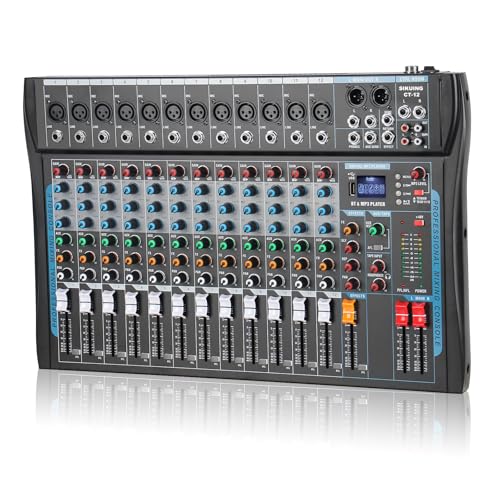
- 12 channels with XLR and balanced line inputs
- USB, Bluetooth, and headphone monitoring
- Three-band EQ, DSP effects, and +48V phantom power
Best For: Small studios needing multiple inputs and easy playback
Studio Workflow Pick
Yamaha MGX12 18-Channel Digital Console
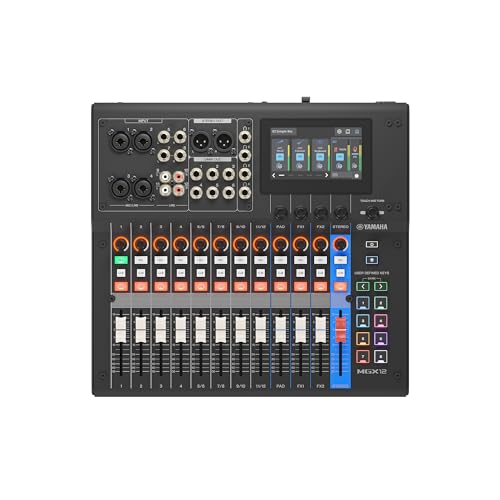
- 18 channels and dual USB-C audio interfacing
- Tactile faders, touchscreen, and scene recall
- DSP monitoring and included Steinberg software
Best For: Computer-based recording with hands-on digital mixing
Hands-On Control Pick
ALTO TMD16 16-Channel Digital Mixer

- 16 channels with 10 digital mic preamps
- Touch faders, 7-inch display, and scene recall
- USB mix recording plus onboard EQ and effects
Best For: Rehearsal spaces and small venues needing repeatable mixes
Compact Studio Pick
PreSonus StudioLive Classic 16.0.2 USB

- 16 inputs and 18-in/16-out USB recording
- 12 XMAX mic preamps with onboard processing
- Scene recall and included recording software
Best For: Small studios needing hands-on multichannel recording
Bluetooth Playback Pick
12-Channel Bluetooth Studio Audio Mixer

- 12 channels with XLR and quarter-inch inputs
- Bluetooth and USB flash-drive playback
- 99 DSP effects and 48V phantom power
Best For: Karaoke, DJ, and rehearsal mixing with playback sources
Large-Format Recording Pick
PreSonus StudioLive Series III 32S
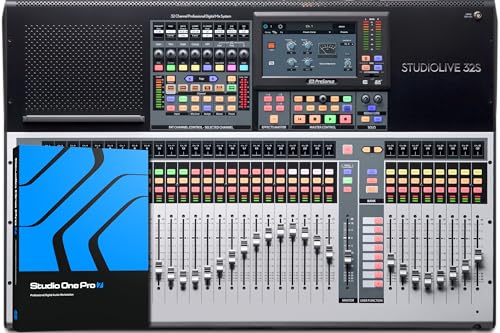
- 40 inputs and 32 fully recallable channels
- 64x64 USB interface and multitrack SD recorder
- 16 FlexMixes plus AVB networking
Best For: Larger studios needing extensive routing and multitrack recording
Best Tablet-Controlled Option – Behringer X AIR XR18
If you want a digital mixing console for recording studio work without a traditional control surface, the Behringer X AIR XR18 offers 18 inputs and tablet-based control in a 7.1-pound unit. Its 18-in/18-out USB interface supports multichannel recording.
Best For: Studios that prefer iPad or Android mixing and need to record multiple inputs over USB.
Pros:
- 16 programmable MIDAS-designed mic preamps.
- Built-in tri-mode Wi-Fi router avoids the need for an external router.
- 18-in/18-out bidirectional USB interface.
Cons:
- Tablet-based control may not suit buyers who want onboard faders.
- Auto-mixing is described as a future firmware feature, not a current capability.
The XR18 makes the most sense when compact hardware and multichannel USB recording matter more than hands-on console controls.
Best for Integrated Recording – PreSonus StudioLive 32SX
The PreSonus StudioLive 32SX is a digital mixing console for recording studio setups that need substantial routing alongside a hands-on surface. This fully recallable, 40-input, 32-channel mixer combines a 64-in/64-out USB interface with onboard multitrack SD recording.
Best For: Studios that want console mixing, extensive USB connectivity, and onboard multitrack recording in one system.
Pros:
- 64-in/64-out USB interface and onboard SD recorder with Virtual Soundcheck.
- 25 motorized faders and fully recallable mixing.
- 16 FlexMixes and AVB networking for compatible PreSonus equipment.
- Includes Studio One Artist and Capture software.
Cons:
- Its 30.9-pound weight is less convenient for frequent moves.
- The extensive routing and networking may be more than a small studio needs.
Choose the 32SX if recording, monitoring, and recall are central to your workflow; its feature set is harder to justify for a simple few-mic setup.
Best Compact Desktop Pick – Pyle PMX408ST
For a small digital mixing console for recording studio use, the Pyle PMX408ST offers eight channels in a 10.2-inch-wide desktop footprint. USB recording and playback, Bluetooth input, and built-in DSP effects give smaller setups several ways to work without adding much gear.
Best For: Home studios and creators who need a compact mixer with four mic/line inputs and straightforward PC recording.
Pros:
- Four XLR combo inputs with individually switchable +48V phantom power.
- USB recording and playback, plus Bluetooth input.
- Per-channel 3-band EQ, faders, and built-in DSP effects.
- Dedicated control-room and headphone outputs.
Cons:
- Only four channels have the listed XLR combo inputs.
- The notes do not specify how many audio channels the USB connection records separately.
This is a practical space-saving choice for modest sessions, but confirm the USB recording configuration if isolated tracks are essential to your workflow.
Best Large-Format Control Surface – Behringer X32
The Behringer X32 is a digital mixing console for recording studio users who want a full-size, hands-on mixing surface. It provides 40 input channels, 25 buses, and 32 programmable MIDAS-designed mic preamps for larger sessions.
Best For: Studios that need many mic inputs, physical faders, and recallable mixing scenes.
Pros:
- 40-input, 25-bus configuration with 32 programmable mic preamps.
- 25 motorized 100 mm faders support scene-based workflows.
- 16 XLR outputs and channel and bus LCD scribble strips.
Cons:
- At 45.4 pounds and 40.4 inches deep, it demands substantial space.
- The supplied notes do not establish its computer-recording interface configuration.
The X32 stands out for physical control and input capacity. If direct multitrack computer recording is a priority, verify the specific connectivity you need before buying.
Flexible Input Pick – CT-12 12-Channel USB and Bluetooth Mixer
If you need a digital mixing console for recording studio sessions that also handles karaoke or streaming, the CT-12 offers 12 channels, USB and Bluetooth connectivity, and a built-in 16-preset DSP effects processor. Its headphone output gives you a way to monitor privately.
Best For: Small studio setups that need multiple inputs and convenient playback options.
Pros:
- 12 channels with XLR and balanced line inputs.
- USB and Bluetooth connectivity for external devices.
- Three-band EQ, channel gain controls, and +48V phantom power.
Cons:
- The notes do not specify USB recording channel count or resolution.
- Bluetooth audio is not a substitute for a wired recording connection.
This is a practical choice when input flexibility matters more than a specified multitrack USB workflow; confirm the recording format before buying if separate tracks are essential.
For buyers comparing a digital mixing console for recording studio work, the Yamaha MGX12 combines 18 channels with dual USB-C audio interfacing, tactile faders, and a 4.3-inch touchscreen. Built-in DSP, latency-free monitoring, and the included Steinberg software bundle make it particularly relevant to computer-based recording.
Best For: Studio users who want hands-on digital control alongside a USB recording workflow.
Pros:
- 18 channels and MGX preamps with an 86 dB gain range.
- Built-in DSP with latency-free monitoring.
- Auto Gain, Clip Safe, and Scene Recall support repeatable setups.
- Includes Cubase AI, WaveLab Cast LE, Basic FX Suite, and Steinberg Plus.
Cons:
- The supplied notes do not specify the number of tracks available over USB.
- At 14.7 pounds, it is heavier than the other models here with listed weights.
The MGX12 stands out for its recording-oriented controls and software, but check its USB track configuration against your session needs before committing.
The ALTO TMD16 is a digital mixing console for recording studio practice spaces that also serves live sound setups. Its 16 channels, 100 mm capacitive touch faders, and 7-inch color display provide hands-on control, while USB lets you record a mix or livestream to a computer.
Best For: Rehearsal rooms and small venues that need repeatable mixes and computer capture.
Pros:
- 10 digital mic preamps across a 16-channel mixer.
- Parametric EQ, compression, and 16-preset effects onboard.
- Scene recall saves faders, EQ, routing, and effects.
- Four aux sends and four subgroups offer flexible routing.
Cons:
- The notes describe recording a mix over USB but do not establish multitrack recording.
- Its stated focus is live sound and practice spaces rather than dedicated studio production.
Choose the TMD16 if physical controls and quick scene changes matter; verify USB recording capabilities if your studio sessions require individual channel tracks.
Compact Studio Pick – PreSonus StudioLive Classic 16.0.2 USB
If you need a digital mixing console for recording studio sessions without moving to a large-format desk, the StudioLive Classic 16.0.2 USB combines 16 inputs with an 18-in/16-out USB interface. It can record individual channels and the main stereo mix at 24-bit/44.1 or 48 kHz.
Best For: Small studios that want hands-on mixing, multichannel USB recording, and scene recall.
Pros:
- 12 Class A XMAX mic preamps and 60 mm channel faders.
- Fat Channel EQ and dynamics on channels and buses, plus onboard effects.
- Includes Studio One Artist and Capture recording software.
Cons:
- USB recording tops out at 48 kHz.
- Four aux buses may limit more complex monitoring setups.
This is a practical choice when integrated recording and physical controls matter more than higher sample-rate support or extensive routing.
Bluetooth Playback Pick – 12-Channel Bluetooth Studio Audio Mixer
This 12-channel mixer offers Bluetooth input, USB flash-drive playback, and 99 DSP effects for flexible live or rehearsal mixing. If you are shopping for a digital mixing console for recording studio use, note that the supplied specifications do not establish a multichannel USB recording interface; assess your recording connections before choosing it.
Best For: Karaoke, DJ, and rehearsal setups that prioritize multiple inputs and convenient music playback.
Pros:
- Accepts XLR and quarter-inch microphone, line, and instrument connections.
- Provides 48V phantom power for condenser microphones.
- Offers per-channel three-band EQ, seven-band master EQ, and onboard effects.
Cons:
- Multichannel computer-recording capability is not specified.
- Bluetooth is described as an input for playback, not a recording connection.
Its appeal is versatile source mixing and built-in effects; buyers focused on separate recorded tracks should verify the output and USB functionality first.
Large-Format Recording Pick – PreSonus StudioLive Series III 32S
PreSonus StudioLive Series III 32S Digital Console Mixer with Studio One Pro Software
Check Price On AmazonFor a digital mixing console for recording studio projects with many sources, the StudioLive Series III 32S pairs a fully recallable 40-input, 32-channel desk with a 64×64 USB interface. An onboard multitrack SD recorder adds another recording and virtual soundcheck option.
Best For: Larger studios and production setups needing extensive inputs, flexible mixes, and multitrack recording.
Pros:
- 64×64 USB audio interface and onboard multitrack SD recording.
- 16 FlexMixes configurable as aux mixes, subgroups, or matrix mixes.
- AVB networking supports compatible PreSonus stage boxes and personal monitor mixers.
- Includes Studio One Artist and Capture software.
Cons:
- At 37 pounds, it is a substantial console to transport.
- Its 32-channel format may be more than smaller sessions require.
Choose the 32S when channel count, routing, and recording flexibility justify the larger footprint; its recall and networking also suit evolving setups.
How We Picked the Best Digital Mixing Console for Recording Studio
We compared the listed mixers for practical recording needs: usable microphone inputs, control style, routing flexibility, computer connectivity, and the space each unit demands. We also considered whether features such as onboard effects, tablet control, and included software would help during tracking. The selection spans compact USB mixers and larger digital consoles, so it is not a like-for-like ranking of identical products. Check the current manufacturer specifications before buying, particularly where a listing does not clearly state its USB recording capabilities.
Quick Comparison by Studio Setup
For a small desk, the Yamaha MGX12 and PreSonus StudioLive Classic 16.0.2 USB offer physical controls without moving to a 32-channel surface. The Behringer X AIR XR18 takes a different approach: it saves desk space by putting control on a tablet or computer. If you regularly track larger groups and want a full console, compare the PreSonus StudioLive Series III 32SX and 32S with the Behringer X32. The ALTO TMD16 sits between compact and large-format options. The Pyle and two generic 12-channel Bluetooth/USB mixers may suit simpler recording or rehearsal setups, but confirm what—and how many channels—they send to a computer before treating them as multitrack studio solutions.
Key Buying Factors for a Digital Mixing Console for Recording Studio Use
Inputs and Recording Channels
Count the sources you need to capture at once, including talkback microphones and spare inputs. A mixer’s total input count is not necessarily its microphone-preamp count. More importantly, USB connectivity does not automatically mean separate tracks for every channel: some mixers send only a stereo main mix. Check the USB send and return channel counts, sample-rate options, and compatibility with your recording computer.
Routing and Monitoring
For overdubs, look for enough independent monitor or aux mixes to give performers useful headphone feeds. Flexible routing also helps when you want to record clean signals while hearing effects during a take. Verify whether the console can provide the cue mixes your sessions require without extra hardware.
Control and Footprint
Physical faders are convenient when making quick changes across many channels; app-controlled mixers free up desk space but depend on a device and a reliable control connection. Consider where the mixer will sit, whether you need access from the live room, and how quickly you can recover a saved session.
Software and Expansion
Included recording software can lower your setup cost, but confirm that the mixer works with your preferred DAW and operating system. If your studio may grow, check available inputs, outputs, and supported expansion options rather than buying on channel count alone.
Who Should Buy Which Digital Mixing Console for Recording Studio?
Choose a compact console if you record a few sources at a time and value immediate hands-on control. Pick the XR18 if space is tight and remote operation appeals to you. Look at the X32 or StudioLive Series III consoles for larger sessions where routing and surface control matter. Consider a lower-cost USB mixer for basic stereo recording, streaming, or rehearsals—only after verifying its actual computer-audio channel count. The best Digital Mixing Console for Recording Studio work is the one that captures every source you need separately and gives performers dependable monitoring.