
The best digital mixing consoles for podcasting make it easier to manage microphones, remote guests, music, sound effects, and recording levels from one workspace. The right choice depends on your production style, input requirements, and how much hands-on control you want.
We compared 10 mixers and podcast-focused recording systems across connectivity, channel count, monitoring, effects, portability, and workflow flexibility to help you choose a setup that fits your studio and budget.
Best 10 Digital Mixing Consoles for Podcasting Picks for 2026
Best Adaptive Mixer
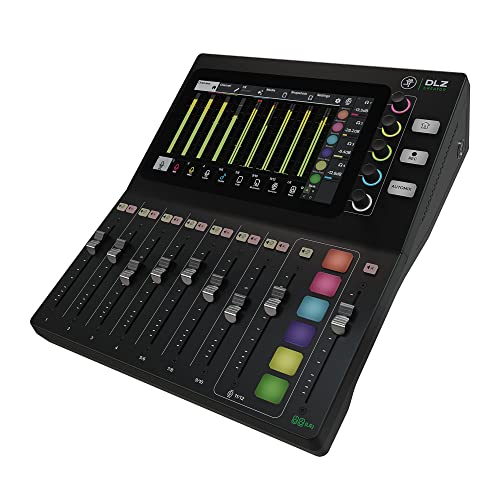
- Three control modes for different experience levels
- AutoMix supports up to four microphones
- USB-C and SD-card multitrack recording
Best For: Multi-person podcasts, YouTube shows, and live streams
Best Portable Recorder

- Six mic inputs and six headphone outputs
- Records up to 13 tracks to SD card
- Battery, AC, and USB power options
Best For: Mobile productions, panel discussions, and call-in interviews
Best Studio Workstation

- 12-channel mixer with 12-in/10-out USB
- Built-in compression and 3-band EQ
- Dual headphone outputs and DAW control
Best For: Home studios and podcasting with broader multitrack needs
Best Budget Analog-Style Mixer

- Four mono mic/line inputs and stereo RCA input
- 48V phantom power for condenser microphones
- 16 DSP effects and 3-band EQ
Best For: Basic analog podcasting, karaoke, and small event setups
Premium Touchscreen Control

- 22 channels with dual USB-C connectivity
- Touchscreen, tactile faders, and built-in DSP
- USB-HDMI supports 4K capture and pass-through
Best For: Feature-rich podcast studios and audio-video workflows
Accessible Podcasting Setup

- Eight XLR and 1/4-inch input channels
- USB recording, playback, and Bluetooth streaming
- Includes 48V phantom power and headphone monitoring
Best For: Beginner podcasters and compact streaming setups
Effects-Focused Expansion

- 16 channels for microphones, instruments, and line sources
- 99 DSP effects with reverb, delay, and ambience
- Bluetooth, USB playback, 48V phantom power, and mute controls
Best For: Larger podcast, live, karaoke, and hybrid studio setups
Compact Creator Console

- Three XLR inputs with 48V phantom power
- USB-B recording and headphone monitoring
- Bluetooth, USB-A playback, echo, and delay
Best For: Beginner podcasters and compact livestream setups
Studio-Ready Channel Hub

- Eight channels with 48V phantom power
- USB recording, Bluetooth 5.0, and MP3 playback
- Slim 1.57-inch design with LED display
Best For: Multi-microphone podcast and small production setups
Feature-Packed Podcast Board

- Three-band EQ and 48V phantom power
- USB, Bluetooth, MP3/U-disk playback and recording
- Up to 33-foot Bluetooth range and reverb
Best For: Podcasters needing detailed EQ and flexible media playback
Best Adaptive Mixer – DLZ Creator
The Mackie DLZ Creator is a flexible choice among digital mixing consoles for podcasting, especially for creators who want touchscreen control and room to grow. Its three operating modes adapt the interface for beginners through experienced users, while AutoMix helps balance up to four microphones during lively conversations.
Best For: Podcasts, YouTube shows, and live streams with up to four microphones and multiple headphone mixes.
Pros:
- Easy, Enhanced, and Pro modes accommodate different experience levels.
- AutoMix manages levels for up to four microphones.
- Records or streams multitrack audio through USB-C or directly to an SD card.
- Creates up to four customized headphone mixes.
Cons:
- It is a corded-electric unit rather than a battery-powered option.
- Its 9.1-pound, 15-inch-deep design may be less convenient for mobile setups.
- The supplied notes do not specify a current software-update date.
The DLZ Creator stands out for combining guided touchscreen operation with more advanced controls. It is a practical fit when straightforward setup, multitrack recording, and guest monitoring matter more than portability.
Best Portable Recorder – PodTrak P8
The Zoom PodTrak P8 is a strong portable alternative among digital mixing consoles for podcasting. It can record up to six microphones and two call-ins without a computer, with a touchscreen, dedicated headphone outputs, sound pads, and onboard editing for faster episode production.
Best For: Mobile podcasters, panel discussions, and interviews that need multiple guests, call-ins, and flexible power.
Pros:
- Supports six mic inputs, six headphone outputs, and up to two call-ins.
- Records up to 13 tracks directly to an SD card.
- Mix-minus helps reduce echo for wired, USB, or Bluetooth call-ins.
- Runs on AA batteries, AC power, or USB power.
Cons:
- Its USB interface is limited to 2-in/2-out operation.
- The supplied product configuration includes many accessories, which may be more than every user needs.
- At 6.3 pounds, it is portable but not an especially lightweight recorder.
With onboard editing and processing, the P8 can shorten the path from recording to finished episode. Its combination of guest management and multiple power options makes it particularly useful outside a fixed studio.
Best Studio Workstation – Model 12
The Tascam Model 12 is an all-in-one option for shoppers comparing digital mixing consoles for podcasting with broader studio needs. It combines a 12-channel mixer, multitrack recording, a 12-in/10-out USB audio interface, and DAW-controller functionality in a corded desktop format.
Best For: Home studios and podcast setups that also need multitrack DAW connectivity, MIDI, and hands-on mixing.
Pros:
- Provides 12 channels and a 12-in/10-out USB audio interface.
- Includes a 1-knob compressor and 3-band EQ on all input modules.
- Offers onboard MIDI functionality and click output with tap tempo.
- Provides dual headphone outputs with individual volume and source selection.
Cons:
- Its 13.3-pound, 18-inch-deep chassis is less suited to portable recording.
- It requires corded power.
- The supplied notes identify an auxiliary output connector rather than a detailed podcast-specific call-in system.
The Model 12 favors a traditional, hands-on studio workflow while adding computer integration and DAW control. Choose it when your podcast setup is part of a larger recording system rather than a compact travel rig.
Best Budget Analog-Style Mixer – 6-Channel Stereo Mixer
This six-channel mixer is a simple, effects-equipped option for buyers exploring digital mixing consoles for podcasting on a smaller budget. It provides four mono mic/line inputs, a stereo RCA input, 48V phantom power, 3-band EQ, and 16 DSP effects, but it does not include USB connectivity.
Best For: Basic home podcasting, karaoke, DJ events, and setups using analog XLR or RCA connections.
Pros:
- Four mono mic/line inputs plus a stereo RCA input accommodate common sources.
- 48V phantom power supports condenser microphones.
- Includes 16 DSP effects and 3-band EQ on all channels.
- Compact 3-pound design with separate master mix outputs.
Cons:
- There is no USB connection for direct computer recording or streaming.
- It has six channels, fewer than the larger podcast-focused recorders in this roundup.
- The supplied notes do not list onboard recording or dedicated call-in features.
This mixer makes sense when your workflow is built around analog connections and you want basic processing plus effects. For computer-based podcast production, the lack of USB means you will need additional hardware.
Premium Touchscreen Control – Yamaha MGX16
For creators seeking advanced digital mixing consoles for podcasting, the Yamaha MGX16 combines tactile faders with a 4.3-inch touchscreen and five control knobs. Its 22 channels, dual USB-C connectivity, built-in DSP, Bluetooth input, and microSD card slot support flexible recording and monitoring setups.
Best For: Podcasters and production teams that want extensive connectivity, guided mixing features, and latency-free monitoring.
Pros:
- 22 channels with versatile XLR, USB, Bluetooth, and microSD connectivity
- Built-in DSP supports professional processing and latency-free monitoring
- Auto Gain, Clip Safe, Scene Recall, and Simple/Standard modes simplify operation
- USB-HDMI interface includes 4K video capture and pass-through
Cons:
- Its extensive feature set may be more than a simple podcast setup requires
- Software update support is not specified in the supplied details
The MGX16 is the most feature-rich option here for a multi-microphone podcast studio or hybrid audio-video workflow. It is a strong choice when hands-on control and expansion flexibility matter more than compact simplicity.
Accessible Podcasting Setup – 8-Channel Audio Mixer
This 8-channel board offers a straightforward entry point among digital mixing consoles for podcasting. It provides XLR and 1/4-inch inputs, USB recording and playback, Bluetooth streaming, headphone monitoring, and channel-level EQ and effects controls.
Best For: Beginner podcasters, streamers, and small recording setups needing multiple microphone inputs and simple monitoring.
Pros:
- Eight channels with XLR and unbalanced 1/4-inch input support
- USB, Bluetooth, computer, mobile-device, and flash-drive connectivity
- Individual gain, FX, PFL, EQ, and fader controls support hands-on mixing
- Includes 48V phantom power, reverb, delay, and headphone monitoring
Cons:
- Offers fewer channels than the Yamaha and 16-channel alternatives
- Software update support is not specified in the supplied details
With its practical input selection and built-in recording features, this mixer covers the essentials for a small podcast or streaming desk. It is less suited to large, complex productions but provides useful control without an overly complicated layout.
Effects-Focused Expansion – 16-Channel Audio Mixer
For podcasters who also handle live shows, music, or guest-heavy sessions, this 16-channel mixer provides broad input capacity and substantial onboard processing. Its 99 DSP effects, Bluetooth and USB playback, 3-band channel EQ, and 7-band master graphic EQ offer plenty of hands-on sound-shaping control.
Best For: Larger podcast setups, live recording, karaoke, and creators who want extensive built-in effects and channel control.
Pros:
- Sixteen channels accommodate larger microphone and instrument setups
- Includes 99 DSP effects, including reverb, delay, and ambience
- Bluetooth and U-disk playback add flexible music-input options
- 48V phantom power and individual channel mute buttons improve workflow flexibility
Cons:
- Its 15.55-by-18.9-inch footprint and 8.26 kg weight may challenge compact desks
- The listed warranty is 360 days
- Software update support is not specified in the supplied details
This model makes sense when a podcasting rig needs room to grow into live production or music applications. Its effects and input count are appealing, though the larger chassis may be unnecessary for a simple two-person recording setup.
Compact Creator Console – 5-Channel USB Mixer
For creators seeking digital mixing consoles for podcasting, the BOMGE BM-05 offers a compact setup with three XLR inputs, USB-B recording, headphone monitoring, Bluetooth playback, and 48V phantom power. Its echo and delay controls can also suit livestreams and other small productions.
Best For: Beginner podcasters, livestreamers, and compact recording setups using up to three microphones.
Pros:
- Three XLR inputs with switchable 48V phantom power support condenser microphones.
- USB-B supports computer, phone, or tablet mixing and recording with the appropriate OTG adapter for phones.
- Includes headphone monitoring, two-band EQ, gain controls, echo, and delay effects.
- Offers Bluetooth playback plus USB-A MP3 playback and recording.
Cons:
- Bluetooth, USB, and channel functions cannot all be used simultaneously.
- Bluetooth operates within a stated 1.5-foot range.
- Phone connection requires a USB-to-phone OTG adapter for data transfer.
The BM-05 is a versatile, space-saving choice when you need several microphone inputs and built-in playback features. Its simultaneous-use limitations make it better for straightforward podcast and streaming workflows than complex hybrid setups.
Studio-Ready Channel Hub – FULUODE 8-Channel Mixer
The FULUODE CT-80S is a larger option among digital mixing consoles for podcasting, with eight channels, 48V phantom power, USB recording, Bluetooth, MP3 playback, and reverb. Its ultra-thin design makes it suitable for studio, karaoke, conference, and live-music applications.
Best For: Podcasters and small production teams needing more input capacity for microphones, instruments, or remote audio sources.
Pros:
- Eight-channel design provides more connection capacity than compact five-channel mixers.
- Includes 48V phantom power for compatible condenser microphones.
- USB recording, MP3 playback, Bluetooth 5.0, and a built-in display add flexible media options.
- Ultra-thin 1.57-inch design helps conserve desk or rack space.
Cons:
- The supplied specifications identify a 110V American plug, which may limit compatibility in other regions.
- Product notes provide fewer detailed podcast-specific monitoring and EQ details.
- At 3.3 kg, it is less portable than a small-format mixer.
With eight channels and multiple playback and recording options, the CT-80S is suited to more involved setups than a basic two-microphone podcast. Verify power compatibility and your desired monitoring controls before buying.
Feature-Packed Podcast Board – AX-80 8-Channel Mixer
The AX-80 combines eight channels with three-band EQ, Bluetooth playback, USB recording, an MP3 player and recorder, reverb, and 48V phantom power. For buyers comparing digital mixing consoles for podcasting, it offers broad connectivity and hands-on tone control for voices and accompanying audio.
Best For: Podcasters, karaoke hosts, and event users who want expanded playback and equalization controls.
Pros:
- Three-band EQ allows separate high, mid, and low adjustment for detailed sound shaping.
- Supports Bluetooth playback within a stated range of up to 33 feet.
- USB and direct MP3/U-disk functions support playback, recording, and common MP3, WAV, and WMA formats.
- Gold-plated XLRs, balanced line inputs, and 48V phantom power are designed for low-noise operation and compatible microphones.
Cons:
- The notes state that it cannot connect to a MacBook for recording.
- Its 110V standard US plug may require a suitable power solution outside compatible regions.
- At 4.51 kg, it is relatively heavy for a portable podcast rig.
The AX-80 stands out for hands-on EQ and extensive playback features, making it useful when a podcast includes music, effects, or multiple sources. MacBook users should confirm recording compatibility before choosing it.
How We Picked the Best Digital Mixing Consoles for Podcasting
We evaluated these consoles for the features that matter most in spoken-word production: microphone connectivity, phantom power, USB recording, headphone monitoring, routing flexibility, onboard processing, and ease of use. We also considered whether each model is better suited to solo creators, interviews, livestreams, music production, or larger multi-person shows.
Not every product is a podcast-specific workstation. Some are compact mixers with Bluetooth and USB playback, while others provide multitrack recording, DAW control, or dedicated podcast tools. That range is useful because podcast studios vary widely in size and workflow.
Quick Comparison
| Best For | What to Prioritize | Ideal Console Type |
|---|---|---|
| Solo podcasts | Simple controls, USB connectivity, reliable headphone monitoring | Compact creator mixer |
| Two- to four-person interviews | Enough mic preamps, independent headphone outputs, routing control | Podcast mixer or mid-size digital console |
| Remote guests and livestreams | Mix-minus, loopback, Bluetooth, and quick mute or effect controls | Podcast-focused digital mixer |
| Multitrack production | Multiple USB channels, SD or computer recording, DAW integration | Multitrack mixer-recorder |
| Music and events | Higher channel count, phantom power, effects, and balanced outputs | General-purpose digital mixer |
Key Buying Factors for Digital Mixing Consoles for Podcasting
Inputs and Microphone Preamps
Count the microphones, phones, instruments, and playback sources you expect to connect at the same time. Leave room for growth if you plan to add co-hosts or in-person guests. XLR inputs with phantom power are important for condenser microphones, while combo inputs add flexibility for line-level devices.
Recording and Computer Connectivity
USB audio interfaces let you record directly to a computer, but channel support varies. A stereo USB feed may be enough for a simple show; multitrack USB recording is more useful when you want to edit each voice independently. Dedicated recorders or SD support can also provide a computer-free backup.
Monitoring, Routing, and Processing
Look for enough headphone outputs or a practical headphone distribution plan. Mix-minus and loopback are especially valuable for remote interviews and livestreams. Built-in compression, equalization, reverb, and voice effects can simplify production, but they should complement—not replace—good microphone technique and room treatment.
Controls and Portability
Physical faders and mute buttons are helpful during live conversations, while touchscreen or preset-based controls can speed up repeatable workflows. For mobile recording, check battery operation, dimensions, power options, and whether the controls remain usable in a small setup.
Who Should Buy Which Digital Mixing Consoles for Podcasting?
Choose a podcast-focused creator mixer if you want fast setup, dedicated vocal controls, remote-guest features, and minimal technical overhead. A compact USB mixer is a sensible choice for solo hosts and small shows that mainly need dependable mixing and computer recording.
Choose a multitrack mixer-recorder if you want independent tracks, standalone recording, or a system that can also handle music and larger productions. A higher-channel general-purpose console is better for creators who record panels, live events, instruments, or multiple sources beyond podcasting.
Finally, verify the exact channel layout, USB behavior, driver or software requirements, and included accessories before buying. The most suitable option is not necessarily the largest mixer—it is the one that matches your microphones, guests, recording method, and day-to-day workflow.