The best digital mixing consoles for voiceover make it easier to control microphone gain, monitoring, playback, and processing from one workspace. The right model can also support streaming, interviews, music, and live production without adding unnecessary complexity.
This roundup compares 10 options ranging from compact USB mixers to larger consoles with multitrack recording, Bluetooth, phantom power, DSP effects, and flexible channel layouts.
Best 10 Digital Mixing Consoles for Voiceover Picks for 2026
Best Hands-On Pick

- 10 digital mic preamps across 16 channels
- Touch faders, display, EQ, compression, and FX
- USB, Bluetooth, app control, and scene recall
Best For: Hands-on voiceover, streaming, and small live-sound setups
Best Recording Ecosystem

- 12 XMAX mic preamps with talkback support
- 18-in/16-out USB computer audio interface
- Fat Channel processing and included recording software
Best For: Computer-based multitrack voiceover recording
Best Compact Voiceover Focus

- Low-noise preamps for vocal recording
- Four-band EQ, sweepable mids, and noise gate
- USB flash-drive recording plus 24-bit/48kHz computer audio
Best For: Podcasts, livestreams, interviews, and home voiceover studios
Best Effects Variety
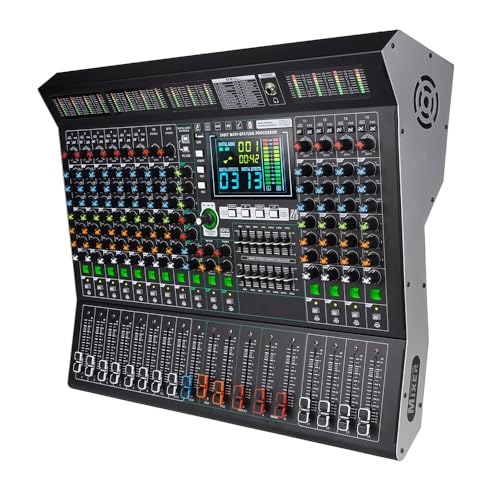
- 14 channels with 48V phantom power
- 99 DSP effects plus 9-band EQ
- Noise reduction, Bluetooth, USB, and LED display
Best For: Voiceover and live setups needing extensive DSP and connectivity
Compact Choice

- Four XLR inputs with switchable 48V phantom power
- USB, Bluetooth, and U-disk playback support
- 3-band EQ and 16 built-in DSP effects
Best For: Compact voiceover, streaming, and recording setups
Expanded Control Pick

- Sixteen channels for larger voice and audio setups
- 99 DSP effects plus 7-band master graphic EQ
- Individual EQ, fader, gain, and mute controls
Best For: Multi-source studios, live production, and larger voiceover rigs
Streaming-Friendly Option

- Eight XLR and 1/4-inch input channels
- USB recording, Bluetooth, and headphone monitoring
- Hands-on EQ, gain, FX, PFL, and fader controls
Best For: Voiceover, podcasting, streaming, and small recording setups
Compact Voiceover Starter

- Three XLR inputs with 48V phantom power
- USB-B recording and headphone monitoring
- Echo, delay, gain, and two-band EQ controls
Best For: Beginner voiceover and podcasting setups
Versatile Studio Mixer
FULUODE CT-80S 8-Channel Console

- Eight channels with 48V phantom power
- USB recording, MP3 playback, and Bluetooth 5.0
- Thin chassis with LED display
Best For: Multi-input studios and small live or conference setups
Feature-Rich Voiceover Hub

- Three-band EQ and eight-channel input capacity
- USB recording with MP3/WAV/WMA playback
- Bluetooth range stated up to 33 feet
Best For: Multi-input voiceover and podcast setups needing onboard media tools
Best Hands-On Pick – Alto TMD16
The Alto TMD16 is a practical choice among digital mixing consoles for voiceover when you want tactile control, built-in processing, and flexible routing without relying on a tablet. Its 10 digital mic preamps, 100mm touch faders, 7-inch display, USB connectivity, and Bluetooth support make it suitable for voice recording, streaming, and small live setups.
Best For: Voiceover users who want hands-on operation, onboard EQ and compression, and room to expand into live sound or livestreaming.
Pros:
- 10 digital mic preamps and 16 total channels provide useful input capacity.
- 100mm capacitive faders, dedicated encoders, and a 7-inch display support direct control.
- Built-in parametric EQ, compression, and a 16-preset FX engine reduce the need for extra gear.
- USB recording, Bluetooth, app control, scene recall, and four aux sends add flexibility.
Cons:
- Its 16-channel live-sound feature set may be more than a simple single-microphone voiceover setup requires.
- The unit requires corded power and is designed primarily around live mixing applications.
Choose the TMD16 if you value physical controls and expect your setup to grow beyond basic voiceover. Scene recall and flexible routing are especially useful when switching between repeatable recording or streaming configurations.
Best Recording Ecosystem – PreSonus StudioLive 16.0.2
The PreSonus StudioLive Classic 16.0.2 is a strong option among digital mixing consoles for voiceover if multichannel computer recording and integrated software matter most. It combines 12 XMAX mic preamplifiers, Fat Channel processing, onboard effects, and an 18-in/16-out USB interface for detailed recording and routing.
Best For: Voiceover creators who record through a computer and want extensive channel processing, multitrack USB connectivity, and software-based control.
Pros:
- 12 Class A XMAX mic preamplifiers support multiple microphone inputs plus talkback.
- Fat Channel processing includes EQ, compression, downward expansion, and limiting on channels and buses.
- 18-in/16-out USB recording captures all channels and the main stereo mix.
- Includes Studio One Artist, Capture, UC Surface, and QMix-UC software options.
Cons:
- Its 20-pound chassis is less convenient for highly portable voiceover setups.
- The 60mm faders are shorter than the TMD16’s 100mm faders.
The StudioLive is best suited to a more established computer-based studio where multitrack recording and software integration justify its larger footprint. Its channel processing can also help prepare voice tracks before they reach the DAW.
Best Compact Voiceover Focus – XTUGA DM80
The XTUGA DM80 is designed with voice recording in mind, making it a focused pick among digital mixing consoles for voiceover. Its low-noise preamps, per-channel four-band EQ, sweepable mid filter, noise gate, USB recording, and 24-bit/48kHz computer recording support target podcasts, livestreams, interviews, and home studios.
Best For: Voiceover and podcast users who want direct vocal shaping, noise control, USB recording, and a smaller eight-channel mixer.
Pros:
- Professional-grade preamps and a low-noise design are intended for clear vocal recording.
- Each channel includes four-band EQ with a sweepable mid filter, plus noise gate and mute controls.
- One-key USB recording allows computer-free stereo capture to a flash drive.
- Includes 16 adjustable effects, a color display, LED meters, and 45mm faders.
Cons:
- With eight channels, it offers less input capacity than the 14- and 16-channel alternatives.
- No warranty is listed in the supplied product details.
The DM80 makes the most sense when vocal clarity and straightforward control are higher priorities than large-scale routing. Its noise gate and dedicated vocal EQ features are particularly relevant for untreated rooms, livestreams, and spoken-word work.
Best Effects Variety – MD-14 Digital Mixer
The MD-14 is a versatile option among digital mixing consoles for voiceover, particularly if you want a broad selection of onboard effects and multiple connectivity options. It provides 14 channels, 48V phantom power, a 9-band equalizer, noise reduction, Bluetooth, USB playback, and a large LED display for monitoring parameters.
Best For: Voiceover and live users who want extensive DSP effects, multiple inputs, phantom power, and Bluetooth or USB playback.
Pros:
- 14 independent channels offer more expansion room than a compact eight-channel mixer.
- 99 built-in DSP effects include reverbs, delays, choruses, flangers, and pitch-shifting options.
- Noise reduction, a 9-band EQ, and 48V phantom power support vocal-focused signal processing.
- Bluetooth and USB playback add convenient wireless and file-based audio options.
Cons:
- At 18 pounds and nearly 20 inches wide, it is less portable than the Alto TMD16.
- The supplied details list a 30-day return and exchange policy rather than a longer manufacturer warranty.
- The extensive effects selection may be unnecessary for a clean, minimally processed voiceover chain.
The MD-14 is a reasonable fit when one mixer needs to cover spoken-word recording, live work, DJ use, and effects-heavy production. For straightforward narration, its noise reduction, EQ, and phantom power are more relevant than its large effects library.
Compact Choice – 6-Channel Voiceover Mixer
For shoppers comparing digital mixing consoles for voiceover, this compact 6-channel mixer offers four XLR inputs, 48V phantom power, USB connectivity, Bluetooth playback, and onboard effects. It is suited to straightforward voice, music, streaming, and recording setups where hands-on controls matter.
Best For: Voiceover users who need a compact mixer with condenser-mic support, basic EQ, and convenient USB or Bluetooth audio playback.
Pros:
- Four XLR inputs support condenser and dynamic microphones, with switchable 48V phantom power.
- USB, Bluetooth, and U-disk playback provide flexible music and recording options.
- Each channel includes gain and 3-band EQ controls, plus 16 DSP effects with reverb and delay.
Cons:
- The supplied notes identify it as a traditional analog mixer, so it may not provide advanced digital-console workflow features.
- Its four XLR inputs may be limiting for larger multi-microphone productions.
This is a practical entry-level option for voiceover and streaming setups that value physical controls and built-in effects. Buyers wanting extensive channel capacity or more advanced processing may prefer a larger console.
Expanded Control Pick – 16-Channel Digital Mixer
Among digital mixing consoles for voiceover, this 16-channel model stands out for its larger input count and extensive onboard processing. Independent channel controls, mute buttons, a 7-band master graphic EQ, USB playback, and Bluetooth make it suitable for more involved studio, live, karaoke, or performance mixes.
Best For: Voiceover or production users managing multiple microphones, instruments, playback sources, and separate channel adjustments.
Pros:
- Sixteen channels provide more room for microphones, line sources, instruments, and playback devices.
- Each channel has independent gain, 3-band EQ, fader, and mute controls.
- Ninety-nine DSP effects, a 7-band master EQ, USB playback, and Bluetooth expand mixing flexibility.
- 48V phantom power supports compatible condenser microphones.
Cons:
- Its larger 18.9-inch-wide chassis and 8.26 kg weight make it less portable than compact mixers.
- The supplied notes do not identify supported software updates.
With its high channel count and broad control set, this mixer is the strongest fit here for complex voiceover environments or shared studio spaces. It may be more console than necessary for a single-microphone setup.
Streaming-Friendly Option – 8-Channel USB Mixer
This 8-channel console is one of the more versatile digital mixing consoles for voiceover, combining multiple XLR and 1/4-inch inputs with USB recording, Bluetooth playback, and headphone monitoring. Its gain, EQ, FX, PFL, and channel-fader controls are useful for podcasting, streaming, recording, and small live productions.
Best For: Voiceover creators, podcasters, and streamers who want direct monitoring, computer connectivity, and flexible input options in a slim mixer.
Pros:
- Eight channels accept XLR and unbalanced 1/4-inch connections, supporting multiple audio sources.
- USB audio connectivity supports mixing and recording with a computer or external USB device.
- Bluetooth playback, USB recording, headphone monitoring, and built-in reverb and delay suit streaming workflows.
- Individual gain, FX, PFL, 3-band EQ, and fader controls enable hands-on adjustments.
Cons:
- The mixer provides eight channels, offering less expansion than the 16-channel alternative.
- The supplied notes do not specify advanced software control or update support.
This model balances connectivity and physical control without the larger footprint of a 16-channel board. It is a sensible choice for voiceover and streaming users who need more than a basic two-input interface.
Compact Voiceover Starter – BOMGE BM-05 5-Channel Mixer
For shoppers comparing digital mixing consoles for voiceover, the BOMGE BM-05 is a compact option with three XLR inputs, 48V phantom power, headphone monitoring, and USB-B connectivity for computer recording. Its gain, two-band EQ, echo, and delay controls also suit simple podcasting and streaming setups.
Best For: Beginner voiceover, podcasting, and small recording setups that need a compact mixer with condenser-mic support.
Pros:
- Three XLR inputs with switchable 48V phantom power support condenser microphones.
- USB-B connection enables recording and mixing with a computer, while a headphone output supports monitoring.
- Includes gain, two-band EQ, echo, and delay controls for basic vocal shaping.
- Bluetooth playback and USB-A MP3 playback add flexible background-audio options.
Cons:
- Bluetooth, USB, and channels 4/5 functions cannot be used simultaneously.
- Bluetooth operates within a short stated range of 1.5 feet.
- Connecting to a phone requires a USB OTG adapter, and the USB-B interface may require additional setup.
The BM-05 makes the most sense when space, simple controls, and a low-complexity recording workflow matter more than extensive channel capacity or advanced digital processing.
Versatile Studio Mixer – FULUODE CT-80S 8-Channel Console
Among digital mixing consoles for voiceover, the FULUODE CT-80S provides eight channels, 48V phantom power, USB recording, Bluetooth 5.0, and a built-in MP3 player. Its larger format is suited to voiceover environments that also handle instruments, multiple microphones, karaoke, or live events.
Best For: Multi-input home studios, small performances, conferences, and voiceover users who want playback and recording features in one console.
Pros:
- Eight channels provide more connection capacity than a compact five-channel mixer.
- 48V phantom power supports condenser microphones and other compatible inputs.
- USB recording, MP3 playback, Bluetooth 5.0, and an LED display offer flexible media control.
- Ultra-thin design measures approximately 1.57 inches in thickness.
Cons:
- The supplied specifications identify a 110V American plug, so power compatibility should be checked.
- The larger 15.75-inch-wide chassis and 3.3 kg weight are less convenient for highly portable setups.
- The notes do not specify detailed voice-processing controls such as a dedicated compressor or parametric EQ.
The CT-80S is a practical choice when channel count and general-purpose connectivity are priorities, though dedicated voiceover buyers should confirm that its available tone controls match their recording workflow.
Feature-Rich Voiceover Hub – AX-80 8-Channel Digital Mixer
The AX-80 is one of the more feature-focused digital mixing consoles for voiceover, combining eight channels, 48V phantom power, balanced inputs, a three-band EQ, USB recording, and Bluetooth playback. It also includes an MP3 player and recorder with LCD feedback for users who need both vocal production and media handling.
Best For: Voiceover and podcast setups that need multiple inputs, three-band vocal adjustment, onboard recording, and wireless playback.
Pros:
- Three-band EQ allows independent high, mid, and low-frequency adjustments for vocals and music.
- Eight channels, balanced line inputs, gold-plated XLRs, and 48V phantom power support varied sources.
- USB recording, MP3/WAV/WMA support, built-in playback, and an LCD provide flexible media control.
- Bluetooth offers a stated wireless range of up to 33 feet.
Cons:
- The supplied notes state that it cannot connect to a MacBook for recording.
- At 4.51 kg, it is heavier than a compact desktop mixer.
- It is designed for 110V alternating current with a standard US plug.
The AX-80 stands out for users who want more hands-on tonal control and integrated recording features, but MacBook users should treat the stated recording limitation as a key buying consideration.
How We Picked the Best Digital Mixing Consoles for Voiceover
We focused on features that matter in spoken-word production rather than judging mixers by channel count alone. Our comparison considers microphone input quality, 48V phantom power for condenser microphones, USB recording and playback, headphone monitoring, routing flexibility, onboard processing, noise-control features, and practical desktop or studio usability.
Because the selection includes both established models and budget-oriented consoles, buyers should verify the current specifications, included cables, software support, and warranty before ordering. A mixer with many DSP effects is not automatically the best choice for clean narration.
Quick Comparison
| Best For | Look For | Recommended Type |
|---|---|---|
| Solo voiceover | Quiet preamps, headphone output, USB connection | Compact 6- or 8-channel mixer |
| Multiple microphones | Several mic preamps and independent gain controls | 14- or 16-channel console |
| Podcasting and interviews | USB playback, flexible monitoring, Bluetooth | Digital mixer with routing controls |
| Live voiceover or streaming | DSP, quick level adjustment, phantom power | Console with onboard effects and direct controls |
| Multitrack recording | Reliable USB interface and multichannel output | USB digital console with stated multitrack support |
Key Buying Factors for Digital Mixing Consoles for Voiceover
Microphone Inputs and Preamps
Count how many microphones you will use now, then leave room for guests or additional sources. The preamps should provide enough clean gain for your microphone without excessive hiss. Condenser microphones require switchable 48V phantom power, while some dynamic microphones may benefit from a high-gain input or inline booster.
USB Recording and Monitoring
Confirm whether USB supports simple stereo recording or true multitrack transfer. Stereo USB is adequate for a single narrator and basic streaming, while multitrack recording is more useful for podcasts, interviews, and post-production. A dedicated headphone output, clear metering, and low-latency monitoring are especially important when recording narration.
Processing, Routing, and Connectivity
High-pass filtering, compression, equalization, and noise reduction can help produce a consistent voice, but processing should remain adjustable and easy to bypass. Bluetooth is convenient for reference playback, although it should not replace a wired connection for critical recording. Also check for balanced outputs, USB playback, and compatibility with your computer and recording software.
Who Should Buy Which Digital Mixing Consoles for Voiceover?
Choose a compact 6- or 8-channel model if you are a solo creator who needs one microphone, occasional music playback, and a small desktop footprint. These mixers typically provide the essential inputs and controls without the cost or space of a larger console.
Choose a 14- or 16-channel mixer if you record several speakers, connect external playback devices, or expect your setup to grow. More channels provide flexibility, but they also add size and may make basic voiceover work less streamlined.
For podcasting, streaming, or live production, prioritize direct controls, USB playback, headphone monitoring, and useful DSP over an impressive effects count. For serious multitrack editing, confirm the mixer’s exact USB channel routing before purchase. Finally, if your main priority is the cleanest possible narration, spend more attention on microphone quality, room treatment, gain staging, and monitoring than on extra effects.