
If your TV has an optical audio output but your speakers or stereo amplifier accept only analog audio, an external DAC can bridge the gap. The right choice depends on your connections, your TV’s audio settings, and whether you need a simple adapter or more control over your sound system.
These 10 options range from compact optical-to-analog converters to desktop DACs with additional inputs and preamp features. Before choosing, check the output on your TV and the input on the device you want to connect.
Best 10 External Dac for TV Audio Picks for 2026
Best for HDMI ARC
Fosi Audio ZD3 Balanced DAC Preamp

- HDMI ARC, optical, coaxial, USB, and Bluetooth inputs
- Balanced XLR and RCA outputs
- Remote, OLED display, and 12V trigger
Best For: TV-and-music stereo systems with a separate amplifier
Best with Headphone Output

- Optical, coaxial, and USB inputs
- RCA and 3.5mm headphone outputs
- Adjustable bass and treble
Best For: TV setups that also need headphone listening
Best Simple Optical-to-RCA Link

- Optical input to RCA male connections
- Supports up to 24-bit/192kHz input
- Requires PCM; no headphone support
Best For: PCM-capable TVs connected to RCA-equipped stereo gear
Best for Dolby and DTS Sources

- Accepts Dolby AC-3, DTS 5.1, and PCM input
- Optical and coaxial digital inputs
- RCA and 3.5mm stereo outputs share volume control
Best For: Dolby or DTS TV sources feeding stereo audio equipment
Long-Reach TV Adapter
eSynic Optical-to-RCA Converter

- 7-foot optical cable
- Optical PCM stereo to RCA
- Power instructions conflict
Best For: Wall-mounted TVs paired with RCA stereo systems
Multi-Source Hi-Res DAC
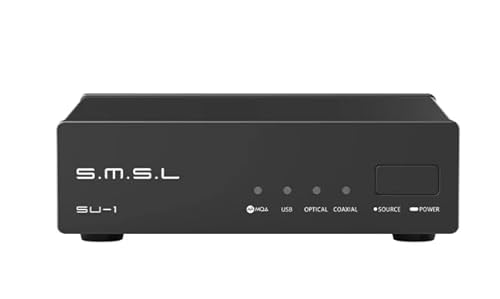
- Optical, coaxial, and USB sources
- Supports MQA-CD decoding
- Check TV format compatibility
Best For: Two-channel systems with TV, CD, and USB sources
Flexible Stereo Outputs
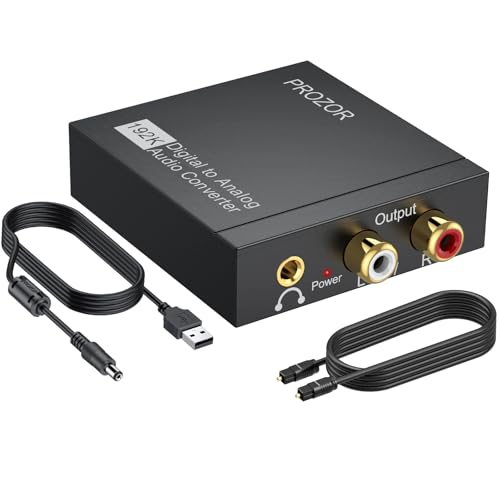
- Optical or coaxial input
- RCA and 3.5mm outputs
- Requires PCM and 5V power
Best For: TVs feeding RCA or 3.5mm stereo inputs
Quiet Listening Pick

- Optical input to 3.5mm stereo output
- Supports up to 192kHz/24-bit input
- Needs 5V USB power and PCM audio
Best For: Private TV listening through 3.5mm headphones
RCA Stereo Pick

- Optical input to stereo RCA output
- Amplifier chip addresses low RCA volume
- Fixed RCA lead; PCM stereo required
Best For: TVs connected to RCA-input amplifiers or speakers
Volume Control Pick

- Optical input to 3.5mm stereo output
- Built-in amplifier and volume knob
- Needs 5V USB power and PCM stereo
Best For: 3.5mm TV audio setups needing manual volume control
Best for HDMI ARC – Fosi Audio ZD3 Balanced DAC Preamp
The Fosi Audio ZD3 is a flexible external dac for tv audio when your setup calls for HDMI ARC and a dedicated stereo amplifier. It also accepts optical, coaxial, USB, and Bluetooth inputs, with RCA and balanced XLR outputs.
Best For: Building a TV-and-music stereo system around an amplifier with RCA or XLR inputs.
Pros:
- HDMI ARC input makes it a direct option for compatible TVs.
- Balanced XLR and RCA outputs suit different amplifier connections.
- Remote, OLED display, preamp bypass, and 12V trigger add setup flexibility.
Cons:
- No headphone output is listed.
- Its many inputs and controls may be more than a basic optical-to-RCA setup needs.
Choose the ZD3 if HDMI ARC and system integration matter; its broad connectivity is the main advantage over a simple TV audio converter.
Best with Headphone Output – Fosi Audio Q4 DAC
The Fosi Audio Q4 is a compact external dac for tv audio if your TV has an optical or coaxial output and you want to feed powered speakers, an amplifier, or headphones. It also includes USB input for a computer.
Best For: A straightforward TV audio setup that also needs a 3.5mm headphone jack and manual tone controls.
Pros:
- Optical and coaxial inputs accommodate common digital TV connections.
- RCA and 3.5mm outputs cover speakers or an amplifier and headphones.
- Separate bass and treble knobs make sound adjustment simple.
Cons:
- No HDMI ARC or Bluetooth input is listed.
- The supplied notes do not specify Dolby or DTS decoding, so check your TV’s audio output settings.
The Q4 offers useful hands-on controls without a complicated interface. It is the practical pick here when headphone listening is part of the plan.
Best Simple Optical-to-RCA Link – AUTOUTLET 192kHz DAC
The AUTOUTLET converter is a focused external dac for tv audio: it takes an optical signal and provides RCA male connections for a stereo amplifier. Its cable-style design suits a setup that needs conversion rather than extra inputs or controls.
Best For: Connecting a TV’s optical output to RCA inputs when the TV can be set to PCM audio.
Pros:
- Direct optical-to-RCA connection keeps the signal path straightforward.
- Supports optical input sampling rates up to 24-bit/192kHz.
- Listed for HDTVs, set-top boxes, disc players, and game consoles.
Cons:
- Does not support 5.1-channel Dolby AC-3; the source must output PCM.
- TV remote volume control is not supported; adjust volume on the output device.
- Does not support headphones.
This is the simplest match when you already have RCA-equipped stereo gear. Confirm the TV’s PCM setting and volume-control arrangement before choosing it.
Best for Dolby and DTS Sources – PROZOR 192kHz DAC Decoder
The PROZOR is an external dac for tv audio that accepts optical or coaxial digital input and converts Dolby AC-3, DTS 5.1, or PCM signals to stereo analog output. That format support makes it worth considering when a PCM-only converter would not fit your source settings.
Best For: Feeding stereo RCA or 3.5mm equipment from a TV or other source that outputs Dolby AC-3 or DTS.
Pros:
- Accepts Dolby AC-3, DTS 5.1, and PCM digital input signals.
- Provides both L/R RCA and 3.5mm stereo outputs.
- A volume knob adjusts both analog outputs together.
Cons:
- Output is stereo, not discrete 5.1-channel analog audio.
- The RCA and 3.5mm output levels cannot be adjusted independently.
- Signal conversion is one-way; it does not provide optical output.
Pick this model when digital-format compatibility is the priority. It decodes supported multichannel inputs for stereo listening rather than adding surround-speaker outputs.
Long-Reach TV Adapter – eSynic Optical-to-RCA Converter
If you need an external dac for tv audio to connect a TV’s optical output to an older stereo amplifier, this eSynic converter offers RCA output and an attached 7-foot optical cable. Set the TV to PCM stereo before connecting it.
Best For: Wall-mounted TVs that need a longer optical reach to an RCA-equipped stereo system.
Pros:
- 7-foot optical cable helps reach equipment below or beside a TV.
- Converts optical PCM stereo to left/right RCA analog audio.
- Aluminum housing and a status LED provide a sturdy, straightforward setup.
Cons:
- Does not decode Dolby or DTS, and conversion works only from optical to RCA.
- Power instructions conflict: the notes claim both optical-port power and a required 5V/1A USB adapter, which is not included.
- TV remote volume may not control the analog output; use the amplifier or speakers.
The long cable is its main advantage. Confirm the power requirement before ordering, and choose it only if your TV can output PCM stereo.
Multi-Source Hi-Res DAC – SMSL SU-1
SMSL SU-1 MQA MQA-CD Audio Decoder AK4493S XU316 768kHz/32Bit DSD512 Hi-Res DAC
Check Price On AmazonThe SMSL SU-1 is an external dac for tv audio worth considering if you also want to connect other digital sources. Its supplied notes describe optical and coaxial digital connections, USB input, an AKM AK4493S DAC chip, and MQA-CD support.
Best For: A two-channel audio setup that combines a TV with a CD player or USB source.
Pros:
- Optical and coaxial connectivity accommodates digital audio sources.
- Supports MQA-CD decoding from a compatible CD player’s digital output.
- USB input supports several computer and mobile platforms; Windows requires a driver.
Cons:
- The supplied notes do not specify TV format compatibility or TV-remote volume behavior.
- The included-components list mentions only the unit and a USB cable; check whether your setup needs additional cables.
Pick this for its broader source options rather than assuming it is a drop-in fix for every TV. Check your TV’s digital output settings and your amplifier’s input requirements first.
Flexible Stereo Outputs – PROZOR 192kHz DAC
For an external dac for tv audio with more connection choices, this PROZOR model takes optical or coaxial digital input and sends PCM stereo to RCA and 3.5mm analog outputs. It is suited to connecting a TV to an older amplifier or a device with a 3.5mm input.
Best For: TVs with optical output feeding RCA-equipped audio systems or 3.5mm-input devices.
Pros:
- Accepts optical and coaxial digital inputs.
- Provides both RCA and 3.5mm analog outputs simultaneously.
- Includes a USB power cable with a ferrite core; the notes also list an optical cable.
Cons:
- Requires PCM or LPCM stereo output; it does not decode 5.1 audio.
- A certified 5V/1A wall adapter is required but not included.
- TV remote volume may not directly adjust optical output.
This is the practical pick when you need a choice of analog connections. Set the TV to PCM/LPCM and plan for a separate 5V/1A power adapter.
Quiet Listening Pick – Tackston Optical-to-3.5mm DAC
If your TV has optical audio output but your headphones or speaker use a 3.5mm connection, this external dac for tv audio provides a straightforward bridge. It converts optical input to stereo AUX output and supports sample rates up to 192kHz.
Best For: Connecting 3.5mm headphones or speakers to a TV’s optical output, especially for private listening.
Pros:
- Supports optical input up to 192kHz/24-bit.
- Provides a 3.5mm connection for headphones or speakers.
- Compact converter-and-cable format.
Cons:
- Requires USB 5V power and PCM/stereo output; Dolby and DTS bitstreams are unsupported.
- The TV remote cannot control playback volume during use, so adjust it on the connected device.
Choose this one when a simple optical-to-3.5mm connection matters more than built-in volume control. Check that your headphones or speaker provide a convenient way to adjust volume.
RCA Stereo Pick – PROZOR Optical-to-RCA DAC
For a TV with optical output and a stereo system with left/right RCA inputs, this external dac for tv audio makes the connection without a separate RCA lead. Its built-in amplifier chip is intended to address low RCA output volume, and it supports sample rates up to 192kHz.
Best For: Connecting a TV’s optical output to an amplifier or speaker system with RCA inputs.
Pros:
- Converts optical audio to two-channel analog RCA.
- Built-in amplifier chip helps address weak RCA output.
- Integrated RCA cable reduces the number of separate cables needed.
- Includes a USB power cable with a ferrite core.
Cons:
- Requires PCM/LPCM stereo; it does not decode Dolby AC3 or other 5.1-channel signals.
- The RCA cable is fixed, and a suitable 5V 1A USB power adapter is recommended.
This is the RCA-oriented choice if your existing audio equipment has analog stereo inputs. Before buying, confirm your TV can output PCM and that the fixed cable will reach your system.
Volume Control Pick – PROZOR Optical-to-3.5mm DAC
If you need a 3.5mm connection and want volume control at the converter, this external dac for tv audio is a practical option. It converts optical input to analog stereo, with a built-in amplifier chip and a knob for adjusting its 3.5mm output.
Best For: Connecting a TV’s optical output to 3.5mm headphones, speakers, or a Bluetooth transmitter when manual volume adjustment is useful.
Pros:
- Built-in knob controls the 3.5mm output volume.
- Amplifier chip is designed to boost weak output signals.
- Supports sample rates up to 192kHz and 24-bit SPDIF input.
- Includes a USB power cable with a ferrite core.
Cons:
- Requires PCM/LPCM 2.0 audio; Dolby AC3 and 5.1 surround are unsupported.
- Needs 5V USB power, and TV-remote volume control depends on the TV.
Compared with a basic optical-to-3.5mm adapter, the on-device knob gives you a reliable place to adjust output volume even when the TV remote does not control optical audio.
How We Picked the Best External Dac for TV Audio
We focused on products with a practical route from a TV’s digital audio output to analog speakers, headphones, or a stereo amplifier. The selection covers compact optical-to-RCA and optical-to-3.5mm adapters alongside desktop DACs that may suit a larger hi-fi setup. We prioritized connection types, power and cable considerations, output flexibility, and how clearly each option fits a common TV setup. Listed sample-rate figures were not treated as a guarantee of better TV sound.
Quick Comparison: Which Type Fits Your Setup?
For a basic TV-to-stereo connection, an optical-to-RCA adapter such as the AUTOUTLET, eSynic, or PROZOR optical-to-RCA models is the most direct type. If your speaker system uses a 3.5mm input, consider the optical-to-3.5mm converters or a model offering both RCA and 3.5mm outputs. The Fosi Audio Q4, Fosi Audio ZD3, and SMSL SU-1 are better starting points if you also want a desktop DAC for other sources or a more flexible stereo system. Check each product’s exact inputs and outputs before buying; models within the same brand do not necessarily connect the same way.
Key Buying Factors for an External Dac for TV Audio
Check the TV Output First
Most compact options here are intended for an optical, or Toslink, output. If your TV offers only HDMI ARC or eARC, a standard optical DAC will not connect directly; you would need a compatible audio extractor or another solution. A TV’s USB port may provide power to some adapters, but that does not make USB an audio output.
Match the Analog Input
RCA left/right outputs suit many stereo amplifiers and powered speakers. A 3.5mm output suits equipment with an AUX input. A physical fit is only the first step: check whether your speakers are powered or require an amplifier. If you want to connect headphones, look for an output specifically intended to drive them rather than assuming every 3.5mm jack is a headphone amplifier.
Confirm Audio Format and Volume Control
Many inexpensive stereo DACs require the TV’s digital audio output to be set to PCM or stereo; they cannot decode a Dolby or DTS bitstream. The PROZOR model advertised for Dolby AC-3 and DTS conversion is a potential exception, but confirm its supported formats and output behavior against your TV settings. Also check whether the DAC has adjustable output volume. A fixed-level output may require you to control volume at the speakers or amplifier rather than with the TV remote.
Plan for Power and Cable Length
Check whether a power adapter is included, where you can plug it in, and whether an attached optical cable will reach your TV. An all-in-one adapter can reduce cable clutter, while separate cables give you more freedom to position the DAC.
Who Should Buy Which External Dac for TV Audio?
Choose a compact optical-to-RCA converter if you simply need sound from a TV to an existing stereo amp or powered speakers. Choose an optical-to-3.5mm option for speakers with an AUX input, after confirming the connector and volume controls. Consider a desktop model if you will also connect a computer or other sources, or want preamp-style flexibility. If your TV has only HDMI ARC/eARC, solve that connection requirement first rather than buying an optical-only DAC.