
A gooseneck microphone puts the pickup point where you need it without asking you to hold a mic or crowd a desk. The right choice depends less on appearance than on where you will speak and what equipment you can connect.
These 10 options cover plug-and-play USB models for computer calls and wired podium microphones for mixers and installed sound systems. Use the buying guide below to narrow down the connection, controls, and pickup pattern that fit your setup.
Best 10 Gooseneck Microphone Picks for 2026
Best USB Meeting Mic
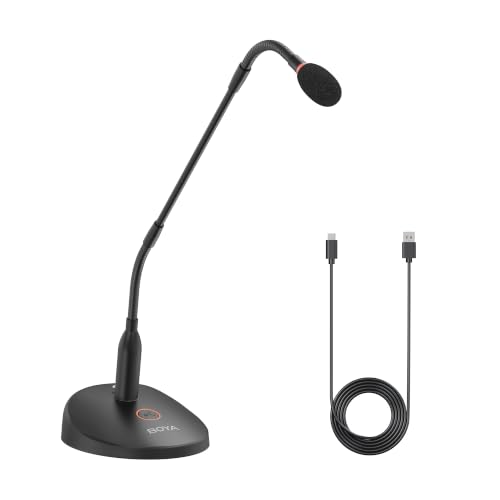
- 18-inch bi-fold neck
- USB plug-and-play connection
- Mute button and headphone monitoring
Best For: Computer meetings and lectures
Best DJ Mixer Talkback

- Direct three-pin XLR connection
- Flexible 17-inch neck
- Unidirectional dynamic capsule
Best For: DJ mixer talkback and PA announcements
Best Compact Computer Pick
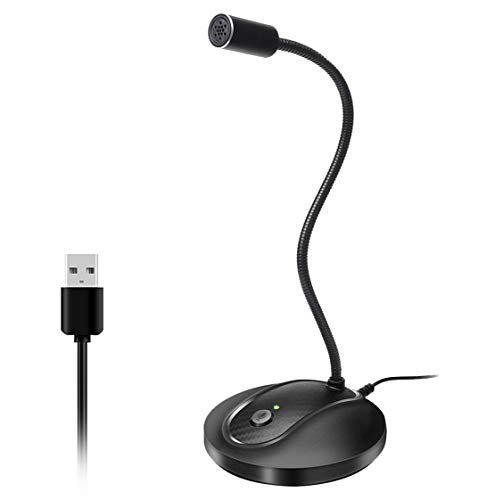
- Driver-free USB setup
- Mute button with LED
- Omnidirectional pickup
Best For: Windows and macOS desktop use
Best Mounted Podium Mic

- 20-inch dual-flex neck
- Cardioid condenser element
- Flange mount and high-pass filter
Best For: Phantom-powered podium installations
Permanent Lectern Pick
Shure MX418/C Cardioid Condenser

- 18-inch gooseneck with locking flange mount
- Shock mount isolates surface vibration
- Requires phantom power
Best For: Fixed lecterns and conference tables
Push-to-Talk Pick
Movo GM-9 18-Inch Podium Microphone

- Push-to-talk button with status LED
- 48V phantom or two AAA power options
- Detachable 18-inch gooseneck
Best For: Podiums and desks needing on-base mute control
Long-Cable Pick
Pyle PDMIKC5 Desktop Gooseneck

- Includes 26-foot XLR-to-1/4-inch cable
- Adjustable neck with cardioid pickup
- Requires one 9V battery
Best For: Desktop speech or karaoke with a 1/4-inch mic input
Best for Podium Announcements
MRSDY 23-Inch XLR Gooseneck Mic
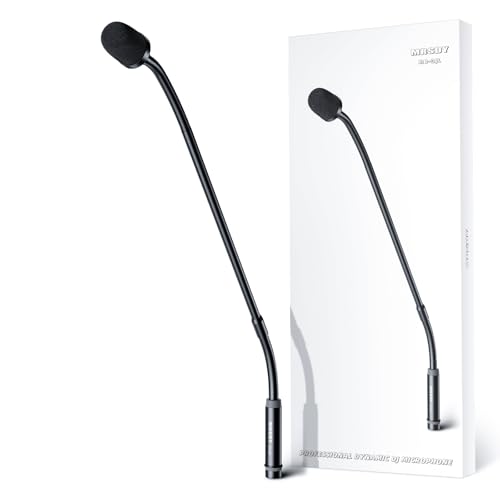
- 23-inch adjustable metal neck
- Cardioid dynamic pickup
- No phantom power required
Best For: DJs and podiums with XLR mic inputs
Best for DJ Talkback
KENBAIDIO 23-Inch XLR Gooseneck Mic

- Direct 3-pin XLR connection
- 23-inch bendable neck
- Unidirectional dynamic capsule
Best For: DJ and karaoke mixer talkback
Best for Computer Calls
CMOCIIY USB Desktop Gooseneck Mic

- Plug-and-play USB setup
- Touch mute with status LED
- Flexible neck and non-slip base
Best For: Computer calls and gaming chat
Best USB Meeting Mic – BOYA BY-GM18CU
The BOYA BY-GM18CU is a gooseneck microphone for computer-based meetings, lectures, and recordings. Its 18-inch bi-fold neck helps position the cardioid capsule toward the speaker, while the included USB cable connects it to a computer without batteries.
Best For: Desk users who want a USB microphone with quick mute control and headphone monitoring.
Pros:
- Cardioid pickup focuses on sound in front of the microphone.
- One-touch mute has an LED status indicator.
- 3.5 mm headphone jack supports real-time monitoring.
Cons:
- Designed for computer USB use rather than direct XLR mixer connection.
- Corded setup requires a nearby USB connection.
Choose this model when easy computer setup and monitoring matter more than integration with an XLR sound system.
Best DJ Mixer Talkback – KENBAIDIO 17-Inch Dynamic Mic
This 17-inch gooseneck microphone is built for DJ mixer talkback, announcements, and similar PA duties. Its dynamic capsule uses a unidirectional pickup pattern, and the flexible metal neck lets you aim it from a mixer or compatible XLR microphone input.
Best For: DJs and PA operators who need an adjustable mic that plugs directly into an XLR microphone input.
Pros:
- Three-pin XLR male connector fits compatible mixer mic inputs.
- Flexible 17-inch neck allows 360-degree positioning.
- Metal construction is intended for repeated handling.
Cons:
- Requires an XLR microphone input; it is not a plug-and-play USB computer mic.
- No mute control is listed in the supplied specifications.
Its direct XLR connection makes the most sense at an existing mixer or PA station, where its adjustable neck can keep the mic within reach.
Best Compact Computer Pick – JOUNIVO JV-601
The JOUNIVO JV-601 is a desktop gooseneck microphone for Windows and macOS computers. It connects over USB without a driver, and its bendable neck helps place the omnidirectional capsule for calls, gaming, or dictation.
Best For: Computer users seeking a compact USB desk mic with a readily accessible mute button.
Pros:
- Plug-and-play USB setup with a 6-foot cable.
- One-click mute button and LED status indicator.
- Adjustable neck and weighted ABS stand support desktop positioning.
Cons:
- Omnidirectional pickup can capture sound from around the desk, despite the stated noise-canceling feature.
- Listed as incompatible with Xbox, Raspberry Pi, and Android.
This is a straightforward choice for a computer desk, provided its supported platforms and all-around pickup suit your workspace.
Best Mounted Podium Mic – Samson CM20P
Samson CM20P 20" Podium Microphone Church Mic 4 Speeches, Sermons, Presentations
Check Price On AmazonThe Samson CM20P is a 20-inch gooseneck microphone designed for podium speeches, sermons, and presentations. Its cardioid condenser element, included flange mount, and flexible sections at both ends suit a fixed speaking position.
Best For: Churches and presentation spaces outfitting a podium with an XLR microphone connection and phantom power.
Pros:
- 20-inch neck has flexible top and bottom sections.
- Cardioid pickup targets the speaker in front of the mic.
- Includes a flange mount, multistage windscreen, and selectable internal high-pass filter.
Cons:
- Requires 9–52 V phantom power.
- Flange mounting is less convenient if you need to move the mic between desks.
For a permanent lectern setup, the CM20P offers useful positioning and filtering features; confirm that your XLR system supplies phantom power before buying.
Permanent Lectern Pick – Shure MX418/C Cardioid Condenser
The Shure MX418/C is an 18-inch gooseneck microphone suited to a lectern or conference table where a fixed installation makes sense. Its cardioid cartridge, attached XLR preamp, and included mounting hardware make it a focused choice for installed speech audio.
Best For: Permanently mounted lecterns, pulpits, and conference tables with phantom power available.
Pros:
- Locking flange mount secures the microphone to a surface.
- Shock mount provides over 20 dB of isolation from surface vibration noise.
- Balanced, transformerless output helps resist hum and RF interference over long cable runs.
- Includes a snap-fit foam windscreen; the cartridge is interchangeable.
Cons:
- Requires phantom power.
- Permanent flange mounting is less convenient if you need to move the mic between locations.
Choose this model when installation stability and vibration isolation matter more than portability. Plan for an XLR connection and a phantom-powered audio system.
Push-to-Talk Pick – Movo GM-9 18-Inch Podium Microphone
The Movo GM-9 is an 18-inch gooseneck microphone for podiums and desks where speakers need an easy way to control when the mic is live. Its base has a push-to-talk button and status LED, while the cardioid pickup favors the speaker over sound from behind.
Best For: Podiums, reception desks, and meeting spaces that need visible mic status and on-base mute control.
Pros:
- Button and LED make live or muted status easy to check.
- Runs on 48V phantom power or two AAA batteries.
- Detachable gooseneck aids storage and travel; the base is slip-resistant.
- Foam windscreen helps soften breath noise and plosives.
Cons:
- XLR cable and AAA batteries are not included.
- Computer use requires an XLR audio interface; this is not a USB microphone.
This is the practical choice if speaker-controlled muting is a priority. Check your mixer or interface connection before buying, and budget for an XLR cable.
Long-Cable Pick – Pyle PDMIKC5 Desktop Gooseneck
The Pyle PDMIKC5 is a desktop gooseneck microphone for speech or karaoke setups that need a long cable in the box. Its adjustable neck helps position the capsule, and the included 26-foot XLR-to-1/4-inch cord connects to compatible audio equipment.
Best For: Desktop speech and karaoke setups using a compatible 1/4-inch mic input.
Pros:
- Includes a 26-foot XLR-to-1/4-inch audio cable.
- Adjustable gooseneck supports flexible speaker positioning.
- Cardioid pickup focuses on the main sound source.
- Pop filter helps reduce breath and popping sounds.
Cons:
- Requires one 9V battery.
- The included cable ends in a 1/4-inch plug, so check your equipment’s input before ordering.
The supplied cable makes this a convenient option when your connection point is some distance from the desk. Verify the input and have a 9V battery ready for setup.
Best for Podium Announcements – MRSDY 23-Inch XLR Gooseneck Mic
This 23-inch gooseneck microphone is a practical choice when you need a wired mic positioned above a mixer or podium. Its dynamic cardioid capsule focuses on the speaker, while the flexible metal neck lets you adjust placement.
Best For: DJs, school announcements, and podium setups with an XLR microphone input.
Pros:
- Dynamic design does not require 48V phantom power.
- Cardioid pickup and included windscreen help limit off-axis noise and plosives.
- All-metal housing and 23-inch neck allow durable, adjustable placement.
Cons:
- Requires an XLR microphone input; it does not connect directly by USB.
- Its long neck may be more than a compact desktop setup needs.
Choose this model if a long, directly pluggable XLR mic fits your mixer and you want focused speech pickup without phantom power.
Best for DJ Talkback – KENBAIDIO 23-Inch XLR Gooseneck Mic
This gooseneck microphone is built for DJ talkback and announcements through an XLR-equipped mixer. Its 23-inch bendable neck offers room to position the dynamic capsule at a comfortable speaking height.
Best For: DJ booths, karaoke setups, and announcement systems with an XLR microphone input.
Pros:
- 3-pin XLR male connector plugs directly into a compatible mixer input.
- Unidirectional pickup helps reduce off-axis sound and feedback.
- Adjustable 23-inch neck and metal construction suit frequent repositioning.
Cons:
- Needs a compatible XLR input rather than a USB port.
- Its 50 Hz–10 kHz stated frequency response is geared more toward speech than full-range recording.
It makes the most sense as a dedicated mixer-mounted speaking mic; check your console’s input location and clearance before buying.
Best for Computer Calls – CMOCIIY USB Desktop Gooseneck Mic
If your gooseneck microphone needs to sit beside a computer rather than plug into a mixer, this USB desktop model offers plug-and-play operation for Windows and Mac. Its flexible neck, weighted-style desktop base design, and touch mute control keep everyday calls straightforward.
Best For: Video meetings, gaming chat, and desktop recording on a Windows or Mac computer.
Pros:
- USB connection works without separate drivers or a sound card.
- Touch mute button has a green/red status indicator.
- Flexible metal neck, non-slip base, and included pop filter support desktop use.
Cons:
- Omnidirectional pickup can also capture nearby room sounds.
- Recommended speaking distance is 6–12 inches, so placement matters.
This is the convenient pick for computer-based speech when simple setup and an easy-to-check mute status matter more than an XLR mixer connection.
How We Picked These Gooseneck Microphones
We focused on the buying decisions that separate desktop and podium microphones: connection type, intended speaking position, mounting or base design, onboard controls, and stated pickup pattern. The selection spans USB desk mics, XLR podium models, and wired systems with different cable and control arrangements. These are specification-based comparisons, not claims that every microphone was tested in the same room. Check each product’s current listing for included accessories and power requirements before ordering.
Quick Comparison: Match the Mic to the Setup
For a computer-only desk, a USB model is usually the simplest starting point: it connects directly and may offer a mute button and status light. For a lectern, church, or conference-room sound system, start with an XLR model and confirm the mixer or audio interface can supply the required power. A dynamic podium mic may suit a setup where phantom power is unavailable, but it still needs a compatible input and enough gain. If speakers take turns at one position, consider whether a push-to-talk base would make operation easier.
Key Buying Factors for a Gooseneck Microphone
Connection and Power
USB plugs into a computer, while XLR is intended for compatible audio equipment. Condenser microphones commonly require phantom power or power supplied through their base; dynamic microphones generally do not. Do not assume an XLR connector guarantees compatibility: verify the mic, base, cable, and input as a complete signal path. A model supplied with an XLR-to-¼-inch cord also warrants an input check.
Length, Base, and Placement
A longer neck helps reach a speaker at a tall lectern, while a shorter one may keep a desk tidy. Measure from the mounting point to the expected mouth position rather than choosing by neck length alone. A stable desk base, secure mount, and manageable cable route matter as much as reach. Position the capsule close enough for clear speech without blocking notes or a screen, and avoid pointing it toward nearby loudspeakers.
Pickup Pattern and Controls
A cardioid pattern favors sound from the front and can help limit pickup from the sides and rear, provided the speaker stays on-axis. An unspecified pickup pattern deserves a closer look if the room is noisy. A mute button, LED, or push-to-talk control can be useful, but check whether it mutes at the microphone, the base, or only through computer software.
Who Should Buy Which Gooseneck Microphone?
Choose a USB desktop Gooseneck Microphone for video calls or streaming when convenience and visible mute status matter most. Choose an XLR condenser podium model when a compatible sound system is already in place and consistent lectern speech is the priority. Consider a dynamic XLR option if you need a straightforward wired mic without relying on phantom power, after confirming input gain. For shared speaking stations, prioritize a suitable base and easy-to-understand controls over extra neck length. Before checkout, verify what comes in the box—particularly the base, cable, windscreen, and any required power source.