
Choosing the right dock can make a big difference in a video editing workflow. The best options speed up offloads, simplify backups, and make it easier to swap drives between projects.
Below, we focus on the most practical hard drive docking stations for video editing, from simple single-bay docks to multi-bay and RAID-friendly setups.
Best 10 Hard Drive Docking Stations for Video Editing Picks for 2026
Dual-Bay Cloning Dock

- Dual-bay support for 2.5-inch and 3.5-inch SATA drives
- Offline cloning lets you duplicate drives without a PC
- USB 3.0 with up to 5Gbps transfer speeds
Best For: Editors who want simple drive swaps, cloning, and plug-and-play storage
Thunderbolt RAID Workhorse
OWC ThunderBay 4 Thunderbolt 3 Enclosure

- Dual Thunderbolt 3 ports for high-bandwidth editing
- Up to 1527MB/s sustained performance
- RAID 0/1/4/5/1+0 support
Best For: Editors who need fast, configurable RAID storage for large projects
Hybrid Clone Dock

- Supports both NVMe M.2 and 2.5/3.5-inch SATA drives
- Up to 10Gbps over USB 3.2 Gen 2
- Offline one-to-one cloning without a computer
Best For: Editors who need a flexible dock for NVMe, SATA, and cloning
Five-Bay RAID Station

- Five bays with up to 110TB total capacity
- Hardware RAID plus JBOD, Clone, and Clear modes
- Built-in 150W power and 80mm cooling fan
Best For: Studios and editors who need large-capacity RAID storage and cooling
Hybrid NVMe + SATA Dock
M.2 NVMe & SATA Hard Drive Docking Station, Offline Cloning
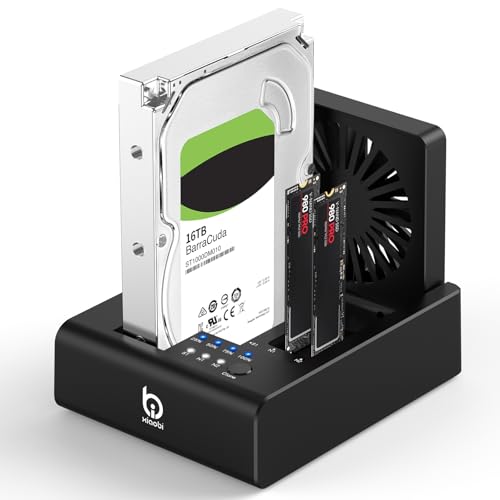
- Supports 2 M.2 NVMe SSDs plus 2.5"/3.5" SATA drives
- USB-C 3.2 Gen 2 with up to 10Gbps transfer speeds
- Built-in fan and offline cloning for workflow convenience
Best For: Editors who want a flexible multi-drive dock with quick cloning
Quad-Bay SATA Workstation Dock
StarTech.com 4-Bay USB 3.0 To SATA Hard Drive Docking Station

- Holds up to four 2.5"/3.5" SATA drives
- Independently powered bays support hot swapping
- Dual fans and tool-less loading suit heavy use
Best For: Workstations that need simultaneous access to several SATA drives
Single-Bay SATA Essential Dock
SABRENT USB 3.0 to SATA Hard Drive Docking Station

- Supports bare 2.5" and 3.5" SATA HDDs/SSDs
- Tool-free hot-swap design with plug-and-play setup
- Includes 12V power adapter for 3.5-inch drives
Best For: Editors who only need a simple single-drive SATA dock
5-Bay Cloning Dock
ORICO USB C 5 Bay Hard Drive Docking Station

- 5-bay dock supports up to 5 x 20TB SATA drives
- Offline cloning can duplicate four copies without a computer
- Aluminum body with USB-C/C-A cable and anti-vibration pads
Best For: High-capacity media storage and offline drive cloning
Dual-Bay Cloner Dock
SABRENT Dual-Bay USB-C Hard Drive Docking Station & Cloner

- Dual bays mount as separate drives over USB
- Offline cloning works without a computer
- USB 3.0 plug-and-play support for Windows and Mac
Best For: Two-drive editing, cloning, and file transfer workflows
Dual-Bay Cloning Dock – SABRENT USB 3.0 Dual Bay Dock
If you want hard drive docking stations for video editing that make drive swaps and backups simple, this SABRENT dual-bay dock is a practical desktop option. It supports standard 2.5-inch and 3.5-inch SATA HDDs and SSDs, offers USB 3.0 transfer speeds up to 5Gbps, and includes offline cloning so you can duplicate a drive without a computer.
Best For: Editors who need a straightforward dual-bay dock for drive backups, cloning, and everyday media storage.
Pros:
- Supports both 2.5-inch and 3.5-inch SATA hard drives and SSDs
- Offline cloning works without a computer, up to 60Mbps
- USB 3.0 supports up to 5Gbps transfer speeds
- Plug-and-play design requires no drivers
Cons:
- Limited to two drives at once
- Cloning speed is much slower than its USB transfer speed
- Not aimed at advanced RAID workflows
Overall, this is a simple and dependable dock for editors who mainly need fast access, easy cloning, and broad SATA compatibility rather than a complex storage setup.
Thunderbolt RAID Workhorse – OWC ThunderBay 4 Thunderbolt 3 Enclosure
For hard drive docking stations for video editing that prioritize speed and RAID flexibility, the OWC ThunderBay 4 is built like a serious desktop storage enclosure. It supports 3.5-inch or 2.5-inch drives without adapters, uses dual Thunderbolt 3 ports, and can reach up to 1527MB/s sustained performance for demanding media workflows.
Best For: Editors building a fast, configurable RAID storage setup for large media projects.
Pros:
- Dual Thunderbolt 3 ports for high-bandwidth workflows
- Up to 1527MB/s sustained performance
- Supports 3.5-inch and 2.5-inch drives with no adapter needed
- User-configurable RAID 0/1/4/5/1+0 (10)
Cons:
- Only four bays, so expansion is limited to the enclosure size
- More specialized than a basic USB dock
- Designed around a full storage setup rather than quick drive swaps
This enclosure makes sense when editing speed and RAID options matter more than simplicity, especially for users who want a quiet, aluminum, heat-dissipating desktop unit.
Hybrid Clone Dock – WAVLINK NVMe to SATA Dock
This WAVLINK dock fits well in hard drive docking stations for video editing because it combines NVMe and SATA support in one dual-bay unit. With up to 10Gbps transfer speeds, offline cloning, and compatibility with M.2 NVMe drives plus 2.5-inch and 3.5-inch SATA HDDs and SSDs, it is built for fast moving files and flexible drive management.
Best For: Editors who want one dock for NVMe drives, SATA drives, and offline cloning.
Pros:
- Supports M.2 NVMe SSDs and 2.5-inch/3.5-inch SATA drives
- USB 3.2 Gen 2 delivers up to 10Gbps transfer speeds
- Offline clone function works without a computer
- Aluminum alloy shell helps with protection and heat dissipation
Cons:
- Only two drive slots
- Cloning is one-to-one only
- Not a RAID enclosure
For editors who move between NVMe project drives and traditional SATA storage, this is a versatile dock that keeps transfers fast and upgrades simple.
Five-Bay RAID Station – ORICO 5 Bay RAID Enclosure
Among hard drive docking stations for video editing, this ORICO 5-bay enclosure is aimed at users who need high-capacity storage, RAID options, and stable cooling. It supports 2.5-inch and 3.5-inch SATA HDDs and SSDs, offers multiple hardware RAID modes, and includes a built-in 150W power supply plus an 80mm cooling fan for long-term operation.
Best For: Studios and editors needing a large-capacity RAID enclosure for backups and media libraries.
Pros:
- Five bays with support for up to 110TB total capacity
- Hardware RAID modes include 0, 1, 3, 5, 10, JBOD, Clone, and Clear
- Built-in 150W power supply helps keep multi-drive setups stable
- 80mm cooling fan and airflow vents support 24/7 operation
Cons:
- USB 3.0 is limited to up to 230MB/s in the supplied notes
- Larger and more complex than a simple two-bay dock
- Best suited to desktop setups rather than portable use
This is a strong pick when your editing workflow is centered on large archives, redundancy, and a dedicated multi-drive desktop station.
Hybrid NVMe + SATA Dock – M.2 NVMe & SATA Hard Drive Docking Station, Offline Cloning
If you want hard drive docking stations for video editing that can handle both fast project SSDs and larger archive drives, this 3-bay dock is built for mixed storage workflows. It supports two M.2 NVMe SSDs plus 2.5″/3.5″ SATA HDDs, includes USB-C 3.2 Gen 2 connectivity, and adds offline cloning for quick drive duplication without software.
Best For: Editors who need one dock for NVMe scratch disks, SATA media storage, and simple offline cloning.
Pros:
- Supports both M.2 NVMe SSDs and 2.5″/3.5″ SATA drives in one unit
- USB-C 3.2 Gen 2 interface offers up to 10Gbps transfer speeds
- One-touch offline cloning works without software or tools
- Built-in 80mm cooling fan helps with heat during long transfers
Cons:
- Does not support reverse cloning from M.2 NVMe SSD to SATA HDD
- Not compatible with SATA (NGFF) or mSATA SSDs
- Cloning requires the target drive to be equal to or larger than the source
This is a practical choice if your editing setup mixes modern NVMe storage with traditional SATA drives and you value a built-in clone function. It is more flexible than a basic single-drive dock, but the compatibility limits matter if your workflow includes non-NVMe M.2 formats.
Quad-Bay SATA Workstation Dock – StarTech.com 4-Bay USB 3.0 To SATA Hard Drive Docking Station
For hard drive docking stations for video editing that focus on large-capacity SATA storage, this 4-bay dock is designed for backup, imaging, and data transfer. It accepts up to four 2.5″/3.5″ SATA HDDs or SSDs, uses independently powered SATA controllers, and adds dual fans for temperature control during heavier workloads.
Best For: Editors and IT users who need to access or back up multiple SATA drives at once.
Pros:
- Four-bay design supports up to four SATA drives simultaneously
- Independently powered controllers allow hot swapping without interrupting other bays
- Dual 40mm fans help maintain drive temperature
- Tool-less, tray-less top-loading design makes drive changes fast
Cons:
- Supports SATA drives only, not IDE or M.2 formats
- USB 3.2 Gen 1 is limited to 5Gbps host connection speed
- Not the most compact option for a simple single-drive setup
This dock makes sense when your editing workflow involves multiple SATA media or backup drives and you want quick access without swapping enclosures. It is more of a workstation tool than a travel-friendly dock, but the four-bay layout is a strong fit for storage-heavy projects.
Single-Bay SATA Essential Dock – SABRENT USB 3.0 to SATA Hard Drive Docking Station
If you need a straightforward dock among hard drive docking stations for video editing, this SABRENT model keeps the setup simple: one bare SATA drive, lay-flat docking, and plug-and-play operation. It is aimed at SATA I/II/III HDDs and SSDs, with USB 3.0 UASP support and the included 12V adapter for stable use with 3.5-inch drives.
Best For: Editors who want a no-frills SATA dock for quick drive access and transfers.
Pros:
- Works with bare 2.5″ and 3.5″ SATA drives and SSDs
- Tool-free, hot-swap design keeps drive changes simple
- Includes a 12V/2A power adapter for 3.5-inch drive stability
- Plug-and-play on Windows, macOS, and Linux
Cons:
- Does not support M.2 NVMe, M.2 SATA, SAS, or IDE/PATA drives
- Uses a USB-A host cable, so USB-C-only systems need an adapter
- S.M.A.R.T. diagnostics are not passed through the USB bridge
This is the most direct pick if your editing bays are built around bare SATA drives rather than newer M.2 formats. It is less feature-rich than multi-bay docks, but its simplicity and included power make it a practical everyday reader for a single working drive.
5-Bay Cloning Dock – ORICO USB C 5 Bay Hard Drive Docking Station
If you need hard drive docking stations for video editing with lots of scratch, archive, and backup space, this ORICO 5-bay model is built for high-capacity SATA storage and fast drive access. It supports 2.5-inch and 3.5-inch SATA SSDs and HDDs, and its USB 3.2 Gen 1 connection gives you a straightforward way to move large video files between drives and a compatible computer.
Best For: Editors, photographers, and other users who want a multi-bay dock with offline cloning and large-capacity expansion.
Pros:
- 5-bay design supports up to 5 x 20TB drives for large media libraries
- Offline cloning can duplicate up to four copies without a computer
- USB-C to C/C-A cable supports both USB-C and USB-A devices
- Aluminum-alloy body and anti-vibration pads help with heat dissipation and stability
Cons:
- Cloning will overwrite the target disk, so backup first
- Rated transfer speed is based on USB 3.2 Gen 1, not faster USB standards
This is a strong pick if your workflow values capacity, cloning convenience, and easy drive swapping over compact size. For media-heavy storage workflows, the 5-bay layout makes it easier to keep source, backup, and project drives in one place.
Budget USB 3.0 Dock – ORICO Hard Drive Docking Station for 2.5/3.5 Inch HDD SSD
For a simple, practical option among hard drive docking stations for video editing, this ORICO USB 3.0 dock focuses on fast access to bare SATA drives without extra setup. It supports 2.5-inch and 3.5-inch SATA HDDs and SSDs, includes UASP and TRIM support, and is designed for quick hot-swapping when you need to move footage or back up projects.
Best For: Editors who want a compact SATA dock for backups, disk imaging, and everyday file transfers.
Pros:
- Supports UASP and TRIM, with transfer speeds up to 5Gbps
- Works with 2.5-inch and 3.5-inch SATA drives up to 22TB
- Tool-less, hot-swappable design makes drive changes quick
- Broad device support includes PCs, laptops, smart TVs, routers, and PS5
Cons:
- Does not support IDE or SAS drives
- New or unallocated drives must be initialized and formatted first
This dock is a good fit if you want a straightforward drive reader rather than a cloning station. It keeps the feature set practical and focused on reliable SATA access for moving large video files and project backups.
Dual-Bay Cloner Dock – SABRENT Dual-Bay USB-C Hard Drive Docking Station & Cloner
If you want hard drive docking stations for video editing that can both clone and mount two drives at once, this SABRENT dual-bay dock is built around that workflow. It works with 2.5-inch and 3.5-inch SATA hard drives and SSDs, lets both bays appear as separate drives over USB, and includes an offline cloning mode for copying one drive to another without a computer.
Best For: Editors who want a two-drive dock for live work, cloning, and fast project transfers.
Pros:
- Offline cloning works without a PC at the press of a button
- Both bays mount as separate drives when connected over USB
- Tool-free, hot-swappable design with an access LED for each bay
- USB 3.0 speeds up to 5Gbps with plug-and-play support on Windows and Mac
Cons:
- Offline cloning is limited to up to 60MBps by design
- Does not support IDE, PATA, M.2, or NVMe drives
This is a practical choice if you routinely shuttle footage between two SATA drives or need a cloning dock for backups. Its dual-bay setup is especially useful when you want both drives available at the same time during editing or file management.
How We Picked the Best Hard Drive Docking Stations for Video Editing
For Hard Drive Docking Stations for Video Editing, we prioritized transfer speed, drive compatibility, bay count, cloning support, and connection type. We also looked for models that fit real editing workflows, including fast ingest from camera media, project backup, and rotating archive drives.
Quick Comparison
Single-bay docks are the simplest choice for importing footage and moving files between one drive and a workstation. Dual-bay models add flexibility for cloning and working with a project drive plus backup drive. Four- and five-bay enclosures are better for editors who need more capacity, redundancy, or a semi-permanent desktop storage setup.
Key Buying Factors for Hard Drive Docking Stations for Video Editing
Speed and Connection
Match the dock to your computer’s fastest available port. USB 3.0 is still fine for many workflows, but USB-C and Thunderbolt options are better if you move large 4K or 8K files often. Faster connections help reduce bottlenecks during offloads and backups.
Bay Count and Workflow
Think about how many drives you use at once. One-bay docks work for simple ingest and archive access. Two-bay docks are a strong all-around pick for editors who want cloning or mirror backups. Multi-bay units are better for larger libraries and RAID-style workflows.
Drive Support
Make sure the dock supports the drive types you actually use, including 2.5-inch SSDs, 3.5-inch HDDs, SATA drives, and, in some cases, NVMe M.2 drives. If you switch between old project drives and new SSDs, broad compatibility matters.
Cooling and Reliability
Long transfers and multi-drive setups can generate heat, especially in larger enclosures. Active cooling, solid build quality, and stable power delivery are important if you edit or archive for hours at a time.
Who Should Buy Which Hard Drive Docking Stations for Video Editing?
Choose a single-bay dock if you mainly need quick drive access and occasional backups. Pick a dual-bay model if you want the best balance of flexibility, cloning, and everyday editing use. Go with a four- or five-bay enclosure if you manage multiple client projects, want more storage expansion, or need a more organized desktop media library. If your workflow centers on speed and you already use Thunderbolt, a higher-performance enclosure is usually worth the extra cost.