
The best hardware streaming encoders for content creators can improve stream stability, reduce computer load, and simplify multi-platform live production. The right model depends on your inputs, preferred streaming protocols, resolution, and whether you need audio mixing or video switching in the same setup.
We selected six options spanning HDMI, SDI, IP, portable production, and creator-focused audio workflows. Use the guide below to narrow your choice by compatibility, performance, portability, and budget.
Best 6 Hardware Streaming Encoders for Content Creators Picks for 2026
Best Compact Audio Mixer

- 5-inch color display for source identification
- Controls multiple USB audio sources
- Submix and routing tools for streaming
Best For: PC and Mac creators managing complex live audio setups
Best All-in-One Switcher
IOGEAR Upstream Pro Video Production Switch
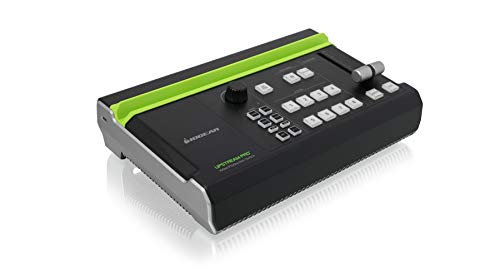
- Three HDMI video inputs
- Built-in audio inputs and mixing
- Records and streams without a PC
Best For: Multi-source HDMI productions and live events
Best Audio Control Bundle – BEACN Light Mix Bundle
For creators comparing hardware streaming encoders for content creators, the BEACN Light Mix Bundle focuses on the audio side of a streaming setup. It combines a broadcast-style dynamic USB microphone with the BEACN Mix Create mixer, giving Windows PC users centralized control over applications, microphones, headsets, and other audio sources.
Best For: Windows-based streamers, podcasters, and gamers who want a microphone and hands-on audio routing in one bundle.
Pros:
- Dynamic microphone is designed to reduce ambient-noise pickup compared with a condenser microphone.
- Push-button encoders provide precise volume control and quick muting.
- Knob paging supports control of more than four audio sources.
- Routing tools can direct audio to headphones, chat applications, or a streaming device.
Cons:
- The listed hardware platform is PC, so Mac compatibility is not specified.
- This is primarily an audio-control bundle rather than a video encoder.
This bundle is a practical choice when clear voice capture and fast audio management matter more than video encoding. Its software and routing features give content creators room to build a more involved audio workflow.
Best Dedicated Video Encoder – UNISHEEN 1080p60 PoE Encoder
For creators specifically shopping for hardware streaming encoders for content creators, this UNISHEEN unit is the most directly focused option in the group. It accepts a 4K60 HDMI signal, provides lossless HDMI loop-out, and encodes a 1080p60 stream using H.264 or H.265 for platforms and workflows built around network delivery.
Best For: Live producers, streamers, and installations that need HDMI capture, network streaming, PoE wiring, and broad protocol support.
Pros:
- Accepts 4K60 HDMI input while simultaneously producing a 1080p60 stream.
- Lossless loop-out supports monitoring through a display, projector, or switcher.
- PoE carries power and data over one Ethernet cable.
- Supports RTMP, SRT, RTSP, HLS, WebRTC, ONVIF, and additional network applications.
Cons:
- Its listed stream output is limited to 1920×1080 at 60 fps.
- Setup depends on a network connection and browser-based configuration.
- The supplied notes list both a three-year warranty claim and a one-year manufacturer warranty, so coverage should be verified.
This is the strongest fit for a creator who needs a standalone HDMI-to-network encoder rather than a USB capture accessory. PoE, loop-out, and protocol flexibility make it especially suitable for fixed or professional-style streaming deployments.
Best Compact Audio Mixer – BEACN Mix Create
Although hardware streaming encoders for content creators often emphasize video, audio control can be just as important during a live production. The BEACN Mix Create is a USB-C mixer for PC and Mac with a 5-inch color display, configurable source controls, submixes, and routing for streamers who want quick physical access to their computer audio.
Best For: PC and Mac streamers who need hands-on control of multiple applications, microphones, headsets, and audience mixes.
Pros:
- 5-inch full-color display helps identify the applications or hardware being controlled.
- Knob paging lets users manage more than four sources.
- Push-button encoders support precise level changes and quick muting.
- Submix and routing features can separate the creator’s mix from the stream mix.
Cons:
- It is an audio mixer, not a video streaming encoder.
- The supplied details do not specify a current software-update date.
The Mix Create is a good complement to a separate video encoder or streaming computer. Its display, submix controls, and routing table are most valuable for creators who regularly balance several audio sources while staying focused on the audience.
Most Versatile SDI Gateway – ZowieBox 3G SDI Encoder Decoder
For content creators comparing hardware streaming encoders, the ZowieBox is a flexible SDI-focused option that can encode, decode, and bridge professional video equipment with IP and USB workflows. It supports SRT, RTMP(S), and RTSP, plus standalone H.265/H.264 streaming.
Best For: Creators and production teams working with SDI cameras, switchers, UVC devices, and mixed broadcast or PC-based workflows.
Pros:
- Supports SDI-to-SRT, RTMP(S), and RTSP encoding and reverse IP-to-SDI decoding.
- Converts SDI equipment to a UVC webcam for software-based streaming and conferencing.
- Offers SRT support, SDI loopout, PoE, USB-C power compatibility, and standalone operation.
Cons:
- Uses SDI rather than HDMI as its primary professional video interface.
- Its broad feature set may be more than needed for simple single-camera streaming.
The ZowieBox stands out when interoperability matters. Its UVC and IP conversion features make it useful for creators who need to move between SDI production gear, streaming platforms, and computer applications.
Best All-in-One Switcher – IOGEAR Upstream Pro Video Production Switch
The IOGEAR Upstream Pro is a practical choice among hardware streaming encoders for content creators who want switching, capture, recording, audio mixing, and streaming in one portable unit. It operates without a PC and accepts multiple HDMI sources.
Best For: Creators producing multi-camera shows, presentations, events, and streams with HDMI cameras and external audio.
Pros:
- Provides three HDMI inputs, including two 1080p inputs and one 4K input.
- Supports direct H.264 recording to USB storage without requiring a computer.
- Includes microphone and RCA audio inputs and can stream to YouTube, Facebook, Twitch, and more.
Cons:
- Its listed video production capabilities are centered on 1080p at 30 fps and one 4K HDMI input.
- At 1.9 kg, it is less lightweight than compact single-purpose encoders.
This model is best viewed as a compact production hub rather than just an encoder. The built-in source inputs, audio connections, recording, and dual direct-streaming support can simplify a creator’s setup.
Best Compact SDI Encoder – DDMALL HEVC SEV-2K SDI Encoder
The DDMALL SEV-2K is a compact hardware streaming encoder for content creators using SDI cameras or production systems. It supports SD, HD, and 3G-SDI input, encodes up to 1080p60, and provides SRT, RTMP/RTMPS, RTSP, and UDP options.
Best For: Mobile crews and creators who need a low-power SDI encoder with 1080p60 support, cloud control, and local recording.
Pros:
- Supports 3G-SDI input and encoding up to 1080p60 with video bitrates up to 16 Mbps.
- Runs from USB-C power or a mobile power bank and uses a compact metal housing.
- Offers SRT, RTMP/RTMPS, RTSP, UDP, SD-card recording, and remote cloud control.
Cons:
- Its video input is SDI, so HDMI-only sources require additional conversion.
- Some future protocol functionality is described as available through the DDMALL Cloud App.
With low 2.5W power consumption and a 129-gram body, the SEV-2K is suited to portable deployments. Its combination of 1080p60 encoding, SRT, remote management, and recording gives mobile SDI workflows useful flexibility.
How We Picked These Hardware Streaming Encoders for Content Creators
We focused on the features that most affect real-world live production: supported video inputs, maximum resolution and frame rate, encoding formats, streaming protocols, loop-through options, audio handling, portability, and ease of setup. The selection includes dedicated HDMI and SDI encoders, IP-focused hardware, a compact production switcher, and creator-oriented audio gear for workflows where clean sound is as important as video.
Because streaming environments vary widely, no single product is ideal for everyone. A gaming creator may prioritize HDMI passthrough and simple RTMP output, while a venue or broadcast operator may need SDI, SRT, H.265 compression, or network redundancy.
Quick Comparison
- For straightforward HDMI streaming: Choose an HDMI encoder with RTMP support and loop-out for a simple camera, console, or production-PC setup.
- For higher-resolution sources: Look for 4K input support, even if your final stream is 1080p, to preserve flexibility for monitoring and future upgrades.
- For SDI cameras and professional systems: Select an SDI encoder such as an option designed for 3G-SDI workflows.
- For mobile production: A compact video switcher can combine multiple HDMI sources and stream without requiring a full desktop computer.
- For audio-first creators: A USB microphone and PC audio mixer can simplify podcasting, gaming commentary, and live voice production.
Key Buying Factors for Hardware Streaming Encoders for Content Creators
Inputs, Outputs, and Compatibility
Start with the ports on your cameras, consoles, computers, and monitors. HDMI is common in consumer and creator setups, while SDI is better suited to longer cable runs and professional cameras. HDMI loop-out is useful when you want to monitor with minimal delay. Also verify whether the encoder works with your operating system, camera output, and display resolution.
Resolution, Frame Rate, and Compression
Confirm the difference between input support and encoded output. Some devices accept 4K signals but stream at 1080p. H.264 offers broad platform compatibility, while H.265 can deliver comparable quality at lower bandwidth but may have more limited service support. For fast gaming or sports, prioritize stable 60fps output when available.
Protocols and Network Requirements
RTMP is widely supported, while SRT is valuable for more reliable contribution over unpredictable networks. RTSP, HLS, and WebRTC can matter for surveillance, internal distribution, or low-latency applications. Check Ethernet requirements, Wi-Fi availability, bitrate controls, and whether the device supports your target platform directly.
Audio and Workflow Features
Look for embedded audio support, external audio inputs, monitoring, and independent level control. Built-in switching, multiview, recording, or cloud connectivity can reduce the number of extra devices required, but may add setup complexity.
Who Should Buy Which Hardware Streaming Encoders for Content Creators?
Choose a simple HDMI encoder if you stream one camera, console, or computer and want dependable plug-and-play operation. Choose an SDI or SRT-capable model for professional cameras, events, remote contribution, or longer cable runs. Choose a portable switcher when you need to combine several HDMI sources and produce without a full PC. Choose creator-focused audio hardware if your primary challenge is managing microphone, game, call, and playback levels during live sessions. Before buying, confirm the required resolution, connectors, protocol, and platform support so the encoder fits your complete production chain.