
Hardware streaming encoders make it easier to send camera, mixer, and other video sources directly to streaming platforms or an IP video network without relying on a computer. The right model can improve reliability, simplify production, and support the resolution and protocols your workflow requires.
This roundup compares 10 options ranging from compact HDMI encoders to multi-channel systems and professional SDI, NDI, and 4K devices. Use the guide below to match features such as codec support, inputs, networking, and streaming protocols to your setup.
Best 10 Hardware Streaming Encoders Picks for 2026
Most Versatile
URayCoder UHE265-4K Network Encoder
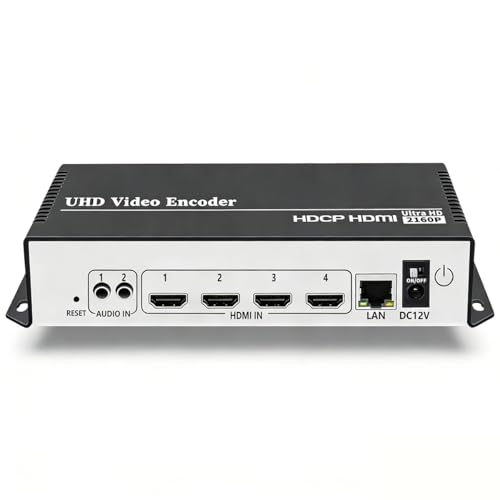
- 4K HDMI input with H.264/H.265 encoding
- Supports four simultaneous protocol outputs
- Includes overlays and lifetime technical support
Best For: Multi-platform and customized HDMI streaming
Best Compact SDI Option
Zowietek ZowieBox SDI/NDI Encoder

- Converts SDI and NDI|HX signals
- Supports standalone SRT, RTMP, and RTSP streaming
- PoE, USB-C power, and tripod mounting
Best For: Portable SDI and NDI|HX production setups
Best All-in-One Mixer

- Mixes four HDMI sources and one USB camera
- Streams to three platforms via built-in encoder
- Records to SD while streaming over USB
Best For: Small teams producing multi-camera live events
Best 4K Broadcast Workflow
Blackmagic Streaming Encoder 4K
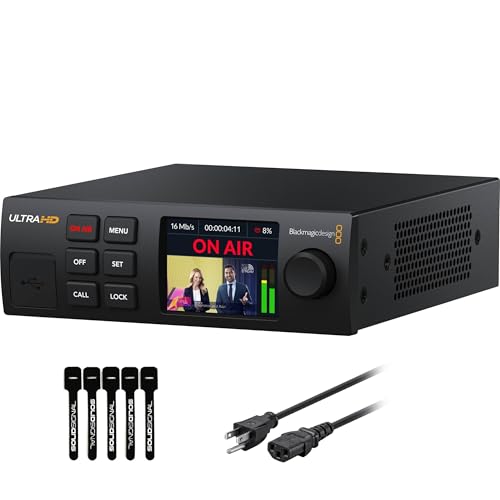
- Streams up to 2160p60 over SRT or RTMP
- 12G-SDI input with standards conversion
- Ethernet and mobile connectivity with auto-failover
Best For: Professional 4K SDI and resilient broadcast streaming
Compact NDI Pick
ZowieBox 4K HDMI NDI Encoder/Decoder

- 4K HDMI passthrough with standalone streaming
- NDI|HX3/HX2, SRT, RTMP(S), and RTSP support
- Compact body with PoE, USB-C, and tripod mounting
Best For: Gamers and mobile NDI production setups
Multi-Protocol Workhorse
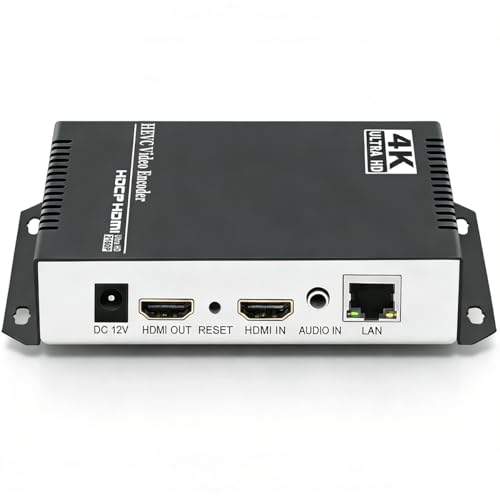
- 4K HDMI input with H.265/H.264 encoding
- Supports numerous streaming and IP protocols
- Up to four differently configured video streams
Best For: Broadcasters needing flexible multi-platform distribution
PoE Installation Pick

- PoE carries power and data over one Ethernet cable
- 4K60 HDMI input with lossless loop-out
- H.264/H.265 1080p60 streaming and ONVIF support
Best For: Clean rack, wall, LAN, and surveillance installations
Best 4K Multi-Platform Encoder

- 4K UHD at up to 30fps
- Up to four simultaneous protocol outputs
- Lifetime warranty and technical support
Best For: 4K events and multi-platform broadcasts
Best Compact 1080p60 Encoder

- Hardware H.265/H.264 at 1080p60
- Browser-based setup with no PC software
- Compact design for 24/7 deployment
Best For: Compact streaming and monitoring installations
Best Multi-Channel HD Encoder

- Multi-channel HDMI-to-IP streaming
- Dual streams per HDMI input
- Lifetime warranty and development support
Best For: Broadcast, IPTV, and NVR systems
Most Versatile – URayCoder UHE265-4K Network Encoder
For buyers comparing hardware streaming encoders, the URayCoder UHE265-4-4K stands out for its broad protocol support and flexible 4K HDMI-to-IP workflow. It accepts 4K input at up to 30fps, supports up to 120fps at 2K and lower resolutions, and can send as many as four streams using different protocols.
Best For: Multi-platform streaming, enterprise video distribution, and HDMI-based 4K workflows.
Pros:
- Supports H.265/H.264 encoding with 4K input and HDCP 1.4 decryption.
- Works with HTTP, RTSP, RTMP(S), SRT, HLS, WebRTC, UDP, and other protocols.
- Offers overlays, captions, logos, timestamps, cropping, rotation, and audio-input options.
- Includes lifetime warranty and technical support.
Cons:
- 4K operation is limited to 30fps.
- Its extensive configuration options may be more than simple streaming setups require.
Choose this encoder when protocol flexibility and simultaneous distribution matter more than a minimal plug-and-play design. Its management tools and customization support also make it a practical fit for branded or specialized streaming deployments.
Best Compact SDI Option – Zowietek ZowieBox SDI/NDI Encoder
The Zowietek ZowieBox is a compact choice among hardware streaming encoders for productions built around SDI and NDI|HX. It can encode SDI to NDI, decode NDI or compatible network streams to SDI, or operate as a standalone streaming device using SRT, RTMP(S), or RTSP.
Best For: Compact SDI productions, NDI|HX workflows, and portable point-to-point video links.
Pros:
- Supports SDI-to-NDI and NDI-to-SDI operation with NDI|HX formats.
- Can convert UVC camera output to SDI at up to 1080p60 in decoding mode.
- Supports PoE, USB-C power, tripod mounting, and standalone PC-free streaming.
- Two units can create an SDI-over-LAN extender link.
Cons:
- It does not support full NDI|HB.
- Encoder and decoder modes cannot operate simultaneously.
- USB capture-card functionality is not supported.
Its small aluminum enclosure and flexible power options suit mobile or space-constrained installations. Buyers should confirm that NDI|HX compatibility meets their workflow requirements before choosing it over a full-NDI device.
Best All-in-One Mixer – Osee GoStream Deck Pro
The Osee GoStream Deck Pro combines switching, recording, and streaming in one hardware unit. Unlike simpler hardware streaming encoders, it accepts up to four HDMI sources plus a USB camera, then sends the production to streaming platforms through its built-in Ethernet encoder.
Best For: Churches, schools, live events, and small production teams needing tactile source control.
Pros:
- Handles four HDMI inputs plus one USB camera input.
- Supports picture-in-picture and multi-window layouts.
- Streams to up to three platforms simultaneously over Ethernet.
- Records MP4 video to an SD card while also streaming through USB.
Cons:
- Its 1.1-pound mixer form factor may be more equipment than a single-source encoder requires.
- The supplied notes do not specify supported streaming protocols or maximum input resolution.
This is a strong fit when production control is as important as encoding. The eight macro buttons and local recording make it especially useful for operators who want fast, repeatable switching without relying entirely on a computer.
Best 4K Broadcast Workflow – Blackmagic Streaming Encoder 4K
The Blackmagic Streaming Encoder 4K is a broadcast-focused option among hardware streaming encoders, pairing 12G-SDI input with H.264/H.265 streaming up to 2160p60. It can stream through SRT or RTMP without an encoding PC and adds standards conversion, monitoring outputs, and connection failover for demanding workflows.
Best For: 4K broadcast production, SDI camera systems, and streams requiring resilient connectivity.
Pros:
- Supports H.264 and H.265 streaming up to 2160p60.
- Accepts 12G-SDI sources up to DCI 4K60 with SDI loop output.
- Provides Ethernet and USB-C-tethered mobile connectivity with auto-failover.
- Includes HDMI and SDI monitoring, captions, timecode, REST API control, and webcam output.
Cons:
- It carries a higher level of broadcast-oriented functionality than basic streaming setups need.
- Its listed warranty is one year.
For professional SDI environments, the standards conversion and network failover are particularly valuable. The front-panel controls, remote-production features, and webcam outputs further broaden its usefulness beyond straightforward internet streaming.
Compact NDI Pick – ZowieBox 4K HDMI NDI Encoder/Decoder
For buyers comparing hardware streaming encoders, the ZowieBox stands out as a compact option for HDMI-to-IP workflows. It supports up to 4K capture with zero-lag HDMI passthrough, standalone RTMP streaming, and NDI|HX3/HX2/HX conversion for gaming, events, and professional production.
Best For: Gamers, mobile production teams, and users building flexible NDI or RTMP streaming setups.
Pros:
- Supports 4K capture with zero-lag HDMI passthrough.
- Offers NDI|HX3, NDI|HX2, SRT, RTMP(S), and RTSP workflows.
- Compact design includes an LCD screen, tally light, PoE, USB-C power, and tripod mounting.
- Can be managed through a web interface on a computer, phone, or tablet.
Cons:
- Encoder and decoder modes cannot operate simultaneously.
- Does not support full NDI signals.
- USB capture card functionality is not currently supported.
The ZowieBox is a versatile choice when portability and NDI compatibility matter more than a traditional capture-card design. Its broad protocol support and flexible power options make it especially useful for compact field or gaming installations.
Multi-Protocol Workhorse – URayCoder 4K HDMI IP Encoder
This URayCoder is one of the more feature-rich hardware streaming encoders for converting HDMI sources into network video. Its H.265/H.264 hardware encoding, 4K input support, extensive protocol list, and ability to output multiple streams make it suited to demanding online and enterprise workflows.
Best For: Broadcasters and businesses needing customizable, multi-platform HDMI streaming with extensive protocol options.
Pros:
- Supports 4K input and H.265/H.264 dual encoding.
- Works with RTSP, RTMP(S), SRT, HLS, WebRTC, UDP, ONVIF, and other protocols.
- Can output up to four video streams using different protocols.
- Offers overlays, audio-source options, cropping, rotation, mirroring, and bitrate controls.
Cons:
- Its extensive configuration options may be more than a basic streaming setup requires.
- The supplied listing provides incomplete details for maximum output specifications.
Choose this encoder if protocol flexibility and customization are priorities. It is particularly appealing for users who need to distribute one HDMI source to several services or integrate overlays and network outputs into a more advanced workflow.
PoE Installation Pick – UNISHEEN 4K60 HDMI Encoder
For clean installations, this UNISHEEN model is a practical hardware streaming encoder with PoE power and data over one Ethernet cable. It accepts a 4K60 HDMI signal, provides lossless loop-out for monitoring, and produces a 1080p60 stream through widely used broadcast protocols.
Best For: Rack, wall, surveillance, and on-location installations where simple cabling and reliable 1080p60 streaming are important.
Pros:
- Uses PoE for single-cable power and network connectivity.
- Accepts 4K60 input and provides lossless HDMI loop-out.
- Encodes smooth 1080p60 streams using H.264 or H.265.
- Supports RTSP, RTMP(S), SRT, HLS, WebRTC, ONVIF, multicast, and unicast workflows.
Cons:
- Its encoded output is limited to 1920×1080 pixels.
- The supplied details list a 1-year manufacturer warranty, while the product bullets mention 3 years; buyers should verify the applicable coverage.
The key advantage here is installation simplicity: PoE reduces cable clutter while the loop-out preserves a full-quality local display. It is a strong fit for LAN distribution, NVR integration, and broadcasts that need 1080p60 rather than 4K streaming output.
Best 4K Multi-Platform Encoder – URayCoder UHE265-1L-4K
For buyers seeking hardware streaming encoders for 4K HDMI sources, this URayCoder model combines H.265/H.264 encoding with broad protocol support. It accepts 4K input at up to 30fps, supports up to 120fps at 2K and lower resolutions, and can send as many as four streams using different protocols.
Best For: 4K live streaming, multi-platform distribution, and branded enterprise or event streams.
Pros:
- Supports 4K UHD input and output with H.265/H.264 encoding.
- Works with RTMP(S), SRT, HLS, RTSP, WebRTC, UDP, and other protocols.
- Can output four streams simultaneously and add logos, captions, or timestamps.
- Includes lifetime warranty and technical support.
Cons:
- 4K operation is limited to 30fps.
- Its extensive configuration options may be more than basic users need.
This is the most capable option here for 4K workflows and multi-destination streaming. Choose it when resolution, protocol flexibility, and customization matter more than a minimal setup.
Best Compact 1080p60 Encoder – UNISHEEN JM1000
This compact choice among hardware streaming encoders provides dedicated H.265/H.264 encoding for 1080p60 video. Browser-based setup eliminates the need for PC software, while support for SRT, RTMP(S), RTSP, HLS, WebRTC, and other protocols suits streaming, IPTV, monitoring, and digital-signage deployments.
Best For: 1080p60 streaming in compact installations, remote monitoring, and always-on deployments.
Pros:
- Delivers 1080p60 hardware encoding in H.265 or H.264.
- Configures through a web browser without drivers or dedicated software.
- Supports HDMI embedded audio, external 3.5mm audio, and OSD overlays.
- Small form factor and low power consumption suit flexible placement.
Cons:
- Requires basic networking knowledge for advanced configurations.
- Includes a 1-year limited warranty rather than lifetime coverage.
With its palm-sized design and straightforward browser management, this encoder is a practical fit for users who want reliable 1080p60 streaming without adding a computer to the setup.
Best Multi-Channel HD Encoder – URayCoder UHE265-8
For multi-source applications, this URayCoder is one of the more flexible hardware streaming encoders in the group. It provides HDMI-to-IP streaming with multiple protocol choices, dual output streams per HDMI input, and adjustable video overlays and encoding parameters.
Best For: Broadcast, IPTV, NVR, and other setups that need multi-channel HDMI streaming and flexible stream routing.
Pros:
- Designed for multi-channel HDMI-to-IP streaming.
- Outputs two streams per HDMI input, with different protocols available.
- Supports RTMPS, RTSP, SRT, HLS, UDP, MP4, FLV, WebRTC, and more.
- Offers overlays, cropping, rotation, mirroring, and adjustable bitrate settings.
Cons:
- The larger chassis may be less convenient for small single-source setups.
- Its multi-channel feature set can add configuration complexity.
This model is best considered when channel capacity and routing flexibility are priorities. For a single HDMI source, a more compact encoder may be simpler, but production and IPTV systems can benefit from its broader architecture.
How We Picked These Hardware Streaming Encoders
We focused on encoder hardware that converts live video into network streams for platforms, content delivery systems, or local IP workflows. The selection includes HDMI and SDI models, NDI-compatible devices, multi-channel units, and products supporting common codecs such as H.264 and H.265.
We also considered practical production needs: maximum input and output resolution, frame-rate support, protocol compatibility, network connectivity, loop-through options, portability, and whether a device is suited to a simple single-camera setup or a more advanced installation. Because specifications and included accessories can vary by listing, confirm current details before buying.
Quick Comparison
| Best For | Features to Prioritize |
|---|---|
| Basic HDMI streaming | 1080p60, H.264/H.265, RTMP, and simple web setup |
| 4K production | 4K input, suitable bitrate control, and reliable Ethernet |
| Broadcast and studio systems | SDI, NDI, genlock or professional signal support, and robust construction |
| Low-latency contribution | SRT, stable wired networking, and configurable encoding settings |
| Multi-source workflows | Multiple inputs, independent channels, and adequate processing capacity |
Key Buying Factors for Hardware Streaming Encoders
Inputs, Resolution, and Frame Rate
Start with the source you actually use. HDMI is common for cameras, consoles, and switchers, while SDI is preferred for longer cable runs and professional equipment. A 4K-capable encoder is useful only if your camera, production chain, network, and destination can handle the added bandwidth. For smooth sports or event video, verify support for 1080p60 or the 4K frame rate you need.
Codec and Streaming Protocols
H.264 offers broad compatibility, while H.265 can reduce bandwidth at similar quality when the receiving service supports it. RTMP remains widely supported, but SRT is valuable for more resilient contribution links. RTSP, HLS, WebRTC, UDP, and NDI address different monitoring, distribution, and IP-production requirements. Check the exact protocol direction—encoding, decoding, or both—before ordering.
Networking and Reliability
Use wired Ethernet whenever possible for consistent throughput. PoE can simplify installations by carrying power and data over one cable, but confirm the required PoE standard and switch capacity. Look for stable configuration tools, bitrate controls, status indicators, and dependable cooling if the encoder will run continuously.
Workflow and Connectivity
A loop-out can let you monitor or feed another device without adding a splitter. Multi-channel models may reduce equipment count, but they require more setup and network capacity. Mobile connectivity, USB power, or compact construction can matter for field production, while rack-friendly hardware is better for permanent systems.
Who Should Buy Which Hardware Streaming Encoders?
Choose a compact HDMI encoder if you need a straightforward camera-to-platform setup, classroom stream, or occasional event broadcast. Select a 4K HDMI model when your entire workflow benefits from higher-resolution capture or when you need room to upgrade.
SDI or NDI models are the better fit for studios, houses of worship, production teams, and facilities already using professional video infrastructure. Choose a multi-channel encoder when reducing rack space and handling several sources is more important than keeping the configuration simple. For remote contribution over unpredictable networks, prioritize SRT support and wired connectivity over a long list of less-used protocols.