
The right headphone splitter can make a live-streaming setup easier to monitor, share, and troubleshoot. This roundup covers traditional 3.5mm Y cables alongside USB-C adapters designed for newer laptops, phones, and tablets.
Before buying, check whether you need headphone-only audio sharing, separate mic and headphone connections, USB-C compatibility, or pass-through charging. Those details determine which splitter will work with your equipment.
Best 10 Headphone Splitters for Live Streaming Picks for 2026
Best for USB-C Recording
Cubilux USB-C Audio Recording Adapter

- Combines line-in, mic-in, and headphone output
- Supports USB-C laptops and PCs
- Records up to 48 kHz/24-bit
Best For: USB-C computer-based streaming and recording
Best Simple Audio Share
Syncwire 3.5mm Nylon-Braided Y Splitter

- Splits one 3.5mm source to two outputs
- Gold-plated, double-shielded connectors
- Braided cable rated for 15,000+ bends
Best For: Sharing stereo audio with two listeners
Best Long Cable
DuKabel 4-Foot Headset Splitter

- Separates headset audio and microphone plugs
- Provides 4 feet of cable reach
- Includes a 12-month warranty
Best For: Desktop PCs with separate mic and headphone jacks
Best for PC Headset Connections

- Connects TRRS headsets to dual PC ports
- Supports separate audio and microphone connections
- Braided cable withstands 10,000+ bends
Best For: CTIA headsets on dual-jack PCs and laptops
Best for Easy Setup
JSAUX 3.5mm Headphone Splitter
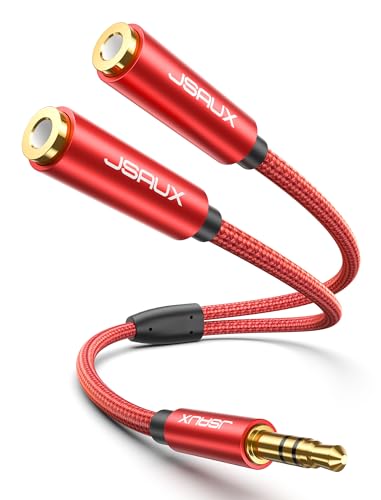
- Splits one 3.5mm output into two
- Braided cable with 15,000+ bend lifespan
- Does not support microphones
Best For: Sharing stereo audio with two listeners
Best USB-C Option
MOSWAG USB-C Dual Headphone Splitter

- USB-C input with two 3.5mm outputs
- Built-in DAC and amplifier
- Braided cable and aluminum housing
Best For: Sharing audio from compatible USB-C devices
Best Mic-and-Audio Adapter

- Separates headphone and mic connections
- Supports compatible CTIA headsets
- Compact 7.87-inch braided cable
Best For: Connecting dual-plug headsets to one 3.5mm jack
Best USB-C Streaming Adapter
USB-C Mic and Headphone Splitter

- Combines headphone, microphone, and charging ports
- Supports up to 24-bit/96kHz audio
- PD 60W charging for compatible devices
Best For: USB-C live-streaming setups needing monitoring and pass-through charging
Best PC Headset Adapter
Dual-Jack Headphone Mic Splitter

- Splits headset audio and mic into two plugs
- Designed for PCs and laptops with separate ports
- Compact gold-plated 3.5mm cable
Best For: PC streamers using a single-plug headset with separate computer audio ports
Best for Two-Listener Sharing

- Connects two headphones to one audio source
- Works with phones, PCs, tablets, and consoles
- Braided cable with aluminum-alloy housing
Best For: Shared monitoring from a standard 3.5mm headphone output
Best for USB-C Recording – Cubilux USB-C Audio Recording Adapter
If your streaming setup uses a USB-C laptop or PC and you need microphone input plus headphone monitoring, this Cubilux adapter is more capable than a basic analog Y cable. It combines line-in, mic-in, and a 3.5mm headphone output for recording and live content workflows.
Best For: USB-C laptop or PC users recording vocals, interviews, vlogs, TikToks, or YouTube content.
Pros:
- Provides USB-C audio connectivity with separate line-in, mic-in, and headphone output functions.
- Supports headphone monitoring after setup.
- Offers playback up to 96 kHz/24-bit and recording up to 48 kHz/24-bit.
Cons:
- Designed for laptops and PCs rather than a general-purpose 3.5mm splitter setup.
- Headphone monitoring requires setup.
Choose this model when your streaming or recording computer has USB-C and you need an integrated microphone input. It is not the simplest choice for merely sharing one analog audio source between two listeners.
Best Simple Audio Share – Syncwire 3.5mm Nylon-Braided Y Splitter
The Syncwire Y cable is a straightforward option for headphone splitters for live streaming when you want to send one 3.5mm stereo audio source to two output devices. Its male-to-two-female design works with compatible phones, laptops, tablets, gaming systems, speakers, and headphones.
Best For: Sharing stereo audio between two headphones or other 3.5mm output devices.
Pros:
- Connects one standard 3.5mm source to two output devices.
- Uses gold-plated connectors and double shielding for signal protection.
- Nylon-braided construction is tested for more than 15,000 90-degree bends.
- Compact and lightweight for portable setups.
Cons:
- Provides two audio outputs, not a dedicated microphone-input arrangement.
- Compatibility is limited to devices with standard 3.5mm audio ports.
This is a practical, portable splitter for monitoring or sharing stereo output. For streaming setups that require separate microphone and headphone connections, choose a TRRS-to-dual-jack adapter instead.
Best Long Cable – DuKabel 4-Foot Headset Splitter
This DuKabel adapter is a useful choice among headphone splitters for live streaming when a desktop or laptop has separate headphone and microphone jacks. Its 4-foot cable gives the headset connection more reach than a short adapter.
Best For: Connecting a four-pole headset to a PC or laptop with separate audio and microphone ports.
Pros:
- Converts one 3.5mm headset connection into separate audio and microphone plugs.
- Provides a 4-foot/1.2-meter cable for more flexible desktop placement.
- Uses gold-finished connectors.
- Includes a 12-month warranty for quality defects.
Cons:
- Designed for desktop and laptop connections rather than two headphone outputs.
- Its longer cable may be less convenient for compact or mobile setups.
Pick this model when cable length matters and your computer uses separate 3.5mm microphone and headphone jacks. Confirm your PC’s port layout before buying, since this is a headset adapter rather than a conventional audio-sharing splitter.
Best for PC Headset Connections – UGREEN 3.5mm Headset Splitter
The UGREEN adapter targets computers with separate 3.5mm audio and microphone jacks. For live streaming, online classes, gaming, or meetings, it lets a compatible four-pole headset connect to those legacy dual-port systems while preserving stereo playback.
Best For: CTIA-compatible TRRS headsets used with PCs or laptops that have separate headphone and microphone jacks.
Pros:
- Connects a four-pole headset to separate computer audio and mic ports.
- Uses gold-plated connectors and oxygen-free copper wire for audio transmission.
- Nylon-braided cable is tested for more than 10,000 bends.
- Compact 20 cm/7.87-inch design is easy to carry.
Cons:
- Requires a CTIA-compliant TRRS headset for microphone functionality.
- Not compatible with CTIA Apple Earbuds and Beats headphones according to the supplied notes.
- Designed for dual-jack computers, not as a two-headphone output splitter.
This is a focused solution for PC streaming and communication setups using a single compatible headset. Check both the headset standard and the computer’s separate-jack layout before ordering.
Best for Easy Setup – JSAUX 3.5mm Headphone Splitter
If you need headphone splitters for live streaming but only want to share stereo audio, the JSAUX splitter is a compact, straightforward option. It converts one 3.5mm output into two 3.5mm headphone or speaker connections, but it does not support microphones.
Best For: Sharing audio from smartphones, tablets, laptops, and other 3.5mm devices with two listeners.
Pros:
- Provides two 3.5mm outputs from one source.
- Gold-plated connectors and an oxygen-copper wire core are designed for clean stereo sound.
- Double-braided nylon construction and a stated 15,000+ bend lifespan support frequent use.
- Compact 0.9-foot design is easy to carry.
Cons:
- Cannot be used with microphones.
- Designed for audio sharing rather than separate microphone and headphone connections.
Choose this JSAUX model when your streaming setup needs simple two-person audio monitoring through a standard 3.5mm jack. For microphone-enabled setups, use a splitter specifically designed for headset audio and mic connections.
Best USB-C Option – MOSWAG USB-C Dual Headphone Splitter
For newer phones, tablets, and laptops, the MOSWAG is one of the more flexible headphone splitters for live streaming because it starts with a USB-C port and provides two 3.5mm outputs. Its built-in DAC and amplifier are intended to deliver clear, stronger audio, provided the host device supports USB-C audio.
Best For: USB-C devices where two people need to monitor the same audio through separate 3.5mm headsets.
Pros:
- Converts one USB-C audio connection into two 3.5mm outputs.
- Built-in 16-bit/48 kHz DAC and amplifier support detailed, higher-output sound.
- Aluminum-alloy housing and nylon-braided cable are designed for durability and reduced tangling.
- Works with many listed iPhone, iPad, Samsung, Google Pixel, MacBook, and other USB-C devices.
Cons:
- Requires a compatible USB-C audio device; it is not a standard 3.5mm splitter.
- Supplied notes do not indicate microphone support.
This is the better fit when your streaming gear has USB-C audio instead of a traditional headphone jack. Check your device’s USB-C audio compatibility before buying, especially if you need microphone input rather than audio output only.
Best Mic-and-Audio Adapter – UGREEN Headset Y Splitter
The UGREEN adapter serves a different purpose from basic audio-sharing cables: it combines separate headphone and microphone connections for a device with one 3.5mm headset jack. That makes it a practical choice among headphone splitters for live streaming when you use legacy headphones with separate audio and mic plugs.
Best For: Connecting a dual-plug headset with separate headphone and microphone connectors to compatible PCs, consoles, tablets, or controllers with a single 3.5mm jack.
Pros:
- Converts one 3.5mm TRRS connection into separate headphone and microphone outputs.
- Compatible with listed devices including PC, PS4/PS5, Xbox One controllers, Steam Deck, Switch, phones, and tablets.
- Nylon braiding, flexible TPE, copper conductors, and gold-plated connectors support durability and signal conductivity.
- Short 7.87-inch cable is portable and helps limit cable clutter.
Cons:
- Headphone connection supports CTIA headphones only and does not support iPhone headsets or OMTP headphones.
- It is not a two-headphone audio-sharing splitter.
- The headset and microphone should be connected before plugging the adapter into the computer for mic pickup.
Pick the UGREEN when your live-streaming setup needs both headset audio and microphone connectivity through one jack. It is not the right choice for sending identical audio to two headphones, so confirm your headset uses separate 3.5mm TRS plugs and the CTIA standard.
Best USB-C Streaming Adapter – USB-C Mic and Headphone Splitter
For creators searching for headphone splitters for live streaming, this USB-C adapter offers a more capable setup than a basic audio Y-cable. It combines headphone and microphone connections with pass-through charging, making it useful for compatible phones and tablets during longer broadcasts.
Best For: USB-C phone and tablet users who need headphone monitoring, microphone connectivity, and charging during live streams.
Pros:
- Provides a headphone jack, a separate microphone input, and a USB-C charging port.
- Supports up to 24-bit/96kHz audio through its built-in DAC.
- Offers plug-and-play operation with many USB-C iPhone, iPad, Android, Surface, and MacBook devices.
- Supports PD 60W fast charging for compatible devices.
Cons:
- The microphone input is line level and requires a preamplifier, mixer, or sound card first.
- It uses USB-C, so it is not intended for devices with only a standard 3.5mm port.
This is the most versatile option of the three for a USB-C streaming rig, particularly if charging while monitoring matters. Confirm your device and microphone signal requirements before buying.
Best PC Headset Adapter – Dual-Jack Headphone Mic Splitter
This compact Y adapter is a practical choice for headphone splitters for live streaming from a desktop or laptop with separate headphone and microphone ports. It converts a headset’s combined 3.5mm connection into dedicated speaker and mic plugs.
Best For: PC and laptop users connecting a newer headset to separate audio and microphone jacks for streaming, calls, or chat.
Pros:
- Separates combined headset audio and microphone signals into two 3.5mm male plugs.
- Works with PCs and laptops that have separate headphone and mic ports.
- Gold-plated connectors and oxygen-free copper support conductivity and durability.
- Compact design is convenient for a laptop bag or travel kit.
Cons:
- It requires a computer with separate headphone and microphone jacks.
- It does not provide USB-C connectivity or pass-through charging.
Choose this adapter when your streaming computer has separate audio and mic inputs but your headset uses one combined plug. It is a straightforward PC-focused solution rather than a general-purpose device splitter.
Best for Two-Listener Sharing – Dual 3.5mm Headphone Splitter
For simple headphone splitters for live streaming, this 3.5mm Y adapter sends one stereo audio source to two pairs of headphones. Its broad device compatibility and portable construction make it useful for shared monitoring, gaming, and media playback.
Best For: Streamers or collaborators who want two people to monitor the same 3.5mm audio source.
Pros:
- Connects two sets of headphones or earbuds to one 3.5mm audio source.
- Compatible with phones, tablets, laptops, PCs, consoles, and MP3 players with 3.5mm ports.
- Uses gold-plated connectors and oxygen-free copper wiring for signal transmission.
- Features a compact braided cable and aluminum-alloy casing.
Cons:
- It is designed for sharing headphone audio, not for connecting a separate microphone input.
- It requires a device with a 3.5mm headphone output.
This is the simplest pick when two listeners need the same audio feed from a compatible 3.5mm source. For microphone-and-headphone routing on a PC or USB-C device, one of the other adapters is a better fit.
How We Picked the Best Headphone Splitters for Live Streaming
We focused on connection type, device compatibility, microphone support, build quality, cable length, and practical streaming use. The selection includes simple passive 3.5mm splitters for sharing audio, headset adapters for computers with separate mic and headphone ports, and USB-C models for devices without a traditional audio jack.
Because Headphone Splitters for Live Streaming can use different wiring standards, we also considered whether each design is intended for headphones only or supports both microphone and headphone signals. Always compare the connector layout with your computer, phone, mixer, or capture device before ordering.
Quick Comparison
| Splitter type | Best for | What to check |
|---|---|---|
| 3.5mm headphone Y cable | Sharing one audio source with two listeners | TRS/TRRS wiring and device jack compatibility |
| Headset mic-and-audio splitter | Computers with separate microphone and headphone ports | Correct color or connector identification |
| USB-C to dual 3.5mm adapter | Phones, tablets, and laptops with USB-C audio | Digital audio support and microphone compatibility |
| USB-C streaming adapter with charging | Live streaming while monitoring and charging | Power pass-through, app support, and port placement |
Key Buying Factors for Headphone Splitters for Live Streaming
Connector and Device Compatibility
Identify the source device first. A standard 3.5mm splitter will not replace a USB-C audio adapter, and a USB-C adapter may require digital audio support from the host device. For desktop computers, determine whether the system uses one combined headset jack or separate microphone and headphone ports.
Microphone Support
Many basic Y cables duplicate stereo output but do not carry microphone input. If you plan to speak during a stream, look for a TRRS-compatible headset adapter or a model explicitly labeled for mic and audio. Confirm that your streaming software and device recognize the microphone after connection.
Charging and Monitoring
USB-C adapters with charging pass-through are useful for phones and tablets used for longer streams. They reduce the need to choose between monitoring audio and keeping the device powered, but they may add another point of compatibility to verify.
Construction and Cable Length
Braided jackets, reinforced plugs, and strain relief can help a splitter withstand frequent setup and teardown. Choose a short cable for a compact desk and a longer lead when the listeners or microphones sit farther from the source.
Who Should Buy Which Headphone Splitters for Live Streaming?
- For two listeners sharing one source: Choose a straightforward 3.5mm dual-headphone splitter.
- For a desktop with separate ports: Select a mic-and-audio headset splitter with two clearly identified 3.5mm plugs.
- For a USB-C phone or laptop: Use a USB-C adapter that matches your device’s audio standards and microphone needs.
- For extended mobile streams: Consider a USB-C model with charging pass-through.
- For frequent travel or production work: Prioritize reinforced construction, compact sizing, and reliable connector strain relief.
Before checkout, verify the plug and jack arrangement, microphone requirements, and whether your device supports simultaneous audio output and input. That quick compatibility check is the best way to avoid buying a splitter that only handles part of your streaming setup.