
Monitoring a podcast with multiple people is easier when everyone can hear the same mix clearly. The right headphone splitter can connect two guests for a quick interview or provide several independent outputs for a growing recording setup.
Our selection covers simple 3.5mm adapters, volume-control splitters, and powered multi-channel headphone amplifiers. Use the buying guide below to match output count, connector type, power needs, and portability to your workflow.
Best 10 Headphone Splitters for Podcasting Picks for 2026
Best Multi-Listener Amp

- Four independent headphone outputs
- Individual volume controls
- Compact, plug-and-play metal design
Best For: Four-person podcast monitoring and tracking sessions
Best Dual-Headset Interview Adapter
Cubilux 3.5mm Dual Headset Adapter

- Supports two TRRS headsets and microphones
- Separate volume controls
- No external power or drivers required
Best For: Two-person interviews and co-hosted recordings
Best Powered Four-Channel Monitor
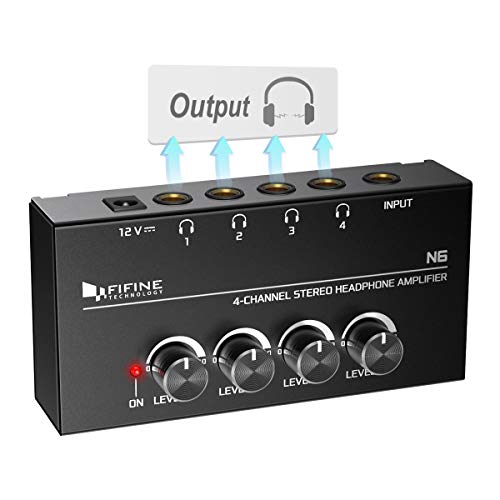
- Four 1/4-inch headphone outputs
- Independent volume knobs
- 12V adapter included
Best For: Studio podcast monitoring from one stereo source
Best Simple 3.5mm Y-Cable

- Splits one 3.5mm output into two
- Lightweight braided cable
- Metal housing with shielded connectors
Best For: Portable two-person audio monitoring
Best for Group Listening
Five-Port 3.5mm Audio Splitter
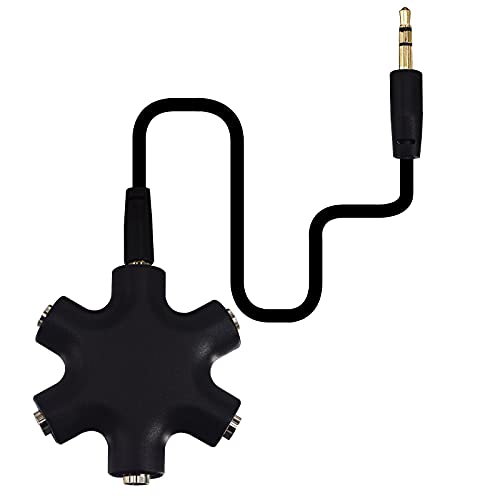
- Connects up to five headphones or speakers
- Works with standard 3.5mm auxiliary sources
- Compact, unpowered design
Best For: Classrooms, travel, and shared listening
Best for Studio Monitoring

- Offers eight stereo headphone outputs
- Adds independent volume controls
- Supports mono/stereo monitoring modes
Best For: Recording studios and multi-person podcast sessions
Best for PC Headset Connections

- Separates headphone and microphone plugs
- Works with compatible PC and laptop jacks
- Compact and portable for headset setups
Best For: Computer recording, VOIP, and chat applications
Best for Multi-Guest Monitoring

- Four independent stereo outputs
- Separate volume control per channel
- Mixes two inputs; power adapter included
Best For: Small podcast teams and studio monitoring
Best Simple Cable Splitter
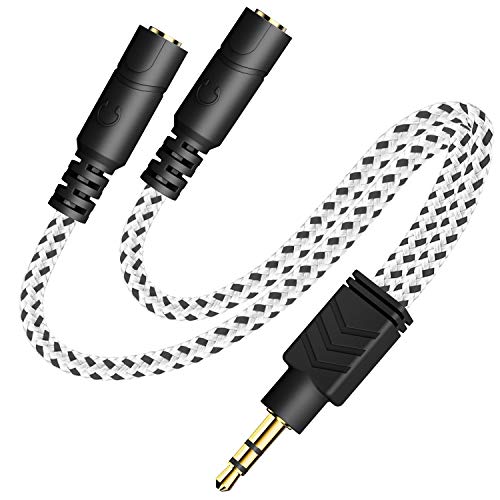
- Shares one stereo source with two listeners
- Slim 20cm braided cable
- Plug-and-play 3.5mm compatibility
Best For: Two-person portable monitoring
Best for Group Audio Sharing
5-Way 3.5mm Headphone Splitter

- Connects up to five headphones
- Compact and lightweight design
- Works with 3.5mm auxiliary devices
Best For: Group podcast monitoring from one source
Best Multi-Listener Amp – Mackie HM-4
The Mackie HM-4 is a practical choice when your podcasting setup needs headphone splitters for podcasting that can serve up to four listeners. It connects to a source through a 1/4-inch or 1/8-inch output and gives each person an independent volume control.
Best For: Podcast sessions, tracking, rehearsals, and other setups where four people need separate headphone volume control.
Pros:
- Drives up to four headphones from one source.
- Provides independent level control for every listener.
- Compact metal enclosure can be attached to a desk, rack, or stand.
- Plug-and-play operation requires no separate power supply.
Cons:
- It is a headphone amplifier rather than a simple passive Y-cable.
- The supplied notes do not specify included headphones or compatible devices.
Choose the HM-4 if you want a compact, straightforward monitoring hub for a four-person podcast or recording session, especially when avoiding another powered device matters.
Best Dual-Headset Interview Adapter – Cubilux 3.5mm Dual Headset Adapter
The Cubilux adapter is aimed at creators who need headphone splitters for podcasting with two headsets and microphone support from one 4-pole TRRS combo jack. Its independent volume wheels make it useful for co-hosted recordings, calls, and online interviews.
Best For: Two-person interviews, podcasts, meetings, and training sessions using compatible TRRS headsets or microphones.
Pros:
- Connects two headsets for simultaneous listening and talking.
- Supports two mono TRRS microphone inputs.
- Offers separate volume controls for both listeners.
- Compact aluminum housing and braided cable are suited to portable use.
Cons:
- Requires a device with a 4-pole TRRS combo jack.
- Does not support powered or stereo microphones.
- Designed for two connections rather than a larger group.
This is the more specialized pick for a two-person mobile recording setup, provided your device and microphones use the required TRRS connection.
Best Powered Four-Channel Monitor – FIFINE N6
The FIFINE N6 is a powered four-channel headphone amplifier for podcast studios and recording setups that need headphone splitters for podcasting with a single stereo source. It provides four 1/4-inch outputs, separate volume knobs, and a supplied 12V DC adapter.
Best For: Studio tracking, live applications, and podcast sessions where up to four people monitor the same stereo mix.
Pros:
- Shares one stereo source across four headphone outputs.
- Provides separate volume controls for each channel.
- Uses a durable, compact metal construction.
- Includes a 12V DC power adapter and power indicator light.
Cons:
- All input and output ports are 1/4-inch connectors.
- A suitable TRS or TS cable is not included.
- It is a 1-input, 4-output amplifier, not a mixer.
The N6 suits a fixed or semi-permanent studio better than a minimalist travel kit, particularly if your interface or mixer already uses 1/4-inch connections.
Best Simple 3.5mm Y-Cable – SYNCWIRE Headphone Splitter
The SYNCWIRE Headphone Splitter is a straightforward passive option for headphone splitters for podcasting when two people only need to hear the same 3.5mm audio source. Its male-to-two-female Y design is compact and works with devices such as laptops, tablets, smartphones, and other standard AUX equipment.
Best For: Simple two-person monitoring, portable recording kits, travel, and shared listening from a standard 3.5mm headphone jack.
Pros:
- Splits one 3.5mm output to two headphones or other audio devices.
- Compact, lightweight design is convenient for portable setups.
- Nylon-braided cable and metal housing improve durability.
- Gold-plated connectors and double shielding are designed for clear transmission.
Cons:
- It does not provide separate volume controls.
- It is intended for audio sharing, not dual microphone input.
- It supports two outputs rather than four.
For a basic two-listener setup with a conventional 3.5mm output, the SYNCWIRE is the simplest and most portable choice; use an amplifier instead if independent volume control is important.
Best for Group Listening – Five-Port 3.5mm Audio Splitter
For simple, unpowered headphone splitters for podcasting, this five-port 3.5mm adapter lets several listeners monitor the same source. It connects to a standard auxiliary output and provides up to five headphone or speaker connections.
Best For: Classroom, travel, family listening, or basic podcast monitoring with multiple 3.5mm headphones.
Pros:
- Supports up to five simultaneous 3.5mm audio outputs.
- Works with compatible phones, tablets, computers, MP3 players, headphones, and speakers.
- Compact ABS-plastic design with a built-in connection cable.
Cons:
- Only supports 3.5mm auxiliary connections.
- Does not work directly with Lightning or USB-C ports.
- Offers no individual volume controls or amplification.
This is a straightforward choice when the source already has enough output power and you simply need more listening ports. For long podcast sessions or less powerful devices, an amplified splitter may be more suitable.
Best for Studio Monitoring – 8-Channel Headphone Amplifier
For podcasting setups that need multiple monitored feeds, this eight-channel headphone amplifier combines splitting with per-channel volume control. Its powered design accepts compatible 1/4-inch or 1/8-inch connections and is aimed at studio or stage use.
Best For: Recording studios, podcast sessions, and other setups where several listeners need independent headphone volume adjustments.
Pros:
- Provides eight stereo output channels with individual volume controls.
- Includes a mono/stereo switch for flexible monitoring.
- Uses a metal enclosure and included 12V AC adapter for powered operation.
- Includes nine 6.35mm-to-3.5mm conversion plugs.
Cons:
- Requires external power from the included 12V AC adapter.
- The 1/8-inch connection requires a conversion plug.
- Larger and heavier than a basic passive splitter.
Among these headphone splitters for podcasting, this is the most capable option for a multi-person recording environment. It costs more space and setup effort than a cable splitter, but independent volume control can make group monitoring much easier.
Best for PC Headset Connections – 3.5mm Headset Y Adapter
This compact Y adapter is designed for podcasting or voice-chat setups that use a computer with separate headphone and microphone jacks. It converts a headset’s single 3.5mm connection into separate speaker and mic plugs for compatible PCs and laptops.
Best For: Connecting a newer smartphone-style headset to a computer for recording, calls, VOIP, or chat applications.
Pros:
- Separates headphone audio and microphone connections into two plugs.
- Compatible with computers and laptops using standard 3.5mm jacks.
- Compact, portable cable with gold-plated connectors and oxygen-free copper.
- Also supports compatible 3.5mm phones and earphones for shared listening.
Cons:
- Designed for one headset connection rather than multiple listeners.
- Requires a computer with separate headphone and microphone ports.
- Does not provide amplification or independent volume controls.
This adapter is a practical fit when the main podcasting problem is headset compatibility rather than distributing audio to a group. Check that your computer has the required separate 3.5mm audio and microphone inputs before buying.
Best for Multi-Guest Monitoring – 4-Channel Headphone Amplifier
For podcasting setups where several people need to monitor audio at once, this headphone amplifier is more capable than a basic splitter. It mixes two input sources into four stereo outputs, with an independent volume control for each connected listener.
Best For: Small podcast teams, studio sessions, and stage setups with up to four listeners and two playback devices.
Pros:
- Four independent stereo headphone outputs with separate level controls.
- Accepts two input sources and supports 3.5mm headphones; 6.35mm headphones can be used with an adapter.
- Compact 6.7-by-2-by-1.26-inch design and included 12V power adapter.
- Uses high-power stereo amplifiers and a low-noise op amp for clear audio performance.
Cons:
- Requires external power through the included adapter.
- It is an amplifier/mixer rather than a simple pocket-size cable splitter.
This is the strongest choice here for a multi-person podcasting workflow. Choose it when individual volume control and four-person monitoring matter more than the simplicity of a passive cable.
Best Simple Cable Splitter – Braided 3.5mm 2-Way Splitter
This compact 3.5mm cable is a straightforward option for headphone splitters for podcasting when two people only need to hear the same source. Its plug-and-play design works with devices that have a standard auxiliary jack and fits many phone and tablet cases.
Best For: Two-person monitoring, portable interviews, and simple audio sharing from phones, tablets, computers, TVs, or stereos.
Pros:
- Splits one 3.5mm stereo output between two headphones or earphones.
- Compact 20cm cable with a slim profile designed to fit inside many device cases.
- Braided exterior adds cable protection and a distinctive Zebra White finish.
- Gold-plated connectors and an oxygen-free-copper conductor are designed for reliable audio transmission.
Cons:
- Supports only two connected audio devices.
- Does not provide independent volume controls or amplification.
For a basic two-person setup, this splitter keeps the connection inexpensive and uncomplicated. It is best suited to shared listening rather than a full podcast monitoring station.
Best for Group Audio Sharing – 5-Way 3.5mm Headphone Splitter
When a podcasting group needs several people to hear one source, this five-way adapter provides a simple alternative to a powered headphone amp. Plug it into a device with a 3.5mm auxiliary port and connect up to five headphones for shared monitoring.
Best For: Group listening, travel recording kits, and podcast sessions where up to five listeners share the same device output.
Pros:
- Provides five 3.5mm ports for connecting up to five headphones.
- Works with compatible smartphones, tablets, laptops, and other devices with an auxiliary port.
- Lightweight and portable for road trips, flights, or mobile recording.
- Nickel-plated terminals and a 24K gold-plated connector line are designed to resist corrosion.
Cons:
- Shares one audio source rather than mixing multiple inputs.
- Offers no individual volume controls or built-in amplification.
- Requires a source device with a 3.5mm auxiliary port.
This is a convenient high-capacity passive splitter for shared listening. It makes sense for five-person monitoring when everyone can use the same source level, but a powered amplifier is preferable when individual control is important.
How We Picked the Best Headphone Splitters for Podcasting
We focused on connection reliability, output capacity, connector compatibility, portability, and practical podcasting use. The lineup includes passive splitters for two listeners, multi-jack adapters for shared monitoring, and powered headphone amplifiers that can drive several pairs more consistently. We also considered useful details such as individual volume controls, metal construction, included adapters, cable flexibility, and whether a product suits a phone, laptop, mixer, or audio interface.
Because a basic Y-cable and a studio headphone amplifier solve different problems, the best option depends on your recording hardware and the number of people who need to monitor at once.
Quick Comparison
| Best For | Recommended Type | What to Look For |
|---|---|---|
| Two listeners | Passive 3.5mm splitter | Durable cable, secure plugs, stereo support |
| Two headset users | Headset and microphone adapter | TRRS compatibility and clear wiring |
| Three to four listeners | Powered headphone amplifier | Multiple outputs and independent volume control |
| Large recording groups | Eight-channel amplifier | Output count, power supply, and adapter flexibility |
| Portable interviews | Compact splitter or mini amp | Low weight, short cable, and simple setup |
Key Buying Factors for Headphone Splitters for Podcasting
Output Count and Power
A passive splitter is usually sufficient for two efficient headphones, but several headphones can reduce volume and place more strain on the source. For three or more listeners, a powered amplifier is generally the safer choice. Look for separate volume controls when guests need different listening levels.
Connector Compatibility
Confirm whether your source uses a 3.5mm stereo output, a 6.35mm headphone jack, or a mixer-specific connection. TRRS headset adapters are designed for combined headphone-and-microphone plugs, while ordinary stereo splitters may carry audio only. Included adapters can make a major difference in studio setups.
Audio Quality and Monitoring Control
Choose stereo-capable hardware for music playback and detailed voice monitoring. A sturdy connector and well-insulated cable help prevent intermittent sound, while a metal amplifier enclosure can better withstand regular studio use. Keep headphone volume low during setup and raise it gradually.
Portability and Setup
For a laptop or phone interview, a small Y-cable is convenient and requires no power. A multi-output amplifier is less portable but offers more dependable distribution and better control when several people record together.
Who Should Buy Which Headphone Splitters for Podcasting?
Choose a basic two-way 3.5mm splitter if you only need to share one source with a co-host. Pick a headset-compatible adapter when participants use TRRS headphones with an integrated microphone. For a home studio with three or four listeners, a compact powered amplifier offers better volume management. Larger productions should choose an eight-channel unit or another model with enough outputs for every guest, plus suitable 3.5mm or 6.35mm connections.