
Visible power and signal cables can make a creator workspace look cluttered and complicate camera angles, lighting placement, and equipment upgrades. The right in-wall cable kit can keep a wall-mounted display, monitor, speakers, or studio accessories organized without sacrificing access.
These 10 options vary in outlet configuration, cable length, pass-through design, installation hardware, and support for power and low-voltage connections. Use the guide below to match the kit to your room, equipment, and installation plans.
Best 10 In-Wall Cable Kits for Content Creators Picks for 2026
Best Long-Cord Charging Kit
WALLCLIQ In-Wall TV Cable Hider

- Adds two AC outlets plus USB-A and USB-C charging
- Includes a 9.84-foot power cord and cutting template
- Uses UL-listed components and ETL-certified wiring
Best For: Creator workspaces needing concealed cables and convenient USB charging
Best Simple Pass-Through Kit
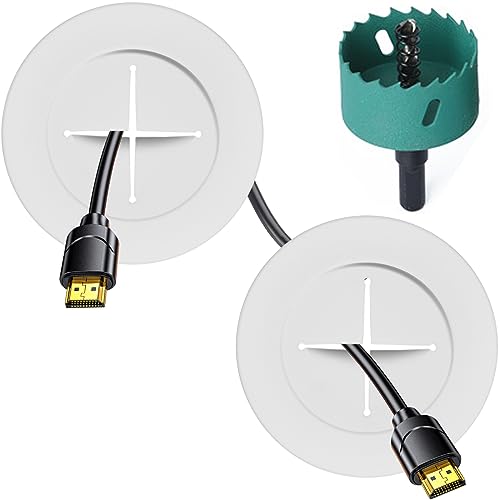
- Includes two pass-throughs and a hole saw attachment
- Supports 12mm–18mm plaster or wood plank walls
- Useful for TVs, gaming systems, and consoles
Best For: Basic low-voltage cable routing where existing outlets provide power
Best Built-In Charging Upgrade
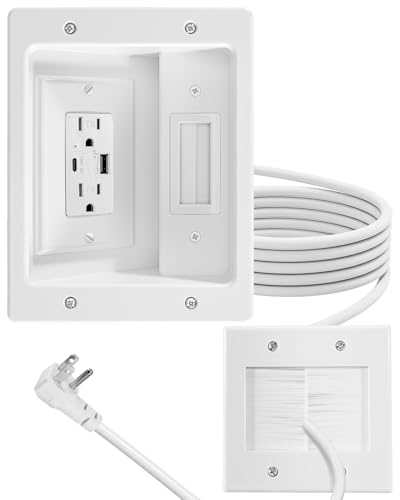
- Combines two AC outlets with USB-A and USB-C ports
- Conceals Ethernet, fiber-optic, and A/V cables
- Includes recessed module, plates, cord, template, and instructions
Best For: Creator media walls needing charging and organized cable routing
Best for Long Cable Runs
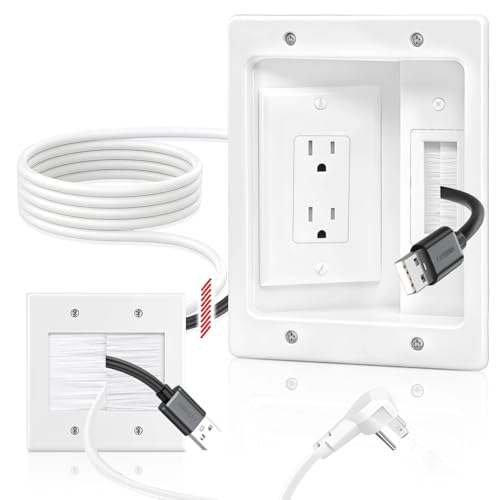
- Includes a 9-foot power cord
- Supports power and low-voltage cables
- Recessed profile for flush equipment placement
Best For: Larger studios and wall-mounted A/V setups
Best Complete Kit
Perlegear In-Wall Cable Manager

- Includes template, hole saw, and dust bag
- Handles power, HDMI, Ethernet, and audio cables
- Includes a 5.9-foot extension cord
Best For: Complete DIY studio and entertainment installations
Power-and-Data Organizer
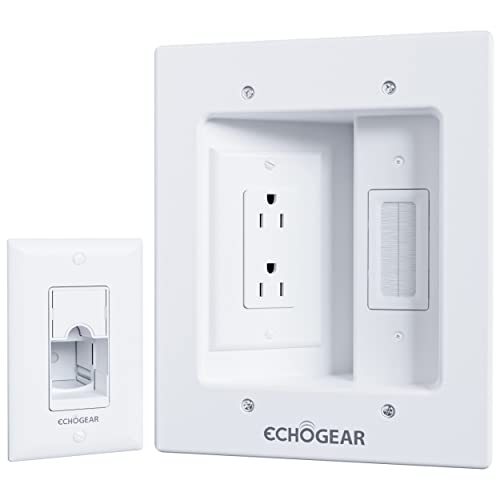
- Adds two AC outlets for connected devices
- Conceals three low-voltage cables
- Includes template, saw, and 6-foot cord
Best For: Wall-mounted displays with power and AV cable needs
High-Capacity DIY System
Power and Low-Voltage Cable Kit

- Pre-wired for simpler DIY installation
- Fits up to four large braided HDMI cables
- Includes drill attachment and locking brackets
Best For: Multi-cable creator setups with at least 2.5 inches of wall depth
Best DIY Power-and-AV Solution – ECHOGEAR In-Wall Cable Management Kit
For content creators building a clean filming or editing setup, these in-wall cable kits for content creators offer a practical way to hide TV power and low-voltage cables. This ECHOGEAR kit includes pre-wired modules, a 6-foot extension cord, and a drywall hole saw attachment for a streamlined DIY installation.
Best For: Wall-mounted TVs, home studios, and entertainment setups needing power plus multiple AV connections.
Pros:
- Includes a hole saw attachment, driver bit, extension cord, and pre-wired grommets.
- Accommodates up to four large HDMI cables along with Ethernet and audio cords.
- ETL certified, with paintable grommets and locking wings for a finished appearance.
Cons:
- Designed for indoor use only.
- Requires drilling and suitable drywall installation conditions.
Its all-in-one design makes this a strong choice when you want to conceal several creator and entertainment cables without assembling a separate parts list.
Best Long-Cord Charging Kit – WALLCLIQ In-Wall TV Cable Hider
This WALLCLIQ option is among the more feature-rich in-wall cable kits for content creators, combining concealed cable routing with two AC outlets and USB charging. Its 9.84-foot cord can help when the nearest receptacle is farther from a wall-mounted display or workspace.
Best For: Home offices, media rooms, and creator setups that need built-in USB-A and USB-C charging.
Pros:
- Provides two AC outlets plus USB-A and USB-C ports with up to 4.2A shared output.
- Includes a brush wall plate, long power cord, template, and screw accessories.
- Uses UL-listed components and ETL-certified internal wiring.
Cons:
- A drywall saw is not included.
- Requires a wall cavity deeper than 3.74 inches.
- Installation requires cutting two standard wall openings.
The integrated charging ports are useful for keeping phones, cameras, and other USB-powered accessories near a wall-mounted screen, provided the wall cavity meets the depth requirement.
Best Simple Pass-Through Kit – Riozoo TV Wire Hider Kit
For creators who mainly need a tidy route for display and equipment cables, this Riozoo kit keeps the setup straightforward. It includes two pass-throughs and a hole saw attachment, making it a practical choice for organizing cables behind a wall-mounted TV, gaming system, or console.
Best For: Basic cable pass-through installations in compatible plaster or wood plank walls.
Pros:
- Includes two pass-throughs and a hole saw drill attachment.
- Works with flat-panel TVs, gaming systems, and entertainment consoles.
- Designed for wall thicknesses from 12mm to 18mm.
Cons:
- The notes specify compatibility with perforated plaster or wood plank walls, not all wall types.
- Does not list integrated AC outlets or USB charging ports.
- Installation still requires drilling and checking wall thickness.
This is a focused cable-hiding option rather than a powered outlet kit, so it fits best when your existing outlets can handle power and you only need cleaner cable routing.
Best Built-In Charging Upgrade – Recessed In-Wall Cable Kit
This recessed kit combines cable concealment with AC and USB charging, making it well suited to creator workspaces that power a display, console, or nearby accessories. It routes low-voltage lines such as Ethernet, fiber-optic, and A/V cables behind the wall while keeping the visible setup cleaner.
Best For: Wall-mounted TV and home-theater setups that need concealed cables and simultaneous device charging.
Pros:
- Offers two AC outlets plus USB-A and USB-C ports.
- Includes a recessed module, paintable wall plates, power cord, template, and instructions.
- Supports concealed Ethernet, fiber-optic, and A/V cable routing.
Cons:
- Requires at least 3.75 inches of wall-cavity depth.
- Users must measure between studs before cutting.
- The supplied details do not specify a wall saw or additional installation tool.
Its combination of charging and low-voltage routing makes it a versatile option for a compact studio or media wall, as long as the recessed module fits between the studs.
Best DIY TV Setup – Compact In-Wall Cable Kit
For content creators building a clean filming or viewing space, this in-wall cable management kit for content creators hides TV power and low-voltage cables behind the wall. It includes a 3-inch hole saw and is designed for a two-hole installation, but confirm your wall cavity is at least 3 inches deep and that your TV plug is no wider than 1.125 inches before buying.
Best For: DIY TV, studio, or entertainment setups needing a simple concealed-cable layout.
Pros:
- Includes a 3-inch hole saw and step-by-step instructions for a basic drill installation.
- Supports up to a 5-foot distance between the modules and includes a 6-foot extension cord.
- Locking wings help hold the modules securely behind the wall.
Cons:
- Requires at least 3 inches of wall cavity depth.
- May not fit TV plugs wider than 1.125 inches.
- Installation requires drilling two 3-inch holes.
This is a practical choice when straightforward installation and flexible module placement matter most. Check the wall depth and plug dimensions carefully before starting.
Best for Long Cable Runs – Recessed TV Outlet Box Kit
This in-wall cable management kit for content creators combines a recessed TV outlet box with a 9-foot power cord for wall-mounted displays and entertainment equipment. It can route power, HDMI, Ethernet, and audio/video cables inside the wall while keeping compatible equipment closer to the wall surface.
Best For: Larger studio, conference-room, or home entertainment installations that benefit from a longer power-cord reach.
Pros:
- Includes a 9-foot power cord and dual 15A/125V sockets.
- Accommodates power, HDMI, Ethernet, and audio/video cables.
- Recessed design helps TVs and A/V equipment sit flush against the wall.
- Flame-retardant PC construction is designed to resist bending and cracking.
Cons:
- Requires sufficient wall depth for the recessed outlet installation.
- A fish tape or wire snake may be needed to guide cables.
- Size should be confirmed before purchase.
Its longer cord and recessed format make it well suited to more involved creator spaces, but installation planning is important. Verify the available wall cavity and cable-routing path first.
Best Complete Kit – Perlegear In-Wall Cable Manager
For content creators who want a more comprehensive installation package, this in-wall cable management kit for content creators includes a drill template, hole-saw attachment, dust bag, two power modules, connecting cables, and a 5.9-foot extension cord. It is designed to conceal TV, speaker, HDMI, Ethernet, and audio cables while keeping the setup tidy.
Best For: Family-friendly studios and entertainment areas where a complete, dust-controlled DIY kit is useful.
Pros:
- Includes the main installation accessories, including a template, hole saw, and dust bag.
- Accommodates multiple HDMI, Ethernet, and audio cables.
- UL and SGS certified and made with fire-resistant materials, according to the supplied product notes.
- Includes a 5.9-foot extension cord for flexible module placement.
Cons:
- Requires a wall cavity at least 2.8 inches deep.
- Still requires a drill for installation.
- Dimensions should be checked before cutting the wall.
This is the strongest all-in-one option of the three for creators who value included installation accessories and support for several cable types. Confirm the wall depth before drilling.
Quick-Install Cable Hider – 4-Pack Wall Pass-Through Kit
For creators who want a cleaner filming or streaming setup, this kit is a straightforward option among in-wall cable kits for content creators. It includes pass-through grommets, locking brackets, and a drill attachment for drywall, with room for up to four large HDMI cables.
Best For: Content creators hiding multiple low-voltage AV cables behind a wall-mounted display or workstation.
Pros:
- Includes a drywall hole-saw drill attachment for installation.
- Fits up to four large HDMI cables through the flexible grommets.
- Paintable grommets can better match the wall.
- Locking brackets help secure the pass-throughs behind drywall.
Cons:
- Designed primarily for low-voltage cables; installation requires a drill.
- Only suitable for indoor use.
This is a practical pick when the main goal is tidying HDMI, AUX, and similar cables without adding an in-wall power outlet. Its included drill attachment and high cable capacity make it useful for a compact creator setup.
Power-and-Data Organizer – Dual-Outlet In-Wall Cable Kit
This dual-outlet model is one of the more complete in-wall cable kits for content creators who need to power a wall-mounted TV and a streaming device while concealing signal cables. It combines two AC outlets with a brush pass-through for HDMI, Ethernet, and audio cables.
Best For: Wall-mounted creator displays that need concealed power for two devices plus organized low-voltage connections.
Pros:
- Provides two AC outlets in the in-wall module.
- Hides up to three low-voltage cables through the brush pass-through.
- Includes a wall template, drywall saw, and 6-foot extension cord.
- Requires no wiring, according to the supplied product notes.
Cons:
- The module requires a relatively large 6.25-by-8-by-3.95-inch wall opening and depth.
- Its low-voltage pass-through is specified for three cables, fewer than some multi-cable grommet kits.
Choose this kit when power management matters as much as cable concealment. The dual outlet and included extension cord can simplify a display-and-streaming-device setup, while the brush plate keeps AV wiring out of sight.
High-Capacity DIY System – Power and Low-Voltage Cable Kit
For creators planning a clean wall-mounted display or speaker installation, this DIY system combines power and low-voltage cable management. It is pre-wired, includes a drill attachment, and is designed to accommodate several large HDMI, Ethernet, and audio cables.
Best For: DIY creator setups needing concealed power and capacity for multiple braided HDMI or network cables.
Pros:
- Pre-wired design is intended for installation in under 30 minutes without an electrician.
- Includes a hole-saw drill attachment and locking bracket wings.
- Can accommodate up to four large braided HDMI cables.
- White components can be painted to coordinate with the wall.
Cons:
- Requires at least 2.5 inches of space behind the drywall.
- Specified for indoor use and is not water resistant.
This COOVIE kit stands out for combining a pre-wired power path with generous cable capacity. Confirm the available wall depth before buying, then use it for a tidy display, speaker, or creator workstation installation.
How We Picked the Best In-Wall Cable Kits for Content Creators
We compared these kits by the features that matter most in a creator workspace: compatibility with wall-mounted equipment, power and low-voltage cable support, outlet design, included installation hardware, cord length, and flexibility for future changes. We also considered whether a kit includes brush plates, recessed outlets, USB charging, pass-through openings, hole saws, or locking components.
Because in-wall electrical work can involve safety and code requirements, we favor products that clearly identify their intended use and included components. Always follow the manufacturer’s instructions and local electrical rules, and do not run ordinary extension cords inside a wall unless the product is specifically designed and approved for that purpose.
Quick Comparison
For a fast shortlist, first decide whether you need a complete power-and-low-voltage solution or only a cleaner route for existing cables. Kits with recessed AC outlets are useful behind TVs, monitors, and editing displays, while brush-style or pass-through plates are better for HDMI, Ethernet, speaker wire, and other low-voltage connections. USB-A and USB-C ports can reduce desktop clutter, but they are most useful when their charging output matches your devices.
Key Buying Factors for In-Wall Cable Kits for Content Creators
Power Versus Low-Voltage Wiring
Creators often need both power and signal connections. Check whether the kit separates AC power from HDMI, USB, Ethernet, audio, or speaker cables. A kit intended only for low-voltage wires may not replace a recessed power outlet, while a power-focused kit may provide limited room for multiple signal cables.
Outlet Layout and Cable Reach
Measure the distance between the source outlet and the mounted equipment before buying. Nine- to ten-foot cords offer useful flexibility, but excess cable still needs a safe, tidy route. Recessed outlets are especially helpful when a monitor or TV has a thick plug that would otherwise push it away from the wall.
Installation and Wall Compatibility
Review the required hole size, wall depth, stud placement, and included drill attachments. Some kits are easier to install between unobstructed studs, while others may require additional tools or electrical experience. Confirm that the wall cavity can accommodate the outlet box and cable path.
Future Expansion
Choose a kit with enough space for today’s connections plus likely additions such as a second monitor, powered speakers, a capture device, or a permanent camera setup. Extra pass-through capacity can be more valuable than a crowded outlet face.
Who Should Buy Which In-Wall Cable Kits for Content Creators?
Choose a recessed dual-outlet kit if your main goal is powering a wall-mounted TV, reference monitor, or display while keeping the plug flush. A kit with USB-A and USB-C is a good fit for creators who regularly charge phones, microphones, lights, or small accessories near the display. Brush-plate designs suit studios that route several low-voltage cables and may change equipment later.
For a simple single-display installation, prioritize an easy-to-cut kit with the necessary cord length and included hardware. For multi-device editing or streaming stations, look for broader pass-through openings, separate power and signal paths, and enough capacity for upgrades. The best In-Wall Cable Kits for Content Creators are the ones that fit the wall, equipment, and installation requirements—not merely the kit with the most ports.