
In 2025, you’ll find that choosing the right Kiloview video encoder can greatly enhance your streaming experience. With the latest advancements in encoding technology, these devices cater to a variety of needs, from casual streaming to professional broadcasts. You’ll want to take into account factors like video quality, connectivity, and ease of use. So, what are the top models that can elevate your content delivery? Let’s explore the best options available this year.
N60 4K HDMI/USB to NDI Bi-directional Converter

The N60 4K HDMI/USB to NDI bi-directional converter is perfect for content creators who demand high-quality streaming and ultra-low latency. With support for 4Kp60 video at a bitrate of 250Mbps, you’ll experience stunning clarity and detail. It features YCbCr 4:2:2 10bit color and H.264/H.265 codecs, ensuring your content looks vibrant. The easy-to-use LCD panel and scroll-wheel allow for seamless configuration, while dual RJ45 Ethernet ports provide robust network connectivity. Plus, with audio input and output options, you can enhance your streams effortlessly. Elevate your production quality with the N60 for an outstanding streaming experience.
Best For: Content creators and streamers seeking high-quality, ultra-low latency video solutions for their productions.
Pros:
- Supports 4Kp60 video with a high bitrate of 250Mbps for exceptional clarity and detail.
- Easy configuration through an intuitive LCD panel and scroll-wheel for quick adjustments.
- Dual RJ45 Ethernet ports provide robust network connectivity, enhancing streaming reliability.
Cons:
- Requires PoE for optimal use, which may necessitate additional equipment if not already available.
- Higher bitrate settings may require significant network bandwidth, potentially limiting use in slower network environments.
- Limited audio options with only basic 3.5mm line in and out ports, which may not meet all professional audio needs.
N5 3G-SDI to NDI/NDI|HX 2/3 Bidirectional Converter

For professionals seeking seamless integration of 3G-SDI with modern NDI/NDI|HX workflows, the Kiloview N5 3G-SDI to NDI/NDI|HX 2/3 Bidirectional Converter stands out as an essential tool. This versatile device allows you to effortlessly convert between formats, enhancing your streaming flexibility. With included components like a power supply, cold shoe, and user manual, setup is straightforward. Its LCD screen and touch buttons make control easy, while PTZ control via USB keypad adds convenience. Backed by a one-year limited warranty, the N5 guarantees reliability, making it a smart choice for any professional streaming setup.
Best For: Professionals looking to integrate 3G-SDI with NDI/NDI|HX workflows for enhanced streaming capabilities.
Pros:
- Versatile conversion between 3G-SDI and NDI/NDI|HX formats for seamless workflow integration.
- User-friendly control features including an LCD screen, touch buttons, and PTZ control via USB keypad.
- Included components such as power supply and cold shoe facilitate easy setup and use.
Cons:
- Limited warranty period of one year may not be sufficient for some users seeking long-term reliability.
- Potential learning curve for users unfamiliar with NDI/NDI|HX technology.
- Dependent on power supply, which may limit mobility in certain setups.
ZowieBox 4K HDMI Video Encoder/Decoder

Compact and powerful, the ZowieBox 4K HDMI Video Encoder/Decoder is ideal for gamers seeking seamless streaming without compromising performance. This device captures console gameplay at 4K with zero-lag passthrough, ensuring you stay in the game. With its NDI|HX3 capabilities, it streams effortlessly to platforms like OBS and vMix. You can also control it through a user-friendly web interface, allowing adjustments to video, audio, and more. Plus, its compact design means you can easily set it up anywhere. Whether you need to encode or decode, the ZowieBox delivers high-quality streaming with minimal impact on your experience.
Best For: Gamers and content creators seeking a compact, high-quality solution for seamless 4K streaming without lag.
Pros:
- Compact and portable design allows for easy setup anywhere.
- Zero-lag passthrough ensures uninterrupted gaming experience.
- User-friendly web interface for convenient control and configuration.
Cons:
- Can only function as either an encoder or decoder at one time, not both.
- Limited to resolutions up to 4K@30fps and 1080p@60fps for streaming.
- Does not support full NDI signals, which may limit some advanced streaming setups.
EXVIST H.265 1080P PoE HDMI Video Encoder/Decoder
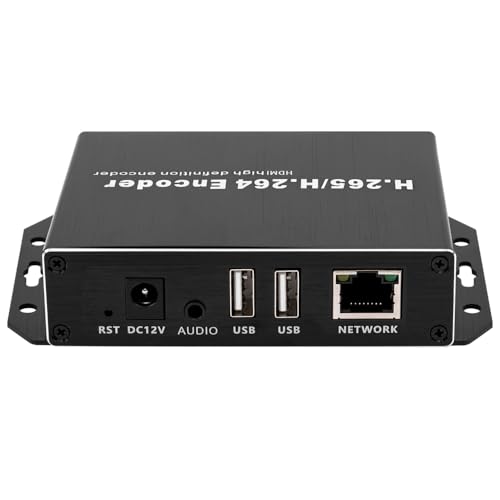
Ideal for content creators and live streamers, the EXVIST H.265 1080P PoE HDMI Video Encoder/Decoder delivers high-quality video encoding and decoding capabilities. It supports 1-channel HDMI input and multiple streaming options, allowing you to push streams to platforms like YouTube and Twitch. With PoE functionality, you can operate it conveniently over a single Ethernet cable. Plus, recording real-time videos is a breeze with an inserted USB flash drive. Weighing only 6.1 ounces and measuring compactly, this encoder fits seamlessly into your setup. Rated 4.4 stars, it’s a reliable choice to elevate your streaming experience.
Best For: Content creators and live streamers looking for a reliable and compact video encoding solution.
Pros:
- Supports high-quality 1080P video encoding and decoding with multiple streaming options.
- Convenient PoE functionality allows for easy setup with a single Ethernet cable.
- Compact design and lightweight build make it easy to integrate into any streaming setup.
Cons:
- Limited to a maximum of 128G for USB flash drive recording.
- HLS streaming only supports H.264, not H.265.
- May require additional setup for compatibility with certain IP cameras or NVR systems.
Blackmagic Design Streaming Encoder 4K

Streaming in stunning DCI 4K at 60 fps, the Blackmagic Design Streaming Encoder 4K is perfect for content creators who demand high-quality video output. It streams H.264 or H.265 via SRT or RTMP, making it compatible with platforms like Facebook, Twitch, and YouTube. You’ll appreciate its robust connectivity features, including a 10/100/1000BASE-T Ethernet port and USB-C for tethering to 5G/4G phones. The integrated LCD screen allows you to monitor everything effortlessly. Plus, with dual power options and 12G-SDI connectivity, this encoder offers flexibility for any streaming setup. Experience professional-grade streaming with the reliability you need.
Best For: Content creators and streamers looking for high-quality DCI 4K streaming at 60 fps with versatile connectivity options.
Pros:
- Supports both H.264 and H.265 streaming formats via SRT or RTMP.
- Integrated LCD screen for easy monitoring of video, audio, and settings.
- Dual power options and 12G-SDI connectivity provide flexibility for various setups.
Cons:
- Relatively heavy at 1.66 pounds, which may be cumbersome for portable use.
- Limited to a 30-day return guarantee on Amazon, which may not be sufficient for some users.
- Not the best choice for users who need advanced features beyond basic streaming capabilities.
H.265/H.264 HDMI Video Encoder for Live Streaming

For content creators looking to elevate their live broadcasts, the H.265/H.264 HDMI Video Encoder stands out with its ability to support multi-streaming output. You can broadcast up to four video streams simultaneously, targeting platforms like Facebook, YouTube, and Ustream. This encoder supports various protocols, including RTMP, RTSP, and UDP, providing versatile streaming options. Plus, you can customize your output with OSD settings for adding logos or text. With free lifetime support and SDK resources for further development, this encoder offers everything you need to enhance your streaming experience and engage your audience effectively.
Best For: Content creators and live streamers who want to broadcast high-quality video to multiple platforms simultaneously.
Pros:
- Multi-streaming capability allows broadcasting to up to four platforms at once.
- Versatile protocol support ensures compatibility with various streaming services.
- Customization options with OSD settings enable branding and personalization of video streams.
Cons:
- May require technical knowledge for optimal setup and customization.
- Limited support for older streaming protocols which some users might need.
- Initial cost may be higher compared to simpler streaming solutions.
Full HD HDMI to IP Network Video Audio Encoder H.265 H.264

The Kiloview Full HD HDMI to IP Network Video Audio Encoder H.265 H.264 is perfect for content creators who demand high-quality video output without compromise. With support for H.265 and H.264 dual encoding, you can enjoy stunning 1920×1080 resolution at 60fps. This encoder seamlessly streams to platforms like YouTube and Facebook, offering four simultaneous outputs across various protocols. You can customize streams with text, logos, and timestamps, adjusting video settings to suit your needs. Plus, its intuitive interface guarantees quick setup, while the reliable HDMI to Ethernet connection minimizes latency. Enjoy lifetime support and warranty for peace of mind.
Best For: Content creators and live streamers looking for high-quality video broadcasting with customizable features.
Pros:
- Supports dual encoding (H.265/H.264) for efficient and high-quality streaming.
- Allows simultaneous output to multiple platforms and protocols, enhancing streaming flexibility.
- Offers extensive customization options for branding and video settings.
Cons:
- May require some technical knowledge for optimal setup and configuration.
- Limited to HDMI input sources, which may restrict compatibility with non-HDMI devices.
- Additional streaming features may require further customization or development for specific enterprise needs.
1080P60 HDMI Encoder for Live Streaming

With its impressive 1080P60 resolution, the UNISHEEN HDMI Encoder is perfect for content creators looking to elevate their live streaming game. Supporting multiple protocols like SRT, RTMP, and HLS, you can easily stream on platforms such as YouTube, Facebook, and Twitch. This compact device weighs just 3.52 ounces and can handle dual video streams without needing a computer. Plus, with customizable IP settings and efficient decoding for high-bitrate content, it meets all your streaming needs. Backed by a 3-year warranty and 24/7 tech support, you’re set for a seamless streaming experience.
Best For: Content creators and live streamers seeking high-quality video encoding for platforms like YouTube, Facebook, and Twitch.
Pros:
- Supports multiple streaming protocols (SRT, RTMP, HLS) for versatile broadcasting options.
- Compact design allows for easy portability and use without a computer.
- Backed by a 3-year warranty and 24/7 tech support for peace of mind.
Cons:
- Prohibited from capturing DRM-protected video, limiting some content options.
- May require network configuration knowledge for advanced features like customizable IP settings.
- Limited to 1080P60 resolution, which may not satisfy users needing higher resolutions.
B-ENC-16 H.264 16-Channel Video Encoder
Designed for those needing robust video encoding solutions, the B-ENC-16 H.264 16-Channel Video Encoder stands out with its ability to support 16 analog video inputs. It accommodates AHD, TVI, and CVBS formats, ensuring versatility for your setup. With H.264 and MJPEG compression, you can enjoy real-time encoding at resolutions up to 1080p. The encoder supports the ONVIF protocol, making integration with your IP systems seamless. Plus, if you choose the optional model, you’ll benefit from four audio input channels. This encoder is perfect for enhancing your streaming experience while maintaining high-quality video and audio outputs.
Best For: The B-ENC-16 H.264 16-Channel Video Encoder is best for security professionals and businesses seeking a high-capacity, versatile video encoding solution for surveillance systems.
Pros:
- Supports up to 16 analog video inputs with multiple format compatibility (AHD, TVI, CVBS).
- Provides real-time encoding at resolutions up to 1080p using efficient H.264/MJPEG compression.
- Easy integration with existing IP systems via ONVIF protocol.
Cons:
- Requires an additional model for audio input channels, which may increase overall costs.
- Limited to analog inputs, potentially restricting compatibility with newer digital cameras.
- May require technical expertise for setup and configuration to achieve optimal performance.
DDMALL HDMI Video Encoder (CEV-2K)
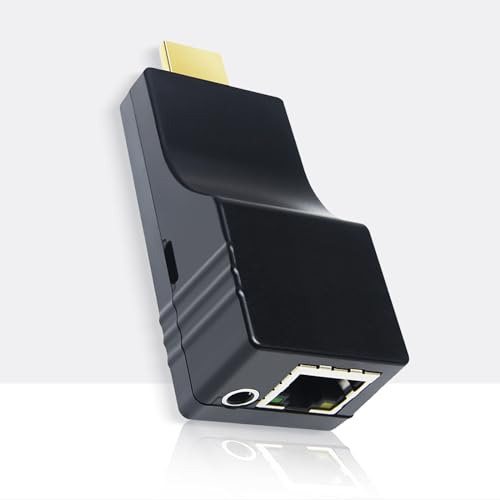
For content creators who demand flexibility and portability, the DDMALL HDMI Video Encoder (CEV-2K) offers an ultra-mini design that weighs just 32g and fits comfortably in tight spaces. It supports H.265 and H.264 encoding, streaming at 1080p60 to platforms like Facebook, YouTube Live, and Twitch. With a power consumption of only 2.4W, you can easily power it through HDMI ports or a USB connection, eliminating extra adapters. Enjoy real-time OSD customization, and control it remotely via the web UI or DDMALL Cloud System. Plus, you’ll get lifetime free technical support to guarantee seamless streaming experiences.
Best For: Content creators and streamers seeking a compact, portable solution for high-quality live streaming.
Pros:
- Supports both H.265 and H.264 encoding for versatile streaming options.
- Ultra-mini design makes it easy to transport and fit into limited spaces.
- Lifetime free technical support ensures ongoing assistance for users.
Cons:
- Limited to 1080p60 streaming, which may not meet the needs of users seeking higher resolutions.
- Requires a stable internet connection for remote control and monitoring.
- May not include additional features that larger encoders offer, such as advanced encoding settings.
Factors to Consider When Choosing a Kiloview Video Encoder
When you’re choosing a Kiloview video encoder, several key factors come into play. You’ll want to evaluate video resolution options, streaming protocol compatibility, and the different input/output connectivity choices. Don’t forget to look at power supply requirements and user interface features to guarantee a seamless experience.
Video Resolution Options
Choosing the right video resolution is essential for achieving ideal quality in your broadcasts. Common formats like 1080p and 4K cater to different needs, so think about your target audience and platform. Many Kiloview encoders support multiple resolutions, letting you pick the best option based on your bandwidth and streaming requirements. Keep in mind that higher resolutions, such as 4K, demand greater bitrate, which can impact network performance and increase latency. Some encoders also allow simultaneous streaming at various resolutions, making it easier to reach viewers on different platforms. Ultimately, your resolution choice can affect compatibility with streaming protocols, so guarantee the format you select aligns with the capabilities of your chosen platforms.
Streaming Protocol Compatibility
Selecting the right video resolution is just the beginning of ensuring a successful broadcast; understanding streaming protocol compatibility is equally important. The protocols you choose—like RTMP, RTSP, SRT, HLS, and UDP—determine where you can stream your content, each catering to different needs. It’s essential to evaluate encoding formats like H.264 and H.265, which optimize both video quality and compression. The ability to output multiple streams simultaneously using different protocols greatly enhances your encoder’s versatility, reaching broader audiences. Additionally, compatibility with industry standards such as ONVIF can streamline integration with existing systems. Keep in mind that your choice of protocol impacts latency and bandwidth; for real-time applications, lower-latency options like SRT are ideal, while others may prioritize reliability.
Input/Output Connectivity Choices
Understanding the input and output connectivity options of a Kiloview video encoder is essential for ensuring seamless integration with your existing equipment. Start by considering the types of video inputs available, such as HDMI, SDI, or USB, to guarantee compatibility with your sources. Evaluate the output options, like HDMI loop-out and streaming protocols such as RTMP, RTSP, and SRT, to enhance distribution capabilities. Don’t forget to check audio connectivity, including line-in and line-out ports, to integrate with audio systems effectively. Look for network features like Ethernet ports with PoE support for easier installation. Finally, assess the encoder’s ability to handle multiple streams and supported resolutions to meet your specific streaming quality requirements.
Power Supply Requirements
When integrating a Kiloview video encoder into your setup, power supply requirements play a pivotal role in guaranteeing reliable operation. You’ll need to take into account specific configurations like DC voltage or Power over Ethernet (PoE). If you opt for a model that supports PoE, it can operate over distances up to 140 meters using just one Ethernet cable, simplifying your setup. Pay attention to the power consumption; some encoders are designed to be energy-efficient and operate at low wattage. Always check the voltage and amperage to verify compatibility with your existing power sources. Additionally, certain models offer flexibility by being powered through USB connections, adding versatility to your deployment options.
User Interface Features
The user interface of a Kiloview video encoder can considerably impact your streaming experience and workflow efficiency. Look for an intuitive interface featuring an LCD screen that lets you monitor video, audio, and status easily. Touch buttons or scroll-wheel controls enhance user experience, giving you quick access to settings. A web-based interface is essential for remote control, allowing you to manage the encoder from your computer or mobile device. Customizable OSD settings enable you to add static text or logos to your video streams, branding your content effectively. Finally, evaluate the availability of technical support and detailed user manuals, as these resources can assist you with troubleshooting and boost your familiarity with the interface.