
Long editing sessions are easier when your laptop screen sits at a comfortable height and angle. The right stand can help reduce neck strain, improve desk organization, and create room for a separate keyboard, mouse, or editing control surface.
We selected 10 laptop stands for video editing with different strengths, from sturdy aluminum risers and rotating bases to foldable designs for mobile workflows. Use the guide below to match stand height, stability, portability, and ventilation to the way you edit.
Best 10 Laptop Stands for Video Editing Picks for 2026
Best Adjustable Stand
Lamicall Aluminum Laptop Stand

- Fits laptops from 10 to 17.3 inches
- Adjustable, foldable, and ventilated
- Heavy aluminum base with protective pads
Best For: Flexible home, office, and travel editing setups
Best Rotating Stand

- Rotates a full 360 degrees
- Adjustable height and viewing angle
- Foldable metal design for laptops up to 16 inches
Best For: Collaborative editing and repositionable workstations
Best Compact Riser
BESIGN LS03 Aluminum Laptop Stand

- Raises laptops up to 5.7 inches
- Supports up to 8.8 pounds
- Detachable, ventilated aluminum design
Best For: Compact setups using 10- to 15.6-inch laptops
Best Floor Stand
Adjustable Projector and Laptop Tripod
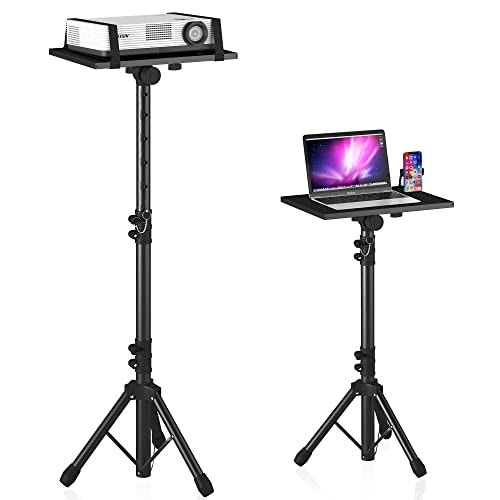
- Adjusts from about 23.5 to 46.5 inches
- 15-by-11-inch tray supports up to 22 pounds
- Tilting tray and detachable travel design
Best For: Standing, studio, presentation, and mixed-equipment setups
Best Overall
Nulaxy 360° Rotating Ergonomic Laptop Stand

- 360° base makes screen sharing easy
- Supports laptops up to 22 pounds
- Foldable dual-hinge design
Best For: Editors seeking sturdy, flexible positioning
Best Portable Value

- Adjustable height and viewing angle
- Supports up to 17.6 pounds
- Foldable and ventilated design
Best For: Mobile editors with smaller laptops
Best for Large Laptops
OMOTON LA10 360° Rotating Stand

- Fits laptops and tablets up to 17 inches
- Tool-free height and angle adjustment
- Open X-frame supports airflow
Best For: Editors with larger laptops and rotating-work needs
Best Lightweight Pick
Tonmom Adjustable Laptop Stand

- Seven height levels up to 6.5 inches
- Ventilated, protective silicone-padded design
- Folds compactly and weighs 0.53 pounds
Best For: Traveling editors with laptops up to 15.6 inches
Best for Flexible Workstations
KENTEVIN Rotating Laptop Stand
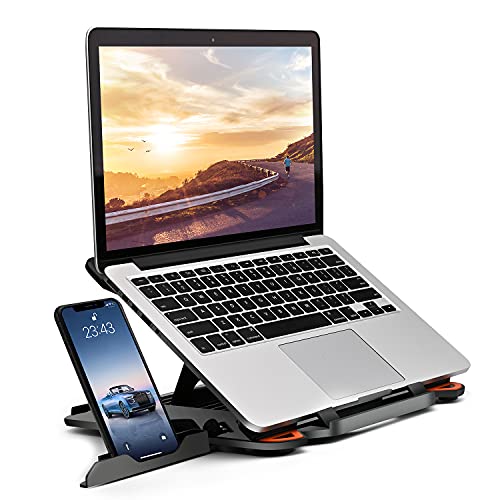
- Eight height settings from 5.5 to 7 inches
- 360-degree rotating base for screen sharing
- Built-in phone holder and 17-inch compatibility
Best For: Editors who multitask or frequently share screens
Best Sturdy Everyday Option
Amazon Basics Adjustable Laptop Stand

- Supports up to 11 pounds
- Height adjusts by up to 7 inches
- Ventilated, foldable aluminum design
Best For: Home or office editing setups with laptops up to 15.6 inches
Best Adjustable Stand – Lamicall Aluminum Laptop Stand
For shoppers comparing laptop stands for video editing, the Lamicall Aluminum Laptop Stand offers broad laptop compatibility, adjustable positioning, and a heavier base designed for a stable desk setup. Its ventilated aluminum platform can also help maintain airflow during extended work sessions.
Best For: Editors who want an adjustable, portable stand that supports laptops from 10 to 17.3 inches.
Pros:
- Supports laptops from 10 to 17.3 inches, including MacBook, Dell, HP, ASUS, and Chromebook models.
- Adjustable height and angle help position the screen more comfortably.
- Heavier aluminum base, silicone pads, and smooth edges help improve stability and protect the laptop.
- Foldable design and ventilation holes suit travel and extended desk use.
Cons:
- The notes do not specify a maximum supported weight.
- Adjusting the stand may require repositioning the laptop and connected accessories.
Its wide size range and foldable design make this a versatile choice for video-editing workstations that may use different laptops. The larger base is particularly useful when you want a more planted stand for everyday desk work.
Best Rotating Stand – LOXP 360-Degree Laptop Stand
The LOXP Adjustable Laptop Stand is a practical option among laptop stands for video editing when you need to turn the computer toward collaborators or change viewing positions. Its 360-degree rotating base combines with adjustable height and angle controls for a flexible workstation.
Best For: Editors who need a rotating laptop platform for shared desks, presentations, or changing work positions.
Pros:
- 360-degree rotation lets you turn the laptop to different viewing angles.
- Foldable design makes it easier to transport or store.
- One-piece metal construction, an upgraded rotating base, and non-slip silicone support stability.
- Compatible with laptops from 10 to 16 inches.
Cons:
- It supports laptops only up to 16 inches, so larger models may not fit.
- The rotating mechanism adds weight; the listed item weight is 1.53 kg.
The standout feature is the swivel base, which can simplify collaboration and repositioning during an edit. Check your laptop’s size before buying, especially if you use a 16-inch model with a larger chassis.
Best Compact Riser – BESIGN LS03 Aluminum Laptop Stand
The BESIGN LS03 is a straightforward choice for laptop stands for video editing if you want to raise a smaller laptop without adding a bulky mechanism. Its detachable aluminum frame elevates the screen by up to 5.7 inches and folds flat for storage.
Best For: Editors using 10- to 15.6-inch laptops who want a compact, fixed-height desktop riser.
Pros:
- Compatible with laptops from 10 to 15.6 inches.
- Raises the laptop up to 5.7 inches to improve viewing height.
- Supports up to 8.8 pounds and uses rubber grips to help prevent sliding and scratches.
- Open aluminum construction promotes airflow, while the detachable design folds flat.
Cons:
- It is detachable rather than continuously height- or angle-adjustable.
- The 15.6-inch maximum excludes larger laptops.
This stand favors simplicity and desk organization over extensive adjustment. It is a good fit when your editing setup benefits from a consistent screen height and your laptop falls within the stated size range.
Best Floor Stand – Adjustable Projector and Laptop Tripod
This adjustable tripod is a distinctive option among laptop stands for video editing, providing a floor-standing platform instead of a traditional desk riser. Its large tray, broad height range, and tilt adjustment can accommodate a laptop, projector, or other equipment in a studio, presentation, or mobile setup.
Best For: Editors who need a height-adjustable floor stand for laptops or mixed equipment up to 22 pounds.
Pros:
- Height adjusts from approximately 23.5 to 46.5 inches for seated or standing use.
- Large 15-by-11-inch tray supports laptops, projectors, music players, and DJ equipment.
- Tray tilts within a 180-degree range and supports up to 22 pounds.
- Detachable sections, a carrying bag, sponge pads, elastic belts, and a safety latch support transport and stability.
Cons:
- Assembly takes approximately 5 to 10 minutes.
- The tripod footprint requires floor space and is less suitable for a conventional desk.
- Its larger structure is less compact than a tabletop laptop stand.
Choose this model when desk height is limiting or when you need one stand for editing equipment and presentations. The adjustable height and high load capacity provide more flexibility than a typical laptop riser, though portability involves assembling and carrying a tripod.
Best Overall – Nulaxy 360° Rotating Ergonomic Laptop Stand
For shoppers comparing laptop stands for video editing, the Nulaxy combines flexible positioning with sturdy support. Its 360° rotating base makes it easy to share a timeline or preview, while the adjustable dual-hinge design helps place the screen at a more comfortable viewing height.
Best For: Editors who want strong support, screen rotation, and a foldable design for flexible desk setups.
Pros:
- 360° rotating base supports convenient collaboration and screen sharing.
- 22-pound capacity and reinforced baffle hooks accommodate heavier laptops.
- Dual hinges, silicone pads, and a foldable design provide stability, protection, and portability.
Cons:
- At 840 g, it is not the lightest option for frequent travel.
- Its listed compatibility is for laptops from 10 to 16 inches, narrower than some alternatives.
The Nulaxy is a strong all-around pick when stability matters during editing work. Its rotating base and high load rating add versatility, while the fold-flat construction keeps storage manageable.
Best Portable Value – Adjustable Metal Laptop Riser
This adjustable metal riser is a practical choice for laptop stands for video editing when you need ergonomic height adjustment without a bulky setup. Its ventilated top promotes airflow, and the foldable construction makes it convenient for moving between home, office, and travel workspaces.
Best For: Mobile editors who use a 10- to 15.6-inch laptop and want a portable, ventilated stand.
Pros:
- Adjustable height and angle can help improve viewing posture.
- Supports up to 17.6 pounds with rubber protection and anti-skid silicone pads.
- Multiple ventilation holes and a foldable design support cooling and portability.
Cons:
- Compatibility is limited to laptops up to 15.6 inches.
- It lacks the 360° rotation offered by the other rotating models.
The Gogoonike focuses on essentials: adjustable positioning, laptop protection, ventilation, and easy transport. It is a sensible fit for editors who prioritize portability over advanced rotation features.
Best for Large Laptops – OMOTON LA10 360° Rotating Stand
The OMOTON LA10 is well suited to laptop stands for video editing when you want a broad compatibility range and easy repositioning. Its 360° rotation helps during collaboration or calls, while the open X-frame allows airflow around the computer during longer sessions.
Best For: Editors using laptops up to 17 inches who want rotation, tool-free adjustment, and travel-friendly storage.
Pros:
- 360° swivel supports presentations, collaboration, and changing viewing angles.
- Tool-free height adjustment ranges from 1.8 to 10.4 inches.
- Open X-frame promotes airflow, and the stand folds for transport with its included pouch.
Cons:
- The manufacturer recommends removing the laptop before adjusting the stand.
- Its 750- to 840-gram listed weight may be noticeable for some travelers.
Choose the LA10 if screen rotation and support for larger laptops are priorities. The X-frame cooling structure and compact folded profile add useful versatility for desk and remote-editing setups.
Best Lightweight Pick – Tonmom Adjustable Laptop Stand
For shoppers comparing laptop stands for video editing, the Tonmom is a compact option that raises a 10- to 15.6-inch laptop while keeping the setup easy to carry. Its adjustable height and open design support a more comfortable editing workstation with improved airflow.
Best For: Editors who want a lightweight, travel-friendly stand for smaller laptops.
Pros:
- Seven height levels adjust from 2.78 to 6.5 inches.
- Triangle support, silicone pads, and smooth edges help protect and stabilize the laptop.
- Weighs 0.53 pounds and folds to a compact size for travel.
- Open construction and forward tilt promote ventilation.
Cons:
- Compatibility is limited to laptops from 10 to 15.6 inches.
- Its lightweight construction may be less suitable for larger or heavier laptops.
The Tonmom stands out when portability matters as much as ergonomic positioning. It is a practical choice for mobile editors, though users with larger laptops should consider a wider stand.
Best for Flexible Workstations – KENTEVIN Rotating Laptop Stand
The KENTEVIN is a versatile choice among laptop stands for video editing, especially if you use a phone as a secondary screen or regularly share your display. It combines eight height settings with a 360-degree rotating base and support for laptops up to 17 inches.
Best For: Editors who need a rotating stand and convenient phone holder for multitasking.
Pros:
- Eight height levels adjust from 5.5 to 7 inches.
- 360-degree rotation helps with screen sharing and orientation changes.
- Built-in phone holder supports a dual-screen-style workspace.
- Fits 10- to 17-inch laptops and folds to about 0.6 inches thick.
Cons:
- The 0.6 kg weight is higher than the lightest portable stands.
- Its broad feature set may be unnecessary for users who only need basic elevation.
Choose the KENTEVIN if collaboration, phone access, and broad laptop compatibility are priorities. Its rotating base adds flexibility for editing reviews, meetings, and shared-screen work.
Best Sturdy Everyday Option – Amazon Basics Adjustable Laptop Stand
For a dependable desk setup, this Amazon Basics model is one of the more practical laptop stands for video editing. Its aluminum construction supports up to 11 pounds, while adjustable height, ventilation, and a foldable design suit extended editing sessions at home or work.
Best For: Everyday editors seeking a sturdy stand for laptops or tablets up to 15.6 inches.
Pros:
- Provides up to 7 inches of height adjustment for a more comfortable viewing position.
- Lightweight aluminum construction supports loads up to 11 pounds.
- Hollow design promotes airflow during extended or intensive tasks.
- Folds for storage and includes silicone pads and protective hooks.
Cons:
- Designed for laptops and tablets up to 15.6 inches.
- Best stability requires a flat, solid surface and careful positioning.
- At 1.7 pounds, it is less lightweight than some travel-focused stands.
The Amazon Basics stand is a balanced pick for a permanent or semi-permanent editing desk. It offers useful load capacity and cooling airflow without giving up adjustability or portability.
How We Picked the Best Laptop Stands for Video Editing
We focused on the features that matter most during long editing sessions: stability, adjustability, viewing angle, build quality, portability, and compatibility with common laptop sizes. We also considered whether each stand leaves space beneath the computer for airflow and whether its design can accommodate an external keyboard, mouse, or other editing accessories.
Because video editors work in different environments, this list includes fixed risers, height-adjustable stands, 360-degree rotating models, foldable options, and a tripod-style stand. Product fit can vary by laptop weight and dimensions, so check the manufacturer’s capacity and size range before buying.
Quick Comparison
- Best for a clean desktop setup: Aluminum risers with a broad, stable base.
- Best for flexible positioning: Rotating or multi-angle stands.
- Best for travel: Foldable, lightweight designs.
- Best for larger laptops: Models rated for screens up to 17 inches or more.
- Best for temporary workstations: A height-adjustable tripod-style stand.
Key Buying Factors for Laptop Stands for Video Editing
Stability and Weight Capacity
Editing laptops can be heavier than ultraportables, especially models with powerful cooling systems. Choose a stand with a firm base, nonslip pads, and a stated capacity that exceeds your laptop’s weight. A wobbling screen can be distracting when trimming clips or working with detailed timelines.
Height and Viewing Angle
A stand should raise the display toward eye level without forcing you to tilt your head downward. Adjustable height and angle are useful when switching between sitting and standing, while a fixed riser may offer greater simplicity and rigidity.
Ventilation and Desk Space
Open designs can leave room for heat to escape and make it easier to connect peripherals. Look for a ventilated platform or a design that lifts the laptop clear of the desk. Confirm that the stand does not block intake vents, ports, or the charging connection.
Size, Rotation, and Portability
Measure your laptop’s width and depth rather than relying only on screen size. A rotating base can help when sharing a screen or changing orientation, while a foldable stand is more practical for editors who move between home, studio, and client locations.
Who Should Buy Which Laptop Stands for Video Editing?
Choose a sturdy aluminum riser if your laptop stays on one desk and you want a polished, stable setup. Choose a rotating adjustable model if you frequently reposition the screen or collaborate with others. Choose a foldable stand if portability and quick setup matter most. Choose a tripod-style stand if you need significant height adjustment or want to work away from a conventional desk.
For most editors, prioritize stability and comfortable screen height first, then consider rotation, portability, and extras such as a phone holder. Pairing any stand with an external keyboard and mouse can provide a more comfortable editing posture than using the laptop keyboard for extended sessions.