
The best live streaming computers for content creators balance processing power, graphics performance, memory, storage, and dependable connectivity. The right choice depends on whether you stream games, produce video, broadcast on location, or manage multiple applications at once.
This roundup compares ten desktops, mini PCs, and laptops across several performance levels so you can find a system that fits your streaming software, camera setup, games, and upgrade plans.
Best 10 Live Streaming Computers for Content Creators Picks for 2026
High-End Desktop Pick

- Ryzen 9 7900X and RTX 5070 12GB
- 32GB DDR5 RAM with 1TB NVMe SSD
- Water cooling, Wi-Fi, keyboard, and mouse included
Best For: High-performance streaming, gaming, and creative desktops
Balanced Streaming Desktop

- Core i7-14700KF with up to 5.4GHz
- RTX 4070 12GB dedicated graphics
- 1TB SSD and built-in Wi-Fi 6
Best For: Streaming, gaming, video editing, and everyday multitasking
Portable Creator Choice
NIMO 15.6-Inch AI Creator Laptop

- Ryzen 7 8745HS with 32GB DDR5 RAM
- 1TB SSD and integrated Radeon 780M graphics
- 3.8 pounds with claimed 15.5-hour battery life
Best For: Mobile streaming, light editing, school, and business use
Compact Creator Desktop
ACEMAGICIAN S3A Ryzen 7 Mini PC

- Ryzen 7 H 255 with 16GB LPDDR5 memory
- Triple 4K display support
- Expandable storage up to 4TB with quiet modes
Best For: Compact streaming, programming, multitasking, and multi-monitor setups
Premium Creator Powerhouse
Skyhawk U7 270K Plus RTX 5070 Ti

- Ultra 7 processor and RTX 5070 Ti for demanding streams and creation
- 32GB DDR5 RAM and 2TB NVMe SSD
- 360mm liquid cooler with 10 ARGB fans
Best For: High-end streaming, video editing, gaming, and 3D work
Value Streaming Desktop

- Ryzen 7 5700X with 8 cores and 16 threads
- RTX 5060 8GB with DLSS 4 and ray tracing
- 32GB RAM, 1TB NVMe SSD, Wi-Fi, and Bluetooth
Best For: 1080p streaming, gaming, and everyday creator workloads
Portable Creator Station
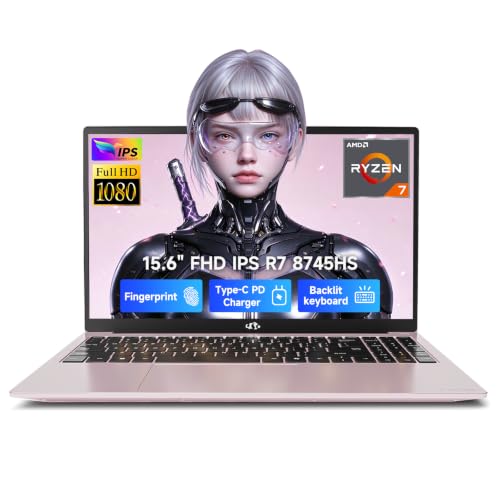
- Ryzen 7 8745HS with Radeon 780M graphics
- 32GB DDR5 RAM and 1TB PCIe 4.0 SSD
- USB4, HDMI 2.1, and up to three external monitors
Best For: Remote streaming, mobile editing, and light gaming
Balanced Gaming Streamer

- RTX 5060 Ti supports 1080p and 1440p gaming with streaming.
- ARGB cooling and a 650W Gold PSU support extended sessions.
- Four DIMM slots and two M.2 slots simplify future upgrades.
Best For: Gaming-focused creators who stream and want upgrade room
Creator Workstation Pick

- 20-core Core Ultra 7 processor handles demanding multitasking.
- 32GB DDR5 memory supports streaming and creative applications.
- Windows 11 Pro, Wi-Fi 6, and multiple display outputs suit workspaces.
Best For: Multitasking creators who also edit video and manage large projects
Budget Streaming Performer

- Eight cores and 16 threads support streaming and rendering.
- RTX 5060 graphics target smooth 1080p and 1440p gameplay.
- Six RGB fans, Wi-Fi 6, and reserved drive bays add practical value.
Best For: Budget-minded creators comfortable installing an operating system
High-End Desktop Pick – iBUYPOWER Ryzen 9 RTX 5070 PC
For creators seeking live streaming computers for content creators, this iBUYPOWER tower combines a 16-thread Ryzen 9 7900X processor, dedicated RTX 5070 graphics, and 32GB of DDR5 memory. It is a strong fit for demanding streaming, gaming, and creative workflows, with water cooling and built-in Wi-Fi.
Best For: Content creators who want a powerful desktop for live streaming, gaming, multitasking, and demanding creative applications.
Pros:
- Ryzen 9 7900X processor with up to 5.6GHz maximum speed
- RTX 5070 12GB dedicated graphics with HDMI and DisplayPort outputs
- 32GB DDR5 RAM, 1TB NVMe SSD, and water cooling
- Includes Wi-Fi, RGB case lighting, keyboard, and gaming mouse
Cons:
- Large 36-pound tower requires substantial desk or floor space
- Only 1TB of included storage may be limiting for large media libraries
This is the most performance-oriented option in the group, especially for creators who prefer a full-size desktop and dedicated graphics. Its included peripherals and connectivity make it convenient for building a complete streaming setup.
Balanced Streaming Desktop – Core i7 RTX 4070 Gaming PC
This Core i7 desktop is a practical choice among live streaming computers for content creators, pairing the 20-core i7-14700KF with an RTX 4070 12GB graphics card. Its 16GB of DDR5 memory and 1TB SSD support gaming, streaming, video editing, and everyday productivity.
Best For: Streamers and creators who want capable 1440p-oriented gaming performance alongside editing, productivity, and general multitasking.
Pros:
- Core i7-14700KF processor with up to 5.4GHz maximum speed
- RTX 4070 12GB dedicated graphics for gaming and creative workloads
- 1TB SSD provides fast startup and application loading
- Built-in Wi-Fi 6 supports modern wireless setups
Cons:
- 16GB RAM is less generous than the 32GB options in this roundup
- Product details identify the operating system only as Windows
The combination of a high-core-count Intel processor and RTX 4070 makes this a versatile middle-ground desktop. Creators planning heavier multitasking may eventually want to expand the memory, which is listed as supporting up to 128GB.
Portable Creator Choice – NIMO 15.6-Inch AI Creator Laptop
The NIMO N158 brings portability to the live streaming computers for content creators category. Its Ryzen 7 8745HS processor, 32GB of DDR5 RAM, 1TB SSD, integrated Radeon 780M graphics, and 15.6-inch FHD display make it suited to mobile streaming, light video editing, school, and business use.
Best For: Mobile creators, students, and remote streamers who need a lightweight Windows laptop with strong memory and storage capacity.
Pros:
- 32GB DDR5 RAM and 1TB SSD support multitasking and media storage
- Eight-core Ryzen 7 8745HS processor reaches up to 4.9GHz
- 3.8-pound design with claimed 15.5-hour battery life
- Includes backlit keyboard, fingerprint reader, numeric keypad, and HDMI
Cons:
- Integrated Radeon 780M graphics are less capable than the dedicated GPUs in the desktop PCs
- 15.6-inch display is limited to 1080p and a 60Hz refresh rate
This laptop emphasizes mobility rather than maximum graphics performance. It is a sensible option for remote streaming and light editing, especially when battery life, a built-in display, and a compact 3.8-pound design matter more than high-end gaming output.
Compact Creator Desktop – ACEMAGICIAN S3A Ryzen 7 Mini PC
For creators who want a small footprint, the ACEMAGICIAN S3A is one of the more space-efficient live streaming computers for content creators. It uses an eight-core, 16-thread Ryzen 7 H 255 processor, Radeon 780M graphics, 16GB of LPDDR5 memory, and a 512GB PCIe 4.0 SSD in a compact mini PC.
Best For: Space-conscious streamers, programmers, and creators who value quiet operation, multi-monitor support, and a compact desktop design.
Pros:
- Ryzen 7 H 255 processor with up to 4.9GHz and 8 cores/16 threads
- Supports up to three 4K displays through HDMI, DisplayPort, and USB4
- Adjustable silent, auto, and performance modes
- Storage is expandable up to 4TB, with a two-year warranty and lifetime support
Cons:
- Integrated Radeon 780M graphics are not equivalent to a dedicated streaming GPU
- 16GB RAM and 512GB storage are modest for large video projects
- Requires separate monitor, keyboard, mouse, and other peripherals
The S3A is a flexible mini desktop for organized workspaces and multi-screen creator setups. Its quiet mode and compact design suit streaming and office use, while the performance mode and expandable storage provide useful room for heavier workloads.
Premium Creator Powerhouse – Skyhawk U7 270K Plus RTX 5070 Ti
For creators who need maximum desktop performance, this live streaming computer for content creators pairs an Intel Core Ultra 7 270K Plus processor with an RTX 5070 Ti 16GB graphics card. It is well suited to demanding gaming streams, video editing, 3D rendering, and multitasking, with 32GB of DDR5 memory and a 2TB NVMe SSD.
Best For: Content creators, streamers, video editors, and gamers who want high-end performance for 1440p or smooth 4K gaming.
Pros:
- RTX 5070 Ti graphics with 16GB GDDR7 supports ray tracing, DLSS 4, AI acceleration, and demanding creative workloads.
- 32GB DDR5 RAM and a spacious 2TB PCIe 4.0 NVMe SSD support large projects and responsive multitasking.
- 360mm liquid cooling and 10 ARGB fans are designed to manage heat during heavy workloads.
- Includes Windows 11 Home, Wi-Fi, Bluetooth, keyboard, and mouse for a ready-to-use setup.
Cons:
- Its high-end configuration may be more performance than casual streamers need.
- The tower requires a substantial desktop setup and uses an 850W power supply.
This is the strongest all-around option in the group for creators who stream while gaming or editing. Its powerful GPU, large SSD, and robust cooling provide useful headroom for demanding workflows, though buyers with modest needs may prefer a more affordable system.
Value Streaming Desktop – YAWYORE Ryzen 7 RTX 5060 PC
This YAWYORE desktop is a practical entry point for live streaming computers for content creators who primarily work at 1080p. Its Ryzen 7 5700X processor, RTX 5060 graphics card, 32GB of RAM, and 1TB NVMe SSD provide a balanced foundation for streaming, gaming, and everyday multitasking.
Best For: Budget-conscious streamers and gamers targeting 1080p content creation.
Pros:
- Eight-core, 16-thread Ryzen 7 5700X processor supports multitasking and streaming workloads.
- RTX 5060 8GB GDDR7 adds DLSS 4, ray tracing, and Reflex 2 support.
- 32GB DDR4 memory and a 1TB M.2 NVMe SSD offer a capable starting configuration.
- Built-in Wi-Fi and Bluetooth simplify wireless networking and peripheral connections.
Cons:
- The 1TB SSD provides less storage than the premium desktop in this roundup.
- DDR4 memory and an AM4 platform are older than the DDR5-based alternatives.
- The listed display resolution is 1920×1080, making it less suited to 4K-focused workflows.
For creators who stream at 1080p and want dedicated NVIDIA graphics without moving into a premium price tier, this is a sensible configuration. Its 32GB memory is helpful for multitasking, while the older platform and smaller SSD keep it better suited to mainstream rather than advanced production.
Portable Creator Station – NIMO Ryzen 7 8745HS AI Laptop
Creators who stream from different locations may prefer this NIMO laptop over a desktop. It combines an eight-core Ryzen 7 8745HS processor, integrated Radeon 780M graphics, 32GB of DDR5 RAM, and a 1TB PCIe 4.0 SSD in a portable 15.6-inch system designed for video editing, light gaming, and remote streaming.
Best For: Mobile creators, remote streamers, students, and professionals who need a portable editing and streaming computer.
Pros:
- Ryzen 7 8745HS provides 8 cores, 16 threads, and boost speeds up to 4.9GHz.
- 32GB DDR5-5600 memory and a 1TB PCIe 4.0 SSD support responsive multitasking.
- Radeon 780M graphics are positioned for 1080p gaming, editing, and light creative work.
- USB4, HDMI 2.1, multiple USB ports, Micro SD, and support for up to three external monitors improve flexibility.
Cons:
- Integrated Radeon 780M graphics are less suitable for demanding gaming or GPU-heavy production than the desktop RTX cards.
- Heavy gaming is listed at about 2.5 hours on battery, so intensive workloads will benefit from AC power.
- The 15.6-inch display is 1080p rather than a higher-resolution creator panel.
This is the most flexible choice for creators who work away from a fixed desk. Its upgradeable memory and storage design, strong connectivity, and 100W USB-C charging add practical value, but desktop systems remain the better fit for sustained high-end streaming and rendering.
Balanced Gaming Streamer – RTX 5060 Ti Creator Tower
For shoppers comparing live streaming computers for content creators, this KOTIN tower offers a practical balance of gaming speed, dedicated graphics, and upgrade flexibility. Its Core i5-14400F processor, RTX 5060 Ti 8GB graphics, 16GB of DDR4 memory, and 1TB Gen4 NVMe SSD are suited to streaming alongside gaming and everyday applications.
Best For: Content creators who want a gaming-focused prebuilt for 1080p or 1440p play, live streaming, and future memory or storage upgrades.
Pros:
- RTX 5060 Ti graphics support high-FPS 1080p and 1440p gaming, ray tracing, and DLSS 4 in compatible games.
- Four ARGB fans and a CPU cooler with six copper heat pipes support airflow during extended sessions.
- 650W 80 PLUS Gold PSU, four DDR4 DIMM slots, and two M.2 slots leave room for upgrades.
- Windows 11 Home arrives preinstalled, with a one-year limited warranty and free technical support.
Cons:
- 16GB of DDR4 memory is adequate for streaming and multitasking but offers less headroom than 32GB systems.
- The included 1TB SSD may fill quickly with large video files and game libraries.
- VGA or DVI monitors require an HDMI or DisplayPort adapter.
This is a strong fit when gaming performance is central to your creator setup. Buyers planning heavier editing workloads may eventually want to expand the memory and storage.
Creator Workstation Pick – Dell Ultra 7 RTX 5060 Tower
Among live streaming computers for content creators, this Dell tower emphasizes multitasking and creator-oriented workloads. The 20-core Intel Core Ultra 7 265F, RTX 5060 8GB graphics, 32GB of DDR5 memory, and 1TB PCIe NVMe SSD provide a well-rounded platform for streaming, video editing, productivity, and entertainment.
Best For: Creators who need a business-friendly Windows 11 Pro desktop for live streaming, video editing, large files, and simultaneous applications.
Pros:
- 20-core Core Ultra 7 processor is designed for demanding multitasking, creative applications, and streaming.
- 32GB DDR5-5600 memory provides more multitasking headroom than typical 16GB configurations.
- RTX 5060 8GB graphics can accelerate creative workflows and supports gaming and entertainment.
- Wi-Fi 6, Bluetooth 5.4, Gigabit Ethernet, HDMI, and DisplayPort offer flexible connectivity.
Cons:
- The 1TB SSD may be limited for creators who retain extensive raw footage and project archives locally.
- Memory expansion is listed up to 64GB, providing less stated capacity than some upgrade-oriented towers.
- The RTX 5060 is positioned as a balanced graphics solution rather than the highest-tier option.
The Dell is the most productivity-oriented choice in this group. Its 32GB of DDR5 memory and high-core-count processor make it especially sensible for creators who stream while editing, managing files, or running other applications.
Budget Streaming Performer – Ryzen 7 RTX 5060 Prebuilt
This Ryzen-based tower is a practical option among live streaming computers for content creators who want multi-threaded performance and dedicated graphics without a complex build. Its Ryzen 7 4700LE processor, RTX 5060 8GB graphics, 16GB DDR4 memory, 1TB NVMe SSD, and Wi-Fi 6 support gaming, streaming, rendering, and multitasking.
Best For: New or budget-conscious creators who need a fully assembled tower for 1080p/1440p gaming, live streaming, and general creative work.
Pros:
- Eight cores and 16 threads are suited to streaming, video rendering, graphic design, and background software.
- RTX 5060 8GB graphics support high-FPS gaming, ray tracing, and video or image production workflows.
- Six RGB fans and a 650W power supply are designed for airflow and steady operation during heavy use.
- Wi-Fi 6, HDMI, DisplayPort, and multiple USB ports support common streaming and multi-monitor setups.
Cons:
- 16GB of DDR4 memory may be limiting for larger editing projects or extensive multitasking.
- DOS is listed as the operating system, so buyers should expect to install their preferred OS and software.
- The 1TB SSD can become restrictive when storing games, raw footage, and finished projects together.
This Qehi prebuilt makes sense for creators comfortable setting up an operating system themselves. Its Ryzen 7 processor and RTX 5060 provide a capable starting point, while the reserved drive bays leave some room for storage expansion.
How We Picked These Live Streaming Computers for Content Creators
We focused on systems with the core hardware needed for modern live production: a capable multi-core processor, dedicated or integrated graphics, at least practical multitasking memory, and fast solid-state storage. We also considered form factor, portability, upgrade potential, wireless connectivity, and the demands of gaming while streaming.
Because streaming workloads vary, this list includes high-end desktops for demanding gaming and production, midrange systems for everyday broadcasts, and portable or compact computers for creators who value flexibility. Specifications can vary by configuration, so confirm the exact memory, storage, ports, and operating system before purchasing.
Quick Comparison
| Best For | Recommended Type | What to Prioritize |
|---|---|---|
| High-end gaming streams | Performance desktop | Strong CPU, modern RTX GPU, 32GB RAM |
| Video production and multitasking | Powerful desktop | Multi-core processor, 32GB RAM, 1TB or larger SSD |
| Portable content creation | Creator laptop | Efficient CPU, fast memory, display quality, battery and USB-C support |
| Small streaming spaces | Mini PC | Compact design, adequate cooling, upgradeable memory or storage |
| Budget gaming broadcasts | Midrange desktop | Dedicated GPU, 16GB RAM minimum, NVMe storage |
Key Buying Factors for Live Streaming Computers for Content Creators
Processor and Encoding
A modern multi-core CPU helps when you run streaming software, browser sources, chat, recording tools, and editing applications together. Hardware encoding on a current graphics card can reduce CPU load, particularly for game streaming.
Graphics Card
A dedicated GPU is valuable for gaming, visual effects, and high-resolution production. Look for a recent card with a suitable hardware encoder and enough video memory for your games and creative applications. Integrated graphics can work for basic webcam streams, tutorials, and office-based broadcasts, but they offer less headroom.
Memory and Storage
Choose 32GB of RAM if you regularly stream while gaming, edit video, or use several applications simultaneously. Sixteen gigabytes may be adequate for lighter workloads. An NVMe SSD improves boot times and application responsiveness; 1TB is a useful starting point, though recorded footage can quickly require external or secondary storage.
Ports, Network, and Thermals
Check for enough USB ports for cameras, microphones, capture devices, and controllers. Wired Ethernet is preferable for consistent broadcasts, while Wi-Fi 6 or newer is useful when Ethernet is unavailable. Desktop cooling and upgrade access also matter during long sessions.
Who Should Buy Which Live Streaming Computers for Content Creators?
Choose a high-end desktop if you stream demanding games, produce 4K video, or want substantial performance headroom. A midrange RTX desktop suits most gaming creators who want smooth broadcasts without paying for workstation-class hardware. A creator laptop is the better fit for mobile filming, events, and flexible workspaces. A mini PC works well for compact studios, podcasting, remote cameras, and lighter streaming workloads, provided its graphics performance matches your software and resolution needs.