
The best live streaming computers for gaming balance fast gameplay, reliable encoding, quiet cooling, and enough memory for broadcast software, chat, alerts, and recording tools.
This roundup compares 10 prebuilt desktops and mini PCs across several performance levels, helping you match CPU, GPU, RAM, storage, and upgrade potential to your streaming setup.
Best 10 Live Streaming Computers for Gaming Picks for 2026
Best Overall
CyberPowerPC Ryzen 7 with RTX 5060 Ti

- 8-core Ryzen 7 8700F processor
- RTX 5060 Ti with 8GB GDDR7
- 1TB NVMe SSD and Wi-Fi 6
Best For: Well-rounded gaming and live streaming
Best Budget Pick

- 8-core, 16-thread Ryzen 7 processor
- RTX 3050 with 8GB graphics memory
- Six RGB fans and Wi-Fi 6
Best For: Entry-level gaming and streaming
Best Performance

- Ryzen 7 8700F boosts up to 5.0 GHz
- RTX 5070 with 12GB graphics memory
- 32GB DDR5 and 2TB SSD
Best For: Demanding gaming, streaming, and multitasking
Best Value 1080p Option

- 8-core Ryzen 7 4700LE processor
- RTX 3050 with 8GB GDDR6
- 512GB NVMe SSD and Wi-Fi 6
Best For: Budget gaming and everyday streaming
Best Compact Option
GMKtec M6 Ultra Ryzen 5 Mini PC

- Ryzen 5 7640HS with Radeon 760M graphics
- 16GB DDR5 RAM and 1TB PCIe SSD
- Triple-display output and dual 2.5GbE ports
Best For: Small gaming and streaming desks
Best Value Tower
YAWYORE Ryzen 7 5700X RTX 5060 Gaming PC

- 8-core Ryzen 7 5700X processor
- Dedicated RTX 5060 with 8GB GDDR7
- 32GB RAM and 1TB NVMe SSD
Best For: Mainstream gaming and streaming
Best High-Performance Mini PC
MINISFORUM G1 Pro RTX 5060 Mini PC

- Ryzen 9 8945HX with 16 cores and 32 threads
- 145W RTX 5060 with 8GB GDDR7
- Wi-Fi 7, 5GbE, and quad 4K output
Best For: Demanding gaming, streaming, and creative work
Balanced Streaming Pick
Ryzen 5 RTX 3050 Gaming Desktop

- Ryzen 5 5500 and RTX 3050 6GB
- 16GB RAM and 1TB NVMe SSD
- Wi-Fi, Bluetooth, HDMI, and DisplayPort
Best For: Plug-and-play 1080p gaming and beginner streaming
High-End Streaming Powerhouse

- Ryzen 9 7900X with RTX 5070 12GB
- 32GB DDR5 RAM and 1TB NVMe SSD
- Water cooling plus keyboard and mouse
Best For: Enthusiast gaming, streaming, and demanding multitasking
Extra-Memory Value
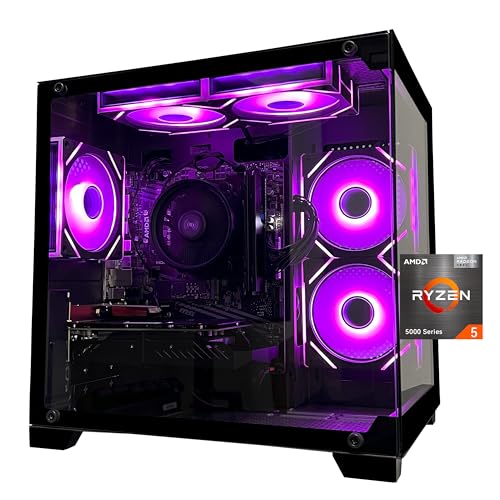
- Ryzen 5 5600 with RTX 3050 6GB
- 32GB DDR4 RAM and 1TB NVMe SSD
- Wi-Fi and ARGB cooling with remote
Best For: 1080p streaming and multitasking with extra RAM
Best Overall – CyberPowerPC Ryzen 7 with RTX 5060 Ti
For shoppers comparing live streaming computers for gaming, this CyberPowerPC offers a current AM5 platform, an 8-core Ryzen 7 processor, and a dedicated RTX 5060 Ti GPU. Its 16GB of DDR5 memory and 1TB PCIe 4.0 NVMe SSD provide a practical starting point for gaming, streaming, and everyday use.
Best For: Gamers who want a modern, well-rounded desktop for gaming and live streaming.
Pros:
- Ryzen 7 8700F provides 8 cores for gaming and multitasking.
- RTX 5060 Ti includes 8GB of dedicated GDDR7 graphics memory.
- 1TB PCIe 4.0 NVMe SSD offers fast storage with useful capacity.
- Includes Wi-Fi 6, Bluetooth 5.3, keyboard, and mouse.
Cons:
- 16GB of RAM may be limiting for especially demanding multitasking.
- Graphics memory is limited to 8GB for future high-resolution workloads.
This is a balanced choice for streamers who want newer DDR5 and AM5 hardware without stepping up to a higher-tier graphics card.
Best Budget Pick – Qehi Ryzen 7 RTX 3050 Desktop
This Qehi desktop is a budget-minded option among live streaming computers for gaming, pairing an 8-core Ryzen 7 4700LE with an RTX 3050 8GB graphics card. It also includes 16GB of DDR4 memory, a 512GB NVMe SSD, Wi-Fi 6, and six RGB cooling fans.
Best For: Entry-level streamers and gamers seeking a capable, lower-cost prebuilt.
Pros:
- 8 cores and 16 threads support gaming, streaming, and multitasking.
- RTX 3050 provides dedicated 8GB graphics memory.
- NVMe SSD should improve boot and game-loading times over a traditional hard drive.
- Wi-Fi 6 and standard LAN support flexible networking.
Cons:
- 512GB of storage may fill quickly with large games and recordings.
- DDR4 memory and the older Zen 2-based processor are less current than newer platforms.
- Ships with DOS, so an operating system may need to be installed or configured.
Its hardware is aimed at practical 1080p-oriented gaming and streaming rather than maximum performance, making it most appealing when price and included cooling are priorities.
Best Performance – MSI Codex Z2 with RTX 5070
For demanding live streaming computers for gaming, the MSI Codex Z2 is the performance-focused choice here. Its Ryzen 7 8700F processor, RTX 5070 graphics card, 32GB of DDR5 memory, and 2TB SSD provide substantial headroom for gaming, streaming, and background applications.
Best For: Enthusiasts who want strong graphics performance and generous memory and storage.
Pros:
- RTX 5070 uses NVIDIA Blackwell architecture and includes 12GB of graphics memory.
- 32GB of DDR5-6000 memory is well suited to multitasking and streaming.
- 2TB SSD provides considerably more room for games and recordings.
- Four system fans and an ARGB air cooler support airflow under load.
Cons:
- Its larger, heavier tower may require more desk or floor space.
- The one-year manufacturer warranty is limited compared with longer coverage options.
This is the strongest fit for creators who want to game and stream simultaneously while keeping plenty of storage and memory available for other workloads.
Best Value 1080p Option – Pebuilt Ryzen 7 RTX 3050 PC
This Pebuilt desktop offers a straightforward value configuration for shoppers seeking live streaming computers for gaming. It combines a Ryzen 7 4700LE, RTX 3050 with 8GB of GDDR6 memory, 16GB of DDR4 RAM, and a 512GB NVMe SSD in a ready-to-use tower.
Best For: Budget-conscious gamers and creators who want a prebuilt system for everyday streaming and 1080p gaming.
Pros:
- 8-core, 16-thread processor supports streaming and content creation.
- RTX 3050 includes 8GB of dedicated GDDR6 VRAM.
- Wi-Fi 6 supports faster wireless networking with compatible equipment.
- Prebuilt design is ready for users who do not want to assemble a PC.
Cons:
- 512GB SSD capacity is modest for a large game library or video archive.
- DDR4 memory and the Zen 2-based processor are from an older platform.
- Supplied details list conflicting RAM information, so buyers should verify the configuration before purchase.
With its dedicated RTX graphics and simple prebuilt setup, this model makes sense for basic streaming and gaming when keeping upfront cost low matters more than upgrade headroom.
Best Compact Option – GMKtec M6 Ultra Ryzen 5 Mini PC
For shoppers seeking live streaming computers for gaming in a small footprint, the GMKtec M6 Ultra is a practical choice for casual 1080p gaming, everyday multitasking, and streaming-focused setups. Its Ryzen 5 7640HS processor, 16GB of DDR5 memory, and Radeon 760M graphics provide a balanced starting point without the bulk of a traditional tower.
Best For: Compact desks, casual 1080p gaming, streaming, office work, and multi-monitor setups.
Pros:
- Compact design with Ryzen 5 7640HS, 16GB DDR5 RAM, and a 1TB PCIe SSD.
- Dual 2.5GbE ports can support fast, flexible wired networking for streaming and home lab use.
- Supports up to three displays, with USB4 output supporting up to 8K at 60Hz.
- Dual SO-DIMM and dual M.2 slots allow substantial memory and storage expansion.
Cons:
- Integrated Radeon 760M graphics are aimed at casual 1080p gaming rather than demanding AAA workloads.
- The included 16GB RAM may require an upgrade for heavier multitasking or production work.
The M6 Ultra makes the most sense when space, connectivity, and upgrade flexibility matter more than maximum gaming performance. It is a capable compact streaming companion, but dedicated-GPU systems are better suited to high-end gaming and graphics-heavy streaming.
Best Value Tower – YAWYORE Ryzen 7 5700X RTX 5060 Gaming PC
The YAWYORE desktop is a strong mainstream pick among live streaming computers for gaming, pairing an eight-core Ryzen 7 5700X with a dedicated GeForce RTX 5060. With 32GB of RAM, a 1TB NVMe SSD, and Windows 11, it is ready for gaming, multitasking, and graphics-accelerated streaming.
Best For: Streamers who want a conventional gaming tower with dedicated graphics, ample memory, and built-in wireless connectivity.
Pros:
- Ryzen 7 5700X provides 8 cores and 16 threads for gaming and multitasking.
- GeForce RTX 5060 includes 8GB of GDDR7 memory, DLSS 4, ray tracing, and Reflex 2 support.
- 32GB DDR4 RAM and a 1TB M.2 NVMe SSD provide a solid ready-to-use configuration.
- Includes Wi-Fi, Bluetooth, a 650W 80 Plus Bronze power supply, and liquid cooling with ARGB fans.
Cons:
- DDR4 memory and the AM4 platform are older than newer DDR5-based systems.
- The graphics card brand may vary, according to the supplied product notes.
- The listed display resolution is 1920×1080, so buyers seeking higher-resolution gaming should verify their monitor setup.
This tower offers a well-rounded starting point for gaming and streaming, especially if you want dedicated NVIDIA graphics without assembling a PC yourself. Its 32GB memory is helpful for running a game, broadcast software, and other applications together.
Best High-Performance Mini PC – MINISFORUM G1 Pro RTX 5060 Mini PC
The MINISFORUM G1 Pro is designed for buyers who want live streaming computers for gaming with desktop-class graphics in a compact chassis. Its Ryzen 9 8945HX, full-power 145W RTX 5060, 32GB DDR5 RAM, and advanced cooling give it the strongest performance profile of the three systems.
Best For: High-performance gaming, streaming, video rendering, AI workloads, and compact multi-monitor workstations.
Pros:
- 16-core, 32-thread Ryzen 9 8945HX processor boosts up to 5.4GHz.
- Full-power 145W RTX 5060 features 8GB GDDR7, ray tracing, DLSS 4, and NVIDIA Studio certification.
- 32GB DDR5 memory and dual M.2 slots support demanding workflows and future expansion.
- Wi-Fi 7, 5GbE, and quad 4K display output provide robust connectivity for streaming setups.
Cons:
- Its compact mini-PC design offers less internal flexibility than a conventional desktop tower.
- The high-performance hardware and 245W power design may be more than casual gamers need.
- Storage begins at 1TB, so large game libraries or video projects may require expansion.
With a 245W total performance release, 300W cooling capacity, and dedicated RTX graphics, the G1 Pro is the most capable option for demanding gaming and creator workloads. Choose it when you want strong performance and multiple displays without moving to a full-size tower.
Balanced Streaming Pick – Ryzen 5 RTX 3050 Gaming Desktop
For shoppers comparing live streaming computers for gaming, this prebuilt ZYNEEX tower offers a practical 1080p-focused setup. Its Ryzen 5 5500 processor, RTX 3050 graphics, 16GB of RAM, and 1TB NVMe SSD cover gaming, streaming, and everyday multitasking in a ready-to-use Windows 11 system.
Best For: Gamers and beginner streamers who want a plug-and-play 1080p desktop with built-in Wi-Fi and flexible display outputs.
Pros:
- Ryzen 5 5500 provides 6 cores and 12 threads for gaming and multitasking.
- RTX 3050 6GB supports high-frame-rate 1080p gaming and ray tracing.
- 1TB NVMe SSD offers fast loading with room for a game library.
- Includes Wi-Fi, Bluetooth, multiple USB ports, HDMI, and DisplayPort.
Cons:
- 16GB of RAM is less generous than the 32GB configurations in this roundup.
- The listed maximum display resolution is 1920×1080.
This is a sensible entry-level streaming computer for gaming when smooth 1080p play and straightforward setup matter more than high-resolution gaming or extensive headroom.
High-End Streaming Powerhouse – Ryzen 9 RTX 5070 Desktop
This iBUYPOWER desktop is the performance leader among these live streaming computers for gaming. The Ryzen 9 7900X, RTX 5070 12GB, 32GB DDR5 RAM, and 1TB NVMe SSD provide a powerful foundation for demanding games, streaming, multitasking, and up to 4K output.
Best For: Enthusiast gamers and creators who want substantial performance headroom for gaming, streaming, and demanding workloads.
Pros:
- Ryzen 9 7900X reaches up to 5.6GHz and is built for demanding multitasking.
- RTX 5070 includes 12GB of GDDR7 graphics memory.
- 32GB DDR5 RAM and a 1TB NVMe SSD support modern gaming and content workflows.
- Water cooling, Wi-Fi, a tempered-glass RGB case, keyboard, and mouse are included.
Cons:
- Its larger 36-pound tower may require more desk or floor space.
- The configuration is likely more performance than needed for basic 1080p streaming.
With its newer platform, powerful dedicated graphics, and included accessories, this is the strongest choice here for buyers prioritizing long-term streaming and gaming performance.
Extra-Memory Value – Ryzen 5 5600 RTX 3050 PC
For buyers seeking live streaming computers for gaming with more memory at a mainstream level, the SKYESEV MX350 combines a Ryzen 5 5600 with an RTX 3050 6GB, 32GB of DDR4 RAM, and a 1TB NVMe SSD. It arrives as a complete Windows gaming desktop designed for gaming and graphics-intensive tasks.
Best For: Streamers and multitaskers who value 32GB of RAM in a 1080p-oriented prebuilt system.
Pros:
- 32GB of DDR4-3200 RAM is useful for streaming and multitasking.
- Ryzen 5 5600 boosts up to 4.4GHz for responsive everyday performance.
- RTX 3050 6GB provides dedicated graphics for gaming and multimedia work.
- Includes a 1TB NVMe SSD, Wi-Fi, and ARGB fans with remote control.
Cons:
- The listed maximum display resolution is 1920×1080.
- Memory is listed at a 32GB maximum, limiting future RAM expansion.
- Connectivity details emphasize HDMI rather than a broad selection of display outputs.
This model is a strong practical option when 32GB of memory is more important than moving to a higher graphics tier, especially for 1080p gaming and streaming workloads.
How We Picked the Best Live Streaming Computers for Gaming
We focused on systems that combine modern multi-core processors with dedicated NVIDIA graphics, since GPU-based encoding can reduce the performance impact of streaming while you play. We also considered memory, SSD capacity, wireless connectivity, cooling, physical size, and upgrade flexibility. The selection spans affordable RTX 3050 systems, mainstream RTX 5060 machines, and higher-end RTX 5070 desktops for demanding games and higher-quality broadcasts.
Specifications can vary by configuration and seller, so verify the exact RAM, storage, operating system, power supply, and included accessories before ordering.
Quick Comparison
- Best overall performance: Choose an RTX 5070 desktop with a high-core-count Ryzen 7 or Ryzen 9 processor.
- Best mainstream balance: RTX 5060 systems offer a strong combination of gaming performance, efficient encoding, and manageable cost.
- Best budget starting point: RTX 3050 desktops can handle entry-level streaming, especially at 1080p with sensible quality settings.
- Best compact option: Mini PCs save desk space, but check cooling, upgrade limits, and port selection carefully.
Key Buying Factors for Live Streaming Computers for Gaming
GPU and Encoding Support
The graphics card affects game frame rates and stream quality. NVIDIA RTX models are particularly useful because their dedicated encoder can handle broadcasting efficiently. For 1080p streaming, an RTX 3050 or RTX 5060 may be sufficient; demanding games, higher refresh rates, and heavier production workloads favor an RTX 5070.
CPU, RAM, and Multitasking
A modern six-core processor is a practical minimum for gaming alongside chat, browser tabs, alerts, and streaming software. Eight or more cores provide more headroom for CPU-heavy games, video recording, editing, and software-based encoding. Aim for at least 16GB of RAM, while 32GB is preferable for multitasking and long-term use.
Storage, Cooling, and Connectivity
A 1TB NVMe SSD gives games and applications reasonable room, though large libraries may require a second drive. Look for effective airflow and a reputable power supply, especially in higher-performance systems. Ethernet is ideal for consistent broadcasts, while Wi-Fi 6 or Wi-Fi 7 can help when wired networking is unavailable.
Upgrade Potential
Traditional tower desktops generally offer easier upgrades than mini PCs. Check for open RAM slots, accessible M.2 bays, available power connectors, and sufficient case space before planning future graphics or storage upgrades.
Who Should Buy Which Live Streaming Computers for Gaming?
New streamers on a budget should consider an RTX 3050 desktop with 16GB or 32GB of RAM. These systems are suited to 1080p gaming and basic overlays without the cost of a premium build.
Most gamers who stream regularly will get a better balance from an RTX 5060 desktop with a Ryzen 7-class processor. This tier offers more breathing room for newer games, higher frame rates, and simultaneous recording.
Competitive players and creators should look toward RTX 5070 desktops with 32GB of RAM. They are better suited to demanding games, high-refresh displays, complex scenes, and future software requirements.
Space-conscious buyers can choose a mini PC, provided its thermal performance, port selection, and upgrade limitations fit the setup. Compact systems are convenient, but tower PCs remain the safer choice for maximum sustained performance and expandability.