
Choosing among the best live streaming computers for home offices means balancing encoding performance, memory, storage, connectivity, and desk space. A capable system should handle your broadcast software, webcam, microphone, browser tabs, and everyday work without constant slowdowns.
This roundup compares 10 desktops and mini PCs across several budgets and performance levels, from efficient office systems to Ryzen-powered machines better suited to demanding streams and multitasking.
Best 10 Live Streaming Computers for Home Offices Picks for 2026
Best Performance Value
GMKtec M6 Ultra Ryzen 5 Mini PC

- Ryzen 5 7640HS with 32GB DDR5 RAM
- 1TB SSD and triple-display support
- Dual 2.5GbE, Wi-Fi 6, and hardware codec support
Best For: High-performance home offices needing a compact, multi-display PC
Best Dedicated Graphics
STGAubron RX 590 Gaming Desktop

- Radeon RX 590 with 8GB dedicated graphics
- 16GB RAM, 512GB SSD, and Windows 11
- Includes RGB keyboard, mouse, Wi-Fi, and Bluetooth
Best For: Streaming and gaming users who prefer a full-size desktop tower
Best Quiet Office Mini PC
BOSGAME E5 Ryzen 3 5300U Mini PC

- Compact, quiet design with VESA mounting
- Triple-4K display support and dual 2.5GbE LAN
- Upgradeable RAM and dual M.2 storage slots
Best For: Quiet, expandable multi-monitor home-office setups
Best Refurbished Tower

- Six-core Intel i5 processor for multitasking
- 1TB SSD and built-in wireless connectivity
- HDMI, DisplayPort, and eight USB ports
Best For: Home offices needing a capable traditional desktop
Best Quiet Triple-Display Mini PC
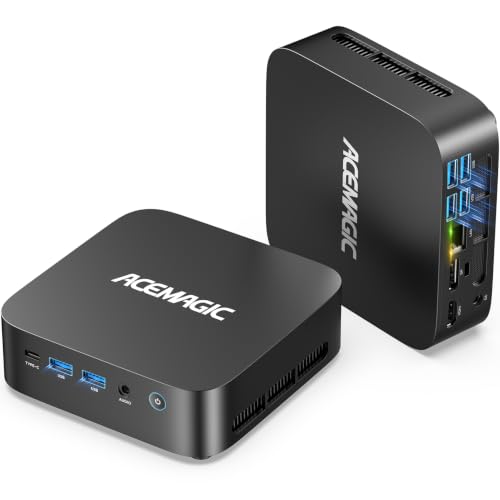
- Ryzen 5 with six cores and 12 threads
- Triple 4K display support at 60Hz
- Quiet, compact design with Wi-Fi 6
Best For: Small, quiet offices using multiple monitors
Best Budget Multi-Monitor Mini PC

- 16GB RAM and 512GB SSD
- Three-monitor support with 4K output
- Tiny chassis and extended service coverage
Best For: Affordable everyday office and streaming setups
Performance Pick
GMKtec M6 Ultra Ryzen 7640HS Mini PC

- Ryzen 5 7640HS, 16GB DDR5, and 1TB SSD
- Triple-display support with USB4 8K output
- Dual 2.5GbE and Wi-Fi 6E connectivity
Best For: Demanding home-office multitasking and streaming setups
Budget Streaming Choice

- 16GB DDR4 RAM and 512GB NVMe SSD
- Dual HDMI outputs for two 4K monitors
- Wi-Fi 6, Bluetooth 5.3, and compact design
Best For: Affordable everyday home-office streaming and multitasking
Best Performance Value – GMKtec M6 Ultra Ryzen 5 Mini PC
For shoppers comparing live streaming computers for home offices, the GMKtec M6 Ultra offers a strong blend of processing power, memory, and compact size. Its Ryzen 5 7640HS, 32GB of DDR5 RAM, and hardware video codec support make it well suited to multitasking, content work, and streaming-related workloads.
Best For: Home-office users who want high performance, expandable storage, and multiple-monitor support in a compact PC.
Pros:
- Ryzen 5 7640HS provides 6 cores, 12 threads, and boost speeds up to 5.0GHz.
- 32GB DDR5 memory and a 1TB PCIe SSD provide a capable starting configuration.
- Supports three displays, including up to 8K at 60Hz through USB4, plus dual 2.5GbE LAN.
- Includes Wi-Fi 6, Bluetooth 5.2, and hardware encoding and decoding for AV1, HEVC, and AVC.
Cons:
- Integrated Radeon 760M graphics are aimed at moderate gaming rather than high-end GPU workloads.
- Advertised memory expansion and larger SSD upgrades require separate purchases.
The M6 Ultra is an especially versatile choice when a home office needs several displays, fast networking, and enough headroom for demanding multitasking without using a full-size tower.
Best Dedicated Graphics – STGAubron RX 590 Gaming Desktop
The STGAubron is a traditional tower PC for buyers who prefer dedicated graphics and a ready-to-use desktop setup. Among live streaming computers for home offices, its Radeon RX 590, 16GB of RAM, and included keyboard and mouse make it a practical option for streaming, gaming, editing, and everyday work.
Best For: Home-office users who want a full-size gaming and streaming tower with dedicated graphics and bundled peripherals.
Pros:
- Dedicated Radeon RX 590 graphics with 8GB of GDDR5 memory.
- Includes 16GB DDR4 RAM, a 512GB SSD, Windows 11, Wi-Fi, and Bluetooth 5.0.
- Offers HDMI and DisplayPort outputs along with four RGB fans.
- Includes an RGB keyboard and mouse, one year of parts and labor coverage, and lifetime technical support.
Cons:
- The older Xeon E5 platform and DDR4 memory are less current than newer mini-PC alternatives.
- Its tower footprint is substantially larger than the compact systems in this roundup.
- The listed native resolution is 1920×1080, despite support for a 4K output specification.
This system makes the most sense when dedicated graphics and a conventional upgrade-friendly tower matter more than minimal desk space or the newest processor platform.
Best Quiet Office Mini PC – BOSGAME E5 Ryzen 3 5300U Mini PC
The BOSGAME E5 is designed around everyday office productivity in a small, quiet enclosure. For live streaming computers for home offices, its Ryzen 3 processor, upgradeable memory, triple-4K display capability, and dual 2.5GbE ports give it useful flexibility for meetings, browser-heavy work, and home-office networking.
Best For: Quiet home offices, video meetings, multi-monitor productivity, and users who plan to expand memory or storage.
Pros:
- Ryzen 3 5300U offers 4 cores, 8 threads, and boost speeds up to 3.8GHz.
- Dual SODIMM slots support memory expansion up to 64GB, while a second M.2 slot supports additional storage.
- Can drive three 4K displays at 60Hz through HDMI, DisplayPort, and full-function USB-C.
- Quiet cooling is rated below 25dB, and a VESA mount helps keep the desk clear.
Cons:
- The included 8GB RAM and 256GB SSD are modest for heavier streaming or creative workloads.
- Integrated Radeon graphics are intended for office work, media, and casual gaming rather than demanding gaming.
The E5 is a sensible compact office foundation, particularly if quiet operation and future upgrades are more important than maximum out-of-box performance.
Best Efficient Multitasker – KAMRUI Ryzen 7 7730U Mini PC
The KAMRUI mini PC pairs an eight-core Ryzen 7 processor with a compact, low-power design. For shoppers seeking live streaming computers for home offices, it provides strong multitasking potential, a 512GB SSD, triple-display support, and a VESA bracket for a tidy workstation.
Best For: Users who need an energy-efficient mini PC for office multitasking, light editing, media, and multi-screen work.
Pros:
- Ryzen 7 7730U delivers 8 cores, 16 threads, and boost speeds up to 4.5GHz.
- Includes 16GB LPDDR4X memory and a 512GB M.2 NVMe SSD.
- Supports three monitors and 4K at 60Hz through HDMI, DisplayPort, and USB-C.
- Compact 5.04-inch-square design includes a VESA bracket, Wi-Fi 6, and Bluetooth 5.2.
Cons:
- Integrated Radeon graphics are not a substitute for a dedicated graphics card in demanding games or production work.
- Memory is listed as LPDDR4X, so the included RAM is less flexible than systems with standard SO-DIMM slots.
With its efficient eight-core processor and small footprint, the KAMRUI is a good fit for a clean home-office setup that still needs responsive multitasking and multiple displays.
Best Refurbished Tower – Dell OptiPlex 3060
For shoppers comparing live streaming computers for home offices, this renewed Dell OptiPlex 3060 offers a practical tower format with a six-core Intel processor, generous listed memory, and fast SSD storage. Its integrated graphics support up to 4K output, making it suitable for everyday streaming, office work, browsing, and content-focused tasks.
Best For: Home-office users who want a traditional desktop with ample storage, many USB ports, and strong multitasking capability.
Pros:
- Intel Core i5-8500 processor with six cores supports multitasking.
- 1TB SSD provides fast boot and application loading.
- Built-in Wi-Fi and Bluetooth simplify wireless setups.
- HDMI and DisplayPort support high-resolution external displays.
Cons:
- Integrated Intel UHD 630 graphics are not intended for demanding gaming or advanced video production.
- As a renewed computer, it includes a 90-day warranty rather than a longer coverage period.
- The tower takes more desk space than the mini PCs in this roundup.
This Dell is a sensible choice when storage, expandability, and port variety matter more than having the smallest possible workspace footprint. It is especially appealing for a home office that also handles media streaming and general content work.
Best Quiet Triple-Display Mini PC – ACEMAGIC K1 Mini PC
The ACEMAGIC K1 is a compact option for live streaming computers for home offices, combining a 6-core, 12-thread Ryzen 5 processor with 16GB of RAM and a 512GB SSD. Its quiet cooling, Wi-Fi 6, and triple-4K display support make it well suited to a clean, productive desk setup.
Best For: Home-office users who need a quiet, space-saving computer for streaming, video calls, multitasking, and multiple monitors.
Pros:
- Ryzen 5 7530U offers six cores, 12 threads, and speeds up to 4.5GHz.
- Supports up to three 4K displays at 60Hz.
- Compact 5 × 5 × 1.6-inch design saves desk space.
- Wi-Fi 6, Bluetooth 5.2, and extensive USB connectivity support flexible setups.
Cons:
- Its 512GB SSD provides less included storage than the Dell tower.
- Compact integrated graphics are better suited to office, streaming, and display tasks than demanding gaming.
- RAM is listed as LPDDR4X, so memory expansion is not described.
Among these options, the K1 offers one of the most balanced home-office designs: capable multitasking performance, quiet operation, and broad display support in a very small enclosure. Its one-year warranty and lifetime technical support add useful setup reassurance.
Best Budget Multi-Monitor Mini PC – BOSGAME B95 Mini PC
For a compact entry point among live streaming computers for home offices, the BOSGAME B95 pairs an Intel N95 processor with 16GB of DDR4 RAM and a 512GB SSD. It supports three-monitor setups and includes Wi-Fi 5, Bluetooth 5.0, and Gigabit Ethernet for everyday office and streaming connectivity.
Best For: Budget-conscious home-office users who want a small computer for web work, streaming, and multi-monitor productivity.
Pros:
- 16GB RAM and a 512GB SSD provide a practical everyday configuration.
- Dual HDMI and USB-C outputs support up to three 4K displays.
- Small 4.96 × 4.4 × 1.6-inch chassis fits easily beside a monitor.
- Includes one-year replacement coverage plus two years of repair service.
Cons:
- Intel N95 has four cores and four threads, making it less capable for heavy multitasking than the Ryzen model.
- Wi-Fi 5 is an older wireless standard than the ACEMAGIC K1’s Wi-Fi 6.
- No keyboard is included.
The B95 makes the most sense for straightforward home-office workloads where size, price, and monitor flexibility are priorities. It can handle everyday streaming and productivity, but users running demanding creator software should consider the stronger processors elsewhere in the roundup.
Performance Pick – GMKtec M6 Ultra Ryzen 7640HS Mini PC
For live streaming computers for home offices, the GMKtec M6 Ultra stands out with its Ryzen 5 7640HS processor, 16GB of DDR5 memory, and 1TB SSD. Its triple-display support, USB4 output, fast networking, and Wi-Fi 6E make it a flexible choice for demanding multitasking and streaming setups.
Best For: Home-office users who need strong multitasking performance, multiple displays, and fast wired or wireless connectivity.
Pros:
- Ryzen 5 7640HS with 6 cores and 12 threads for responsive multitasking.
- 16GB DDR5 RAM and a 1TB PCIe SSD provide a strong starting configuration.
- Supports up to three displays, including USB4 output up to 8K at 60Hz.
- Dual 2.5GbE ports, Wi-Fi 6E, and Bluetooth 5.2 offer versatile connectivity.
Cons:
- Integrated Radeon 760M graphics are positioned for casual 1080p gaming rather than demanding dedicated-GPU workloads.
- Its feature-rich configuration may be more than needed for basic office tasks.
The M6 Ultra is the most capable option here for a home office that combines video conferencing, content creation, multiple monitors, and streaming. Expandable memory and storage also give it room to grow.
Multi-Display Value – KAMRUI Pinova P2 Ryzen 5425U Mini PC
The KAMRUI Pinova P2 is a compact option among live streaming computers for home offices, pairing a four-core Ryzen 5 5425U processor with 16GB of memory and a 256GB SSD. Triple 4K display support and numerous USB ports make it practical for monitor-heavy desks and everyday business use.
Best For: Home-office and conference-room users who want a small computer with triple-display capability and broad peripheral support.
Pros:
- Ryzen 5 5425U offers 4 cores, 8 threads, and boost speeds up to 4.1GHz.
- Supports three 4K displays at 60Hz through HDMI, DisplayPort, and USB-C.
- Compact design includes a VESA mount and a cooling system designed for quiet operation.
- Two storage slots support expansion up to 4TB, according to the supplied specifications.
Cons:
- The included 256GB SSD provides less storage than the other listed options.
- It uses LPDDR4 memory, with no stated user-upgrade capacity in the supplied notes.
- It has Gigabit Ethernet rather than the faster 2.5GbE found on the GMKtec.
The Pinova P2 is a sensible middle ground for office streaming, video playback, and multitasking across several screens. Its small footprint and expansion options are useful when desk space is limited.
Budget Streaming Choice – Getorli Ryzen 5 3500U Mini PC
The Getorli GT101 is a budget-friendly choice for live streaming computers for home offices, with a Ryzen 5 3500U processor, 16GB of DDR4 RAM, and a 512GB NVMe SSD. It is designed for everyday computing, media streaming, web browsing, and light multitasking in a compact form factor.
Best For: Budget-conscious home-office users who need practical storage, dual-monitor support, and wireless connectivity.
Pros:
- 16GB RAM and a 512GB NVMe SSD support smooth everyday use and quick app launches.
- Dual HDMI ports support two 4K displays.
- Wi-Fi 6 and Bluetooth 5.3 provide modern wireless connections.
- Compact design includes a VESA mounting bracket and multiple USB ports.
Cons:
- The Ryzen 5 3500U is an older, lower-performance processor than the CPUs in the other two options.
- Memory expansion is limited to 32GB.
- The listed warranty is one year, shorter than the GMKtec’s stated three-year limited warranty.
The GT101 keeps the essentials in a small and affordable package. It is best suited to routine office work, webcam-based streaming, and media use rather than especially demanding production workloads.
How We Picked These Live Streaming Computers for Home Offices
We focused on systems that can realistically support common home-office streaming setups, including OBS or similar software, webcam video, screen sharing, browser-based tools, and productivity applications. We considered processor generation, core and thread count, integrated or discrete graphics, RAM, SSD capacity, wireless connectivity, operating system support, and overall upgrade potential.
The selection includes compact mini PCs for small desks, refurbished business desktops for practical value, and higher-performance systems for creators who stream games or edit video. Specifications can vary by seller, so confirm the exact memory, storage, ports, and included accessories before ordering.
Quick Comparison
| Best For | Recommended Type | What to Prioritize |
|---|---|---|
| Basic webcam and office streaming | Entry-level mini PC | 16GB RAM, SSD storage, reliable Wi-Fi |
| Multitasking and frequent broadcasts | Modern Ryzen mini PC | Six or more cores, 16GB to 32GB RAM |
| Gaming or demanding capture workflows | Higher-end Ryzen system or desktop | Strong multicore CPU, capable graphics, cooling |
| Lowest-cost productivity setup | Refurbished business desktop | Condition, ports, warranty, and upgrade options |
Key Buying Factors for Live Streaming Computers for Home Offices
Processor and Encoding Performance
Streaming software relies heavily on the CPU unless you use hardware encoding supported by the graphics processor. Modern Ryzen 5 and Ryzen 7 chips generally provide a useful balance of cores, efficiency, and multitasking performance. Older business processors can still manage basic streams, but they may leave less headroom for gaming, editing, or numerous applications.
Memory, Storage, and Graphics
Choose at least 16GB of RAM for streaming alongside office work; 32GB is preferable for video editing, virtual machines, or heavy browser use. An NVMe or SATA SSD makes Windows and applications feel much faster than a hard drive. Integrated graphics are adequate for webcam, presentation, and light streaming, while gaming streams may benefit from a dedicated GPU or a processor with stronger integrated graphics.
Ports, Network, and Desk Fit
Check for enough USB ports for a camera, microphone, capture device, keyboard, and external storage. Ethernet is often the most dependable connection for live broadcasts, while Wi-Fi 6 or newer is helpful when cable placement is difficult. Mini PCs save space, but desktops may offer easier upgrades and better sustained cooling.
Who Should Buy Which Live Streaming Computers for Home Offices?
Buy an entry-level mini PC if you mainly stream meetings, tutorials, presentations, or webcam content while handling normal office tasks. Choose a newer Ryzen mini PC if you want smoother multitasking, regular OBS use, or occasional editing without occupying much desk space. Select a higher-performance Ryzen model or a desktop with dedicated graphics for gaming broadcasts, multiple displays, capture cards, and heavier production workloads.
Refurbished business desktops can be excellent value for office streaming, especially when they include 32GB of RAM and a large SSD. However, verify the seller’s return policy, Windows licensing, physical condition, upgrade limitations, and included Wi-Fi or Bluetooth before buying.