
If you’re stepping into the world of audio production or just looking to enhance your listening experience, choosing the right studio monitors is essential. Mackie offers a variety of options tailored for beginners, balancing quality and affordability. From compact models to those with robust bass response, there’s something for everyone. Ready to discover which Mackie studio monitors can elevate your sound? Let’s explore the top picks that suit your needs and preferences.
Mackie CR3.5 Powered Studio Monitors

If you’re a beginner looking to plunge into music production or enhance your gaming experience, the Mackie CR3.5 Powered Studio Monitors are an excellent choice. These monitors deliver studio-quality sound with a silk dome tweeter and a 3.5″ woven woofer, ensuring clear audio and impressive bass. You can easily connect them to various devices via TRS, RCA, or a 3.5 mm input, making them versatile for any setup. Plus, the tone control knob lets you customize your sound, while the location switch optimizes audio for desktop or bookshelf placements. With a customer rating of 4.6 stars, they’re a reliable pick for beginners.
Best For: Beginners looking to enhance their music production or gaming experience with studio-quality sound.
Pros:
- Studio-quality sound with a silk dome tweeter and woven woofer for clear audio and enhanced bass.
- Versatile connectivity options (TRS, RCA, 3.5 mm) for easy integration with various devices.
- Sound customization features, including a tone control knob and location switch for optimal audio based on placement.
Cons:
- Limited power output at 50 watts, which may not suffice for larger spaces.
- Size constraints with compact dimensions, potentially limiting bass response compared to larger monitors.
- Nontransferable warranty, which may be a drawback for resale or gifting.
Mackie CR8BT Creative Reference Powered Studio Monitors

The Mackie CR8BT Creative Reference Powered Studio Monitors are perfect for beginner music producers and casual listeners who want high-quality sound without breaking the bank. With an 8″ woven woofer and 1″ silk dome tweeter, you’ll enjoy clean, articulate audio and substantial bass response. They feature Bluetooth connectivity, multiple input options, and a tone control knob for personalized sound shaping. Plus, the built-in headphone output and location switch make these monitors versatile for any setup. Weighing 35.3 pounds and offering 140 Watts of power, the CR8BTs deliver impressive performance that you can rely on for music production, gaming, and more.
Best For: Beginner music producers and casual listeners seeking high-quality sound and versatile connectivity options.
Pros:
- Bluetooth connectivity allows for easy pairing with smartphones and tablets.
- Tone control knob enables personalized sound shaping for enhanced listening experience.
- Multiple input options make it compatible with various devices like gaming consoles and PCs.
Cons:
- The subwoofer is sold separately, limiting bass enhancement without additional purchase.
- Size and weight may not be ideal for portable setups or small spaces.
- Limited built-in features compared to higher-end studio monitors.
Mackie CR4.5 Creative Reference Powered Studio Monitors
For budding musicians and casual listeners alike, the Mackie CR4.5 Creative Reference Powered Studio Monitors deliver studio-quality sound in a compact package. These active speakers feature a 4.5″ woven woofer and silk dome tweeter, ensuring clean and articulate audio. You’ll appreciate the tone knob for easy sound shaping and the switchable desktop and bookshelf modes for ideal placement. With multiple input options, including TRS and RCA, connecting your devices is a breeze. Plus, the built-in headphone output lets you enjoy private listening. Backed by a one-year warranty, they’re a solid choice for anyone looking to enhance their sound experience.
Best For: Budding musicians and casual listeners looking for studio-quality sound in a compact format.
Pros:
- Studio-quality sound with a 4.5″ woven woofer and silk dome tweeter for clean audio.
- Versatile connectivity with multiple input options including TRS, RCA, and 3.5 mm for easy device connection.
- Adjustable sound shaping with a tone knob and switchable modes for optimal placement and listening experience.
Cons:
- Limited bass response without the optional CR8SBT subwoofer for enhanced low-end performance.
- Corded power source may limit placement options compared to battery-powered alternatives.
- Weight of 12.37 lbs may not be ideal for portable use.
Mackie MR824 -Channel Studio Monitor

Designed with professionals in mind, the Mackie MR824 -Channel Studio Monitor excels in delivering superior mix translations and accuracy. Its advanced logarithmic waveguide design guarantees ultra-wide dispersion, enhancing your stereo imaging and creating an ideal listening sweet spot. You’ll appreciate the 1” silk dome tweeter for fast transient response, offering detailed highs and vocal clarity. The 8” polypropylene woofer delivers dynamic low frequencies for a full-range sound. With 65 watts of bi-amplified Class A/B amplification, the MR824 assures peak performance in any studio. If you’re seeking high-quality sound reproduction, this monitor is a fantastic choice for your setup.
Best For: Professionals seeking high-quality sound reproduction and accuracy in studio environments.
Pros:
- Ultra-wide dispersion enhances stereo imaging and provides an ideal listening sweet spot.
- Fast transient response from the 1” silk dome tweeter ensures detailed highs and vocal clarity.
- Bi-amplified Class A/B amplification with 65 watts delivers optimal performance across a full range of frequencies.
Cons:
- May be overkill for casual listeners or home studio setups with lower sound quality needs.
- The size and design may not fit all aesthetic preferences in a studio environment.
- Potentially higher price point compared to entry-level monitors may deter budget-conscious buyers.
Mackie CR-X Series 4.5-Inch Multimedia Monitors (CR4-X)

If you’re diving into music production or content creation and need a reliable audio solution, Mackie CR-X Series 4.5-Inch Multimedia Monitors (CR4-X) are an excellent choice. These monitors deliver professional studio-quality sound with 50 watts of clean, articulate stereo output. The front-facing headphone jack auto-defeats speaker output for a seamless listening experience. With flexible rear panel inputs, you can easily connect to smartphones, tablets, and laptops. Their compact design and remote control add convenience, while a 1-year warranty guarantees peace of mind. With a 4.5-star rating from thousands of reviews, you’ll enjoy great sound every time.
Best For: Music producers, content creators, and casual listeners seeking professional studio-quality sound in a compact design.
Pros:
- Professional Sound Quality: Delivers 50 watts of clean, articulate stereo sound for an exceptional listening experience.
- Versatile Connectivity: Features flexible rear panel inputs to connect easily with various devices like smartphones, tablets, and laptops.
- Compact Design: The sleek, lightweight construction makes these monitors suitable for different environments and easy to set up.
Cons:
- Limited Warranty: Comes with a 1-year limited warranty, which may not provide enough coverage for long-term use.
- Remote Control Dependency: Some users may find the reliance on a remote control for features less convenient than built-in controls on the monitors.
- No Built-in Bluetooth: Lacks Bluetooth connectivity, which may limit wireless streaming options for some users.
Mackie CR-X Series 3.5-Inch Multimedia Monitors (CR3-X)
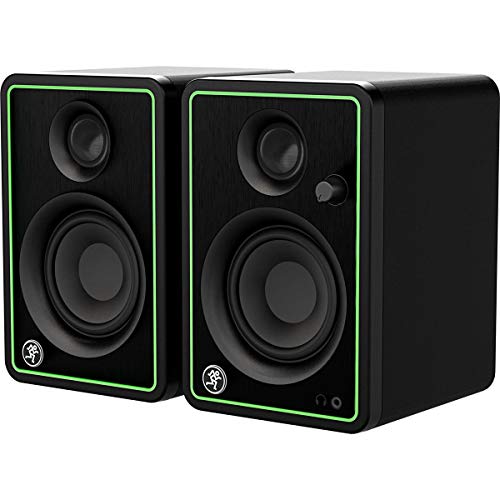
The Mackie CR-X Series 3.5-Inch Multimedia Monitors (CR3-X) are perfect for budding musicians and content creators seeking studio-quality sound without breaking the bank. With 50 watts of clean stereo sound and a frequency response down to 45 Hz, these monitors deliver impressive audio clarity. The sleek design, along with the wood enclosure, adds a stylish touch to your setup. You’ll appreciate the flexible connectivity options, including 1/4” TRS and RCA inputs, plus a front-facing headphone jack. Weighing just 9.19 pounds, they’re easy to position, making them an ideal choice for music production, casual listening, and more.
Best For: Budding musicians and content creators seeking affordable studio-quality sound for music production and casual listening.
Pros:
- Studio-quality sound with 50 watts of clean stereo output and a frequency response down to 45 Hz.
- Sleek design with a wood enclosure that adds a stylish touch to any setup.
- Flexible connectivity options including 1/4” TRS, 1/8” stereo, and RCA inputs, plus a front-facing headphone jack.
Cons:
- Limited power output may not suffice for larger spaces or professional studio settings.
- Weight of 9.19 pounds could be cumbersome for frequent transport.
- 1-year limited warranty may be less appealing compared to longer warranties offered by competitors.
Mackie MR624 -Channel Studio Monitor

For anyone stepping into the world of audio production, the Mackie MR624 studio monitor stands out as an excellent choice due to its impressive accuracy and clarity. With a 6.5-inch polypropylene woofer and a 1-inch silk dome tweeter, it delivers dynamic lows and crisp highs, ensuring your mixes translate well across different playback systems. Its ultra-wide dispersion and logarithmic waveguide create an expansive sweet spot, perfect for collaborative sessions. Plus, with 65 watts of bi-amplified power, you’ll enjoy robust performance. Designed for indoor use, the MR624 is compatible with various audio hardware, making it an ideal companion for your studio setup.
Best For: Audio producers and musicians looking for accurate sound reproduction in a professional studio environment.
Pros:
- Excellent clarity and accuracy for mixing across various genres.
- Wide listening sweet spot thanks to the logarithmic waveguide design.
- Strong performance with 65 watts of bi-amplified power.
Cons:
- Not designed for outdoor use as it is not waterproof.
- Limited warranty period of one year.
- May require additional adjustments to fit specific studio environments.
PreSonus Eris 3.5 Studio Monitors (Powered, Active Monitor Speakers)

Designed specifically for beginners in music production and audio mixing, the PreSonus Eris 3.5 Studio Monitors deliver exceptional sound quality in a compact package. With a frequency response of 20 kHz and 50 Watts of power, these monitors guarantee clear audio reproduction. The 3.5-inch woven-composite woofers provide a robust low end, while the 1-inch silk-dome tweeters create a natural high-frequency response for accurate stereo imaging. You’ll appreciate the versatile connectivity options, including TRS and RCA inputs, plus a front-panel aux input for your devices. With a power-saving mode and stellar customer ratings, these monitors are a fantastic choice for any budding audio engineer.
Best For: Beginners in music production and audio mixing looking for compact yet high-quality studio monitors.
Pros:
- Excellent sound quality with pronounced low and high frequencies for accurate audio reproduction.
- Versatile connectivity options including TRS, RCA, and a front-panel aux input for easy integration with various devices.
- Compact design makes them ideal for small spaces like desks or bookshelves.
Cons:
- Limited low-frequency response compared to larger monitors, which may not satisfy advanced users needing deeper bass.
- Maximum output power of 50 Watts may not be sufficient for larger studio environments.
- Lacks Bluetooth connectivity without pairing with an additional subwoofer.
Edifier MR3 Powered Studio Monitor Speakers (Pair)

Looking for a studio monitor that balances quality and affordability? The Edifier MR3 Powered Studio Monitor Speakers deliver impressive audio with Hi-Res Audio certification, ensuring a flat response from 52Hz to 40kHz. With 18W*2 RMS power and peak SPL of 92.5dB, you’ll enjoy rich sound through 3.5-inch mid-low drivers and a tweeter. Connectivity is a breeze with balanced TRS, RCA, AUX inputs, and Bluetooth V5.4 for multi-device pairing. Customize your sound with Music, Monitor, and Custom modes through the EDIFIER ConneX app. The MDF cabinet design minimizes distortion, making it perfect for any audio production or casual listening.
Best For: Audio professionals and enthusiasts seeking high-quality, versatile studio monitors at an affordable price.
Pros:
- Hi-Res Audio certification ensures precise sound reproduction across a wide frequency range.
- Multiple connectivity options including Bluetooth V5.4 support for easy pairing with multiple devices.
- Customizable sound profiles through the EDIFIER ConneX app for personalized audio experiences.
Cons:
- Limited power output of 18W may not be sufficient for larger spaces.
- MDF cabinet design may not appeal to those looking for a more premium aesthetic.
- Potential learning curve for users unfamiliar with audio customization features.
M-AUDIO BX3 Studio Monitors

The M-AUDIO BX3 Studio Monitors stand out as an excellent choice for beginners engaged in recording and multimedia applications. With 120W powered speakers, these monitors deliver studio-quality sound perfect for gaming, podcasting, and streaming. Their compact design not only saves space but also enhances your desktop’s aesthetics. The 3.5″ Kevlar low-frequency drivers and 1″ silk dome tweeters guarantee rich audio, while rear ports boost bass response. You’ll appreciate the versatile connectivity options, including RCA and aux inputs. Plus, the included accessories make setup a breeze. With a stellar 4.5-star rating, these monitors are a smart investment for any aspiring audio professional.
Best For: Beginners in recording and multimedia applications looking for compact, high-quality studio monitors.
Pros:
- Studio-quality sound with 120W powered speakers ideal for gaming, podcasting, and streaming.
- Versatile connectivity options including RCA, 1/4″, and 1/8″ inputs for compatibility with various devices.
- Compact and aesthetically pleasing design enhances desktop space while delivering rich audio performance.
Cons:
- Limited bass response compared to larger studio monitors due to the smaller size.
- Rear port placement may require careful positioning to avoid wall interference.
- May not be suitable for professional-level audio production due to size and power limitations.
Factors to Consider When Choosing Mackie Studio Monitors for Beginners
When you’re choosing Mackie studio monitors, sound quality should be at the top of your list. You’ll also want to take into account connectivity options and the size of your workspace to guarantee a good fit. Budget-friendly choices can help you get started without breaking the bank, so keep that in mind as well.
Sound Quality Importance
Sound quality plays a pivotal role in your experience with studio monitors, especially when you’re just starting out. It directly affects how accurately you can reproduce audio, which is essential for making informed mixing and production decisions. Look for monitors with a balanced frequency response; they should deliver clear highs, mids, and lows without coloration. If you’re into bass-heavy genres, larger woofers can provide better low-frequency response, while smaller woofers are ideal for compact spaces. High-quality tweeters enhance clarity, ensuring vocals and instruments sound accurate. Finally, consider the power output; monitors should handle various volumes without distortion, allowing you to work effectively in your chosen listening environment. Prioritizing sound quality will set you up for success in your music production journey.
Connectivity Options Available
Choosing the right connectivity options is essential when you’re picking out Mackie studio monitors. Look for models that offer multiple input options like TRS, RCA, and 3.5 mm. These connections let you easily hook up various devices, from computers to gaming consoles and smartphones. Built-in headphone outputs are a must for private listening without unplugging other gear. If you prefer wireless, check for Bluetooth connectivity to pair with tablets and smartphones seamlessly. Additionally, monitors that come with thorough hookup cables, such as 1/8 to RCA, can simplify your setup. Finally, make sure there’s a front-facing headphone jack with auto-defeat speaker output, allowing for smooth shifts between listening modes without hassle.
Size and Space Considerations
After considering connectivity options, the size and space available in your workspace play a significant role in selecting Mackie studio monitors. Think about your desk dimensions; larger monitors need more space for peak sound placement and might not fit comfortably on smaller desks. Weight matters too—heavier models often indicate sturdier build quality but can be less portable. Monitor size affects sound projection; larger woofers deliver better low-end response, ideal for bass-heavy genres. Ascertain there’s adequate distance between the monitors and your listening position, typically needing a few feet for larger models. Also, consider design; front-facing ports allow closer wall placement without compromising sound quality, unlike rear-ported designs. Choose wisely to enhance your listening experience!
Adjustability and Customization
When selecting Mackie studio monitors, adjustability and customization features can greatly enhance your listening experience. Look for models with tone control knobs, allowing you to tweak bass and treble for a personalized sound. Some monitors even have location switches to optimize audio based on placement, like desktop or bookshelf modes. High- and low-frequency tuning controls are also beneficial, as they help adjust sound according to room size and speaker orientation. Built-in headphone outputs enable private listening, letting you fine-tune your audio without external noise. Additionally, monitors with multiple input options, such as TRS, RCA, and 3.5 mm, guarantee compatibility with various devices, giving you more flexibility in your setup.
Budget-Friendly Choices
Finding budget-friendly Mackie studio monitors can make a big difference in your audio setup without breaking the bank. When shopping, look for options in the $100 to $300 range that deliver quality sound performance. Versatile connectivity options, like TRS, RCA, and 3.5 mm inputs, guarantee compatibility with various devices, saving you extra costs. Aim for monitors with high customer ratings, ideally above 4.5 stars, to gauge user satisfaction and overall value. Features such as built-in tone control and different listening modes can enhance your experience without a significant price hike. Finally, pay attention to the warranty offered; a solid warranty can provide peace of mind and protect your investment in budget studio monitors.