
When you’re teaching online, the clarity of your voice can make all the difference. A quality microphone not only enhances your audio but also improves student engagement. With so many options available, finding the right one can feel overwhelming. From noise-canceling features to versatile connectivity, each microphone offers unique benefits tailored to different teaching environments. Let’s explore the top choices that can elevate your virtual classroom experience.
USB Microphone with 360 Degree Adjustable Gooseneck Design

When it comes to online teaching, the JOUNIVO USB Microphone stands out with its 360-degree adjustable gooseneck design, making it perfect for educators who need flexibility in positioning their mic for ideal sound pickup. This premium omnidirectional condenser microphone captures your voice clearly while minimizing background noise. Plus, the built-in mute button lets you control sound quickly, with an LED indicator showing your status. Its durable construction, combining metal and heavy-duty ABS, guarantees longevity. With USB plug-and-play connectivity, it’s compatible with major operating systems, making setup a breeze for your virtual classroom. Enhance your teaching experience effortlessly!
Best For: Educators and online instructors seeking a high-quality microphone for clear audio during virtual teaching sessions.
Pros:
- 360-degree adjustable gooseneck design allows for optimal positioning and sound pickup.
- Built-in mute button with LED indicator provides quick sound control during presentations.
- Premium omnidirectional condenser technology effectively reduces background noise for clearer voice capture.
Cons:
- Not compatible with Xbox, Raspberry Pi, or Android devices, limiting versatility.
- Corded electric power source may restrict movement compared to wireless options.
- Weight of 7.06 ounces might be considered heavier for some users seeking ultra-portable solutions.
ZealSound Podcast Microphone for PC

The ZealSound Podcast Microphone for PC stands out as an ideal choice for online educators seeking studio-quality sound without the hassle of complex setups. Its cardioid pickup pattern focuses on your voice, effectively minimizing background noise, while the intelligent noise reduction mode guarantees clear recordings. With plug-and-play connectivity, you can easily connect to various devices, including PCs, laptops, and mobile devices. Real-time monitoring via the headphone jack lets you adjust audio levels effortlessly. Plus, its durable design and complete accessory package make it a reliable option for long-term use, assuring you deliver the best learning experience to your students.
Best For: Online educators looking for high-quality sound and easy setup for their lessons.
Pros:
- Studio-quality sound with noise reduction for clear recordings.
- Plug-and-play design compatible with multiple devices.
- Durable construction with a complete accessory package for long-term use.
Cons:
- Limited to cardioid pickup pattern which may not suit all recording environments.
- May require additional equipment for optimal sound in very noisy settings.
- Real-time monitoring may not be necessary for all users, adding complexity for some.
Logitech Blue Yeti USB Microphone for PC and Mac

For educators seeking a reliable microphone for online teaching, the Logitech Blue Yeti USB Microphone stands out with its custom three-capsule array that delivers broadcast-quality sound. It’s perfect for YouTube videos, Zoom meetings, and podcasting. With four pickup patterns—cardioid, omni, bidirectional, and stereo—you can tailor your audio experience. Plus, the Blue VO!CE software enhances your vocal sound. Its plug-and-play setup makes it easy to use on both Mac and PC. The adjustable desktop stand allows for ideal positioning, ensuring your voice is always clear and powerful. With a 2-year warranty, it’s a smart investment for your virtual classroom.
Best For: Educators, content creators, and podcasters looking for a high-quality microphone for online teaching and streaming.
Pros:
- Produces clear, broadcast-quality sound with a custom three-capsule array.
- Versatile with four pickup patterns to suit various recording needs.
- Easy plug-and-play setup compatible with both Mac and PC.
Cons:
- Slightly heavier at 3.2 pounds, which may affect portability.
- Requires USB Type-A connection, limiting compatibility with some newer devices.
- Blue VO!CE software may be complex for users unfamiliar with audio editing.
FIFINE USB/XLR Dynamic Microphone for Podcast Recording

If you’re looking to elevate your online teaching experience, the FIFINE USB/XLR Dynamic Microphone stands out with its directional cardioid design, which effectively rejects off-axis noise to guarantee your voice comes through clearly. With a frequency response of 50Hz-16KHz, it captures your voice in stunning clarity. The plug-and-play USB option is perfect for beginners, while the XLR connection offers flexibility for advanced setups. Enjoy real-time monitoring through the headphones jack and adjust your audio easily with the volume control. Plus, the RGB lighting adds a touch of style, making it not just functional but visually appealing for your virtual classroom.
Best For: The FIFINE USB/XLR Dynamic Microphone is best for online educators, podcasters, and content creators looking for clear audio quality and versatile connectivity options.
Pros:
- Directional cardioid design effectively reduces background noise, ensuring vocal clarity.
- Plug-and-play USB connection makes it easy for beginners to set up and use.
- Real-time audio monitoring through the headphones jack allows for immediate feedback during recordings.
Cons:
- XLR connection requires a separate cable, which is not included in the package.
- RGB lighting features are only accessible via USB, limiting functionality with XLR.
- Limited frequency response range may not capture very high frequencies for music recording enthusiasts.
Norwii Bluetooth Voice Amplifier with Wired Microphone Headset
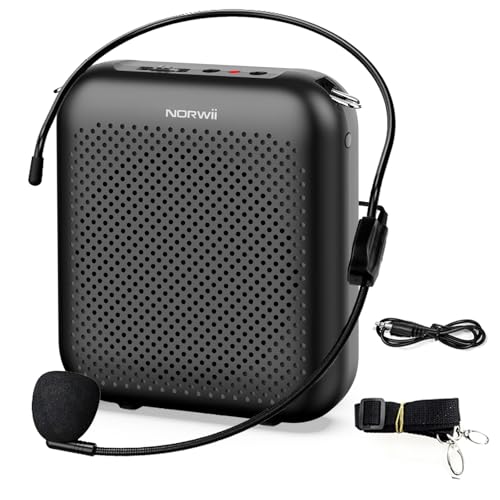
Designed to amplify your voice clearly and effectively, the Norwii Bluetooth Voice Amplifier with Wired Microphone Headset is a game-changer for educators and fitness instructors alike. With its 10-watt output and lightweight design, you can easily project your voice during lessons or outdoor activities. The 2000mAh battery lasts 12-15 hours, ensuring you won’t run out of power. Plus, feedback suppression technology keeps your audio crisp and clear. Simple to operate, it connects via Bluetooth or AUX, making it versatile for various devices. Whether teaching in class or outdoors, this tool enhances your communication effortlessly.
Best For: The Norwii Bluetooth Voice Amplifier is best for educators, fitness instructors, and tour guides who need to project their voice clearly in various settings.
Pros:
- Powerful Sound: With a 10-watt output and high-quality speakers, it delivers loud and clear audio.
- Long Battery Life: The 2000mAh battery provides 12-15 hours of usage, ideal for all-day events.
- Easy to Use: Simple two-step operation and volume control make it user-friendly.
Cons:
- Weight: At 250 grams, it may feel slightly heavy for extended wear.
- Distance Limitations: Requires maintaining a 20 cm distance between the microphone and amplifier to avoid feedback.
- Dependence on Power: Users must be mindful of battery life, especially during long events.
AIRHUG USB Microphone for Desktop Computers

The AIRHUG USB Microphone for Desktop Computers stands out with its 360° omnidirectional capability, making it an excellent choice for online teaching. It easily picks up your voice within a 6 ft radius, ensuring clarity during lessons. With a compact design and a 6.5 ft cable, it fits seamlessly on your desk. Plus, its advanced noise-canceling technology and AI Noise Reduction Mode eliminate background distractions, providing a clear audio experience. Plug-and-play functionality means you won’t need to install drivers. Use it with various platforms like Zoom and Teams, and enjoy the convenience of the mute function with an LED indicator.
Best For: Online teachers and professionals who require clear audio for virtual meetings and classes.
Pros:
- 360° omnidirectional microphone ensures clear voice pickup from multiple angles within a 6 ft radius.
- Advanced noise-canceling technology and AI Noise Reduction Mode effectively eliminate background distractions for a focused audio experience.
- Plug-and-play functionality allows for easy setup without the need for drivers or software installation, compatible with major platforms like Zoom and Teams.
Cons:
- No built-in echo cancellation, which may be a drawback for users needing that feature for clearer audio in certain environments.
- Compact size might not suit all setups; larger users may prefer a more sizeable microphone for enhanced performance.
- Limited to USB connection, which may restrict use with devices lacking USB ports or require adapters.
Bluetooth Wireless Microphone Voice Amplifier
For educators who need a reliable way to enhance their online teaching experience, the Bluetooth Wireless Microphone Voice Amplifier stands out as an exceptional choice. With studio-quality sound, this 15W mic guarantees your voice projects clearly across 1,500 sq ft, perfect for larger classrooms. It offers over eight hours of continuous use, so you won’t face interruptions. Plus, its versatile design allows you to switch between voice amplification, Bluetooth speaker, and karaoke modes. Lightweight and ergonomic, it’s easy to carry. Whether you’re teaching or presenting, this tool elevates your virtual classroom, making learning more engaging for everyone involved.
Best For: This product is best for educators, tour guides, and event hosts who need reliable voice amplification for larger spaces.
Pros:
- Studio-quality sound with 15W high-performance speaker for clear audio projection.
- Over 8 hours of continuous use on a single charge, minimizing interruptions during use.
- Lightweight and ergonomic design for easy portability, making it suitable for various settings.
Cons:
- Does not support external audio systems, limiting connectivity options.
- May require a learning curve to fully utilize all three sound modes and controls.
- Not designed for use in extremely large venues beyond 1,500 sq ft.
WinBridge Voice Amplifier with Bluetooth (WB002)

Whether you’re a teacher, fitness instructor, or public speaker, the WinBridge Voice Amplifier with Bluetooth (WB002) is an excellent choice for enhancing your online teaching experience. This portable speaker and microphone combo delivers 15 watts of power, covering up to 10,000 sq. ft. It easily pairs with your devices and can be worn as a headset or used handheld. With a battery life of 12-15 hours for the amplifier and 8-10 hours for the microphone, you won’t have to worry about constant recharging. Plus, it comes with a one-year warranty and lifetime support for your peace of mind.
Best For: The WinBridge Voice Amplifier with Bluetooth (WB002) is best for teachers, tour guides, public speakers, and fitness instructors looking to enhance their communication.
Pros:
- Powerful 15W output covers large areas up to 10,000 sq. ft.
- Easy Bluetooth connectivity and automatic pairing with devices.
- Long battery life of 12-15 hours for the amplifier and 8-10 hours for the microphone.
Cons:
- Limited to a single audio channel, which may not suit all users.
- Relatively small size might limit some advanced features.
- Requires regular charging for optimal performance during extended use.
FIFINE USB Microphone for MAC OS and Windows (K669B)

Looking for a reliable microphone to enhance your online teaching experience? The FIFINE USB Microphone (K669B) is an excellent choice for both MAC and Windows users. Its plug-and-play design allows for easy setup via a 5.9-foot USB cable, ensuring you can start teaching quickly. The cardioid pattern effectively captures your voice while minimizing background noise, making it perfect for streaming and video calls. With a durable metal design and adjustable volume knob, you’ll enjoy clear audio quality every time. Plus, its compatibility with popular applications like Zoom and Discord makes it a versatile addition to your teaching toolkit.
Best For: The FIFINE USB Microphone (K669B) is best for educators and content creators looking for a high-quality, easy-to-use microphone for online teaching and streaming.
Pros:
- Easy Setup: Plug-and-play functionality with a generous 5.9-foot USB cable for quick installation.
- Clear Sound Quality: Cardioid pattern effectively captures voice while minimizing unwanted background noise.
- Durable Construction: Sturdy metal design with a stable tripod stand ensures reliability during use.
Cons:
- Limited Compatibility: Not compatible with Xbox or mobile phones, limiting its use to computers only.
- USB Connection Only: Requires a USB-A or USB-C port, which may not be available on all devices.
- Weight: At 0.35 pounds, it may be slightly heavier than some other portable microphone options.
Logitech Blue Yeti USB Microphone for PC and Mac

The Logitech Blue Yeti USB Microphone is an excellent choice for educators and online teachers seeking high-quality sound in their virtual classrooms. Its custom three-capsule array delivers powerful, broadcast-quality audio, making it ideal for platforms like Zoom, YouTube, and Twitch. With four pickup patterns—cardioid, omni, bidirectional, and stereo—you can tailor your sound to fit any teaching scenario. Plus, the onboard controls allow you to adjust volume and mute instantly. Setup is a breeze with Plug and Play functionality, and it’s compatible with both PC and Mac. With a stellar rating of 4.6 stars, it’s a trusted option for many educators.
Best For: Educators and online teachers who need high-quality audio for virtual classrooms and streaming platforms.
Pros:
- Custom three-capsule array provides broadcast-quality sound.
- Multiple pickup patterns allow for versatile audio capture tailored to different teaching scenarios.
- Easy Plug and Play setup with compatibility for both PC and Mac.
Cons:
- Requires Logitech G HUB software for full features, which may not be ideal for all users.
- Slightly heavier than some portable microphones, making it less convenient for mobility.
- The price point may be higher compared to basic USB microphones.
Factors to Consider When Choosing a Microphone for Online Teaching
When choosing a microphone for online teaching, you’ll want to contemplate several key factors. Sound quality is essential for clear communication, while connectivity options play a big role in how easily you can set up your gear. Additionally, features like noise-canceling and device compatibility can make all the difference in your teaching experience.
Sound Quality Importance
Sound quality plays a pivotal role in online teaching, directly impacting how effectively you communicate with your students. High-quality sound guarantees clarity, allowing learners to hear your instructions without distortion or background noise. When choosing a microphone, consider options with omnidirectional or cardioid pickup patterns, as they focus on your voice and reduce external sounds. A wide frequency range, ideally between 20Hz and 20kHz, captures the full spectrum of your voice, enhancing engagement. Noise-canceling technology minimizes disruptive background sounds, creating a better learning environment. Additionally, look for a microphone with a signal-to-noise ratio above 70 dB to guarantee a clear signal, crucial for maintaining your students’ attention during lessons. Prioritizing sound quality will elevate your online teaching experience.
Connectivity Options Available
Choosing the right microphone goes beyond just sound quality; connectivity options play a significant role in guaranteeing a smooth online teaching experience. Look for USB connectivity for easy plug-and-play functionality, eliminating the hassle of additional drivers or software. It’s also wise to choose microphones that work with both Windows and macOS systems, giving you versatility across different devices. If you’re teaching in larger spaces, consider Bluetooth connectivity for greater mobility during lessons. Additionally, having multiple options, like USB and XLR, allows for flexible recording setups and future upgrades. Finally, confirm your microphone is compatible with popular platforms like Zoom, Teams, and Google Meet to ensure seamless integration during your online classes.
Microphone Design and Build
The design and build of a microphone can make a huge difference in your online teaching experience. Choosing a compact model enhances portability, making it easier to set up your virtual classroom. Look for microphones with a durable construction, using metal or high-grade plastics to guarantee they withstand frequent use. Adjustable features, like a 360-degree gooseneck, allow you to position the mic perfectly to capture your voice while reducing unwanted sounds. A stable base or stand is essential to keep the microphone steady during lessons, making sure of consistent audio quality. Finally, consider ergonomic designs that provide easy access to controls, such as mute buttons and volume knobs, so you can make quick adjustments when needed.
Noise-Canceling Features
When it comes to online teaching, effective communication relies heavily on audio clarity, which is where noise-canceling features come into play. Look for microphones that reduce background noise and echo, ensuring your voice is clear and focused. While omnidirectional microphones capture sound from all directions, those with directional patterns, like cardioid, excel at minimizing unwanted ambient noise. Aim for a high signal-to-noise ratio (SNR) above 70 dB to distinguish your voice from background sounds effectively. Features like intelligent noise reduction modes can suppress distractions like keyboard clicks or chatter. Additionally, advanced microphones often include built-in mute buttons with LED indicators, allowing you to control audio output quickly and minimize interruptions during your lessons.
Compatibility With Devices
Clear audio is only part of the equation for successful online teaching; you also need to take into account how well your microphone connects with your devices. Make sure your microphone has USB compatibility for easy plug-and-play functionality with computers and laptops, as most educational platforms require this connection type. Confirm it supports both Windows and macOS, since these are the most common operating systems used. Also, check for compatibility with popular online meeting platforms like Zoom, Microsoft Teams, and Google Meet. Consider options that offer additional connectivity, like USB-C or Lightning adapters, for tablets and smartphones. Finally, choose a microphone that doesn’t need external drivers or software, ensuring a hassle-free setup during your lessons.
Ease of Use
Choosing a microphone for online teaching can feel overwhelming, but focusing on ease of use can simplify the process. Look for plug-and-play functionality, which lets you start using the microphone immediately without complex software installations. USB connectivity is a great option, as it usually works with various operating systems and devices, making setup a breeze. A built-in mute function is essential for quick audio control during lessons, so you won’t have to fumble with software settings. Additionally, adjustable volume controls help you manage sound levels easily. Finally, consider lightweight designs that are simple to move and store, enhancing overall usability. With these features, you’ll create a smoother teaching experience for both you and your students.
Portability and Weight
Portability and weight are essential factors to take into account when selecting a microphone for online teaching. As an educator, you often find yourself moving between different locations, so a lightweight microphone, ideally under a pound, can make your life much easier. Look for compact designs that come with features like foldable stands or detachable cables, which enhance mobility without compromising sound quality. A microphone with plug-and-play functionality guarantees you won’t waste time with complex setups when switching environments. Plus, a durable build means it’ll withstand the rigors of frequent travel. Choosing the right portable microphone not only simplifies your setup but also elevates your online teaching experience.
Price and Warranty Considerations
When you’re shopping for a microphone for online teaching, it’s essential to keep your budget in mind, as prices can vary widely based on features and performance. You can find quality options that fit both budget-friendly and premium ranges. Pay attention to warranty options, which typically range from one to three years, giving you peace of mind regarding reliability. A favorable return policy is also important; some retailers offer a 30-day guarantee, allowing you to test the microphone before fully committing. Finally, check customer feedback ratings. Higher-rated products often indicate better quality and user satisfaction. Investing in a reliable microphone with a solid warranty and good return policy is key for your online teaching success.