
The best mini PCs for live streaming balance smooth encoding, dependable multitasking, fast storage, and enough ports for cameras, microphones, displays, and network gear.
These 10 models cover a range of budgets and performance levels, helping you choose a compact system that fits your streaming setup without paying for hardware you do not need.
Best 10 Mini PCs for Live Streaming Picks for 2026
Best All-Around Creator Pick

- 8-core/16-thread processor with Radeon 780M graphics
- Three power modes and triple 4K display support
- 512GB SSD with expansion up to 4TB
Best For: Content creators and streamers who multitask
Best Budget Streaming Workstation

- 16GB RAM and 512GB NVMe SSD included
- Upgradeable to 64GB RAM and 2TB storage
- Triple-display output with 8K DisplayPort support
Best For: Everyday streaming, office work, and HTPC use
Best Expandable Streaming Powerhouse

- 32GB DDR5 RAM and 1TB PCIe 4.0 SSD
- Expandable RAM and dual M.2 storage slots
- 2.5Gbps LAN, USB4, and OCuLink support
Best For: Power users and creators with demanding workflows
Best Entry-Level Compact Pick

- Efficient 28W Ryzen PRO processor
- Triple 4K display support in a compact chassis
- Dual memory slots and dual drive bays
Best For: Light streaming, office work, and HTPC setups
Best Balanced AMD Option

- 8-core Ryzen 7 6800H processor
- Triple 4K display support
- Dual LAN and WiFi 6 connectivity
Best For: Multitasking, light content creation, and multi-monitor streaming workspaces
Best for Connectivity

- Dual 2.5GbE LAN ports
- 1TB SSD with expansion options
- USB4 and triple-display support
Best For: Streaming setups needing fast networking and flexible upgrades
Best for Multitasking
Beelink SER5 MAX Ryzen 7 7735U

- 24GB LPDDR5 RAM
- Ryzen 7 with 8 cores and 16 threads
- Triple 4K display and 2.5G LAN
Best For: Running streaming, editing, and productivity apps together
Best Value Office Pick
GMKtec NucBox G10 Ryzen 5 Mini PC

- Ryzen 5 3500U with 16GB RAM and 512GB SSD
- Triple 4K@60Hz display support
- 2.5GbE wired networking and VESA mounting
Best For: Light streaming, office work, and multi-monitor setups
Best Performance Pick
Beelink SER5 Max Ryzen 7 Mini PC
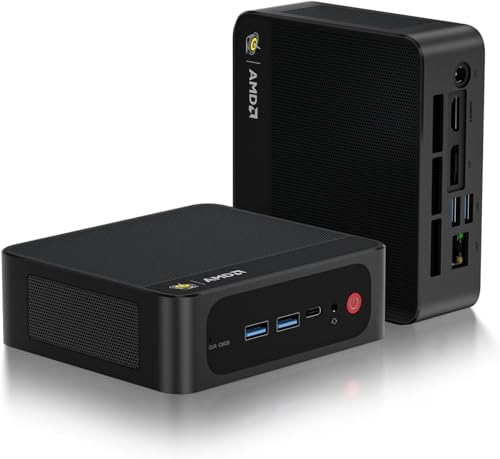
- Ryzen 7 7735U with 8 cores and 16 threads
- Radeon 680M graphics and 16GB LPDDR5 RAM
- Triple display, Wi-Fi 6, and 2.5GbE support
Best For: More demanding streaming and multitasking
Best Budget Streaming Pick

- 16GB RAM expandable to 32GB
- 512GB NVMe SSD and dual 4K HDMI outputs
- Wi-Fi 6 and Bluetooth 5.3 connectivity
Best For: Basic streaming, home office work, and dual-monitor setups
Best All-Around Creator Pick – Ryzen 7 255 Streaming Mini PC
For shoppers comparing mini PCs for live streaming, the ACEMAGICIAN S3A stands out as a performance-focused option with an 8-core/16-thread Ryzen 7 H 255 processor, Radeon 780M graphics, and adjustable power modes. It is suited to streaming alongside editing, multitasking, and other demanding desktop work.
Best For: Content creators, streamers, programmers, and users who want strong multitasking performance in a compact PC.
Pros:
- Ryzen 7 H 255 and Radeon 780M graphics support demanding workloads and streaming.
- Three performance modes let you prioritize quiet operation or maximum output.
- Supports up to three 4K displays and storage expansion up to 4TB.
- Includes a 2-year warranty and lifetime technical support.
Cons:
- The included 16GB memory and 512GB SSD may be limiting for larger production libraries.
- Its integrated graphics are designed for compact-PC workloads rather than a dedicated gaming GPU.
The S3A is a well-rounded choice when streaming is only one part of your setup. Its expandable storage, multi-display support, and selectable power profiles give it useful flexibility for creator workflows.
Best Budget Streaming Workstation – Intel i5-1235U Mini PC
This compact Intel mini PC is a practical option for live streaming, office work, and home entertainment. Its Core i5-1235U processor, 16GB of RAM, and 512GB NVMe SSD provide a balanced starting point, while the upgradeable memory and storage leave room for future needs.
Best For: Everyday streamers, home-theater users, office workers, and buyers who value upgradeability.
Pros:
- 10-core/12-thread Core i5-1235U supports responsive multitasking and streaming tasks.
- RAM can be upgraded to 64GB, and storage supports expansion up to 2TB.
- Three-display support includes HDMI, DisplayPort, and full-featured USB-C.
- Gigabit Ethernet and Wi-Fi 6 provide flexible networking options.
Cons:
- Integrated Intel graphics are better suited to streaming, office work, and casual gaming than demanding gaming.
- The base 512GB storage may fill quickly with recorded broadcasts and media files.
Choose this model if you want a versatile streaming companion without committing to a larger desktop. Its upgrade paths and connectivity are especially useful for a growing home or office setup.
Best Expandable Streaming Powerhouse – Ryzen 7 255 Mini PC
The MINISFORUM X1 Lite-255 is built for demanding users seeking mini PCs for live streaming with generous headroom. Its Ryzen 7 255 processor, Radeon 780M graphics, 32GB of DDR5 memory, and 1TB SSD make it particularly well equipped for streaming alongside heavy multitasking and media work.
Best For: Power users, serious multitaskers, creators with large files, and streamers who want substantial expansion options.
Pros:
- Ryzen 7 255 provides 8 cores, 16 threads, and speeds up to 4.9GHz.
- 32GB DDR5 RAM and a 1TB PCIe 4.0 SSD offer a strong starting configuration.
- Dual M.2 slots support substantial storage expansion, while RAM can reach 128GB.
- 2.5Gbps LAN, Wi-Fi 6E, USB4, and triple-display output provide flexible connectivity.
Cons:
- OCuLink use requires an M.2 SSD slot and is not hot-swappable.
- Its broad expansion feature set may be more than casual streamers need.
This is the strongest fit in the group for users who expect their streaming workstation to grow. The large memory and storage configuration reduce immediate upgrade pressure, while OCuLink adds an external-GPU pathway for specialized needs.
Best Entry-Level Compact Pick – Ryzen PRO 7330U Mini PC
The ACEMAGIC Ryzen PRO 7330U offers an economical starting point for light live streaming, home-theater use, and everyday productivity. Its compact 28W design includes Windows 11 Pro, dual storage bays, and triple-display support, though the modest 8GB RAM and 256GB SSD make it better suited to simpler streaming setups.
Best For: Light streamers, office users, HTPC setups, and buyers who plan to upgrade storage or memory.
Pros:
- Efficient Ryzen PRO 7330U processor uses a 28W design.
- Dual memory slots and dual drive bays allow flexible upgrades.
- Supports three 4K displays through USB-C, HDMI, and DisplayPort.
- Compact chassis, wall mount, and Windows 11 Pro are included.
Cons:
- 8GB RAM and 256GB SSD provide less headroom for intensive streaming and recordings.
- Wi-Fi 5 and Gigabit Ethernet are less advanced than the networking options on the higher-end models.
- Integrated graphics are intended for everyday and multimedia use rather than demanding gaming.
This model makes sense when space, efficiency, and price matter more than maximum production performance. Plan on upgrading memory or storage if you expect to stream regularly while running several applications.
Best Balanced AMD Option – Glorlin Ryzen 7 6800H Mini PC
For shoppers comparing mini PCs for live streaming, the Glorlin offers a capable eight-core Ryzen 7 processor, 16GB of LPDDR5 memory, and integrated Radeon 680M graphics in a compact desktop. Its triple-display support and wired or wireless networking also suit multitasking setups.
Best For: Everyday streaming-related multitasking, office work, content creation, and multi-monitor setups.
Pros:
- Ryzen 7 6800H with 8 cores and 16 threads supports demanding multitasking.
- Triple 4K output through HDMI, DisplayPort, and USB-C.
- Includes WiFi 6, Bluetooth 5.3, dual LAN, and expandable dual M.2 storage.
Cons:
- Integrated Radeon 680M graphics are positioned for light gaming and media rather than high-end graphics workloads.
- Memory is limited to the installed 16GB capacity.
This is a practical choice when your live-streaming workspace also needs multiple displays and dependable connectivity. The 512GB SSD is a reasonable starting point, while the dual M.2 design provides room for additional storage.
Best for Connectivity – GMKtec M6 Ultra Ryzen 7640HS
The GMKtec M6 Ultra stands out among mini PCs for live streaming when fast networking and expansion are priorities. Its Ryzen 5 7640HS, 16GB of DDR5 RAM, 1TB SSD, dual 2.5GbE ports, and USB4 output create a flexible foundation for streaming, office, and home-lab use.
Best For: Streamers who value fast wired networking, storage expansion, and versatile display connectivity.
Pros:
- Ryzen 5 7640HS reaches up to 5.0GHz and includes Radeon 760M graphics.
- Dual 2.5GbE LAN ports support fast wired connections for streaming and networked storage.
- 1TB SSD, two RAM slots, and dual M.2 slots provide substantial expansion potential.
- USB4 supports high-speed data transfer and up to 8K display output.
Cons:
- Ships with 16GB of RAM, so heavier workflows may benefit from an upgrade.
- Graphics are integrated, making it more suitable for casual 1080p gaming than demanding graphics work.
With dual 2.5GbE and broad upgrade support, this model is especially appealing for a streaming setup connected to fast networking or a home server. Its 1TB SSD also gives it more initial storage than the other listed options.
Best for Multitasking – Beelink SER5 MAX Ryzen 7 7735U
The Beelink SER5 MAX is a strong multitasking candidate for buyers evaluating mini PCs for live streaming. It combines an eight-core Ryzen 7 7735U with 24GB of LPDDR5 RAM, Radeon 680M graphics, triple 4K display support, and 2.5G Ethernet for a compact streaming or productivity station.
Best For: Multitaskers handling streaming-related applications, editing tools, office software, and multiple monitors.
Pros:
- 24GB of LPDDR5 RAM supports heavier multitasking out of the box.
- Ryzen 7 7735U has 8 cores, 16 threads, and boost speeds up to 4.75GHz.
- Radeon 680M graphics and triple 4K output suit media and multi-display workflows.
- 2.5G LAN, WiFi 6, and Bluetooth 5.4 provide flexible connectivity.
Cons:
- The included 500GB SSD offers less starting storage than the GMKtec model.
- Integrated graphics are better suited to the listed esports and media uses than demanding gaming.
The SER5 MAX is a sensible pick if having more memory immediately matters for running several applications alongside a stream. Its quiet dual-cooling design and triple-display support further suit a compact desk-based workstation.
Best Value Office Pick – GMKtec NucBox G10 Ryzen 5 Mini PC
For shoppers comparing mini PCs for live streaming, the GMKtec NucBox G10 is a compact, budget-conscious option for basic streaming, media playback, and everyday multitasking. Its Ryzen 5 3500U processor, 16GB of memory, and integrated Radeon Vega 8 graphics are better suited to lighter workloads than demanding production setups.
Best For: Home-office users, casual live streaming, media playback, and multi-monitor productivity.
Pros:
- 16GB RAM and a 512GB PCIe 4.0 M.2 SSD provide a practical everyday configuration.
- Triple-display support through HDMI, DisplayPort, and full-function USB-C.
- 2.5GbE networking, Wi-Fi 5, and Bluetooth 5.2 offer flexible connectivity.
- Compact design includes a VESA mount and several USB ports.
Cons:
- Ryzen 5 3500U and Vega 8 graphics are aimed at light workloads, not intensive streaming production.
- Wireless connectivity is Wi-Fi 5 rather than Wi-Fi 6.
The G10 makes sense when desk space and price matter more than maximum encoding performance. Its wired 2.5GbE connection and multiple display outputs are useful for a straightforward streaming workstation, while the older processor limits its appeal for complex scenes or heavy video editing.
Best Performance Pick – Beelink SER5 Max Ryzen 7 Mini PC
The Beelink SER5 Max is the strongest option here for mini PCs for live streaming, thanks to its eight-core Ryzen 7 7735U processor, 16GB LPDDR5 memory, and Radeon 680M graphics. It is designed for users who want more headroom for streaming software, multitasking, 4K playback, and light editing.
Best For: More demanding live-streaming workflows, multitasking, light video editing, and triple-monitor use.
Pros:
- Eight cores and 16 threads provide substantially more multitasking capacity than the Ryzen 5 models listed here.
- Radeon 680M graphics support 4K playback and light gaming.
- HDMI, DisplayPort, and USB-C enable triple-display setups.
- Wi-Fi 6, Bluetooth 5.4, and 2.5GbE support fast wired and wireless connections.
Cons:
- Memory is listed as 16GB maximum, so it cannot be expanded beyond that configuration.
- The 45W processor may require more cooling and power than the lower-power alternatives.
Choose the SER5 Max if streaming performance and responsive multitasking are priorities. Its modern processor, faster LPDDR5 memory, and Radeon 680M graphics give it the clearest performance advantage, although buyers who need extensive future memory upgrades may prefer a more expandable system.
Best Budget Streaming Pick – Getorli GT101 Ryzen 5 Mini PC
The Getorli GT101 is a practical entry-level choice among mini PCs for live streaming. Its Ryzen 5 3500U, 16GB DDR4 RAM, and 512GB NVMe SSD cover everyday streaming, browsing, and basic multitasking, while dual HDMI outputs make it easy to build a simple two-screen setup.
Best For: Budget-conscious streamers, home offices, basic media streaming, and dual-monitor workstations.
Pros:
- 16GB RAM is expandable to 32GB for additional multitasking capacity.
- 512GB NVMe storage offers quick boot and application loading times.
- Dual HDMI outputs support two 4K displays.
- Wi-Fi 6, Bluetooth 5.3, USB-C, and multiple USB ports provide broad connectivity.
Cons:
- The four-core Ryzen 5 3500U is better suited to basic streaming than complex production workloads.
- Only a one-year manufacturer warranty is listed.
The GT101 stands out for its combination of expandable memory, dual-display support, and modern wireless connectivity at a budget-oriented level. It is a sensible choice for straightforward streaming and office use, but users running demanding scenes or extensive video editing should consider the faster Beelink instead.
How We Picked the Best Mini PCs for Live Streaming
We focused on the hardware features that matter most during real streaming sessions: processor core count, integrated graphics capability, memory, SSD capacity, display support, connectivity, and upgrade flexibility. Systems with modern Ryzen 7 or Core i5-class processors generally offer more headroom for broadcasting, gaming, recording, chat moderation, and browser tabs at the same time.
We also included more affordable Ryzen 5 and entry-level options for creators who stream less demanding games, camera content, tutorials, or office-based presentations. Specifications such as USB4, 2.5Gb Ethernet, Wi-Fi 6, multiple display outputs, and dual-LAN connectivity can make a meaningful difference in a permanent studio setup.
Quick Comparison
| Best For | Recommended Hardware | Why It Stands Out |
|---|---|---|
| Highest overall headroom | Ryzen 7 255 or Ryzen 7 7640HS | Strong multicore performance for demanding multitasking |
| Memory-heavy workflows | 32GB RAM configuration | More room for OBS, browsers, plugins, and editing tools |
| Balanced gaming and streaming | Ryzen 7 7735U models | Efficient 8-core performance with capable integrated graphics |
| Budget streaming | Ryzen 5 3500U or entry-level Core i5 | Lower cost for simpler broadcasts and lighter games |
Key Buying Factors for Mini PCs for Live Streaming
Processor and Encoding Performance
Choose an 8-core processor if you plan to stream games while running several applications. More cores help with OBS, browser sources, Discord, recording, and background tasks. Hardware encoding support can reduce CPU load, but actual results depend on your streaming software, game, resolution, and bitrate.
Memory and Storage
Sixteen gigabytes of RAM is a sensible minimum for most setups. Choose 24GB or 32GB if you use multiple scenes, animated overlays, virtual cameras, editing software, or many browser tabs. A 512GB SSD works for basic streaming, while a 1TB drive provides more room for recordings, games, and media assets.
Graphics, Displays, and Ports
Integrated Radeon graphics are suitable for many esports titles, indie games, emulation, and lower-demand broadcasts, but they are not a substitute for a discrete GPU in demanding modern games. Check HDMI, DisplayPort, USB-C, and USB-A layouts before buying. Multiple video outputs are useful for a gaming display plus a chat or control monitor.
Networking and Cooling
Wired Ethernet is preferable for consistent streams. A 2.5Gb LAN port is valuable for fast local transfers, while Wi-Fi 6 is helpful when cabling is inconvenient. Compact systems should also have adequate ventilation and a reliable cooling design, especially during long broadcasts.
Who Should Buy Which Mini PCs for Live Streaming?
Choose a Ryzen 7 255 or Ryzen 7 7640HS model if you want the strongest compact platform for gaming, streaming, recording, and creator multitasking. Choose a Ryzen 7 7735U system for a balanced everyday setup with solid efficiency and integrated graphics.
Choose a 32GB configuration if your streams use numerous browser sources, plugins, or simultaneous applications. Choose a Ryzen 5 3500U or basic Core i5 model if you mainly stream camera content, tutorials, office work, or lightweight games and want to keep costs down.
Before ordering, verify the exact RAM and SSD configuration, operating system, available ports, upgrade options, and return coverage. For demanding AAA gaming streams, plan on using a dedicated gaming PC or external capture setup rather than expecting any mini PC to replace a full desktop with a discrete graphics card.