
The best mini PCs for YouTube streaming combine dependable multitasking, fast storage, and enough graphics capability for encoding, editing, and live production without taking over your desk.
This roundup compares 10 compact Windows systems across entry-level, mainstream, and performance-focused configurations, so you can match processing power and connectivity to your streaming setup.
Best 10 Mini PCs for YouTube Streaming Picks for 2026
Best Performance Pick
ACEMAGICIAN S3A Ryzen 7 Mini PC

- Ryzen 7 H 255 with Radeon 780M graphics
- Triple 4K display support
- Expandable storage up to 4TB
Best For: YouTube streaming and content creation
Best Intel Multitasker

- Intel Core i5-13500H processor
- Expandable RAM up to 64GB
- Included VESA mounting bracket
Best For: Streaming with office and multi-monitor tasks
Best Value Streaming Setup

- Ryzen 5 7530U processor
- Three 4K display outputs
- Wi-Fi 6 and dual M.2 storage slots
Best For: Everyday streaming and home-office use
Best Connectivity Pick
MINISFORUM NAB6 Lite i5-12600H

- Dual 2.5G Ethernet ports
- Four-screen display support
- Upgrade-friendly DDR4 and SSD design
Best For: Streaming with wired networking and multiple displays
Best for Easy Setup
GMKtec M6 Ultra Ryzen 5 Mini PC

- Ryzen 5 7640HS with Radeon 760M graphics
- 16GB DDR5 RAM and 1TB PCIe SSD
- Dual 2.5GbE, USB4, and triple-display support
Best For: YouTube streaming, multitasking, and expandable workstations
Best Budget-Friendly Pick

- Compact, low-power design for everyday use
- 16GB RAM with a 256GB SSD
- Dual 4K display support and expandable storage
Best For: Basic streaming, browsing, and compact home-office setups
Best Multitasking Value
ACEMAGICIAN K1 Ryzen 7 Mini PC

- 8-core, 16-thread Ryzen 7 7730U processor
- 16GB RAM and 512GB PCIe SSD
- Triple 4K display support with USB Type-C
Best For: Multitasking, streaming, office work, and light creative tasks
Best Value Office Pick

- 16GB RAM and 512GB PCIe 4.0 SSD
- Supports triple 4K@60Hz displays
- 2.5GbE, Wi-Fi 5, and VESA mounting
Best For: Home offices, YouTube viewing, and light multitasking
Best Heavy-Duty Pick
Beelink SER5 Max Ryzen 7 Mini PC
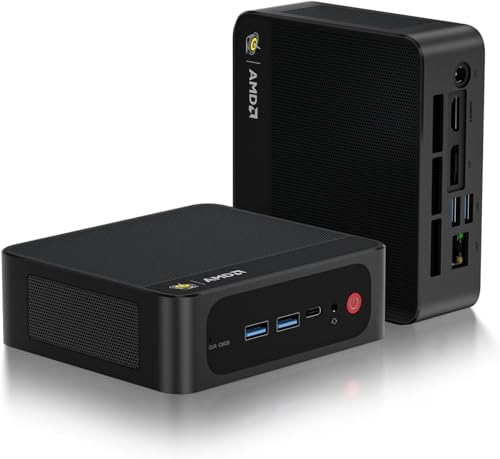
- Ryzen 7 7735U with 8 cores and 16 threads
- Radeon 680M supports triple 4K displays
- Wi-Fi 6, 2.5GbE, and three-year warranty
Best For: Multitasking, 4K playback, and creative workloads
Best Budget Streaming Pick

- 16GB RAM expandable to 32GB
- 512GB NVMe SSD for quick storage performance
- Dual HDMI supports two 4K displays
Best For: Budget streaming, browsing, and home-office setups
Best Performance Pick – ACEMAGICIAN S3A Ryzen 7 Mini PC
For buyers seeking mini PCs for YouTube streaming, the ACEMAGICIAN S3A stands out with its 8-core/16-thread Ryzen 7 H 255 processor and Radeon 780M graphics. Its adjustable performance modes, fast LPDDR5 memory, and quiet cooling make it well suited to streaming alongside other creative or productivity tasks.
Best For: YouTube streaming, content creation, multitasking, and users who need strong integrated graphics.
Pros:
- Ryzen 7 H 255 and Radeon 780M graphics provide capable processing for streaming and creation.
- Supports up to three 4K displays through HDMI, DisplayPort, and USB4 Type-C.
- 512GB PCIe 4.0 SSD and removable storage design support expansion up to 4TB.
- Silent, Auto, and Performance modes let you balance noise and performance.
Cons:
- Included memory is 16GB LPDDR5 and is not described as user-upgradeable.
- Performance mode can use substantially more power than Silent mode.
The S3A is the strongest all-around option here for creators who want streaming capability plus room for editing, programming, and multi-display work. Its 2-year warranty and lifetime technical support add useful reassurance.
Best Intel Multitasker – INYUDA i5-13500H Mini PC
The INYUDA mini PC is a practical choice among mini PCs for YouTube streaming if you also need responsive office software, media playback, and multiple displays. Its Intel Core i5-13500H processor, 16GB DDR4 RAM, and Wi-Fi 6 connectivity provide a capable foundation for everyday streaming workflows.
Best For: YouTube streaming, office multitasking, video calls, and multi-monitor workspaces.
Pros:
- Intel Core i5-13500H processor is designed for demanding multitasking.
- Intel Iris Xe graphics support native 4K playback and multi-monitor use.
- Memory can be expanded from 16GB up to 64GB using the dual SODIMM slots.
- Compact design includes a VESA mounting bracket for a clean setup.
Cons:
- Integrated Iris Xe graphics are aimed at multimedia and casual gaming rather than demanding graphics work.
- Storage expansion is specified up to 2TB, less than some competing models.
Choose this model if your streaming setup also involves numerous browser tabs, office applications, and displays. Its included wall-mount hardware is especially useful for space-conscious desks.
Best Value Streaming Setup – KAMRUI E3B Ryzen 5 Mini PC
For straightforward YouTube streaming and everyday use, the KAMRUI E3B offers an efficient Ryzen 5 7530U platform, 16GB of memory, and a 512GB SSD. It also provides Wi-Fi 6, a full-function USB-C port, and three 4K display outputs for a flexible home or office setup.
Best For: Everyday YouTube streaming, browsing, office work, and efficient multi-display setups.
Pros:
- Six-core Ryzen 5 7530U processor handles everyday multitasking and streaming tasks.
- Full-function USB-C supports 10Gbps data, 4K/60Hz display output, and PD output.
- Two M.2 slots support storage expansion up to 2TB per slot according to the supplied notes.
- Wi-Fi 6 and Bluetooth 5.2 provide modern wireless connectivity.
Cons:
- 16GB LPDDR4X memory is non-upgradeable.
- Radeon RX Vega 7 graphics are more suited to everyday multimedia than demanding creation.
The E3B is a sensible pick when you want capable streaming basics, plenty of ports, and storage flexibility without prioritizing high-end creative performance. Its efficient 15W processor is also well matched to routine home and office use.
Best Connectivity Pick – MINISFORUM NAB6 Lite i5-12600H
The MINISFORUM NAB6 Lite is a strong option among mini PCs for YouTube streaming when reliable networking and abundant connections matter. Its Core i5-12600H processor, dual 2.5G Ethernet ports, Wi-Fi 6, and support for up to four displays suit streaming, media playback, and productivity-heavy setups.
Best For: YouTube streaming with wired networking, multi-display productivity, and home or business media use.
Pros:
- Core i5-12600H provides 12 cores and 16 threads for multitasking.
- Dual 2.5G Ethernet ports support flexible wired networking applications.
- Supports four-screen output through HDMI and USB-C connections.
- DDR4 memory and the 500GB PCIe 4.0 SSD can be upgraded through the pop-up housing design.
Cons:
- Integrated Intel graphics are intended for streaming and light gaming rather than demanding graphics workloads.
- Supplied storage is 500GB, slightly below the 512GB capacity offered by several alternatives.
The NAB6 Lite makes the most sense for users who value network flexibility and multiple displays as much as streaming performance. Its dual 2.5G LAN ports are a notable advantage for advanced home or small-business setups.
Best for Easy Setup – GMKtec M6 Ultra Ryzen 5 Mini PC
For demanding mini PCs for YouTube streaming setups, the GMKtec M6 Ultra offers strong processing power, fast storage, and flexible display connectivity. Its Ryzen 5 7640HS processor, Radeon 760M graphics, 16GB of DDR5 RAM, and 1TB SSD make it well suited to streaming, multitasking, and light content creation.
Best For: YouTube streaming, multitasking, home offices, and users who want room to expand memory and storage.
Pros:
- Ryzen 5 7640HS with 6 cores and 12 threads supports demanding everyday workloads.
- 16GB DDR5 RAM and a 1TB PCIe SSD provide responsive performance and useful starting capacity.
- Dual 2.5GbE ports, Wi-Fi 6E, and USB4 offer versatile networking and connectivity.
- Supports up to three displays, including USB4 output up to 8K at 60Hz.
Cons:
- Its higher-performance hardware may be more than needed for basic streaming and browsing.
- The product notes describe a 3.5mm audio jack but do not specify a built-in microphone or webcam.
The M6 Ultra is the strongest all-around option in this group for creators who want extra headroom. Expandable RAM and storage also make it a practical choice for a growing streaming workstation.
Best Budget-Friendly Pick – KAMRUI AK1PLUS N5095 Mini PC
The KAMRUI AK1PLUS is a compact, low-power choice for straightforward mini PCs for YouTube streaming setups. Its Intel Celeron N5095 processor, 16GB of LPDDR4X memory, and 256GB SSD are aimed at browsing, video playback, video conferencing, and everyday multitasking rather than demanding production work.
Best For: Basic YouTube streaming, home offices, online classes, and compact media-center use.
Pros:
- Compact 5.04-by-5.04-by-2.05-inch design fits easily on a small desk.
- 16GB RAM supports everyday multitasking, while the SSD helps with boot and app loading.
- Dual HDMI 2.0 outputs support two 4K displays at 60Hz.
- Storage can expand through an additional M.2 drive and a 2.5-inch SATA drive.
Cons:
- The Celeron N5095 is less suited to intensive streaming production or demanding editing.
- The included 256GB SSD offers less starting storage than the other options here.
- Networking is limited to Gigabit Ethernet and 802.11ac wireless connectivity.
Choose the AK1PLUS when affordability, low power use, and a small footprint matter more than creator-focused performance. It can handle routine streaming and media tasks, but heavy encoding or editing may call for a faster processor.
Best Multitasking Value – ACEMAGICIAN K1 Ryzen 7 Mini PC
The ACEMAGICIAN K1 is a balanced option for mini PCs for YouTube streaming, especially when streaming is combined with office work, media playback, or light creative tasks. Its Ryzen 7 7730U processor has 8 cores and 16 threads, while 16GB of DDR4 RAM and a 512GB PCIe SSD provide a capable everyday foundation.
Best For: Multitasking streamers, home offices, light creative work, and users who need triple-display support.
Pros:
- Ryzen 7 7730U delivers 8-core, 16-thread performance for multitasking.
- 512GB PCIe SSD offers more starting storage than the KAMRUI AK1PLUS.
- HDMI, DisplayPort, and USB Type-C support triple-display output at up to 4K.
- Five USB 3.2 ports, Wi-Fi 6, Bluetooth 5.2, and Gigabit Ethernet provide broad connectivity.
Cons:
- It uses DDR4 memory rather than the newer DDR5 standard.
- The listed wired network connection is Gigabit Ethernet, not 2.5GbE.
- The product notes do not specify a dedicated graphics card for intensive gaming or production.
The K1 sits between the other two systems in practical appeal: it offers substantially more multitasking capacity than the entry-level model without the M6 Ultra’s higher-end networking and DDR5 platform. Its triple-display support is useful for a streaming or productivity desk.
Best Value Office Pick – GMKtec Ryzen 5 3500U Mini PC
For shoppers comparing mini PCs for YouTube streaming, the GMKtec NucBox G10 offers a practical mix of everyday performance, 4K video playback, and compact connectivity. Its Ryzen 5 3500U processor, 16GB of memory, and 512GB PCIe 4.0 SSD suit home-office work, browsing, multimedia, and light multitasking.
Best For: Home offices, YouTube viewing, light productivity, and compact media setups.
Pros:
- Ryzen 5 3500U with Radeon Vega 8 graphics supports everyday computing and 4K video playback.
- Supports up to three 4K@60Hz displays through HDMI, DisplayPort, and USB-C.
- Includes 2.5GbE networking, Wi-Fi 5, Bluetooth 5.2, and a VESA mount.
Cons:
- Older Ryzen 3000-series processor compared with newer mini PCs.
- Integrated graphics are aimed at light gaming and multimedia rather than demanding gaming.
The G10 is a sensible budget-oriented choice when your YouTube use centers on watching streams, web browsing, and office tasks. Triple-display support and 2.5GbE give it flexibility for desk-based workflows, while its compact design keeps the setup unobtrusive.
Best Heavy-Duty Pick – Beelink SER5 Max Ryzen 7 Mini PC
Among mini PCs for YouTube streaming, the Beelink SER5 Max stands out for users who want more processing headroom. Its Ryzen 7 7735U, 16GB LPDDR5 memory, and 500GB PCIe 4.0 SSD are well suited to streaming playback, multitasking, creative applications, and demanding everyday workloads.
Best For: Heavy multitasking, 4K streaming playback, photo and video editing, and multi-monitor workstations.
Pros:
- Eight-core, 16-thread Ryzen 7 7735U processor reaches up to 4.75GHz.
- Radeon 680M graphics and HDMI, DisplayPort, and USB-C support triple 4K displays.
- Includes Wi-Fi 6, Bluetooth 5.4, 2.5GbE, and a three-year warranty.
Cons:
- Memory is listed as 16GB maximum, limiting future RAM expansion.
- Higher 45W power consumption than the lower-power options in this roundup.
The SER5 Max is the strongest all-around performer here for users who stream while keeping numerous applications open. Its modern processor, fast LPDDR5 memory, and broad display connectivity make it a better fit for demanding work than basic streaming and browsing alone.
Best Budget Streaming Pick – Getorli Ryzen 5 3500U Mini PC
The Getorli is a straightforward option for shoppers seeking mini PCs for YouTube streaming without paying for high-end hardware. With a Ryzen 5 3500U, 16GB of expandable DDR4 RAM, and a 512GB NVMe SSD, it covers browsing, media streaming, office tasks, and light multitasking in a small footprint.
Best For: Budget home-office setups, YouTube playback, browsing, and dual-monitor use.
Pros:
- 16GB DDR4 RAM can be expanded to 32GB for additional multitasking capacity.
- 512GB NVMe SSD provides quick boot and application-loading performance.
- Dual HDMI outputs support two 4K displays, with Wi-Fi 6 and Bluetooth 5.3 included.
Cons:
- Ryzen 5 3500U is an older four-core processor.
- Graphics are intended for everyday media use and light gaming rather than demanding titles.
The Getorli makes the most sense for a simple, affordable streaming and productivity station. Its dual-4K HDMI support, upgradeable memory, and modern wireless connections provide useful flexibility, while the compact design saves desk space.
How We Picked the Best Mini PCs for YouTube Streaming
We evaluated these systems by focusing on the hardware that most directly affects streaming: processor performance, integrated graphics, memory, storage, upgrade options, and display connectivity. We also considered whether each mini PC is better suited to basic webcam streaming, multi-source production, gaming broadcasts, video editing, or general home-office use.
Most models include 16GB of RAM and at least a 256GB or 512GB SSD, which is a sensible starting point for OBS, browser tabs, chat, and creator software. Higher-end Ryzen and Intel processors are better choices for simultaneous recording, editing, gaming, and streaming, while entry-level systems make more sense for simple camera-and-microphone broadcasts.
Quick Comparison
- Best performance headroom: Choose a Ryzen 7 7735U, Ryzen 7 H 255, Ryzen 7 7730U, Ryzen 7 7735U-class, or Intel Core i5-12600H system.
- Best gaming-streaming potential: Prioritize newer Ryzen chips with Radeon integrated graphics, such as the 7640HS or H 255 configurations.
- Best balanced everyday option: A Ryzen 5 7530U or comparable Core i5 mini PC offers practical performance for streaming, office work, and light editing.
- Best budget setup: Celeron N5095 and older Ryzen 5 systems can handle basic streaming, but they offer less multitasking and gaming headroom.
Key Buying Factors for Mini PCs for YouTube Streaming
Processor and Encoding Performance
Streaming software, browser sources, video calls, and background applications can quickly load a processor. Look for a modern six- or eight-core CPU if you plan to stream regularly or edit video. Entry-level four-core chips are best reserved for uncomplicated broadcasts at modest settings.
RAM and Storage
Sixteen gigabytes of memory is the practical minimum for a comfortable streaming workstation. A 512GB SSD gives you room for applications and active projects, while a 1TB drive is more convenient if you record frequently. Check whether the RAM is replaceable before buying if you expect your workflow to grow.
Graphics, Displays, and Connectivity
Integrated graphics can handle webcam production, hardware-assisted encoding, and multiple displays, but gaming streamers should favor newer Radeon graphics and stronger cooling. HDMI, DisplayPort, USB ports, Ethernet, Wi-Fi, and dual-monitor support are equally important when connecting cameras, microphones, capture devices, and external storage.
Cooling and Reliability
Compact computers have limited space for airflow. A system with a stronger cooling design may sustain performance better during long broadcasts. Confirm the included power adapter, operating system, warranty terms, and user feedback before purchase.
Who Should Buy Which Mini PCs for YouTube Streaming?
Choose a higher-end Ryzen 7 or Core i5 model for frequent live production, gaming broadcasts, editing, multiple displays, or several simultaneous applications. Choose a Ryzen 5 system for a balanced home studio, office, and occasional streaming setup. Choose an entry-level Celeron model only when your priority is affordable basic streaming, media playback, and everyday productivity rather than demanding gaming or editing.