
Accurate color starts with a trustworthy reference. The best monitor calibration tools for video editing help you correct display color, brightness, and white balance so creative decisions hold up across screens.
This roundup includes current colorimeters, camera-reference charts, and combination kits for beginners, editors, and professional video workflows. Match the tool to your display, software, and required level of precision.
Best 10 Monitor Calibration Tools for Video Editing Picks for 2026
In-Camera Color Control

- Includes two video targets
- Supports custom white balance
- Helps match multiple cameras
Best For: Field production and post-production color matching
Simple Everyday Calibration

- Guided single-click workflow
- Room-light monitoring
- Calibrates multiple displays
Best For: First-time users and standard laptop or desktop monitors
Portable Display Matching
- Compact and self-contained
- Calibrates monitors and projectors
- Includes diffuser and tripod mount
Best For: Portable monitor and projector calibration
Advanced Display Control

- Deep grayscale calibration and display analysis
- Supports displays up to 12,000 nits
- Exports 3D LUTs for video monitors
Best For: Video editors with advanced or multi-monitor setups
Capture-to-Display Accuracy

- Colorimeter measures up to 10,000 nits
- Includes Passport Video 2 reference targets
- Supports camera matching and monitor profiling
Best For: Creators needing on-set and post-production color control
Simple Capture Reference
DKC-Pro Color Calibration Charts

- Includes two 5-by-7-inch reference cards
- Provides 12% and 18% gray targets
- Adds 18 color patches for correction
Best For: Creators seeking an affordable physical color reference
Reliable Display Calibration

- Automated color and brightness calibration
- Calibrates multiple displays with one sensor
- Includes quick ReCAL assistance
Best For: Multi-monitor users seeking repeatable calibration
Camera-to-Display Color Reference
ColorChecker Classic 24-Patch Chart

- Offers 24 formulated color reference patches
- Supports white balance and exposure checks
- Enables profile creation with PROFILER software
Best For: Video teams seeking consistent capture and grading references
Simple Dual-Monitor Calibration

- Uses a guided Easy 1 2 3 workflow
- Calibrates up to two displays
- Includes USB-C and a before-and-after check
Best For: Creators wanting easy dual-monitor calibration
High-Brightness Precision – Display Pro HL
For editors working with HDR, OLED, mini-LED, or bright modern displays, the Calibrite Display Pro HL is one of the more capable monitor calibration tools for video editing. Its high-luminance sensor measures up to 3000 nits, while PROFILER software supports detailed control over white point, luminance, gamma, and other settings.
Best For: Video editors and creative studios calibrating high-brightness displays or multiple monitors.
Pros:
- Measures displays up to 3000 nits, including compatible LCD, mini-LED, OLED, and Apple XDR screens.
- Offers Basic and Advanced PROFILER modes with custom presets and patch sets.
- Includes profile validation, uniformity checks, Quick Check, and flare correction tools.
- Supports Mac and Windows, multiple-monitor workflows, and USB-C with a USB-A adapter.
Cons:
- Its advanced controls may be more than beginners need.
- High-luminance capabilities may be unnecessary for standard-brightness displays.
The Display Pro HL is a strong choice when accurate highlight handling and repeatable color across several workstations matter. It is especially well suited to professional HDR-oriented editing setups.
In-Camera Color Control – ColorChecker Passport Video 2
The ColorChecker Passport Video 2 is a portable reference target rather than a monitor sensor, making it a useful companion to monitor calibration tools for video editing. It helps editors and camera operators establish consistent white balance, color, and camera matching across changing or mixed lighting conditions.
Best For: Video creators matching multiple cameras and maintaining consistent color from capture through post-production.
Pros:
- Includes two video targets for in-camera use or post-production editing software.
- Provides a White Balance target for custom in-camera white balance.
- Includes a ColorChecker Classic 24 patch target for custom camera profiles.
- Portable protective case, adjustable positioning, and included lanyard support field use.
Cons:
- It does not directly calibrate a monitor.
- Its value depends on incorporating a reference target into the shooting workflow.
This Passport is best viewed as a capture-side color-control tool. Used alongside a calibrated display, it can make camera matching and post-production color decisions more consistent.
Simple Everyday Calibration – Spyder X Pro
The Datacolor Spyder X Pro is designed for straightforward display calibration, making it an approachable option among monitor calibration tools for video editing. Its wizard workflow, single-click calibration, room-light monitoring, and automatic profile changing help users improve color consistency without needing extensive calibration experience.
Best For: First-time users, photographers, and editors calibrating laptop and desktop displays.
Pros:
- Uses a lens-based color engine for display color, shadow-detail, and white-balance accuracy.
- Provides a guided workflow with single-click calibration and 12 predefined targets.
- Supports room-light monitoring and automatic profile changing.
- Can calibrate multiple laptop and desktop monitors.
Cons:
- The supplied notes focus on photographic display accuracy rather than advanced HDR calibration.
- It lacks the high-luminance measurement specification listed for the Display Pro HL.
Spyder X Pro prioritizes ease of use and repeatable everyday results. It is a practical starting point for creators who want a guided calibration process across common laptop and desktop screens.
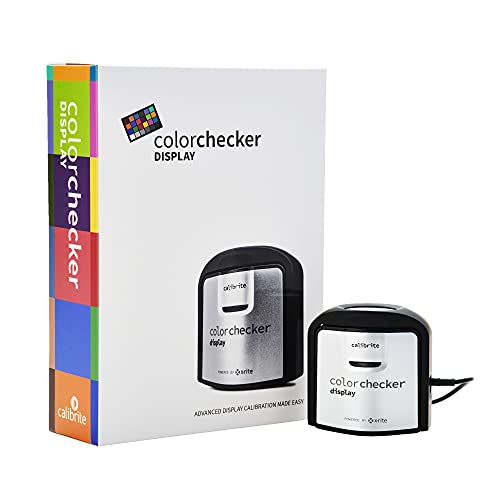
Portable Display Matching – ColorChecker Display
The Calibrite ColorChecker Display is a compact colorimeter for monitor and projector calibration. Its portable design, intuitive ccStudio software, repeatable optical system, and rotatable diffuser make it a flexible option among monitor calibration tools for video editing, particularly when work involves more than one display type.
Best For: Editors and creators who need portable calibration for monitors, laptops, or projectors.
Pros:
- Compact, self-contained design supports portable use.
- Optical design is intended to provide repeatable results across display types.
- Rotatable diffuser supports ambient-light measurement, tabletop projector profiling, and optic protection.
- Integrated tripod mount helps with projector profiling in larger venues.
Cons:
- The supplied notes do not specify high-brightness or HDR measurement capability.
- Projector-focused features may be unnecessary for monitor-only workflows.
ColorChecker Display stands out for portability and projector flexibility. It is a sensible choice when a calibration tool must travel between editing stations or support both monitors and projectors.
Advanced Display Control – SpyderPro Monitor Calibrator
For editors looking for monitor calibration tools for video editing, the datacolor SpyderPro combines fast standard calibration with deeper grayscale measurement and advanced display analysis. It supports modern OLED, mini-LED, QD-OLED, Apple XDR, and other displays, while also offering 3D LUT export for compatible video monitors.
Best For: Video editors and creators managing high-brightness displays or multi-monitor workflows.
Pros:
- Supports Rec.709, Rec.2020, and DCI-P3 3D LUT export.
- Calibrates displays up to 12,000 nits and supports many backlight types.
- Offers deeper grayscale calibration, display analysis, StudioMatch, and SpyderTune.
- Includes USB-C connectivity, a USB-A adapter, and multi-language software.
Cons:
- Advanced features may be more than casual users need.
- Some capabilities depend on compatible displays, software, and computer performance.
The SpyderPro is the most comprehensive choice here for post-production users who need detailed profiling, broad display compatibility, and tools for maintaining consistency across multiple screens.
Capture-to-Display Accuracy – Calibrite Video Photo Kit
The Calibrite Video Photo Kit pairs a high-luminance colorimeter with a ColorChecker Passport Video 2, making it one of the more complete monitor calibration tools for video editing. It addresses both display profiling and on-set reference needs, helping creators carry consistent color from capture through post-production.
Best For: Videographers and photographers who need camera references alongside monitor calibration.
Pros:
- Display Plus HL measures monitors up to 10,000 nits.
- Profiles mini-LED, OLED, and Apple XDR displays.
- Passport Video 2 supports white balance, exposure, grayscale, and camera matching.
- Includes access to Calibrite PROFILER software and works with Windows and macOS.
Cons:
- Its included capture reference tools may be unnecessary for monitor-only users.
- Software access requires a download.
This kit is a strong fit when color consistency matters both on set and in the editing room. Its two-part design offers more workflow coverage than a standalone colorimeter.
Simple Capture Reference – DKC-Pro Color Calibration Charts
These DKC-Pro charts are a straightforward companion to monitor calibration tools for video editing. Rather than profiling a display directly, they provide 12% and 18% gray references plus color patches for white balance and digital correction in applications such as Adobe Photoshop and Lightroom.
Best For: Budget-conscious creators who need physical white-balance and color references.
Pros:
- Includes two 5-by-7-inch calibration cards.
- Provides 12% and 18% gray references for white balance.
- Offers 18 color patches for digital color correction.
- n-Chrome coating is designed to improve saturation, luminance, and accuracy.
Cons:
- Does not directly calibrate or profile a monitor.
- Its supplied software references focus on Photoshop and Lightroom rather than dedicated video calibration.
- It lacks the automated display measurement features of a colorimeter.
The DKC-Pro set can improve capture and correction consistency at a low-complexity entry point, but it should be viewed as a reference chart rather than a replacement for a dedicated monitor calibrator.
Reliable Display Calibration – Spyder4Pro S4P100
The Datacolor Spyder4Pro is a practical choice among monitor calibration tools for video editing when you want automated color and brightness calibration across multiple displays. Its full-spectrum sensor and ReCAL feature support repeatable calibration as your monitor changes over time.
Best For: Editors and creators calibrating more than one display who want automated adjustments and quick recalibration.
Pros:
- Automates color and brightness calibration.
- One sensor can calibrate multiple displays.
- Double-shielded color filters are designed for improved accuracy and long-term stability.
- ReCAL helps speed up repeat calibration.
Cons:
- It is an older Spyder4 model rather than a current-generation colorimeter.
- The supplied notes do not specify support for newer connection standards or operating systems.
The Spyder4Pro stands out for its multi-display support and convenient recalibration workflow. It is worth considering if those features matter more to your setup than having the newest hardware platform.
Camera-to-Display Color Reference – ColorChecker Classic 24-Patch Chart
The Calibrite ColorChecker Classic is a camera-side reference tool that complements monitor calibration tools for video editing. Its 24 scientifically formulated patches help with white balance, exposure evaluation, color grading, and profile creation for more predictable footage.
Best For: Filmmakers and editors who need a consistent in-camera reference for multi-camera shoots, varied lighting, or color-critical deliverables.
Pros:
- Provides 24 color patches for dependable color comparison.
- Supports white balance and exposure evaluation under the same lighting as the subject.
- Can support custom DNG and ICC camera profiles with Calibrite PROFILER software.
- Useful for maintaining consistency across cameras and production days.
Cons:
- It is a physical color reference target, not a monitor colorimeter.
- Profile creation requires Calibrite PROFILER software.
The ColorChecker Classic is best viewed as a production and camera-profiling aid rather than a replacement for screen calibration hardware. Used at capture, it can give your editing workflow a reliable reference for later corrections and grading.
Simple Dual-Monitor Calibration – Calibrite Display 123
The Calibrite Display 123 is an approachable option among monitor calibration tools for video editing, with guided Easy 1 2 3 software and a USB-C connection. It can calibrate up to two displays and includes a before-and-after check to help confirm the effect of calibration.
Best For: Photographers, video editors, and creators who want straightforward calibration for a dual-monitor workspace.
Pros:
- Guided Easy 1 2 3 workflow simplifies setup.
- Supports calibration of up to two displays.
- USB-C connection and adjustable counterweight support flexible screen placement.
- Before-and-after comparison makes changes easy to review.
Cons:
- It supports up to two displays, which may not suit larger monitor arrays.
- The supplied notes describe brightness targets as Native or Photo, without listing advanced video-specific targets.
Display 123 is a strong fit for users who prioritize an uncomplicated workflow and dual-screen consistency. Its comparison view is especially useful when you want immediate confirmation that calibration changed the display as expected.
How We Picked the Best Monitor Calibration Tools for Video Editing
We compared these tools by looking at the job they perform, the displays and brightness levels they support, included software, portability, workflow compatibility, and ease of use. Display colorimeters directly measure a monitor and create a correction profile, while gray cards and color charts help establish consistent capture and grading references. Because those tools solve different problems, the list includes both standalone options and bundled workflows.
We also considered whether a product suits modern LCD, Mini-LED, or OLED panels, as well as whether it makes sense for occasional creators or color-critical production environments. Manufacturer claims such as supported luminance should be checked against your exact monitor and operating system before purchase.
Quick Comparison
- Best for advanced displays: Choose a current Calibrite or Datacolor colorimeter designed for high-brightness panels.
- Best for camera matching: Use a ColorChecker Passport Video, ColorChecker Classic, or gray-chart kit alongside monitor calibration.
- Best for beginners: Look for guided software and a straightforward USB workflow, such as an entry-level display calibrator.
- Best value for an established setup: An older colorimeter can work, but verify software and operating-system support first.
Key Buying Factors for Monitor Calibration Tools for Video Editing
Display Technology and Brightness
Check whether the device supports your panel type and target brightness. HDR, OLED, and high-nit displays can require more capable hardware than a standard office monitor. A tool that cannot measure your intended luminance range may produce an incomplete or unreliable profile.
Calibration Software
Software controls the process and creates the profile your computer uses. Prioritize clear target settings, support for your operating system, and options for white point, gamma, luminance, and refresh reminders. Guided workflows are useful for beginners; manual controls matter more when matching a studio pipeline.
Color References and Camera Workflow
A monitor colorimeter calibrates the display, but it does not replace an on-set reference. Color charts and gray cards help with exposure, white balance, camera matching, and grading consistency. If you edit footage from multiple cameras, a kit combining both types of tools can be more practical.
Connectivity and Maintenance
Confirm the connector, adapter requirements, and software compatibility before ordering. Recalibrate after major display changes and at regular intervals, particularly in bright or changing room conditions. Keep charts clean and replace worn references when accuracy matters.
Who Should Buy Which Monitor Calibration Tools for Video Editing?
New video editors should choose an easy, guided monitor colorimeter and learn a repeatable calibration routine. Freelancers and small studios may benefit from a current high-brightness colorimeter paired with a portable video chart. Colorists and HDR editors should prioritize measured luminance range, software controls, and compatibility with their reference display. Camera operators and hybrid creators should consider a chart or bundled video kit, especially when consistent white balance and camera matching are as important as the monitor profile. Finally, budget-conscious buyers can consider older or entry-level devices, provided their software still supports the computer and display in use.