
Accurate color starts with a calibrated display. The best monitor calibration tools help photographers, designers, and video creators reduce color surprises between their screens, prints, and finished projects.
We compare 10 colorimeters and calibration kits, including options for everyday editing, professional workflows, bright HDR displays, and camera-to-screen color control.
Best 10 Monitor Calibration Tools Picks for 2026
Best for Fast Professional Calibration

- Calibration takes about one to two minutes
- StudioMatch supports multiple displays and projectors
- Room-light monitoring and SpyderProof comparisons
Best For: Professional photographers and motion imagemakers
Best for Hybrid Photo and Video Work
- Includes Rec.709 and Rec.2020 video targets
- Offers display analysis, soft proofing, and unlimited settings
- Native USB-C with USB-A adapter and Studio Match
Best For: Creators working across photography, video, and digital design
Pro-Level Display Accuracy

- Automated color and brightness calibration
- Calibrates multiple displays with one sensor
- ReCAL supports quick recalibration
Best For: Users maintaining consistent color across multiple monitors
Easy Modern Display Calibration

- Calibrates screens in about 90 seconds
- Supports Liquid Retina XDR displays
- Upgradeable software adds advanced tools
Best For: Creators wanting quick calibration for modern displays
Complete Photo Color Workflow

- Includes Display Pro HL and ColorChecker Passport Photo 2
- Supports mini-LED, OLED, and Apple XDR displays
- Creates custom profiles for RAW photography
Best For: Photographers building a capture-to-edit color workflow
Best for Simple Dual-Screen Setups

- Guided Easy 1 2 3 calibration workflow
- Supports up to two displays
- Includes before-and-after accuracy check
Best For: Creators matching color across two monitors
Best for First-Time Users

- Single-click calibration with a guided wizard
- Offers 12 predefined calibration targets
- Supports room-light monitoring and multiple monitors
Best For: Beginners and photographers seeking guided color calibration
Best for High-Brightness Creative Displays – Calibrite Display Pro HL
The Calibrite Display Pro HL is one of the more capable monitor calibration tools for photographers and designers working with bright LCD, mini-LED, OLED, Apple XDR, or compatible projector displays. Its sensor measures up to 3,000 nits, while PROFILER software provides both guided and advanced controls.
Best For: Photo and design professionals who need dependable profiling for modern high-luminance displays and multi-monitor workflows.
Pros:
- Measures displays up to 3,000 nits, including LCD, mini-LED, OLED, and compatible projectors.
- Offers adjustable white point, luminance, contrast ratio, gamma, custom presets, and custom patch sets.
- Includes profile validation, uniformity checks, Quick Check, and flare correction.
- Supports multiple monitors, shared presets, Mac and Windows, and USB-C or USB-A connections.
Cons:
- The 3,000-nit measurement range may not suit ultra-bright displays that exceed it.
- Advanced settings may be more than casual users need.
Choose this model when your workflow depends on accurate color and tonal consistency across bright modern panels. Its validation and multi-display tools also make it practical for studios and hybrid editing setups.
Best for Fast Professional Calibration – Datacolor Spyder X Elite
The Datacolor Spyder X Elite is a practical choice among monitor calibration tools for professional photographers and motion imagemakers. Its lens-based color engine, guided workflow, and fast calibration process are designed to make accurate monitor setup easier without requiring extensive color expertise.
Best For: Professional photographers and video creators who want fast calibration, room-light monitoring, and support for multiple displays or projectors.
Pros:
- Calibration can take approximately one to two minutes.
- Supports multiple monitors and projectors, with StudioMatch Assistant for matching displays.
- Includes room-light monitoring, automatic profile changing, and flexible calibration settings.
- SpyderProof provides before-and-after, full-screen comparisons using supplied or personal images.
Cons:
- The product is geared toward expert and professional users rather than basic home display setup.
- Its supplied details do not specify a USB-C connection or included adapter.
This model stands out for a streamlined calibration experience that still offers professional controls. It is especially appealing if you regularly switch between displays, projectors, photography, and motion work.
Best for HDR and Ultra-Bright Displays – Calibrite Display Plus HL
The Calibrite Display Plus HL is a premium option among monitor calibration tools for HDR production and extremely bright displays. Its high-luminance sensor measures up to 10,000 nits, and the included PROFILER software adds video-standard controls and validation features for demanding grading workflows.
Best For: Video editors and colorists working with HDR, Apple XDR, super-bright LCD, mini-LED, OLED, or compatible projector displays.
Pros:
- Measures ultra-bright displays up to 10,000 nits for HDR calibration.
- Supports Rec.709, Rec.2020 workflows, and BT.1886 tone-curve options.
- Provides Quick Check, profile validation, uniformity checking, and Profiler Manager.
- Supports custom patch sets, shared presets, and matched multi-monitor setups.
Cons:
- Its advanced HDR capability may be unnecessary for standard-brightness office monitors.
- The supplied details do not identify a dedicated desktop mounting accessory beyond the built-in clip and thread.
If your work involves HDR highlights or super-bright reference displays, the 10,000-nit range gives this colorimeter considerable headroom. Its broadcast-oriented options make it particularly relevant to video production pipelines.
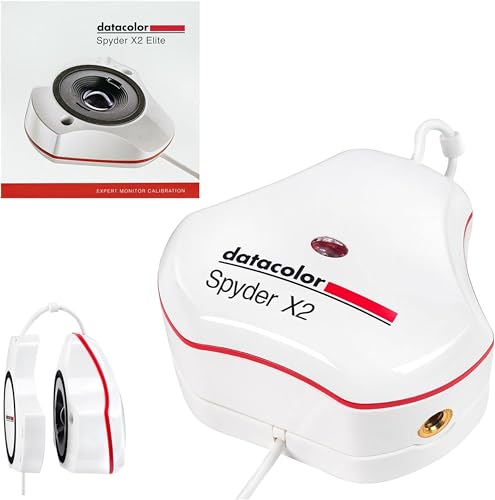
Best for Hybrid Photo and Video Work – Datacolor Spyder X2 Elite
The Datacolor Spyder X2 Elite is a flexible set of monitor calibration tools for photographers, video creators, and digital designers who move between still and motion work. It combines expert-recommended presets with advanced controls, video targets, display analysis, soft proofing, and native USB-C connectivity.
Best For: Hybrid photo/video creators who need Rec.709 and Rec.2020 targets, soft proofing, and multi-monitor matching.
Pros:
- Includes Video & Cinema Targets for Rec.709 and Rec.2020 workflows.
- Offers Advanced Display Mapping & Analysis, unlimited calibration settings, and soft proofing.
- Studio Match helps calibrate multiple monitors for greater consistency.
- Native USB-C connection includes a USB-A adapter for broader compatibility.
Cons:
- Its advanced feature set may be excessive for users who only need basic calibration.
- The supplied details do not specify a measurement luminance limit.
The X2 Elite is a strong fit for creators whose calibration needs extend beyond photography. Its combination of guided presets and customizable video-focused controls lets users start simply and refine the process as their workflow develops.
Pro-Level Display Accuracy – Spyder4Pro
The Datacolor Spyder4Pro is a practical choice among monitor calibration tools for users who want automated color and brightness calibration across multiple displays. Its full-spectrum sensor and improved filter stability are designed to support repeatable results over time.
Best For: Photographers, designers, and other users who need consistent calibration across multiple monitors.
Pros:
- Automates color and brightness calibration.
- One sensor can calibrate multiple displays.
- Double-shielded filters improve accuracy and long-term stability.
- ReCAL helps speed up routine recalibration.
Cons:
- Older Spyder4 model rather than a current-generation device.
- Product details list German as the language.
With its multi-display support and ReCAL feature, the Spyder4Pro is geared toward repeatable maintenance rather than one-time setup. It is a sensible fit when consistent screen performance is more important than having the newest hardware.
Easy Modern Display Calibration – SpyderExpress
The Datacolor SpyderExpress is an approachable option among monitor calibration tools for creators who want a quick, guided setup. It supports everyday monitors and the latest Liquid Retina XDR displays, with calibration completed in about 90 seconds according to the supplied product details.
Best For: Content creators, photo editors, and Mac users seeking straightforward calibration with upgradeable software features.
Pros:
- Three-step setup with calibration in about 90 seconds.
- Supports Liquid Retina XDR displays, including the MacBook M4 mini-LED screen.
- Can calibrate up to three connected displays per workstation.
- Software upgrades can add ambient-light adjustment and multi-display profiling.
Cons:
- OLED and advanced mini-LED support require a software upgrade.
- Advanced features are not included in the base setup.
SpyderExpress emphasizes speed and ease of use, while giving creators a path to expand functionality later. It is particularly attractive for users working with newer Apple displays or those who prefer a simple calibration workflow.
Complete Photo Color Workflow – Calibrite Photo Kit
The Calibrite Photo Kit combines monitor calibration tools with camera profiling hardware for a more complete RAW photo workflow. Its Display Pro HL colorimeter supports modern mini-LED, OLED, and Apple XDR displays, while the ColorChecker Passport Photo 2 helps establish camera profiles and white-balance references.
Best For: Photographers who want to coordinate camera capture, monitor calibration, and editing in one workflow.
Pros:
- Combines Display Pro HL monitor calibration with a ColorChecker Passport Photo 2.
- Supports calibration for mini-LED, OLED, and Apple XDR displays.
- Enables custom camera profiles for RAW still workflows.
- PROFILER software offers presets plus adjustable white-point and gamma targets.
Cons:
- More specialized and potentially more equipment than monitor-only users need.
- Its broader photo workflow may be unnecessary for users who do not shoot RAW stills.
This kit is strongest when color consistency must be managed from capture through editing. The included camera reference target adds value for photographers, while the high-luminance colorimeter addresses current display technologies.
Best All-Around Pick – datacolor Spyder Monitor Calibrator
If you want a modern, flexible option among monitor calibration tools, the datacolor Spyder is designed for current laptop and desktop displays, including OLED, mini-LED, and Apple Liquid Retina XDR screens. Its guided software aims to establish an accurate color baseline in about 90 seconds, while offering additional control for experienced users.
Best For: Photographers, creators, and professionals who want broad display compatibility with quick setup and ambient-light assistance.
Pros:
- Supports a wide range of modern display technologies and current Windows and Mac operating systems.
- Provides a fast calibration process plus preset and customizable settings.
- Ambient-light monitoring can help adjust display brightness and contrast as room lighting changes.
- DevicePreview Beta simulates how photos may appear on other devices.
Cons:
- Its expanded customization may be more than casual users need.
- DevicePreview is identified as a beta feature.
This is a strong choice when display compatibility and adaptable calibration matter. It combines an approachable workflow with room-light tracking and more advanced controls for users who want room to refine their process.
Best for Simple Dual-Screen Setups – Calibrite Display 123
The Calibrite Display 123 is one of the more approachable monitor calibration tools for creators who prefer a guided process. Its Easy 1 2 3 workflow, USB-C connection, before-and-after comparison, and support for up to two displays make it practical for straightforward photo and video work.
Best For: Photographers and creators who want simple calibration across a two-monitor workspace.
Pros:
- Guided Easy 1 2 3 software workflow keeps setup approachable.
- Supports calibration of up to two displays for more consistent multi-screen viewing.
- Includes a before-and-after check to help verify the visible change.
- Offers Native or Photo brightness target selection and a USB-C connection.
Cons:
- Supports up to two displays, which may not suit larger multi-monitor workflows.
- Its simple workflow may offer fewer advanced controls than tools aimed at experienced color specialists.
Display 123 focuses on clarity rather than complexity. The dual-display support and comparison view are especially useful when you want a repeatable way to match screens and confirm that calibration improved your viewing setup.
Best for First-Time Users – Datacolor Spyder X Pro
The Datacolor Spyder X Pro is a user-friendly option among monitor calibration tools, with a wizard-based workflow and single-click calibration designed for people new to color management. It also provides room-light monitoring, multiple calibration targets, and support for calibrating several laptop and desktop monitors.
Best For: First-time users and photographers who want guided calibration with useful control over multiple displays.
Pros:
- Single-click calibration and a wizard workflow make setup approachable.
- Provides 12 predefined calibration targets for more advanced color accuracy.
- Room-light monitoring can support automatic profile changes.
- SpyderProof offers before-and-after evaluation using your own images.
Cons:
- It is an older Spyder X Pro model compared with newer display-calibration releases.
- The supplied notes do not specify support for newer OLED, mini-LED, or Liquid Retina XDR displays.
Spyder X Pro is a sensible starting point for users who want a guided path into monitor calibration without giving up useful controls. Its predefined targets and multi-monitor capability also make it suitable for photographers building a more consistent editing setup.
How We Picked the Best Monitor Calibration Tools
We focused on hardware-based colorimeters rather than software-only calibration. Each device was evaluated for its display compatibility, sensor capabilities, calibration software, ease of use, and suitability for different creative workflows. We also considered whether a tool supports modern LCD, mini-LED, OLED, or high-brightness displays, since older colorimeters may not perform equally well on newer panels.
The selection includes professional models from Calibrite and Datacolor, as well as simpler and older-generation options that may appeal to beginners or shoppers working with a limited budget. Product claims such as supported brightness levels and workflow features should be checked against the current manufacturer specifications before purchase.
Quick Comparison
| Best For | What to Look For |
|---|---|
| Professional photo and video | Advanced software, broad display support, and precise profiling controls |
| Bright HDR or OLED screens | A sensor rated for high luminance and modern panel types |
| Beginners | Guided software, simple setup, and clear calibration instructions |
| Camera-to-edit workflows | A bundled color target or tools for matching capture and display color |
| Budget upgrades | A reliable colorimeter with software that supports your operating system |
Key Buying Factors for Monitor Calibration Tools
Display Compatibility
Check whether the colorimeter and software support your monitor technology. Standard IPS and VA displays are widely supported, but OLED, mini-LED, wide-gamut, and HDR monitors can require newer sensors or dedicated profiling options.
Brightness Range
High-brightness monitors can exceed the practical range of older devices. If you edit HDR content or use a very bright display, choose a model specifically designed to measure higher luminance levels.
Software and Controls
Calibration software determines how much control you have over white point, luminance, gamma, color space, and ambient-light settings. Beginners may prefer guided workflows, while professionals often benefit from custom targets and profile validation.
Workflow Extras
A standalone colorimeter is enough for screen calibration, but a kit with a camera color target can help create a more consistent capture-to-edit process. Make sure bundled accessories match the type of photography or video work you do.
Who Should Buy Which Monitor Calibration Tools?
Choose a professional Calibrite or Datacolor model if color accuracy is central to paid photography, print production, video grading, or digital design. These buyers should prioritize current software support, panel compatibility, and measurement range over the lowest price.
Choose an entry-level calibration tool if you are editing photos occasionally, building a home content studio, or correcting a monitor that looks noticeably different from other screens. A guided workflow can make regular recalibration easier.
Choose a modern high-luminance model for mini-LED, OLED, or HDR displays, especially when your work depends on brightness and highlight detail. Older products may still work with conventional monitors, but compatibility should be confirmed first.
Choose a photo kit if you want to align camera color with display color. This is particularly useful for photographers who need a repeatable workflow from capture through editing and delivery.