
The right motorized screen can make a 4K projector setup look cleaner, sharper, and easier to use. These 10 options cover compact rooms, dedicated theaters, classrooms, and large indoor-outdoor viewing areas.
We focus on screen size, aspect ratio, installation flexibility, control features, and 4K-readiness so you can match the screen to your projector and room.
Best 10 Motorized Projection Screens for 4K Viewing Picks for 2026
Best for Laser Clarity
Valerion PureVision 100-Inch Screen

- Over-90% laser-speckle reduction design
- 20-inch adjustable drop
- Quiet motor below 40 dB
Best For: Valerion RGB laser projector owners using long-throw setups
Best Large-Format Value
DINAH 120-Inch Electric Screen

- Large 120-inch viewing area
- Remote-controlled automatic operation
- Supports 4K, 3D, and HD projection
Best For: Large-room movie, office, or classroom installations
Best for Large Home Theaters
Elite Screens Spectrum 150-Inch

- 150-inch 16:9 viewing area
- 1.1-gain MaxWhite 2 surface
- RJ45 and programmable drop control
Best For: Large indoor spaces with standard-throw projectors
Best Flexible Widescreen Pick
Kayle 120-Inch Motorized Screen

- 16:9 format for movies and HD content
- 1.2 gain with 180-degree viewing angle
- RF remote and three-way wall switch
Best For: Multipurpose indoor or outdoor movie setups
Big-Screen Outdoor Pick
YODOLLA 150-Inch Motorized Screen

- 150-inch 16:9 format with 1.2 gain
- Wired and wireless remote control
- Wall or ceiling mounting included
Best For: Large home theaters, patios, and backyard movie nights
Compact Room Pick
VIVOHOME 84-Inch Motorized Screen

- 84-inch 16:9 viewing area
- Remote control reaches up to 82 feet
- Wall or ceiling installation
Best For: Bedrooms, smaller living rooms, offices, and classrooms
Installation-Focused Pick
Akia Screens 125-Inch Motorized Screen

- 125-inch 16:9 format with MaxWhite 2 material
- 180-degree viewing angle and 1.1 gain
- 12V trigger and programmable drop control
Best For: Large home theaters, offices, and conference rooms
Best for Large 16:9 Spaces
Aoxun 140-Inch Motorized Screen

- 140-inch 16:9 viewing area
- 1.2 gain, black-backed PVC
- Quiet motor with RF remote
Best For: Large home theaters and presentation spaces
Best for Flexible 4:3 Presentations

- 120-inch 4:3 screen
- 4K/8K-ready MaxWhite material
- IR, wall-switch, and 12V controls
Best For: Classrooms, offices, and presentation spaces
Best for Compact 16:9 Setups
SiliBamb 94-Inch Electric Screen
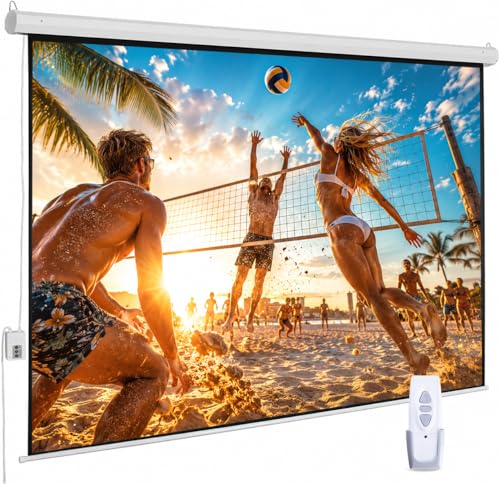
- 94-inch 16:9 viewing area
- 1.1-gain matte-white PVC
- RF remote and integrated switch
Best For: Compact home theaters and offices
Best for Laser Clarity – Valerion PureVision 100-Inch Screen
For buyers seeking motorized projection screens for 4K viewing with laser projectors, the AWOL Valerion PureVision emphasizes reduced speckle, color purity, and flexible image placement. Its 100-inch matte surface is tuned for Valerion projectors and supports long-throw setups.
Best For: Valerion projector owners who want a quieter motor, enhanced contrast, and adjustable eye-level positioning.
Pros:
- Optical matte coating is designed to reduce laser speckle by over 90%.
- 20-inch adjustable drop helps center the image at eye level.
- Quiet motor operates below 40 dB, with ceiling-, wall-, and hook-installation options.
Cons:
- Designed for long-throw projectors rather than ultra- or short-throw models.
- The tuning and stated visual enhancement are specifically associated with Valerion projectors.
This is a specialized pick for RGB laser and Valerion projector setups. Its narrower compatibility focus is balanced by features aimed at reducing speckle and improving viewing comfort.
Best Large-Format Value – DINAH 120-Inch Electric Screen
The DINAH 120-inch electric screen is a straightforward option for motorized projection screens for 4K viewing in a home theater, office, or classroom. It combines automatic drop-down operation with remote control and a matte surface intended for 4K, 3D, and HD projection.
Best For: Buyers who want a large 120-inch screen with simple remote-controlled ceiling or wall installation.
Pros:
- Large 120-inch format creates an immersive viewing area.
- Included remote controls automatic lowering and retraction.
- Supports 4K, 3D, and HD projection with a 160-degree viewing angle.
Cons:
- The listed 120-inch model uses a 4:3 diagonal format, not a widescreen 16:9 layout.
- The notes describe ceiling mounting, so installation flexibility may be more limited than models explicitly supporting both wall and ceiling mounting.
Choose this screen when size and basic motorized convenience matter more than a modern widescreen format. Check the 4:3 proportions carefully before pairing it with a 16:9 projector setup.
Best for Large Home Theaters – Elite Screens Spectrum 150-Inch
For large spaces needing motorized projection screens for 4K viewing, the Elite Screens Spectrum provides a 150-inch 16:9 image area and a MaxWhite 2 front-projection surface. Its 1.1 gain, 180-degree viewing angle, programmable drop positions, and control-system integration suit dedicated theaters and presentation rooms.
Best For: Large indoor home theaters, offices, and conference rooms using standard-throw projectors.
Pros:
- 150-inch 16:9 format offers a substantial widescreen viewing area.
- ISF-certified MaxWhite 2 material provides 1.1 gain and a 180-degree viewing angle.
- Includes IR remote, wall-box controller, RJ45 integration, and programmable drop positions.
- Arrives assembled for wall or ceiling mounting and carries a manufacturer warranty.
Cons:
- Not compatible with ultra- or short-throw projectors.
- Its large housing and screen dimensions require considerable installation space.
This is the most feature-rich choice for a substantial standard-throw installation. It makes the most sense when you have the room for a 150-inch screen and value automation or third-party control integration.
Best Flexible Widescreen Pick – Kayle 120-Inch Motorized Screen
The Kayle 120-inch screen is a practical candidate among motorized projection screens for 4K viewing, offering a familiar 16:9 format, 1.2 gain, and a 180-degree viewing angle. It arrives assembled with a metal casing, RF remote, and detachable three-way wall switch for indoor or outdoor movie use.
Best For: Home theater, presentation, education, and occasional outdoor viewing where a retractable 16:9 screen is useful.
Pros:
- 16:9 format matches common HD and movie content.
- 1.2-gain black-backed material is listed as 4K Ultra HD and active 3D ready.
- Energy-efficient synchronous motor is designed for smooth, quiet operation.
- Includes RF remote, three-way wall switch, mounting kit, and wall or ceiling installation support.
Cons:
- The listed warranty is one year, shorter than some competing options.
- The product dimensions and screen dimensions in the notes differ, so installation measurements should be verified carefully.
Kayle offers a well-rounded feature set for buyers who want widescreen proportions and flexible controls without moving to an extra-large 150-inch screen. Its claimed indoor and outdoor suitability adds versatility for multipurpose use.
Big-Screen Outdoor Pick – YODOLLA 150-Inch Motorized Screen
For shoppers comparing motorized projection screens for 4K viewing, the YODOLLA stands out with a 150-inch, 16:9 display, 1.2 gain, and a 160-degree viewing angle. Its large format suits spacious home theaters, patios, and backyard movie setups, but measure carefully before ordering.
Best For: Large indoor or outdoor viewing areas where a very large retractable screen is practical.
Pros:
- 150-inch 16:9 screen supports 4K, 8K, 3D, and 1080P content.
- Motorized operation includes wired and wireless remotes, plus height stopping via auto-lock.
- Wall or ceiling mounting hardware is included.
- Three-layer PVC matte material and 1.2 gain support brightness and color consistency.
Cons:
- The overall motorized assembly is approximately 141.34 inches wide, so installation space must be checked carefully.
- A slight new-PVC odor may be noticeable initially and requires airing out.
- At 23.59 pounds, installation may be easier with assistance despite the relatively light weight for its size.
The YODOLLA is a strong choice when maximum image size matters more than compact installation. Its quiet motor, flexible mounting, and broad viewing angle make it versatile, provided your wall or ceiling can accommodate the substantial housing.
Compact Room Pick – VIVOHOME 84-Inch Motorized Screen
The VIVOHOME is a practical option among motorized projection screens for 4K viewing when room size limits the display. Its 84-inch 16:9 viewing area, 160-degree angle, and remote operation fit bedrooms, smaller living rooms, offices, and classrooms.
Best For: Smaller rooms needing a manageable electric screen with flexible wall or ceiling installation.
Pros:
- 84-inch 16:9 display area measures 73.2 by 41.1 inches.
- Remote control works from up to 82 feet and can be wall-mounted.
- Matte white surface supports 4K, 3D, 1080P, and Full HD images.
- Waterproof, three-layer PVC fabric and an 8mm metal casing support durability.
Cons:
- The 82.1-inch-wide casing still requires more wall space than the viewing area suggests.
- The remote battery is not included.
- A slight odor may be present when first unpacked.
With its smaller footprint, long-range remote, and dual mounting options, the VIVOHOME is easier to place than larger alternatives. Confirm both the 73.2-inch viewing width and 82.1-inch overall width before installation.
Installation-Focused Pick – Akia Screens 125-Inch Motorized Screen
The Akia Screens 125-inch model is designed for buyers seeking motorized projection screens for 4K viewing in larger indoor spaces. Its MaxWhite 2 surface, 1.1 gain, 180-degree viewing angle, and programmable electric drop provide a more installation-focused setup for home theaters, offices, and conference rooms.
Best For: Large indoor spaces using a standard long-throw projector and requiring precise screen control.
Pros:
- 125-inch 16:9 format provides a 109-inch-wide viewing area.
- ISF-certified MaxWhite 2 material is designed for accurate color reproduction.
- Includes infrared remote, wall controller, programmable drop settings, and mounting hardware.
- RJ50 support enables a wired 12V trigger for synchronized projector operation.
Cons:
- The 118-inch-wide housing requires substantial installation space.
- It is recommended for standard long-throw projector setups rather than every projection arrangement.
- The supplied specifications list manual operation despite the electric motorized design, so buyers should verify the control configuration.
The Akia combines a large image area with useful integration features, including programmable drop and 12V triggering. Its broad viewing angle and low-emission certifications add appeal for dedicated indoor installations, while the generous housing size calls for careful planning.
Best for Large 16:9 Spaces – Aoxun 140-Inch Motorized Screen
For shoppers comparing motorized projection screens for 4K viewing, the Aoxun 140-inch model emphasizes a large 16:9 image, broad seating coverage, and simple installation. Its 1.2-gain, black-backed PVC material is designed to support color reproduction while reducing light penetration.
Best For: Large home theaters, conference rooms, classrooms, and outdoor movie setups where a 140-inch image is appropriate.
Pros:
- Large 140-inch diagonal screen with a 122 x 69-inch 16:9 viewing area.
- Four-layer black-backed PVC material with a 160-degree viewing angle and 1.2 gain.
- Quiet motor rated below 42 dB, plus RF remote and wall-mountable controls.
- Arrives assembled and supports wall or ceiling mounting.
Cons:
- The large screen and nearly 40-pound listed product weight require substantial installation space and support.
- Its 140-inch size may be excessive for smaller rooms.
This Aoxun is a practical choice when screen size is the priority. The wide viewing angle, black backing, and dual control options make it flexible, but buyers should confirm room dimensions and mounting support before ordering.
Best for Flexible 4:3 Presentations – Elite Screens Spectrum 120
The Elite Screens Spectrum is a versatile option among motorized projection screens for 4K viewing, especially for rooms that still use a 4:3 presentation format. Its MaxWhite material is listed as 4K/8K Ultra HD ready and includes several wired and wireless control options.
Best For: Classrooms, offices, and home theaters that need a 120-inch 4:3 screen with flexible control integration.
Pros:
- 120-inch diagonal screen with a 96.1 x 72-inch viewing area in a 4:3 ratio.
- MaxWhite material offers 1.1 gain, a black backing, and a 180-degree viewing angle.
- Includes IR remote, detachable three-way wall switch, and 12V trigger cable.
- Ships assembled for wall or ceiling installation and includes an installation kit.
Cons:
- The 4:3 aspect ratio is less suited to widescreen movies than a 16:9 screen.
- Its overall housing is wider and taller than the viewing area, so installation clearance is important.
This model stands out for control compatibility and a broad viewing angle. It is a stronger fit for presentation-focused spaces than for buyers who primarily watch modern widescreen films.
Best for Compact 16:9 Setups – SiliBamb 94-Inch Electric Screen
For smaller rooms, the SiliBamb 94-inch model offers a practical format for motorized projection screens for 4K viewing without the footprint of a very large display. The 16:9 matte-white PVC surface is designed for wide-area viewing and can be mounted on a wall or ceiling.
Best For: Home offices, compact theaters, classrooms, and occasional indoor or outdoor movie screenings.
Pros:
- 94-inch 16:9 screen with an 81.89 x 46.06-inch viewing area.
- 1.1-gain matte-white PVC surface with a 160-degree viewing angle.
- Offers integrated switch controls and radio-frequency remote operation.
- Dual-purpose metal casing supports wall or ceiling installation.
Cons:
- The smaller viewing area may not deliver the same impact as 120- or 140-inch alternatives.
- The supplied notes list a ceiling-mount designation, so buyers should verify the preferred mounting arrangement before installation.
This SiliBamb is well suited to buyers who want electric operation and a widescreen image in a more manageable size. Its simple controls and compact format make it easier to accommodate than the larger screens in this roundup.
How We Picked These Motorized Projection Screens for 4K Viewing
We selected screens across several practical size ranges, including compact 84- to 100-inch models, versatile 120- to 125-inch options, and large 140- to 150-inch screens. The lineup also includes both 16:9 and 4:3 formats, helping shoppers match the screen to movies, streaming content, presentations, or older projectors.
We also considered motorized operation, remote controls, wall- and ceiling-mount compatibility, indoor or outdoor suitability, and advertised HD, 4K, or 8K support. Product claims such as “4K-ready” describe screen compatibility; actual image quality still depends on the projector, viewing distance, lighting, and installation.
Quick Comparison
| Best For | Recommended Size Range | Format to Consider |
|---|---|---|
| Small rooms and bedrooms | 84–100 inches | 16:9 |
| Standard home theaters | 120–125 inches | 16:9 |
| Large dedicated theaters | 140–150 inches | 16:9 |
| Classrooms and office presentations | 120 inches or larger | 4:3 or 16:9 |
Key Buying Factors for Motorized Projection Screens for 4K Viewing
Screen Size and Viewing Distance
A larger screen is not automatically better. Choose a size that fits the wall while keeping viewers far enough away to see the full image comfortably. Oversizing can make lower-quality sources and visible pixel structure more distracting.
Aspect Ratio
Most modern movies, streaming services, and gaming content use 16:9, making it the safest choice for a home theater. A 4:3 screen can be more practical for business presentations, classroom content, or legacy equipment, but it may leave unused space with widescreen video.
Screen Material and Lighting
Room brightness affects perceived contrast more than a “4K-ready” label. A white screen is a general-purpose choice, while a darker or contrast-enhancing surface may help in rooms with ambient light. Look for a smooth, even surface to preserve fine detail and avoid visible texture.
Motor, Controls, and Installation
Confirm whether the screen includes a wireless remote, wall switch, projector synchronization, or another control method. Check the housing dimensions, power connection, drop length, and mounting hardware before choosing a wall or ceiling location. A quiet, reliable motor is especially valuable in smaller rooms.
Indoor Versus Outdoor Use
Some retractable screens are marketed for occasional outdoor viewing, but motors and screen fabrics should be protected from rain, wind, and moisture. For outdoor use, prioritize easy setup, secure anchoring, and storage rather than maximum size alone.
Who Should Buy Which Motorized Projection Screens for 4K Viewing?
Choose an 84- to 100-inch screen if you have limited wall space or sit relatively close to the image. A 120- to 125-inch model is a strong all-around choice for a typical living room or dedicated theater. Pick a 140- to 150-inch screen only when your projector has enough brightness, the room provides suitable viewing distance, and the mounting surface can support the larger housing.
For primarily cinematic use, select a 16:9 screen. For presentations or mixed legacy content, a 4:3 option may be more practical. Buyers seeking the cleanest automated setup should prioritize projector synchronization and dependable remote operation, while occasional users may get better value from a simpler electric retractable model.