
Choosing a compact NAS is about more than counting drive bays. The right enclosure should balance storage capacity, noise, networking, upgrade flexibility, cooling, and the software or hardware you plan to use.
This roundup covers ready-to-use NAS systems, direct-attached storage, and DIY-friendly cases for home backups, media libraries, creative work, and space-conscious server builds.
Best 10 NAS Enclosures for Compact Setups Picks for 2026
Simple Private Storage

- Two-bay personal NAS for beginners
- Automatic multi-platform backups
- AI photo organization and private storage
Best For: Beginners and families building a simple private backup hub
Easy Private Cloud

- Compact two-bay diskless enclosure
- Automated Mac, PC, and mobile backups
- Supports file sharing and IP cameras
Best For: Home users wanting supported private-cloud features
High-Speed Smart Hub

- 10GbE and Ryzen R2514 performance
- Docker, VMs, and SSD expansion
- Built-in local surveillance support
Best For: Creators and advanced users with demanding compact workflows
Direct-Attached Expansion
QNAP TR-004 USB RAID Enclosure

- Four-bay USB Type-C DAS
- Hardware RAID 0, 1, 5, and JBOD
- Works with computers and compatible QNAP NAS units
Best For: Users needing compact USB storage expansion with RAID
High-Capacity Pick

- Holds eight 3.5-inch HDDs and one 2.5-inch SSD
- Includes a hot-swap backplane and two 10 cm fans
- Supports Mini-ITX, SFX power, and 130 mm CPU coolers
Best For: Compact home servers requiring high drive capacity
Ultra-Compact NVMe Pick
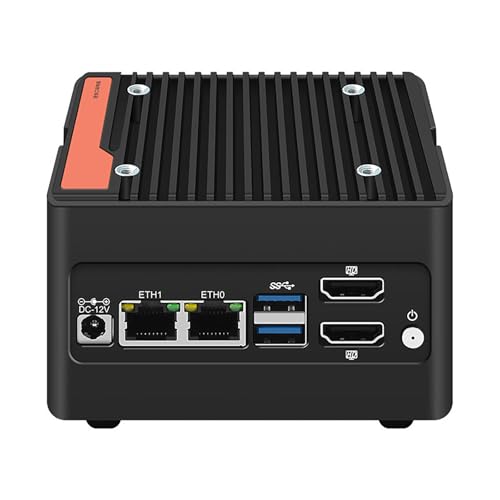
- Fits four M.2 2280 NVMe drives
- Offers dual 2.5GbE and dual HDMI 2.0
- Pocket-sized aluminum enclosure with active cooling
Best For: Portable, high-speed NVMe storage systems
Balanced Home-Server Pick

- Holds five 3.5-inch HDDs and one 2.5-inch SSD
- Compact aluminum chassis with a built-in 12 cm fan
- Supports Mini-ITX and SFX power supplies up to 150 mm
Best For: Compact personal and home servers using standard hard drives
Best High-Capacity DIY Pick
AUDHEID 8-Bay Hot-Swap NAS Case

- Eight hot-swap HDD/SSD bays
- Mini-ITX and Micro-ATX support
- Separated cooling with three fans
Best For: DIY builders needing eight-bay storage capacity
Best Expandable Performance Build
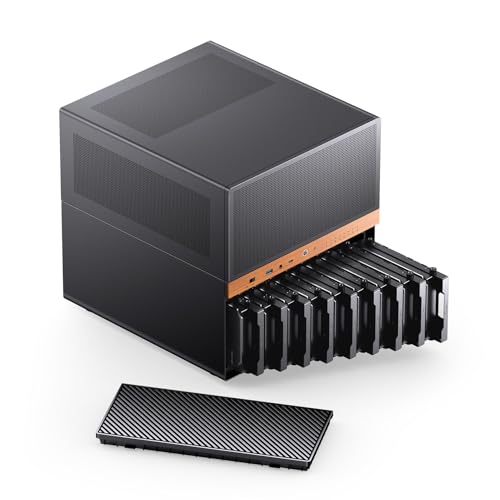
- Nine hot-swap drive bays
- ATX/SFX power-supply flexibility
- Extensive cooling and 240mm AIO support
Best For: Expandable high-capacity home or office servers
Simple Private Storage – UGREEN NAS DH2300
For shoppers seeking NAS enclosures for compact setups, the UGREEN NAS DH2300 is a straightforward two-bay option for personal files, photos, videos, and device backups. Its 4GB of onboard RAM, 1GbE connection, and support for up to 64TB make it a practical move beyond cloud storage or scattered external drives.
Best For: Beginners, families, and personal users who want private storage and simple cross-platform backups.
Pros:
- Supports automatic backups from Windows, iOS, Android, and macOS devices.
- Offers AI photo tagging, duplicate detection, and searchable organization features.
- Includes security features such as RAID modes, two-factor authentication, permissions, and encrypted transfers.
- Provides up to 125MB/s file-transfer speeds through its 1GbE port.
Cons:
- Does not support Docker or virtual machines.
- Drives are not included.
- Wi-Fi requires an external USB adapter; wired Ethernet is recommended.
The DH2300 is best viewed as an easy-entry personal NAS rather than an expandable homelab platform. It suits compact setups where simple backup, private media storage, and photo organization matter more than advanced applications.
Easy Private Cloud – Synology DiskStation DS223j
The Synology DS223j is a compact, diskless two-bay enclosure for buyers who want NAS enclosures for compact setups with an emphasis on guided software and everyday access. It supports private-cloud file sharing, device backups, remote access, and home security camera recording.
Best For: Home users and small teams wanting a supported two-bay private cloud with backup and sharing tools.
Pros:
- Provides multi-platform access and file sharing from anywhere.
- Supports automated backups for Macs, PCs, and mobile devices.
- Can record and monitor compatible IP cameras with remote viewing.
- Includes a two-year warranty and ongoing Synology software support.
Cons:
- Diskless design means storage drives must be purchased separately.
- Its two-bay capacity is more limited than larger enclosures.
With its small tabletop footprint and mature support ecosystem, the DS223j is a sensible choice for routine backups, file access, and home use. It is less suited to buyers specifically seeking high-speed creator workflows or extensive hardware expansion.
High-Speed Smart Hub – UGREEN DXP2800 GT
For compact setups that need more than basic storage, the UGREEN DXP2800 GT brings 10GbE networking, expandable memory, SSD options, and application support to the NAS enclosures for compact setups category. Its two-bay design is aimed at creators, freelancers, and smart-home users managing demanding files, backups, cameras, and self-hosted services.
Best For: Creators, freelancers, and advanced home users who need fast transfers, Docker, virtual machines, and smart-home integration.
Pros:
- Combines an AMD Ryzen Embedded R2514 processor with 8GB DDR4 RAM, expandable to 64GB.
- Offers 10GbE networking plus SATA, U.2, and M.2 SSD expansion options.
- Supports Docker, virtual machines, Plex-related setups, and other self-hosted applications.
- Includes surveillance features for compatible ONVIF and RTSP cameras.
Cons:
- Drives and SSDs are not included.
- Plex requires Docker and manual setup.
- The pre-installed RAM is non-ECC; ECC protection requires a compatible upgrade.
The DXP2800 GT is the performance-oriented choice in this group. Its expansion options and software flexibility make it attractive for demanding compact workspaces, although setup and hardware selection require more involvement than an entry-level NAS.
Direct-Attached Expansion – QNAP TR-004 USB RAID Enclosure
QNAP TR-004 4 Bay USB Type-C Direct Attached Storage (DAS) with hardware RAID (Diskless)
Check Price On AmazonThe QNAP TR-004 is a four-bay USB Type-C direct-attached storage enclosure for shoppers comparing NAS enclosures for compact setups. Rather than operating as a standalone NAS, it connects to Windows, macOS, or Linux computers and can also expand compatible QNAP NAS storage through hardware RAID.
Best For: Users who need removable four-drive USB storage, hardware RAID, or additional capacity for a compatible QNAP NAS.
Pros:
- Provides four 3.5-inch SATA drive bays in a compact metal enclosure.
- Supports hardware RAID 0, 1, 5, JBOD, and individual-disk modes.
- Connects through USB Type-C and includes a Type-C-to-Type-A cable.
- Lockable drive bays add physical access control.
Cons:
- It is a DAS, not a standalone NAS with installable NAS applications.
- Drives are not included.
- QNAP NAS compatibility has specific model and software-version limitations.
The TR-004 makes sense when direct USB connectivity and four-bay hardware RAID are more important than network services. Confirm compatibility before using it with a QNAP NAS, especially because its storage pool cannot be combined with the connected NAS.
High-Capacity Pick – JONSBO N3 9-Bay NAS Chassis
For compact setups that still need substantial local storage, the JONSBO N3 is a Mini-ITX NAS enclosure with room for eight 3.5-inch hard drives and one 2.5-inch SSD. Its removable top cover, pull-out drive structure, and separated cooling channels make it a practical foundation for a home server or larger storage build.
Best For: Home offices, personal servers, and compact storage systems needing up to nine internal drives.
Pros:
- Supports eight 3.5-inch HDDs plus one 2.5-inch SSD.
- Includes a server-grade hot-swap backplane with dual D-type and SATA power connections.
- Built-in 10 cm fans provide direct cooling for the HDD compartment.
- Supports Mini-ITX boards, SFX power supplies up to 105 mm, and CPU coolers up to 130 mm.
Cons:
- Limited to Mini-ITX motherboards and two expansion slots.
- The compact layout may require careful planning during assembly.
- Its nine-drive capacity may be more than smaller personal storage setups need.
The N3 stands out among NAS enclosures for compact setups when drive capacity is the priority. It is larger than ultra-small alternatives, but the nine-bay layout and included drive cooling make it a strong choice for expandable storage.
Ultra-Compact NVMe Pick – 4-Bay i3-N305 Mini NAS
This pocket-sized system takes a different approach to NAS enclosures for compact setups by using four M.2 2280 NVMe drives instead of larger hard-drive bays. The Intel i3-N305 platform, dual 2.5GbE ports, and very small 100 × 100 × 58.5 mm enclosure suit fast, portable storage and network-intensive compact builds.
Best For: Portable NVMe storage, mobile office use, and compact systems needing fast networking.
Pros:
- Supports four M.2 2280 NVMe PCIe 3.0 drives through its adapter board.
- Uses an eight-core Intel i3-N305 processor with speeds up to 3.8 GHz.
- Provides dual Intel 2.5GbE ports, dual HDMI 2.0, and dual USB 3.2 Gen 2 ports.
- Its 100 × 100 × 58.5 mm size makes it highly portable.
Cons:
- RAM and SSDs are not included.
- NVMe-only storage does not accommodate 3.5-inch or 2.5-inch drives.
- The compact enclosure has limited upgrade space compared with a conventional Mini-ITX case.
This is the most compact and connectivity-focused option in the group. Buyers should budget for memory and four NVMe drives, but the small footprint and dual 2.5GbE interfaces make it compelling for high-speed, space-constrained storage.
Balanced Home-Server Pick – JONSBO N2 6-Bay NAS Case
The JONSBO N2 balances a small footprint with useful storage capacity, making it a practical choice among NAS enclosures for compact setups. It accommodates five 3.5-inch hard drives and one 2.5-inch SSD while supporting a Mini-ITX board, SFX power supply, and low-profile expansion hardware.
Best For: Personal or home servers that need several hard-drive bays without a large tower chassis.
Pros:
- Provides five 3.5-inch HDD bays plus one 2.5-inch SSD bay.
- Compact 222.5 × 222.5 × 224 mm aluminum chassis.
- Includes a built-in 12 cm fan for airflow.
- Supports SFX power supplies up to 150 mm and CPU coolers up to 65 mm.
Cons:
- Requires a low-profile expansion card under 197 mm.
- The 65 mm CPU-cooler limit restricts cooling choices.
- Supports only Mini-ITX motherboards.
The N2 is a sensible middle ground for a compact home NAS. It offers more conventional hard-drive capacity than a pocket NVMe system while remaining notably smaller and simpler than the higher-capacity N3.
Best High-Capacity DIY Pick – AUDHEID 8-Bay Hot-Swap NAS Case
For NAS enclosures for compact setups, the AUDHEID 8-bay case combines substantial drive capacity with a Mini-ITX or Micro-ATX-compatible layout. Its hot-swap bays, separated cooling channels, and support for several compact power-supply formats make it a flexible foundation for a custom home server, media library, or backup system.
Best For: DIY builders who need eight hot-swap bays in a compact, customizable enclosure.
Pros:
- Eight hot-swap bays support both 3.5-inch HDDs and 2.5-inch SSDs.
- Dual air channels separate drive and motherboard cooling, with three temperature-controlled fans.
- Supports Mini-ITX and Micro-ATX motherboards, 1U or FLEX power supplies, and CPU coolers up to 58mm tall.
- Steel construction, drive-status indicator lights, and a front USB 3.0 port add practical convenience.
Cons:
- Motherboard, CPU, power supply, and other core components are not included.
- The 58mm CPU-cooler height limit may restrict cooler selection.
The AUDHEID is a strong choice when storage expandability and DIY compatibility matter more than a fully integrated system. Confirm your cooler and power-supply dimensions before building.
Best Living-Space-Friendly Design – JONSBO N4 8-Drive NAS Case
The JONSBO N4 brings a polished walnut-accented design to NAS enclosures for compact setups. It supports Micro-ATX or ITX boards, combines four hot-swap bays with two non-hot-swap 3.5-inch bays, and adds two 2.5-inch SSD positions for a balanced home-server build.
Best For: Home-office and living-space builds that need flexible storage and a more furniture-friendly appearance.
Pros:
- Eight total drive positions: six 3.5-inch HDD bays and two 2.5-inch SSD bays.
- Four 3.5-inch bays support hot swapping, while two additional HDD bays are non-hot-swap.
- Supports ITX and Micro-ATX motherboards, SFX power supplies, GPUs up to 230mm, and CPU coolers up to 70mm.
- Walnut wood detailing and front USB 3.2 Gen 2 Type-C provide a distinctive, modern finish.
Cons:
- Only four of the six 3.5-inch HDD bays are hot-swappable.
- Cooling is limited to one included 120mm fan.
- SFX power supply and 230mm GPU limits may narrow component choices.
The N4 is a compelling compact NAS case for builders who want storage flexibility without an overtly industrial look. Its component limits make careful parts matching especially important.
Best Expandable Performance Build – JONSBO N6 9-Bay NAS Case
For builders who need more room for drives and performance hardware, the JONSBO N6 is one of the more expandable NAS enclosures for compact setups. Its nine-bay design, Micro-ATX or ITX support, flexible ATX/SFX power options, and extensive fan-mounting layout suit a high-capacity home or office server.
Best For: High-capacity NAS projects that need hot-swap storage, stronger cooling options, and flexible component support.
Pros:
- Nine drive bays provide extensive storage capacity with hot-swap functionality.
- Supports both ATX and SFX power supplies in multiple mounting positions.
- Offers multiple fan positions, two pre-installed fans, and support for a 240mm AIO cooler.
- Supports GPUs up to 275–320mm, four PCI expansion slots, and ITX or Micro-ATX motherboards.
Cons:
- The larger 305mm by 353mm by 318mm chassis may not suit very tight spaces.
- Drive backplane power requires careful cable and connector planning.
- Enterprise drives may require all four backplane power interfaces connected according to the supplied guidance.
The N6 is the most capable option here for a demanding, expandable server build, but its power-connection requirements deserve attention during assembly. Measure the intended location and plan backplane power before installing drives.
How We Picked These NAS Enclosures for Compact Setups
We selected products across the main compact-storage categories rather than treating every enclosure as the same. The list includes simple two-bay NAS appliances, four-bay direct-attached storage, Mini-ITX and Micro ATX cases, and compact systems built around NVMe drives or low-power processors.
Our comparison focuses on drive capacity, physical footprint, expansion potential, cooling, connectivity, installation requirements, and intended user. Because some products are diskless, buyers should also account for the cost, compatibility, and setup of their own hard drives or SSDs.
Quick Comparison
| Type | Best For | Main Advantage | Watch Out For |
|---|---|---|---|
| Two-bay NAS appliance | Beginners and personal users | Simple software and automated backups | Limited expansion |
| Four-bay NAS or DAS | Growing storage libraries | More capacity and RAID flexibility | May need a host computer or separate setup |
| Mini-ITX case | DIY NAS builders | Hardware and operating-system freedom | Requires parts, configuration, and troubleshooting |
| Micro ATX NAS case | High-capacity home servers | More drive bays and component flexibility | Larger footprint and greater power use |
| NVMe mini server | Fast, quiet compact storage | Low latency and small physical size | Usually less economical per terabyte |
Key Buying Factors for NAS Enclosures for Compact Setups
Drive Bays and Storage Type
Two bays are suitable for basic mirrored storage, while four or more bays provide better capacity growth and RAID options. Check whether the enclosure supports 3.5-inch hard drives, 2.5-inch SSDs, NVMe modules, or a combination. Hot-swap bays can make replacement easier, but they are not essential for every home user.
NAS, DAS, or DIY Case?
A NAS appliance includes a processor, operating system, and network features. A DAS such as the QNAP TR-004 connects directly to a computer and is often simpler for adding storage, but it is not a standalone network server. DIY cases offer the most control, though you must supply the motherboard, CPU, memory, power supply, cooling, and software.
Networking, Cooling, and Noise
For large media files and frequent backups, 2.5GbE can be a worthwhile upgrade over standard gigabit Ethernet. Examine fan size, airflow paths, drive spacing, and replacement-fan availability. Compact cases can become noisy or hot when filled with mechanical drives, so ventilation matters as much as the listed bay count.
Compatibility and Physical Fit
Before buying, confirm motherboard format, power-supply dimensions, CPU-cooler height, GPU clearance, cable routing, and drive thickness. Also verify the operating system supports the chosen controllers and networking hardware.
Who Should Buy Which NAS Enclosures for Compact Setups?
Choose the UGREEN NAS DH2300 or Synology DS223j if you want a straightforward two-drive backup system with minimal hardware work. Consider the UGREEN DXP2800 if you need a more capable platform for smart-home data, creative files, or freelance workloads.
The QNAP TR-004 is a practical choice when you want several drives attached directly to an existing computer. DIY builders should look at the JONSBO N2 or N3 for smaller builds, while the NVMe mini server suits quiet, fast storage in a very small footprint. For maximum drive capacity and component flexibility, the larger eight- and nine-bay Mini-ITX or Micro ATX cases are better suited to experienced builders with adequate room, cooling, and power.