
As you explore the world of NDI video distribution systems, you’ll find that the options available in 2026 are both impressive and diverse. From the Magewell Pro Convert series to the BirdDog 4K encoders, each system offers unique features tailored for seamless streaming. You might wonder which systems truly stand out and what factors are essential in making your choice. Let’s take a closer look at the top contenders and what they bring to the table.
Magewell Pro Convert NDI to HDMI Decoder (Model 64100)

The Magewell Pro Convert NDI to HDMI Decoder (Model 64100) is ideal for professionals seeking seamless IP-to-display integration. It effortlessly converts full-bandwidth NDI and NDI|HX streams to HDMI, supporting resolutions up to 4096×2160 at 60 fps. With automatic scaling and EDID-based enhancement, your display will look fantastic. The built-in processing features guarantee peak playback through de-interlacing, aspect ratio adjustments, and color space corrections. Plus, you can power it via PoE or USB, and control it easily through a web-based interface. Its compact design and near-zero latency make it a reliable choice for any live streaming setup.
Best For: Professionals seeking seamless integration of NDI and HDMI for live streaming and display applications.
Pros:
- Supports high-resolution output up to 4096×2160 at 60 fps for exceptional video quality.
- Built-in processing features enhance playback with de-interlacing and color space adjustments.
- Compact design with near-zero latency makes it suitable for live streaming environments.
Cons:
- Requires a stable network connection for optimal performance and reliability.
- May have a learning curve for users unfamiliar with web-based configuration and control.
- Limited compatibility with non-NDI sources may restrict its versatility in some setups.
Magewell Pro Convert HDMI Plus – HDMI to NDI Converter (64020)

For those seeking a reliable and high-performance solution for streaming, the Magewell Pro Convert HDMI Plus stands out with its ability to convert HDMI input up to 4096×2160 at impressive frame rates. This HDMI to NDI converter delivers high-quality NDI streams up to 2048×2160 at 120fps, guaranteeing smooth performance. You’ll appreciate its integrated HDMI loop-through for real-time monitoring and on-board video processing features like de-interlacing and scaling. With flexible power options and broad software compatibility, it easily integrates into your existing setup. Its compact, rugged design assures dependable operation around the clock, making it an ideal choice for professionals.
Best For: Professionals in video production and live streaming who require high-quality HDMI to NDI conversion for seamless broadcasting.
Pros:
- High-performance video conversion with support for 4096×2160 input and 120fps NDI output.
- Real-time local monitoring through integrated HDMI loop-through, ensuring minimal latency during broadcasts.
- Broad compatibility with popular streaming software like OBS Studio, vMix, and Wirecast across multiple operating systems.
Cons:
- Requires additional configuration for optimal integration with certain software platforms.
- Potential learning curve for users unfamiliar with NDI technology and remote camera control features.
- Limited maximum output resolution of 2048×2160, which may not meet the needs of some ultra-high-definition projects.
HDMI to Coax Modulator for 1080p Video Source
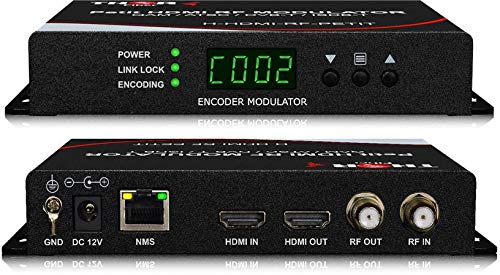
Looking to broadcast high-definition content across multiple TVs? The HDMI to Coax Modulator is your solution. This device converts HDMI video sources up to 1080p into HD CATV QAM or ATSC channels, perfect for any setup. It’s compatible with various sources like satellite receivers and computers, making it versatile. With support for resolutions like 720p and 1080i, it guarantees crisp visuals. The internal digital modulator features HD MPEG2 encoding and AC3 Dolby Audio for enhanced sound. Plus, control it easily through a PC using Thor Broadcast’s intuitive GUI, making it ideal for both home and commercial applications.
Best For: Home entertainment enthusiasts and commercial setups looking to broadcast HDMI content to multiple TVs seamlessly.
Pros:
- Cost-effective solution for distributing high-definition video to multiple displays.
- Supports a wide range of HDMI sources, ensuring versatility in usage.
- Includes advanced audio encoding (AC3 Dolby Audio) for enhanced sound quality.
Cons:
- Limited to a maximum resolution of 1080p, which may not meet future 4K needs.
- Requires PC connectivity for management, which could complicate setup for some users.
- May not be compatible with all TV models, requiring additional checks before purchase.
BirdDog 4K 12G-SDI NDI Encoder/Decoder

Designed with professionals in mind, the BirdDog 4K 12G-SDI NDI Encoder/Decoder excels in delivering high-quality UHD 4K/60 video input, making it ideal for live streaming and broadcast applications. This compact device measures just 7.6 x 6.2 x 4.2 inches and weighs only 2 pounds, guaranteeing portability without compromising performance. It features 12G-SDI inputs and outputs, along with HDMI 2.0 output, to cater to various setups. With full-bandwidth I-frame compression and built-in cross-conversion, it simplifies your workflow. Plus, its durable aircraft-grade aluminum case assures reliability, making it a top choice for any video professional.
Best For: Professionals in live streaming and broadcast applications who require high-quality UHD 4K video encoding and decoding.
Pros:
- Compact and lightweight design for easy portability.
- Supports a wide range of video formats with 12G-SDI and HDMI outputs.
- Durable construction with an aircraft-grade aluminum case for reliability in various environments.
Cons:
- May be overkill for casual users or small-scale applications.
- Limited customer reviews, making it hard to gauge long-term reliability.
- Higher price point compared to basic video converters on the market.
BirdDog 4K HDMI 2.0 NDI Encoder/Decoder

The BirdDog 4K HDMI 2.0 NDI Encoder/Decoder stands out as an ideal solution for content creators and live streamers who demand high-quality video performance. Engineered with BirdDog’s custom NDI silicon chip, it delivers impressive encoding and decoding up to 4Kp60. Its robust design features an aircraft-grade aluminum case for durability. With 12G SDI and HDMI 2.0 inputs and outputs, plus a built-in cross converter, you’ll enjoy seamless connectivity. Additional perks like active loop outs, an audio intercom system, NDI tally system, and Power over Ethernet (PoE) support make this encoder/decoder a top choice for professional streaming.
Best For: Content creators and live streamers seeking high-quality 4K video performance and reliable connectivity.
Pros:
- High-quality 4K encoding and decoding capabilities up to 60 frames per second.
- Durable construction with an aircraft-grade aluminum case for enhanced longevity.
- Versatile connectivity options with 12G SDI and HDMI 2.0 inputs/outputs, and built-in cross converter.
Cons:
- Higher price point compared to standard encoders/decoders.
- Requires compatible infrastructure for optimal performance (e.g., 10GbE network).
- Potential learning curve for new users unfamiliar with NDI technology.
OREI HDMI Extender Splitter 1×8

If you’re seeking a reliable solution for distributing video across multiple displays, the OREI HDMI Extender Splitter 1×8 is an excellent choice. This device connects one HDMI source to up to eight displays, making it perfect for home or commercial setups. You can enjoy impressive transmission ranges—up to 132 ft at 4K@30Hz and 230 ft at 1080p@60Hz—using HDMI over Ethernet. With 10.2 Gbps bandwidth, it delivers superior audio-visual quality, supporting various sound formats. Plus, features like HDMI loop-out, Power over Cable, and IR control enhance usability. The package includes all necessary components and a one-year warranty for peace of mind.
Best For: The OREI HDMI Extender Splitter 1×8 is best for homeowners and businesses looking to efficiently distribute high-quality video across multiple displays.
Pros:
- Supports long-range transmission up to 132 ft at 4K and 230 ft at 1080p, making it versatile for various setups.
- High audio-visual quality with 10.2 Gbps bandwidth and compatibility with multiple sound formats.
- Includes convenient features like HDMI loop-out, Power over Cable, and IR control for easy management.
Cons:
- May require additional Ethernet cabling for optimal performance, which could add to installation complexity.
- The maximum resolution supported is limited to 4K@30Hz, which may not meet the needs of those desiring higher frame rates.
- The reliance on Ethernet might not be suitable for environments without existing cabling infrastructure.
AV Access 4K HDMI Over Ethernet Extender (4KEX70L-H2)

For AV integrators seeking a reliable solution for high-quality video and audio distribution, the AV Access 4K HDMI Over Ethernet Extender (4KEX70L-H2) stands out with its ability to deliver stunning 4K@60Hz 4:4:4 video over a single Cat6 cable up to 70 meters. You’ll appreciate its full compatibility with HDCP 2.3 and support for immersive audio formats like PCM 7.1 and Dolby Atmos. The bi-directional IR passthrough simplifies remote control operation, while the bi-directional PoC reduces wiring complexity. With built-in EDID and ARC switches, it guarantees seamless integration, making it an ideal choice for any AV installation.
Best For: AV integrators and professionals looking for a high-performance solution for seamless 4K video and audio distribution in various installations.
Pros:
- Supports 4K@60Hz 4:4:4 video over long distances (up to 70m) using a single Cat6 cable.
- Simplifies installation with bi-directional PoC, requiring only one power adapter.
- Offers bi-directional IR passthrough for easy remote control operation.
Cons:
- Limited to a maximum distance of 70 meters, which may not suffice for larger installations.
- Requires specific cabling (Cat6/6A/7) for optimal performance, potentially increasing installation costs.
- May need additional configuration for compatibility with certain devices due to built-in EDID and ARC switches.
Magewell Pro Convert SDI Plus – 3G-SDI to Full NDI Encoder

Designed for professionals in live streaming and broadcasting, the Magewell Pro Convert SDI Plus – 3G-SDI to Full NDI Encoder stands out with its ability to convert 3G-SDI input to high-quality NDI output, making it ideal for IP-based production workflows. You’ll appreciate its on-board video processing features like de-interlacing and aspect ratio conversion, optimizing your output. With integrated SDI output, you can monitor in real-time while controlling remote PTZ cameras. It’s powered via PoE or USB, ensuring versatile deployment. Compatible with various production systems, its rugged design and web-based interface simplify setup and control for seamless streaming.
Best For: Professionals in live streaming and broadcasting looking for a reliable solution to convert 3G-SDI input to high-quality NDI output.
Pros:
- High-quality video processing with features like de-interlacing and aspect ratio conversion for optimized output.
- Real-time local monitoring via integrated SDI output while transmitting over NDI.
- Versatile power options including PoE and USB for deployment in various environments.
Cons:
- Limited to 3G-SDI input, which may not support higher formats for some users.
- Dependency on NDI compatibility, which may limit options for non-NDI users.
- Potentially complex setup for those unfamiliar with IP-based production workflows.
Magewell Pro Convert HDMI 4K Plus – HDMI to NDI Encoder
The Magewell Pro Convert HDMI 4K Plus is an ideal solution for content creators and live streamers seeking high-quality video encoding. It converts HDMI inputs up to 4096×2160 at 60fps into an NDI output stream, ensuring exceptional video quality. With on-board processing features like de-interlacing and color format conversion, you’ll optimize your output for any system. The integrated HDMI output allows for real-time monitoring, while remote PTZ camera control enhances multi-camera setups. Powered via PoE or USB, it suits various environments. Plus, its compatibility with popular software like OBS Studio makes it a versatile choice for any production.
Best For: Content creators and live streamers looking for high-quality video encoding and multi-camera production capabilities.
Pros:
- High video quality: Supports resolutions up to 4096×2160 at 60fps for exceptional output.
- On-board processing: Features like de-interlacing and color format conversion optimize video for various systems.
- Versatile power options: Can be powered via PoE or USB, making it suitable for diverse environments.
Cons:
- Limited to NDI output: Users may need additional equipment for other streaming formats.
- Potential learning curve: May require setup time and familiarity with NDI and video production software.
- Price point: Higher cost compared to basic HDMI to USB converters, which may not be suitable for budget-conscious users.
H.265 H.264 IP Video Decoder for Video Streaming
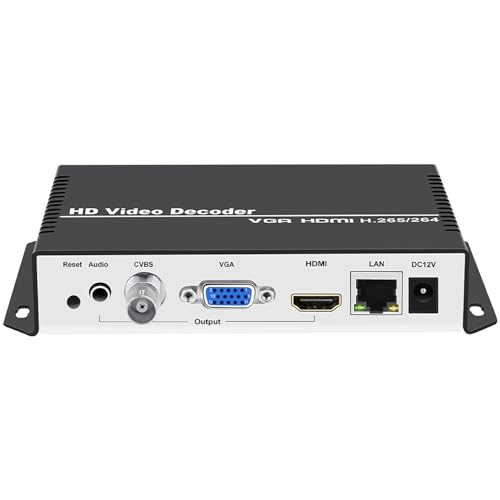
If you’re looking for a reliable solution to decode multiple video streams seamlessly, the H.265 H.264 IP Video Decoder for Video Streaming is your best bet. It supports up to four channels simultaneously, making it perfect for various applications. With compatibility for multiple protocols like RTSP, RTMP, and HLS, you can easily integrate it into your existing setup. Enjoy stunning 4K UHD video quality at 30fps, ensuring your streams look great. Plus, the simple configuration process means you just need to enter the stream link for automatic output. With lifetime support and customization options, it’s a solid choice for your streaming needs.
Best For: Those seeking a high-quality, versatile video decoding solution for live streaming applications or multi-channel video monitoring.
Pros:
- Supports up to 4 channels of simultaneous decoding for enhanced multi-stream management.
- Delivers stunning 4K UHD video quality at 30fps, ensuring clear and vibrant video output.
- Simple setup process with various protocol compatibility for easy integration into existing systems.
Cons:
- Limited to 4 channels, which may not be sufficient for larger setups.
- Dependency on internet connection quality for optimal streaming performance.
- Customization options may require additional technical knowledge to implement effectively.
Factors to Consider When Choosing an Ndi Video Distribution System
When choosing an NDI video distribution system, you need to think about several key factors. Consider the resolution and frame rate that best suit your needs, along with the input and output types your setup requires. Don’t forget to evaluate video processing features, control options, and power supply flexibility to guarantee a smooth operation.
Resolution and Frame Rate
Choosing the right resolution and frame rate is vital for an effective NDI video distribution system. You’ll want to look for systems that support high resolutions, ideally up to 4096×2160 (4K), to guarantee excellent output. Frame rates also play an important role; aim for at least 60 frames per second (fps) to keep fast-paced content smooth and engaging. Additionally, consider the color formats your system can handle, such as 4:4:4 or 4:2:2, since these affect both color fidelity and bandwidth. Make certain your system accommodates standard resolutions like 1080p while also providing 4K support for future-proofing. Automatic scaling features can further enhance playback quality across various displays and formats, guaranteeing versatility in different viewing environments.
Input and Output Types
To achieve the best performance from your NDI video distribution system, it’s important to examine the types of inputs and outputs it supports. Consider if the system accepts HDMI, SDI, or NDI formats, as this affects compatibility with your current gear. Output capabilities also matter; look for systems that can handle various resolutions and frame rates, ideally up to 4K at 60fps or higher for superior quality. Integrated monitoring options, like HDMI loop-through or local monitoring outputs, offer real-time feedback during production. Additionally, flexibility in output formats, including NDI, HDMI, and SDI, enhances adaptability across different broadcasting environments. Don’t forget to check for proper audio format and channel support, as audio is essential for thorough video distribution.
Video Processing Features
While evaluating an NDI video distribution system, it’s essential to take into account the video processing features that can greatly enhance your content’s quality. Look for de-interlacing capabilities to eliminate visual artifacts and guarantee smooth playback of interlaced sources. Aspect ratio conversion is also critical; it keeps your content looking sharp on various screen sizes without distortion. Cropping and scaling options let you focus on specific elements or adjust to different output resolutions easily. Don’t forget about color format conversion, which assures your visuals maintain ideal color representation across devices. Finally, built-in processing features that adjust brightness, contrast, and saturation can notably improve your video’s visual appeal, making your streaming experience more engaging.
Control and Management Options
When considering an NDI video distribution system, effective control and management options are vital for a smooth operation. Look for systems that feature web-based configuration and control interfaces, making it easy for you to manage video streams and settings. Guarantee compatibility with remote control features, like PTZ camera control and tally integration, to boost efficiency during live productions. Supporting HTTP API control is also essential for seamless integration with other management tools and automation processes. Opt for solutions that enable central management across multiple devices, allowing you to monitor and control video distribution from a single interface. Finally, evaluate the availability of support for various control protocols to guarantee flexibility in diverse operational environments.
Power Supply Flexibility
Choosing the right power supply options for your NDI video distribution system can greatly impact your installation efficiency and overall functionality. Consider options like Power over Ethernet (PoE) or USB power adapters, which simplify cabling and enhance compatibility with your environment. Evaluate how flexible the power deployment is; systems that allow powering from a single source reduce multiple outlet needs. Check for bi-directional power capabilities, letting either the transmitter or receiver supply power, which boosts convenience. Don’t forget to assess power consumption and heat generation—efficient systems can cut operational costs and guarantee reliability. Finally, look for power management features that help control energy usage, particularly in large-scale setups or when integrating multiple devices.
Compatibility With Software
Ensuring your NDI video distribution system is compatible with various software platforms can greatly enhance your production capabilities. Look for systems that support popular streaming and production platforms like OBS Studio, vMix, and Wirecast. It’s also essential to check compatibility with different operating systems, including Windows, macOS, and Linux, to maximize usability across setups. Consider whether the system allows for remote control of PTZ cameras and tally indicators via supported software interfaces, as this can streamline your workflow. Additionally, verify that the system can handle various video formats and resolutions to maintain high video quality. Finally, systems offering web-based interfaces or APIs will simplify integration and configuration with your existing software solutions.
Latency and Performance
While selecting an NDI video distribution system, understanding latency and performance is essential for achieving seamless streaming experiences. Latency is critical, especially for real-time applications like live broadcasting, so aim for systems with near-zero latency decoding. The performance also depends on the processing capabilities of the encoder and decoder; features like de-interlacing and scaling can improve playback quality and responsiveness. Be aware that network conditions, including bandwidth and congestion, directly impact latency, so a robust network infrastructure is necessary. Using Power over Ethernet (PoE) can simplify your setup by powering devices through a single cable, further reducing latency. Finally, find a balance between video quality and latency, as higher resolutions can lead to increased processing time and transmission delays.
Build Quality and Reliability
When evaluating NDI video distribution systems, build quality and reliability play a significant role in your overall user experience. Look for devices made from durable materials like aircraft-grade aluminum or rugged metal housing to guarantee they can withstand various environments. Check for specifications that assure 24/7 operational reliability, confirming the system can handle continuous use without overheating or failing. Models with built-in PoE (Power over Ethernet) support simplify installation by reducing the need for extra power sources. It’s also essential to take into account devices with effective cooling solutions to prevent overheating during extended usage. Finally, review user feedback and ratings to gauge real-world performance and reliability in demanding applications. This will help you make an informed choice.