
A reliable overhead camera rig can turn a desk into a professional live-streaming workspace. The right setup keeps your camera centered, reduces unwanted movement, and makes top-down demonstrations easier to frame.
We selected 10 overhead mounts with different arm designs, clamps, capacities, and adjustment options so you can match your streaming setup to your camera, desk, and available space.
Best 10 Overhead Camera Rigs for Live Streaming Picks for 2026
Best Versatile Desk Rig
NEEWER ST008 Overhead Camera Mount

- Two boom arms support multiple devices
- Adjustable height and multi-angle joints
- Includes adapters and cable ties
Best For: Multi-device desktop streaming and studio setups
Best for Large Overhead Views
Glide Gear OH 75 Overhead Mount

- Six-foot pole for wide top-down coverage
- 15-pound maximum payload
- Includes clamps, posts, and camera sled
Best For: Large overhead scenes and on-location shooting
Best Compact Adjustable Arm

- Height and arm length adjust independently
- 360-degree ball head supports flexible framing
- Mounts up to two devices
Best For: Compact indoor streaming and tabletop shooting
Best Heavy-Duty Platform
NEEWER NK002 Overhead Camera Rig

- 26.5-pound stated stand capacity
- Adjustable height and width crossbar
- Includes dual ball-head clamp and phone holder
Best For: Heavy cameras and expandable overhead setups
Flexible Desk Pick
ULANZI Aluminum Camera Desk Stand

- 29.53-inch three-stage extending arm
- 2 kg load capacity with 360-degree ballhead
- Clamps to desks up to 5 cm thick
Best For: Flexible tabletop streaming and overhead shooting
Best for Everyday Use
NEEWER ST100 Overhead Camera Mount Rig

- Steel frame supports up to 10 lb
- 24-39-inch adjustable height range
- 12 crossbar mounting points for accessories
Best For: Large, expandable overhead streaming setups
Stable Compact Mount
SMALLRIG Triangle Camera Desk Mount

- Triangular structure supports up to 3 kg
- 42-68.5 cm adjustable horizontal rod
- Includes phone holder and 1/4-inch-20 ballhead
Best For: Stable phone, webcam, and camera desk streaming
Best Expandable Rig

- Supports up to 22 pounds
- Seven-pole modular aluminum design
- Includes super clamp for added gear
Best For: Multi-device desktop streaming studios
Best Flexible Budget Arm
DImotliyor 3-Section Overhead Mount
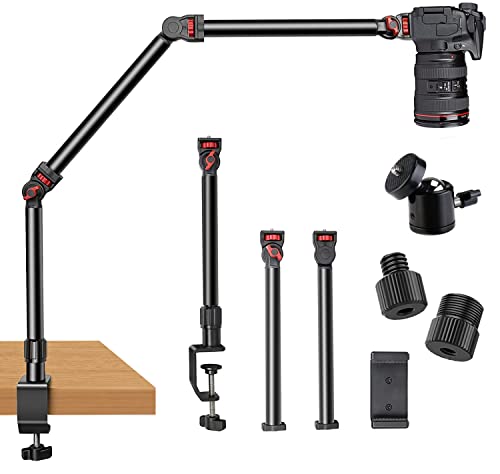
- Three adjustable detachable sections
- 360-degree rotating base and ball head
- Supports up to 6 pounds
Best For: Flexible phone, webcam, and compact-camera setups
Best Heavy-Duty Jointed Arm

- Three locking gear joints
- Supports up to 8.8 pounds vertically
- 38-inch workspace reach
Best For: Stable camera and lighting setups with heavier gear
Best Versatile Desk Rig – NEEWER ST008 Overhead Camera Mount
The NEEWER ST008 is a flexible choice among overhead camera rigs for live streaming when you need to mount several devices around a desktop. Its center column and two boom arms support cameras, phones, webcams, lights, and microphones, while multiple joints provide broad height and angle adjustment.
Best For: Multi-device home office, tabletop streaming, and compact studio setups.
Pros:
- Supports up to 11 pounds on the center column and 5.5 pounds per arm.
- Adjustable center column and arms offer extensive height, tilt, and swivel control.
- Includes multiple adapters, cable ties, and an anti-slip C-clamp for organized mounting.
Cons:
- The complete multi-device setup can approach the stated joint load limit.
- The desk clamp accommodates surfaces up to 3.5 inches thick.
Choose this model if you want one desktop rig that can handle a camera plus supporting lights or audio gear. Its folding components also make storage easier when the setup is not in use.
Best for Large Overhead Views – Glide Gear OH 75 Overhead Mount
The Glide Gear OH 75 takes a different approach to overhead camera rigs for live streaming, using a six-foot pole for top-down coverage over larger work areas. It is designed for DSLR and smartphone shooting and includes the main mounting hardware needed to create a rail-style overhead setup.
Best For: Large tabletop demonstrations, food content, assembly videos, and other wide top-down shots.
Pros:
- Six-foot pole helps cover broad overhead scenes.
- Supports up to 15 pounds while weighing 2.3 pounds.
- Includes two pole clamps, two baby pin posts, and a camera sled.
Cons:
- C-stands are required but are not included.
- The rig is less self-contained than a desktop clamp mount.
This is a strong fit when your priority is reach rather than a small desk footprint. Its compatibility with poles or rails from one to two inches in diameter also allows some customization of the support structure.
Best Compact Adjustable Arm – SMALLRIG DTCK001 Desk Mount
The SMALLRIG DTCK001 is a compact option among overhead camera rigs for live streaming, with a height-adjustable main pole and a movable secondary arm. Its 360-degree ball head and threaded mounting points make it suitable for cameras, phones, lights, and microphones in tabletop shooting environments.
Best For: Indoor live streaming, video conferences, and small desktop photography setups.
Pros:
- Main pole adjusts from 30 to 73 cm, while the secondary arm extends from 30 to 50 cm.
- 360-degree adjustment and a detachable ball head support flexible framing.
- Can hold two devices and supports up to 2 kg.
Cons:
- The 2 kg capacity is lower than the heavier-duty rigs in this roundup.
- The base fits surfaces from 1 to 6 cm thick.
For creators who want a tidy, adjustable desktop arm without a large overhead frame, the DTCK001 is a practical choice. Its detachable and retractable components also simplify setup and storage.
Best Heavy-Duty Platform – NEEWER NK002 Overhead Camera Rig
The NEEWER NK002 is built for creators who need a sturdier overhead platform for live streaming. Its crossbar-and-twin-stand design adjusts in height and width, while the included dual ball-head clamp and phone holder support cameras, phones, webcams, lights, and other accessories.
Best For: Heavy desktop cameras, unboxing streams, tabletop demonstrations, and multi-device overhead shooting.
Pros:
- Supports up to 26.5 pounds with reinforced tubes and a secure C-clamp design.
- Height adjusts from 27.2 to 48 inches and width from 25.2 to 47.2 inches.
- Includes a dual ball-head super clamp, phone holder, and multiple mounting screws.
Cons:
- Additional telescopic crossarms and accessories are sold separately.
- The dual ball-head accessory is limited to a 3.3-pound maximum load.
This model makes sense when stability and capacity matter more than minimal size. It arrives as a robust crossbar platform, with room to expand using compatible NEEWER accessories for more elaborate overhead layouts.
Flexible Desk Pick – ULANZI Aluminum Camera Desk Stand
The ULANZI Aluminum Camera Desk Stand is a flexible option for overhead camera rigs for live streaming when you need adjustable positioning in a compact tabletop setup. Its extending arm, ballhead, and clamp make it suitable for cameras, lights, and webcams.
Best For: Live streaming, online lessons, crafting, baking, and top-down product or document views.
Pros:
- 29.53-inch extending arm with three stages of adjustment.
- 360-degree ballhead and multiple 1/4-inch mounting points support flexible angles and accessories.
- Supports up to 2 kg and clamps to desks up to 5 cm thick.
- Compatible with cameras, webcams, ring lights, panel lights, and key lights.
Cons:
- Phone clamp, camera, and lights are not included.
- Its 2 kg capacity is lower than the heavier-duty options in this roundup.
- The supplied warranty is limited to three months.
This stand is a practical choice when flexible reach matters more than maximum load capacity. It offers useful expansion options for a personal streaming desk, provided your camera and accessories stay within the 2 kg limit.
Best for Everyday Use – NEEWER ST100 Overhead Camera Mount Rig
The NEEWER ST100 is a substantial choice among overhead camera rigs for live streaming, especially for creators who want a stable platform for cameras, lights, monitors, and other accessories. Its steel frame and adjustable columns are designed for larger tabletop or floor-based setups.
Best For: Heavy overhead cameras, flat-lay streaming, cooking demonstrations, drawing, unboxing, tutorials, and expanded multi-device rigs.
Pros:
- Steel construction supports up to 10 lb (4.5 kg).
- Height adjusts from 24 to 39 inches using spring-loaded positioning points.
- Crossbar includes 12 mounting points for additional accessories.
- Includes backdrop brackets and clips, while nonslip bases improve stability.
Cons:
- At 5.7 kg, it is considerably heavier than a simple desk clamp mount.
- Requires a desk at least 39.4 inches wide or can be placed on the ground.
- Super clamps, phone clamp, backdrop, and some accessories are sold separately.
The ST100 is best viewed as a modular production platform rather than a minimal desk stand. Choose it when load capacity, height range, and accessory expansion are more important than portability or a quick clamp-on setup.
Stable Compact Mount – SMALLRIG Triangle Camera Desk Mount
The SMALLRIG Triangle Camera Desk Mount is a strong middle-ground option for overhead camera rigs for live streaming. Its triangular support structure, adjustable horizontal rod, and included phone holder provide a stable way to position a camera, phone, webcam, or light above a desk.
Best For: Live broadcasts, product unboxings, food content, beauty videos, vlogs, and phone-or-camera desktop shooting.
Pros:
- Triangular support structure improves stability and supports up to 3 kg.
- 42 to 68.5 cm adjustable horizontal rod offers multiple shooting positions.
- Includes a phone holder and 1/4-inch-20 ballhead for cameras and other devices.
- C-clamp fits desks up to 7 cm thick.
Cons:
- The arm is shorter than the ULANZI stand’s 29.53-inch extending arm at its stated maximum.
- Its desk clamp limits use to compatible tabletop surfaces.
- It is not described as a floor-standing or large-platform system.
SMALLRIG’s reinforced design makes it appealing when stability and broad device compatibility are priorities without moving to a full-size steel rig. It is particularly convenient for creators switching between a phone, webcam, and camera on one desk.
Best Expandable Rig – JUSMO LS15 Pro Overhead Mount
The JUSMO LS15 Pro is a strong choice for overhead camera rigs for live streaming when you need a sturdy, expandable setup. Its segmented aluminum design allows flexible height and length adjustments, while the included super clamp supports additional cameras, lights, or microphones.
Best For: Creators building a multi-device desktop studio for streaming, recipe videos, crafts, demonstrations, or overhead photography.
Pros:
- Supports up to 22 pounds with an aluminum-alloy construction.
- Includes seven universal poles, two fixed bases, two enlarged C-clamps, and a super clamp.
- Corrugated anti-slip poles, locking screws, and engraved adjustment markings help with positioning.
- Can be expanded with extra poles or compatible clamps.
Cons:
- The larger setup may be more than needed for a simple single-camera stream.
- Additional expansion components are sold separately.
- The listed warranty is only three months.
Choose the LS15 when load capacity and expandability matter most. It is particularly suited to creators who want to keep several pieces of production equipment mounted around a tabletop workspace.
Best Flexible Budget Arm – DImotliyor 3-Section Overhead Mount
This three-section desk stand is a practical option among overhead camera rigs for live streaming, especially when you want flexible positioning without taking up much desk space. Its articulating rods, rotating base, ball head, and phone holder support a range of camera and lighting angles.
Best For: YouTubers, online instructors, bakers, and streamers using a DSLR, webcam, phone, microphone, or compact light.
Pros:
- Three detachable sections provide adjustable positioning, with rods moving up to 180 degrees.
- Base rotates 360 degrees for flexible framing.
- Includes 1/4-inch, 3/8-inch, and 5/8-inch connection options plus a 360-degree ball head.
- Padded aluminum desk clamp is designed to fit desks up to 2.4 inches high.
Cons:
- Load capacity is limited to 4.5 pounds horizontally and 6 pounds maximum when suspended.
- May be less suitable for heavier DSLR and lens combinations than higher-capacity rigs.
- The supplied notes do not specify a warranty period.
Its lightweight, detachable construction makes this arm convenient for creators who need a portable overhead setup. Keep the stated weight limits in mind when choosing a camera and accessories.
Best Heavy-Duty Jointed Arm – TARION TKA01-L Overhead Mount
The TARION TKA01-L is designed for overhead camera rigs for live streaming that require firm angle control and substantial support. Its three locking gear joints, steel tubes, detachable ball head, and dual-slot clamp help stabilize cameras, ring lights, or projectors across a workspace.
Best For: Streamers and video creators using heavier cameras or accessories for cooking tutorials, product photography, unboxing videos, document scans, and extended recording sessions.
Pros:
- Locking gear joints provide 180-degree tilt and 360-degree rotation.
- Supports up to 8.8 pounds vertically and 6.6 pounds in a horizontal extension.
- Steel 1.18-inch tubes are designed to reduce shaking during use.
- Detachable ball head and extra 1/4-inch and 3/8-inch threads support varied equipment.
Cons:
- The 38-inch reach may require careful desk placement.
- Its heavier-duty construction may be unnecessary for lightweight phone-only setups.
- The clamp opening is limited to 2.36 inches.
The TKA01-L stands out when stability and mechanical angle locking are priorities. It offers a capable third arm for creators who need a secure overhead position without sacrificing access to the desktop.
How We Picked the Best Overhead Camera Rigs for Live Streaming
We focused on the features that matter most during real-world streaming: mounting stability, adjustment range, payload capacity, desk compatibility, construction materials, and ease of repositioning. The selection includes compact phone and webcam mounts as well as heavier-duty rigs designed for DSLR and mirrorless cameras.
We also considered whether each design supports practical top-down framing without taking up unnecessary desk space. Clamps, articulating arms, ball heads, boom arms, and geared joints can all affect how quickly you can compose a shot and how securely the camera stays in place.
Quick Comparison
| Best For | Look For | Most Important Benefit |
|---|---|---|
| Phones and webcams | Compact clamp and flexible arm | Easy setup in small spaces |
| Crafts and tutorials | Stable overhead positioning | Consistent top-down framing |
| DSLR or mirrorless cameras | High weight capacity and rigid joints | Better support for heavier equipment |
| Multi-device streaming | Multiple arms or accessory mounts | Room for lights, microphones, and cameras |
Key Buying Factors for Overhead Camera Rigs for Live Streaming
Camera Weight and Payload Capacity
Check the combined weight of your camera, lens, battery, cage, and accessories. A rig rated close to its maximum capacity may sag or vibrate, so choose extra headroom when using a DSLR, mirrorless camera, or long lens.
Desk Clamp and Surface Compatibility
Measure your desk thickness and inspect the available clamping area. A wide, padded clamp is preferable for stability and helps protect finished surfaces. Make sure the clamp can clear shelves, cable trays, and monitor stands.
Adjustment and Locking Mechanisms
Ball heads offer quick angle changes, while articulating arms provide flexible positioning. Geared joints can make precise adjustments easier. Look for secure locking knobs and joints that remain firm after repeated repositioning.
Clearance, Reach, and Cable Management
Confirm that the arm can reach the center of your work area without colliding with monitors or lights. Leave room for power and video cables, and avoid routing cables where they can pull the rig out of alignment.
Who Should Buy Which Overhead Camera Rigs for Live Streaming?
Choose a compact desk mount if you stream with a phone, webcam, or lightweight camera and need a low-profile setup. These are convenient for small desks and occasional top-down demonstrations.
Choose a heavy-duty or long-reach rig if you use a DSLR or mirrorless camera, need a larger shooting area, or plan to keep the mount installed permanently. Prioritize payload headroom and rigid construction over portability.
Choose a multi-arm design if your broadcasts include lighting, microphones, or more than one device. Additional mounting points can reduce clutter, but they also require a stronger clamp and careful weight distribution.
Before buying, compare the rig’s rated capacity, reach, clamp dimensions, and included hardware with your exact camera setup. The best Overhead Camera Rigs for Live Streaming are the ones that stay stable, fit your workspace, and allow fast, repeatable framing.