
Choosing the right passive studio monitor controller can make day-to-day mixing faster, safer, and more consistent. The best models give you simple level control, quick muting, and clean routing without adding extra electronics to the signal path.
Below, we focus on practical options for home studios, project rooms, and budget-conscious control setups, with an emphasis on reliability, connectivity, and the features that actually matter at the desk.
Best 10 Passive Studio Monitor Controller Picks for 2026
Passive Signal Switcher

- Passive audio path for clean monitor control
- Two sources and two monitor pairs
- Mono, mute, and dim buttons
Best For: Small studios needing simple passive routing and volume control
Compact Bluetooth Monitor Hub

- Bluetooth input for wireless playback
- Balanced and stereo inputs for broad compatibility
- Headphone/aux output plus easy source switching
Best For: Desktop setups that need Bluetooth and compact monitor control
Budget Passive Volume Controller

- Passive volume control design
- Dual pair input/output support
- Compact, desk-friendly footprint
Best For: Simple, budget-friendly monitor setups
Feature-Rich Passive Controller
ESI MoCo Passive Monitor Controller

- Fully passive with no external power required
- Two stereo inputs and two stereo outputs
- Mono, mute, and left/right flip controls
Best For: Producers wanting passive control with flexible routing and utility buttons
Classic Passive Control
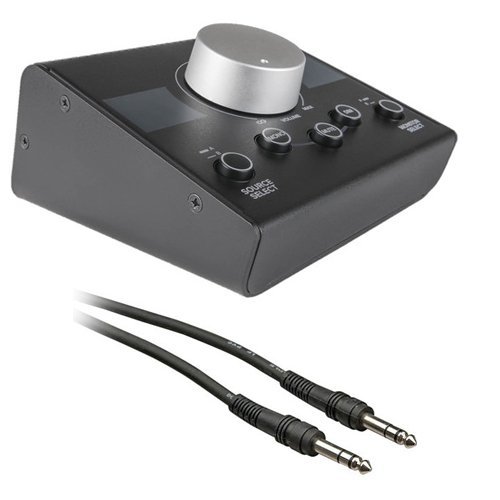
- 2 sources and 2 monitor pairs
- Passive operation with no power needed
- Mono, mute, and dim controls
Best For: Users needing simple two-source, two-pair monitoring control
Precision Stereo Attenuator
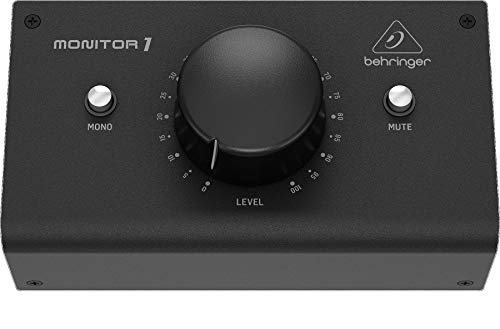
- Passive stereo volume controller
- XLR combo and 3.5 mm I/O
- Large knob for precise adjustment
Best For: Desktop studios needing simple stereo monitoring control
Flexible Routing Hub
StudioMan M04 Passive Monitor Controller

- 2 inputs and 4 outputs
- 100% passive, no power required
- Volume knob with one-click mute
Best For: Multi-device studios needing 2-in/4-out passive routing
Precision Passive Control
DYNASTY PROAUDIO PMC-1 stereo monitor controller
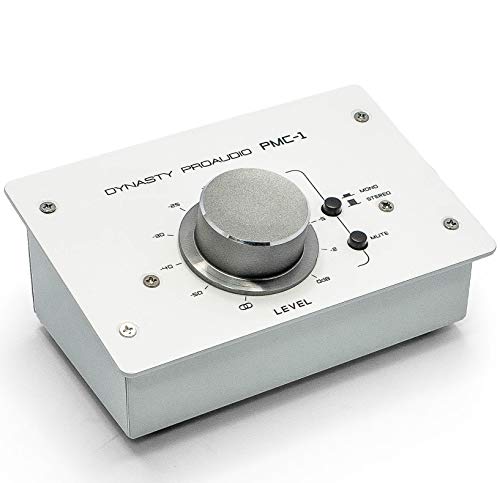
- Passive analog volume control with no power required
- Balanced XLR/TRS I/O helps keep signals clean
- Large knob and metal chassis suit everyday studio use
Best For: Simple, transparent monitor level control in small studios
Flexible Routing Pick
StudioMan MV4 4-in 2-out passive controller

- 4-in/2-out routing reduces constant cable swapping
- Passive design needs no external power
- Mute button and damped knob make quick control easy
Best For: Multi-device monitoring and fast source switching
Balanced 2x2 Choice
DYNASTY PROAUDIO PMC-2 passive monitor controller
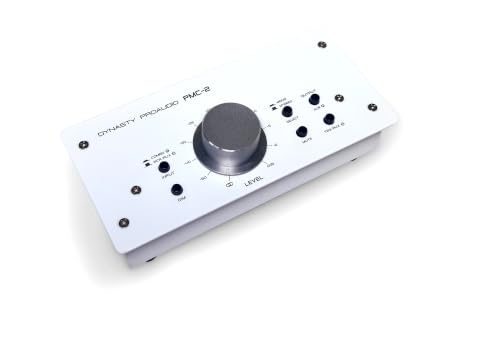
- Passive 2x2 controller with no power supply needed
- Balanced XLR/phone plus RCA and 3.5 mm inputs
- DIM and mute/mono switches add useful monitor control
Best For: Analog studios that want flexible inputs and desk control
Passive Signal Switcher – Mackie Big Knob Passive
The Mackie Big Knob Passive is a straightforward passive studio monitor controller for people who want clean level control and simple source/pair switching without adding power or processing to the signal path. It’s built around a passive audio path, with handy mono, mute, and dim functions for everyday monitor checks.
Best For: Small studio setups that need reliable passive volume control and dual source/dual monitor switching.
Pros:
- Passive audio path helps keep the signal clean and uncolored.
- Supports two sources and two monitor pairs for flexible routing.
- Mono, mute, and dim buttons make quick reference checks easy.
- Sturdy metal tabletop design is built for studio use.
Cons:
- No powered features or onboard extras beyond core monitor control.
- Large desktop footprint may be more than some compact setups need.
For buyers who want a no-frills passive studio monitor controller, this Mackie keeps the workflow simple and dependable. It focuses on the essentials: clean attenuation, source selection, and basic monitor management.
Compact Bluetooth Monitor Hub – PreSonus MicroStation BT
The PreSonus MicroStation BT is a compact passive-style monitor controller alternative for setups that need Bluetooth alongside wired monitoring. Its small footprint, easy source switching, and headphone/aux output make it practical for desktop studios, media listening, and casual reference monitoring.
Best For: Desktop users who want a compact way to add Bluetooth and subwoofer-friendly monitor control.
Pros:
- Bluetooth input adds wireless playback to speaker setups.
- Balanced 1/4-inch TRS and stereo 1/8-inch TRS inputs support pro and consumer gear.
- Bluetooth on/off and pairing buttons keep source switching simple.
- Headphone/aux output adds flexible listening and recording options.
Cons:
- Not a fully passive, no-features controller like simpler monitor boxes.
- Designed for compact setups, so it may not suit larger control rooms.
If you want a passive studio monitor controller-style desktop hub with Bluetooth convenience, this unit is built around ease of use. It’s especially appealing when you need a small, affordable control point for both wired and wireless sources.
Budget Passive Volume Controller – Behringer Studio M
The Behringer STUDIO M is a passive studio monitor controller focused on simple volume control and dual pair input/output support. It keeps the feature set lean, making it a practical choice when you want basic monitor management without extra complexity.
Best For: Budget-conscious users who need a simple passive volume controller for dual pair monitoring.
Pros:
- Passive design keeps the signal path simple.
- Dual pair input/output support adds useful monitoring flexibility.
- Compact footprint is easy to place on a desk.
- Works as a straightforward volume controller for basic setups.
Cons:
- Feature set appears minimal compared with more fully equipped controllers.
- Supplied notes don’t list detailed switching or monitor management extras.
As a passive studio monitor controller, the STUDIO M is best understood as a utility piece: it gets the job done without adding much to the signal path. That makes it a sensible pick for simple rigs where basic control is the priority.
Feature-Rich Passive Controller – ESI MoCo Passive Monitor Controller
The ESI MoCo is a passive monitor controller built for users who want more hands-on control from a single desktop unit. It offers two stereo inputs, two stereo outputs, and dedicated buttons for mono, mute, and left/right channel flipping, all without requiring external power.
Best For: Engineers and producers who want a passive studio monitor controller with flexible I/O and quick monitoring tools.
Pros:
- Fully passive operation means no external power required.
- Two stereo inputs and two stereo outputs provide flexible connectivity.
- Mono, mute, and left/right flip buttons support fast monitoring checks.
- Oversized knob makes level changes easy and precise.
Cons:
- Plastic enclosure may feel less rugged than metal-bodied rivals.
- More control options can be more than very basic setups need.
For buyers comparing passive studio monitor controller options, the MoCo stands out for combining core passive operation with useful utility functions. It’s a strong fit if you want clean signal handling plus practical desk-level monitoring control.
Classic Passive Control – Mackie Big Knob Passive
If you want a passive studio monitor controller with simple, no-fuss routing, the Mackie Big Knob Passive is built around 2 sources and 2 monitor pairs. Its passive design keeps the signal path straightforward, while the large volume knob, mono, mute, and dim functions make day-to-day monitoring easy during recording and mixing.
Best For: Studio users who want a basic passive controller for two sources and two monitor pairs.
Pros:
- 2x sources and 2x monitor pairs for flexible studio routing
- Passive design with no external power required
- Mono, mute, and dim controls for quick monitoring changes
- Includes a 1/4" male TRS cable
Cons:
- Limited to the core passive monitoring features
- No advanced routing beyond the 2×2 layout
For a compact passive studio monitor controller, this model focuses on clean operation and practical control rather than extra features. It suits users who mainly need dependable volume management and easy source switching in a recording or mixing setup.
Precision Stereo Attenuator – Behringer MONITOR1
The Behringer MONITOR1 is a passive studio monitor controller designed for clean stereo volume control with minimal circuitry in the signal path. It offers a large knob for precise level adjustment, plus XLR combo and 3.5 mm connections for bringing a DAW and studio monitors into one simple monitoring setup.
Best For: Desktop studio users who want a passive stereo volume controller with XLR and 3.5 mm connectivity.
Pros:
- Passive circuitry for a pure signal path
- Large volume knob for fine level adjustments
- 2 XLR combo inputs and 3.5 mm stereo input
- 2 XLR outputs and 3.5 mm stereo output for monitors
Cons:
- Focused on stereo volume control rather than broader routing features
- Requires a corded power setup in the supplied notes
If you mainly need a straightforward passive studio monitor controller for stereo monitoring, this model emphasizes precision and easy connectivity. It is a practical pick for recording and audio production setups that benefit from simple source and output options.
Flexible Routing Hub – StudioMan M04 Passive Monitor Controller
The StudioMan M04 is a passive studio monitor controller built for setups that need 2 inputs and 4 outputs without constant cable swapping. Its 100% passive design, smooth volume knob, and one-click mute button make it a practical control point for powered studio monitors and power amplifiers.
Best For: Multi-device studio users who want a passive 2-in/4-out controller with mute control.
Pros:
- 2 input and 4 output routing for flexible switching
- 100% passive design with no external power required
- Precise volume knob plus one-click mute button
- 1/4" unbalanced connectors for powered monitors and amplifiers
Cons:
- Uses unbalanced 1/4" connections
- Bulkier routing focus may be more than simple setups need
For users comparing a passive studio monitor controller with broader routing, the M04 stands out for its 2-in/4-out layout. It is aimed at studio, podcast, and DJ workflows where quick source changes and clean passive signal handling matter.
Precision Passive Control – DYNASTY PROAUDIO PMC-1 stereo monitor controller
If you want a passive studio monitor controller for simple, transparent level trimming, the PMC-1 keeps the signal path straightforward. It sits between your analog source and active speakers or amplifiers, with a large rotary knob for fine fingertip adjustments and balanced XLR/TRS connectivity to help reduce noise on longer runs.
Best For: Home studios or small project setups that need clean, hands-on monitor volume control without adding power or extra circuitry.
Pros:
- Passive design with no power supply needed
- Balanced XLR/TRS inputs and TRS outputs for cleaner signal handling
- Large rotary knob makes precise level changes easy
- Solid metal chassis for a durable desktop build
Cons:
- Limited to analog volume control, with no active processing
- Best suited to setups that can use balanced connections
The PMC-1 is a practical pick if your priority is transparent attenuation and a sturdy, no-frills monitoring workflow. Its job is to stay out of the way while giving you fast physical control.
Flexible Routing Pick – StudioMan MV4 4-in 2-out passive controller
The StudioMan MV4 is a passive studio monitor controller built for setups that need flexible source and output switching. With 4 inputs, 2 outputs, and unbalanced 1/4-inch connectors, it reduces repetitive plugging while giving you a smooth volume knob and a one-click mute button for quick control.
Best For: Multi-device studios, podcasts, and streaming setups that need passive switching plus easy mute control.
Pros:
- 4 input and 2 output routing helps manage multiple devices
- Fully passive design requires no external power
- Mute button adds quick on-demand silence
- Smooth damped knob supports precise volume changes
Cons:
- Uses 1/4-inch unbalanced connectors rather than balanced I/O
- Signal handling is focused on routing and attenuation, not extra features
For users who switch between sources often, the MV4’s routing flexibility is its main advantage. It keeps the workflow simple while preserving a clean passive signal path.
Balanced 2×2 Choice – DYNASTY PROAUDIO PMC-2 passive monitor controller
The PMC-2 is a passive studio monitor controller designed for straightforward analog volume control between your source and active monitors or amplifiers. It offers balanced combo XLR/phone connections, RCA and 3.5 mm TRS inputs, plus DIM and Mute/Mono switches, making it a versatile desk-friendly option for precise listening control.
Best For: Small studios and PC-based monitoring setups that want multiple analog input options and simple passive attenuation.
Pros:
- Completely passive, so no power supply is required
- Balanced and unbalanced input options add setup flexibility
- DIM and Mute/Mono switches increase monitoring control
- Solid metal chassis supports everyday studio use
Cons:
- Focused on analog monitoring rather than advanced processing
- Designed around passive attenuation, so it won’t alter audio beyond level control
If you want a more connection-rich passive controller, the PMC-2 stands out for its input variety and monitor switches. It’s a practical way to keep your software master at unity and control levels from the desk.
How We Picked the Best Passive Studio Monitor Controller
We looked for Passive Studio Monitor Controller models that prioritize a clean analog signal path, straightforward operation, and dependable hardware. We also considered input/output flexibility, whether the unit supports one or more speaker pairs, and how well the layout fits real studio workflows.
Quick Comparison
At a high level, these controllers split into a few useful categories: basic 2×2 models for simple monitor switching, units with extra outputs for more flexible routing, and feature-led options that add conveniences like mute buttons or Bluetooth on select models. If you want the most direct setup, a simple passive controller is usually the easiest choice. If you need more sources or speakers, choose a model with additional I/O.
Key Buying Factors for a Passive Studio Monitor Controller
Inputs and Outputs
Match the controller to your studio layout. A 2-in/2-out unit works well for one interface and one monitor pair, while multi-input or multi-output designs are better if you switch between sources, speakers, or reference devices.
Signal Path and Level Control
The main appeal of a Passive Studio Monitor Controller is clean, transparent attenuation. Look for smooth knob action, accurate channel tracking, and mute or dim functions if you often adjust levels while listening critically.
Connector Type and Cabling
Check whether the unit uses TRS, XLR, RCA, or 1/4-inch connections, and make sure it matches your interface and monitors. Simpler cabling usually means fewer setup issues and less clutter on the desk.
Build Quality and Ergonomics
A sturdy enclosure and a large, easy-to-grab volume knob are important if you make frequent level changes. For passive controllers, good tactile feel matters because the device is often used every session.
Who Should Buy Which Passive Studio Monitor Controller?
If you want the simplest path to accurate monitor control, choose a compact 2×2 passive model. If you work with multiple sources, alternate speakers, or a more complex desk setup, pick a controller with extra inputs or outputs. If convenience is a priority and Bluetooth or other added functions fit your workflow, a hybrid-feature model may be more useful than a bare-bones unit.
In short, the best Passive Studio Monitor Controller is the one that matches your routing needs, cabling, and daily workflow without adding unnecessary complexity.